
Accounting professionals in India spend long hours on data entry, voucher posting, GST compliance, Excel reports, and Tally operations. A reliable Bluetooth or wireless keyboard is not just a convenience—it directly impacts speed, accuracy, and comfort. Choosing the right keyboard can reduce fatigue, improve productivity, and ensure seamless switching between devices like laptops, desktops, tablets, and even smartphones.
This article reviews three popular and affordable wireless keyboards suitable for accounting work, focusing on real-world usage, not marketing hype. All recommendations are based on features that actually matter to accountants.
🔑 What Accountants Should Look for in a Wireless Keyboard
Before diving into product reviews, here are key factors accountants should prioritize:
- Full-size layout with numpad for fast numerical entry
- Stable wireless connectivity (Bluetooth + USB receiver preferred)
- Quiet keys for long working hours
- Good battery life to avoid interruptions
- Compatibility with Windows & Excel-based software
- Compact but practical design for desk efficiency
Portronics Bubble 3.0 Wireless Keyboard

Overview
The Portronics Bubble 3.0 is designed for users who want flexibility across multiple devices. With Bluetooth + 2.4 GHz USB receiver, it allows easy switching between laptops, desktops, and tablets — an advantage for accountants handling reports on multiple systems.
Key Features
- Dual connectivity: Bluetooth + USB receiver
- Rechargeable battery (no recurring battery cost)
- Dedicated numpad for accounting entries
- Dual height adjustment for ergonomic comfort
- Multimedia shortcut keys
Practical Accounting Use
This keyboard performs well for Tally data entry, GST returns, Excel reconciliation, and MIS reporting. The keys are soft, reducing finger strain during extended sessions.
Pros
- Excellent connectivity flexibility
- Rechargeable (long-term cost saving)
- Comfortable for long Excel/Tally work
- Full numpad included
Cons
- Slightly larger footprint
- Not ideal for users who prefer ultra-slim keyboards
👉 Buy Here
Logitech MK215 Wireless Keyboard and Mouse Combo

Overview
From a trusted brand, the MK215 combo is known for reliability and battery efficiency. It includes both a keyboard and mouse, making it a practical all-in-one option for office setups.
Key Features
- 2.4 GHz wireless USB connectivity
- Keyboard battery life up to 2 years
- Compact keyboard with standard layout
- Includes matching wireless mouse
Practical Accounting Use
This keyboard is best suited for fixed desktop-based accounting roles, such as data entry operators, back-office accountants, and billing staff. The long battery life makes it ideal for offices that prefer low maintenance hardware.
Pros
- Extremely reliable wireless performance
- Long battery life
- Trusted brand quality
- Mouse included
Cons
- No Bluetooth support
- Compact size may feel tight for heavy numeric entry
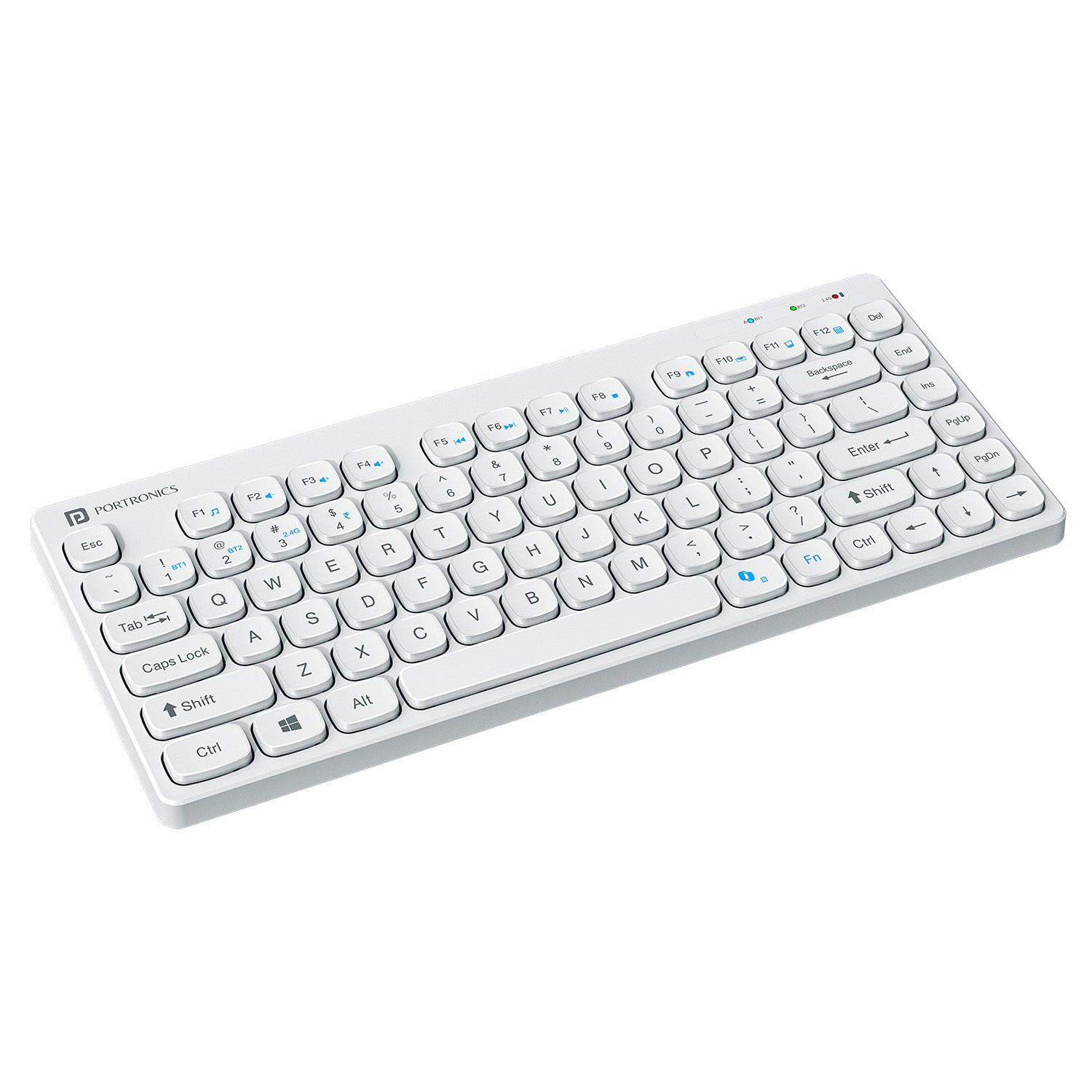
Portronics Bubble Multimedia Wireless Keyboard (White)
Overview
This variant of the Bubble series focuses on portability and silent typing. It supports Bluetooth 5.0 and 2.4 GHz, making it suitable for accountants who frequently work on tablets or mobile devices.
Key Features
- Bluetooth 5.0 + USB receiver
- Noiseless keys
- Compact and lightweight
- Works with Windows, Android, and iOS
Practical Accounting Use
Ideal for traveling professionals, auditors, and consultants who work on Excel sheets via laptops or tablets. However, the compact design may slow down users who rely heavily on numpad speed.
Pros
- Silent typing experience
- Very portable
- Affordable pricing
- Multi-device compatibility
Cons
- Compact layout
- Smaller numpad compared to full-size keyboards
👉 Buy Here
🔍 Quick Comparison (Key Accounting Perspective)
| Feature | Best Choice |
|---|---|
| Heavy Excel & Tally Work | Portronics Bubble 3.0 |
| Office Desktop Setup | Logitech MK215 Combo |
| Portable / Tablet Use | Portronics Bubble Multimedia |
🧾 Final Recommendation
- Full-time accountants & data entry operators → Portronics Bubble 3.0
- Office desks with long working hours → Logitech MK215 Combo
- Auditors, freelancers, mobile professionals → Portronics Bubble Multimedia
Each keyboard serves a different accounting workflow. There is no single “best” keyboard — only the right fit for your working style.
❓ Frequently Asked Questions (FAQ)
Q1. Is Bluetooth better than USB receiver for accounting work?
Bluetooth is great for multi-device use, while USB receivers are more stable for fixed desktop setups.
Q2. Do accountants really need a numpad?
Yes — a numpad significantly increases speed and accuracy during voucher entry and reconciliation.
Q3. Are rechargeable keyboards better than battery-powered ones?
Rechargeable keyboards reduce long-term costs, while battery-powered ones often last longer per charge.
Q4. Can these keyboards be used with Tally and Excel?
Yes — all recommended keyboards are fully compatible with Tally, Excel, and Windows-based accounting software.
⚠️ Disclaimer
Prices, availability, and ratings may change over time. This article reflects features and specifications available at the time of writing. Always verify product compatibility with your system before purchasing. Affiliate links may generate a small commission at no extra cost to you.