Category: Educational News

  • Lifetime Access Courses – Why They’re Worth It for Long-Term Skill Development and Career Growth in 2026

    In today’s fast-changing professional world, continuous learning is no longer optional. One of the smartest ways to stay updated is by enrolling in lifetime access courses. Understanding lifetime access courses – why they’re worth it can help students and professionals make better learning investments that deliver value for years.

    Unlike traditional courses with limited access, lifetime access courses allow learners to revisit content anytime, refresh skills, and stay updated with evolving industry trends. This flexibility makes them highly valuable for long-term career growth.


    What Are Lifetime Access Courses?

    Lifetime access courses are educational programs that provide:

    • Unlimited access to course content
    • No expiry date
    • Ability to learn at your own pace

    Once you enroll, you can revisit lessons whenever needed, even years later.


    Why Lifetime Access Courses Are Becoming Popular

    Recent trends show:

    • Over 65% of online learners prefer lifetime access courses
    • Learners revisit course content 3–5 times on average
    • Professionals update their skills every 12–18 months

    This shift reflects the growing need for continuous learning in a competitive job market.


    Key Benefits of Lifetime Access Courses

    1. Learn at Your Own Pace

    One of the biggest advantages is flexibility.

    You can:

    • Pause and resume anytime
    • Learn according to your schedule
    • Avoid pressure of deadlines

    2. Unlimited Revision

    Repetition is key to mastery.

    With lifetime access:

    • You can revisit difficult topics
    • Refresh knowledge before interviews
    • Reinforce concepts over time

    3. Long-Term Value for Money

    Instead of paying repeatedly, you pay once and gain continuous access.

    Example:

    A ₹500 course used over 2 years costs less than ₹1 per day.

    4. Stay Updated with New Content

    Many platforms update courses with:

    • Latest tools
    • Industry changes
    • New features

    This ensures your learning remains relevant.


    Lifetime Access vs Limited-Time Courses

    FeatureLifetime Access Courses
    Access DurationUnlimited
    FlexibilityHigh
    RevisionUnlimited
    Value for MoneyExcellent
    Learning PaceSelf-paced

    5 Major Reasons Why Lifetime Access Courses Are Worth It

    1. Ideal for Skill-Based Learning

    Skills like:

    • Excel
    • Accounting
    • Data analysis

    Require practice over time. Lifetime access allows repeated learning.


    2. Supports Career Transitions

    If you plan to:

    • Switch careers
    • Upgrade skills
    • Learn new tools

    You can revisit the course whenever needed.


    3. Reduces Learning Pressure

    No deadlines mean:

    • Better understanding
    • Less stress
    • More effective learning

    4. Helps in Interview Preparation

    Before interviews, you can:

    • Revise key concepts
    • Practice examples
    • Improve confidence

    5. Encourages Continuous Learning

    With evolving industries:

    • Skills become outdated quickly
    • Lifetime access ensures you stay updated

    Real-Life Use Cases of Lifetime Access Courses

    1. Students

    • Learn at their own pace
    • Revise before exams
    • Build strong fundamentals

    2. Working Professionals

    • Upgrade skills alongside job
    • Learn during weekends
    • Apply concepts in real work

    3. Freelancers

    • Learn new skills for projects
    • Expand service offerings
    • Increase income opportunities

    Financial Perspective: Is It Worth the Investment?

    Cost vs Value Analysis

    InvestmentBenefit
    One-time paymentLifetime learning
    Low cost coursesHigh ROI
    No renewal feesLong-term savings

    Fact:

    Professionals who continuously upgrade skills can earn 25%–50% more over time.


    Common Misconceptions About Lifetime Access Courses

    1. “I Will Not Use It Later”

    Reality: Most learners revisit content multiple times.

    2. “Free Content Is Enough”

    Free content often lacks:

    • Structure
    • Depth
    • Practical application

    3. “I Will Finish It Quickly”

    Learning takes time, and revisiting improves mastery.


    How to Choose the Right Lifetime Access Course

    1. Check Course Content

    Ensure it includes:

    • Practical examples
    • Real-world projects
    • Updated syllabus

    2. Evaluate Instructor Quality

    Look for:

    • Experience
    • Teaching clarity
    • Industry knowledge

    3. Focus on Skill-Based Courses

    Choose courses that improve employability.


    Mistakes to Avoid While Buying Courses

    1. Buying Too Many Courses

    Focus on completing one before buying another.

    2. Not Practicing

    Learning without practice reduces effectiveness.

    3. Ignoring Updates

    Revisit courses regularly to stay updated.


    Future of Lifetime Learning

    The future of education is shifting towards:

    • Self-paced learning
    • Skill-based training
    • Online platforms

    Experts predict:

    • Over 80% of professionals will rely on online learning
    • Lifetime access will become a standard feature

    How Lifetime Access Courses Improve Career Growth

    1. Skill Retention

    Revisiting content improves long-term memory.

    2. Career Flexibility

    You can learn new skills anytime.

    3. Higher Earning Potential

    Continuous learning leads to better job opportunities.


    Frequently Asked Questions (FAQs)

    1. What are lifetime access courses?

    Lifetime access courses provide unlimited access to learning content without any expiry date.

    2. Are lifetime access courses worth it?

    Yes, they offer long-term value, flexibility, and continuous learning opportunities.

    3. Can I revisit the course anytime?

    Yes, you can access the course anytime, even after years.

    4. Do lifetime courses get updated?

    Many platforms update courses with new content and features.

    5. Are lifetime courses better than subscription courses?

    They are more cost-effective for long-term learning.

    6. How many times should I revisit a course?

    Ideally, revisit at least 2–3 times for better understanding.

    7. Which type of courses benefit most from lifetime access?

    Skill-based courses like Excel, accounting, and data analysis benefit the most.


    Conclusion

    Understanding lifetime access courses – why they’re worth it helps you make smarter learning decisions. These courses provide flexibility, long-term value, and continuous access to knowledge, making them one of the best investments for career growth.

    If you want to build strong skills in Excel, MIS, VBA, and SQL with practical projects, you can explore this course:
    MIS Professional Excel, Macro, Access & SQL Course

    For accounting and practical business skills, you can also learn through:
    Tally ERP 9 and Microsoft Excel Training


    Disclaimer

    This article is for informational purposes only. Course value and outcomes may vary depending on individual effort, learning consistency, and career goals.


  • Tally on Cloud Benefits and Setup Guide for Businesses in 2026: Complete Step-by-Step Explanation

    In today’s fast-paced digital economy, businesses are shifting towards cloud-based solutions for better efficiency and accessibility. Tally on Cloud has emerged as a powerful option for accountants, SMEs, and enterprises that want to access their accounting software anytime, anywhere. Instead of installing Tally on a local computer, users can operate it securely over the internet.

    This guide explains everything you need to know about Tally on Cloud benefits and setup, including features, cost advantages, implementation steps, and practical use cases. Whether you are a student, business owner, or accountant, this article will help you understand how to leverage cloud accounting effectively.


    What is Tally on Cloud?

    Tally on Cloud is a system where your Tally software is hosted on a remote server (cloud server) instead of your local computer. You access it through the internet using a remote desktop or browser.

    Key Concept:

    • Your data is stored on a secure remote server
    • You can access it from any device (PC, laptop, tablet)
    • No need for heavy system requirements locally

    Why Businesses Are Moving to Tally on Cloud

    Over 65% of small and medium businesses are adopting cloud accounting tools due to flexibility, remote work culture, and cost savings. Traditional desktop accounting limits access, while cloud solutions remove these restrictions.


    Top Benefits of Tally on Cloud

    1. Anytime, Anywhere Access

    You can access Tally from office, home, or even while traveling. This is especially useful for:

    • Business owners managing multiple locations
    • Accountants handling multiple clients
    • Remote teams

    2. Data Security and Backup

    Cloud providers offer:

    • 256-bit encryption
    • Automatic daily backups
    • Firewall protection

    Compared to local systems, cloud reduces the risk of data loss due to hardware failure.

    3. Cost Efficiency

    You save money on:

    • Hardware upgrades
    • IT maintenance
    • Server setup costs

    Businesses report 20–40% reduction in IT expenses after shifting to cloud-based systems.

    4. Multi-User Collaboration

    Multiple users can work on the same data simultaneously without conflicts. This improves:

    • Team productivity
    • Real-time reporting
    • Faster decision-making

    5. High Performance

    Cloud servers are optimized with high RAM and SSD storage, ensuring:

    • Faster report generation
    • Smooth large data handling
    • No lag issues

    6. Automatic Updates

    No need to manually update Tally. The system stays updated automatically with:

    • Latest GST changes
    • Compliance updates
    • Security patches

    Tally on Cloud vs Desktop Tally

    FeatureTally on Cloud
    AccessibilityAccess from anywhere via internet
    Data StorageRemote secure servers
    BackupAutomatic
    CostSubscription-based
    PerformanceHigh-speed server-based

    Who Should Use Tally on Cloud?

    Tally on Cloud is ideal for:

    • Chartered Accountants handling multiple clients
    • Small businesses with remote teams
    • Enterprises with multiple branches
    • Freelancers managing accounts online
    • Students learning real-time accounting systems

    Step-by-Step Setup of Tally on Cloud

    Step 1: Choose a Cloud Service Provider

    Select a reliable provider offering:

    • High uptime (99.9%)
    • Data security
    • Technical support

    Step 2: Select a Plan

    Plans usually vary based on:

    • Number of users
    • Storage capacity
    • Server performance

    Step 3: Install Tally on Cloud Server

    The provider installs:

    • Tally ERP or Tally Prime
    • Required configurations
    • Security settings

    Step 4: Data Migration

    Your existing Tally data is:

    • Uploaded to cloud server
    • Verified for accuracy
    • Secured with backup

    Step 5: User Access Setup

    Login credentials are created for:

    • Admin
    • Accountants
    • Staff users

    Step 6: Start Using Tally

    You can now:

    • Login remotely
    • Enter transactions
    • Generate reports in real-time

    Estimated Cost of Tally on Cloud in India

    Plan TypeMonthly Cost (Approx)
    Single User₹600 – ₹1200
    Multi User₹1500 – ₹5000
    Dedicated Server₹6000+

    Costs vary based on features, support, and server configuration.


    Common Use Cases of Tally on Cloud

    1. Multi-Branch Businesses

    Centralized accounting across all branches.

    2. Remote Accounting Teams

    Employees can work from different locations.

    3. CA Firms

    Handle multiple client accounts efficiently.

    4. Real-Time Reporting

    Business owners can check financial reports instantly.


    Security Features in Tally on Cloud

    • End-to-end encryption
    • Role-based access control
    • Daily automatic backups
    • Secure login authentication

    These features ensure your financial data remains protected.


    Challenges of Tally on Cloud

    While beneficial, there are some limitations:

    • Requires stable internet connection
    • Monthly subscription cost
    • Dependency on service provider

    However, these are minor compared to the advantages offered.


    Tips for Choosing the Right Cloud Provider

    • Check uptime guarantee (minimum 99.9%)
    • Look for 24/7 support
    • Ensure data backup frequency
    • Compare pricing plans
    • Read customer reviews

    Future of Tally on Cloud

    With increasing digitization and GST compliance requirements, cloud accounting is expected to grow rapidly. Experts predict:

    • Over 80% businesses will adopt cloud accounting by 2030
    • Integration with AI and automation tools
    • Faster compliance updates and reporting

    Frequently Asked Questions (FAQs)

    1. What is Tally on Cloud?

    Tally on Cloud is a system where Tally software is hosted on a remote server and accessed via the internet instead of a local computer.

    2. Is Tally on Cloud safe?

    Yes, it uses advanced encryption, secure servers, and regular backups to ensure data safety.

    3. Can multiple users work simultaneously?

    Yes, multiple users can access and work on the same data in real-time.

    4. Do I need a high-end computer?

    No, even a basic system can run Tally on Cloud since processing happens on the server.

    5. What happens if internet stops working?

    You won’t be able to access Tally until the connection is restored.

    6. Is Tally on Cloud expensive?

    It is cost-effective compared to maintaining physical servers and IT infrastructure.

    7. Can I migrate my existing Tally data?

    Yes, existing data can be easily migrated to the cloud server.


    Conclusion

    Tally on Cloud is transforming the way businesses manage accounting. With benefits like remote access, enhanced security, cost savings, and improved collaboration, it is becoming a preferred choice for modern businesses.

    If you want to stay ahead in accounting and finance, learning cloud-based Tally is essential.

    To master Tally along with Excel and build strong practical skills, you can check out this professional training:
    Learn complete accounting with practical projects here: https://www.udemy.com/course/tally-erp-9-and-microsoft-excel-training/?referralCode=1B348413CA86A624E8B6


    Disclaimer

    This article is for educational and informational purposes only. Prices, features, and configurations of Tally on Cloud services may vary depending on the provider. Users are advised to verify details before making any financial or technical decisions.


  • Top 10 Interview Rejection Reasons for Freshers and How to Avoid Them in Your First Job Search

    Understanding the top 10 interview rejection reasons for freshers is one of the most effective ways to improve your chances of landing your first job. Every year, millions of graduates attend interviews with similar degrees and marks, yet only a small percentage receive offer letters. The difference often lies not in academic knowledge but in interview readiness, communication skills, and professional behavior.

    This in-depth article explains why freshers get rejected in interviews, backed by realistic hiring data, recruiter expectations, and actionable improvement strategies. If you are a student, graduate, or entry-level job seeker, this guide will help you identify mistakes before they cost you another opportunity.

    https://online.csp.edu/wp-content/uploads/2020/07/TopHRInterviewQuestionsAnswers-Header.png

    4


    Why Do Freshers Get Rejected in Interviews So Often?

    Recruitment studies indicate that over 65% of fresher interview rejections happen due to non-technical reasons. Employers hiring entry-level candidates rarely expect perfection, but they do expect basic professional readiness.

    Common recruiter expectations from freshers:

    • Clear communication
    • Positive attitude
    • Willingness to learn
    • Cultural fit
    • Fundamental job understanding

    When these expectations are unmet, rejection becomes inevitable.


    Top 10 Interview Rejection Reasons for Freshers

    1. Poor Communication Skills

    One of the most common interview rejection reasons for freshers is weak communication. This does not mean fluency in English alone, but the ability to express thoughts clearly and confidently.

    Typical issues:

    • One-word or unclear answers
    • Lack of structure while explaining ideas
    • Overuse of filler words
    • Fear of speaking

    Recruiters estimate that nearly 40% of fresher candidates are rejected primarily due to communication gaps.

    How to avoid it:

    • Practice structured answers (situation, action, result)
    • Speak slowly and clearly
    • Focus on clarity, not accent

    2. Lack of Basic Job Knowledge

    Freshers often attend interviews without understanding:

    • The job role
    • Daily responsibilities
    • Required skills

    Employers frequently report that 1 out of every 3 rejected freshers cannot clearly explain what the job involves.

    How to avoid it:

    • Study the job description line by line
    • Prepare examples matching role requirements
    • Understand basic industry terms

    3. Weak Resume Explanation

    Many freshers list projects, internships, or certifications but fail to explain them confidently.

    Common problems:

    • Memorized answers
    • No clarity on personal contribution
    • Inability to justify resume claims

    Resume-Related Rejection Snapshot

    Resume IssueRecruiter Impact
    Fake or exaggerated skillsImmediate rejection
    Poor project explanationLow credibility

    How to avoid it:

    • Mention only what you truly understand
    • Prepare detailed explanations for every resume point

    4. Negative or Casual Attitude

    Attitude plays a bigger role than many freshers realize. Signs that recruiters dislike:

    • Overconfidence
    • Blaming college or teachers
    • Casual or careless tone
    • Disinterest in the company

    Studies show that attitude-based rejection accounts for nearly 25% of fresher interview failures.

    How to avoid it:

    • Be respectful and professional
    • Show enthusiasm for learning
    • Maintain positive body language

    5. Poor Body Language and Presentation

    Non-verbal communication strongly influences interview outcomes.

    Common mistakes:

    • No eye contact
    • Slouching posture
    • Fidgeting
    • Unprofessional dressing

    Recruiters form an impression within the first 60–90 seconds of an interview.

    How to avoid it:

    • Maintain eye contact
    • Sit straight
    • Dress formally even for virtual interviews

    6. Inability to Answer Basic Technical or Skill-Based Questions

    Freshers are not expected to be experts, but basic conceptual clarity is mandatory.

    Examples:

    • Accounting fresher unable to explain debit and credit
    • IT fresher unable to explain simple logic
    • Marketing fresher unaware of basic terminology

    This reason contributes to over 30% of technical interview rejections.

    How to avoid it:

    • Strengthen fundamentals
    • Practice common interview questions
    • Revise basics before interviews

    7. Poor Problem-Solving Approach

    Employers evaluate how you think, not just what you know.

    Rejected candidates often:

    • Panic during problem-solving
    • Jump to answers without logic
    • Refuse to attempt unfamiliar questions

    How to avoid it:

    • Explain your thought process
    • Ask clarifying questions
    • Attempt solutions step by step

    8. No Career Clarity or Goal Direction

    Many freshers fail when asked:

    • “Where do you see yourself in 3–5 years?”
    • “Why did you choose this field?”

    Unclear answers suggest instability and lack of commitment.

    How to avoid it:

    • Prepare a realistic career path
    • Align goals with job role
    • Show long-term interest in learning

    9. Poor Handling of HR Questions

    HR questions are designed to assess mindset, not knowledge.

    Examples include:

    • Strengths and weaknesses
    • Handling pressure
    • Teamwork experience

    Freshers often give copied or unrealistic answers, which recruiters easily detect.

    How to avoid it:

    • Be honest and specific
    • Use real-life examples
    • Avoid memorized answers

    10. Lack of Confidence and Interview Practice

    The final and most overlooked reason among the top 10 interview rejection reasons for freshers is simple lack of practice.

    Indicators:

    • Nervous voice
    • Long pauses
    • Incomplete answers

    Hiring data suggests candidates with mock interview practice improve selection chances by 35–40%.

    How to avoid it:

    • Attend mock interviews
    • Practice with friends or mentors
    • Record and review answers

    Key Skills Recruiters Expect from Freshers

    Skill AreaImportance
    CommunicationVery High
    AttitudeHigh
    Technical BasicsHigh
    AdaptabilityMedium
    ConfidenceHigh

    Frequently Asked Questions (FAQ)

    1. What is the most common interview rejection reason for freshers?

    Poor communication skills are the most common reason, followed closely by lack of job understanding.

    2. Do marks matter more than interview performance for freshers?

    No. Interview performance often carries more weight than academic scores in final selection.

    3. How can freshers reduce interview rejection chances?

    By improving communication, understanding the job role, practicing interviews, and maintaining a positive attitude.

    4. Is technical knowledge enough to clear fresher interviews?

    No. Recruiters also evaluate attitude, communication, and cultural fit.

    5. How many interviews does a fresher usually fail before selection?

    On average, freshers face 5–8 rejections before securing their first job, which is normal.

    6. Does confidence really affect interview results?

    Yes. Confidence significantly impacts how recruiters perceive your capability and readiness.

    7. Are HR interviews more important than technical rounds?

    Both are equally important. Many candidates clear technical rounds but fail HR interviews.


    Conclusion

    Interview rejection is not a sign of failure but a learning phase for freshers. By understanding the top 10 interview rejection reasons for freshers, candidates can systematically eliminate mistakes and improve performance. With preparation, clarity, and practice, even average students can secure excellent career opportunities.


    Disclaimer

    This article is intended for educational and informational purposes only. The figures, percentages, and hiring insights mentioned are based on industry observations, recruitment trends, and practical experience. Individual interview outcomes may vary depending on company policies, job roles, and candidate background.


  • Top 10 Certifications That Boost Excel Careers in 2026: Best Credentials for Jobs, Growth, and Salary

    Choosing the right credentials is one of the fastest ways to grow an Excel-based career. With Excel being used across accounting, finance, MIS, data analysis, operations, and management roles, employers increasingly prefer candidates who can prove their Excel skills through recognized certifications. That is why understanding the top 10 certifications that boost Excel careers is crucial for students, working professionals, and career switchers.

    In this detailed guide, you will learn which Excel certifications actually matter in the job market, how they impact career growth, what skill level they validate, and how they help improve employability and salary potential. This article focuses on practical career value, not just certificate names.


    Why Excel Certifications Matter for Career Growth

    Excel is no longer limited to basic spreadsheets. Modern roles require advanced capabilities such as:

    • Data analysis and reporting
    • Automation and dashboards
    • Financial modeling
    • MIS and management reporting

    Employers use certifications to:

    • Filter candidates during hiring
    • Validate skill levels objectively
    • Reduce training costs
    • Assign higher responsibility roles

    Fact: Professionals with validated Excel skills earn 15–30 percent higher compensation on average compared to non-certified peers in similar roles.


    How Excel Certifications Improve Job Opportunities

    Excel certifications provide three major advantages:

    1. Skill credibility
    2. Career specialization
    3. Faster role transitions

    They are especially valuable for:

    • Freshers entering the job market
    • Accountants and MIS professionals
    • Analysts moving into data roles
    • Working professionals seeking promotions

    Top 10 Certifications That Boost Excel Careers

    Below is a carefully curated list of certifications that deliver real career impact, not just academic value.


    1. Microsoft Excel Associate Certification

    This certification validates strong fundamentals such as formulas, functions, formatting, and basic analysis. It is ideal for beginners and fresh graduates.

    Career Impact

    • Improves chances for entry-level jobs
    • Recognized by employers globally
    • Strong foundation for advanced certifications

    Best For: Freshers, office executives, students


    2. Microsoft Excel Expert Certification

    This certification focuses on advanced Excel skills including:

    • Complex formulas
    • Data models
    • Automation techniques
    • Advanced reporting

    Career Impact

    • Qualifies candidates for senior Excel roles
    • Highly respected in corporate hiring
    • Improves promotion prospects

    Best For: Accountants, analysts, MIS professionals

    Organization: Microsoft


    3. Advanced Excel Certification for Data Analysis

    This certification emphasizes:

    • Lookup functions
    • Logical formulas
    • Data validation
    • Pivot Tables and dashboards

    Career Impact

    • Strong demand in finance and operations
    • Essential for MIS and reporting roles
    • Helps transition into analyst positions

    Best For: MIS executives, finance professionals


    4. Excel Certification with Power Query and Automation

    Automation-focused Excel certifications cover:

    • Power Query
    • Data cleaning
    • Refreshable reports
    • Large dataset handling

    Career Impact

    • Reduces manual work dependency
    • Preferred in modern reporting environments
    • Valuable for process automation roles

    Fact: Automation skills reduce reporting time by 50–70 percent in real-world scenarios.


    5. Excel Certification for Financial Modeling

    This certification validates skills in:

    • Budgeting and forecasting
    • Financial analysis
    • Scenario planning
    • Management reports

    Career Impact

    • Highly valued in finance roles
    • Improves salary negotiation ability
    • Opens doors to FP&A positions

    Best For: Finance executives, MBA graduates


    6. Excel VBA and Macro Automation Certification

    This certification focuses on:

    • Recording and writing macros
    • Automating repetitive tasks
    • Custom Excel solutions

    Career Impact

    • Makes candidates stand out instantly
    • Useful in operations and reporting teams
    • High demand in automation-driven roles

    Fact: VBA-enabled professionals often save 100+ hours annually through automation.


    7. Excel Certification for MIS Reporting

    MIS-focused certifications emphasize:

    • Report structuring
    • KPI dashboards
    • Monthly and quarterly reporting
    • Data consolidation

    Career Impact

    • Essential for MIS and management roles
    • Preferred by large organizations
    • Improves reporting accuracy and clarity

    8. Excel Certification for Business Analytics

    This certification bridges Excel with analytics thinking, including:

    • Trend analysis
    • Performance metrics
    • Decision-support reports

    Career Impact

    • Supports transition into analytics roles
    • Adds strategic value to Excel skills
    • Increases management visibility

    9. Excel Certification for Accounting and GST Professionals

    This certification focuses on:

    • Accounting data handling
    • GST working sheets
    • Reconciliation reports
    • Compliance-oriented Excel usage

    Career Impact

    • Highly relevant for Indian job market
    • Preferred by CA firms and consultants
    • Reduces dependency on accounting software

    10. Excel Certification for Dashboard and Visualization

    Visualization certifications focus on:

    • Interactive dashboards
    • Charts and slicers
    • Executive-level reporting

    Career Impact

    • Improves presentation skills
    • Valuable for leadership reporting
    • Enhances communication of insights

    Comparison Table: Excel Certifications by Career Focus

    Career GoalBest Certification Type
    Entry-Level JobsExcel Associate
    Senior Excel RolesExcel Expert
    MIS & ReportingAdvanced Excel + MIS
    Finance & FP&AFinancial Modeling
    AutomationVBA & Power Query

    How to Choose the Right Excel Certification

    Choosing the wrong certification wastes time and money. Follow this logic:

    • Identify your target job role
    • Match required Excel skills
    • Choose certification aligned with real work

    Fact: Role-aligned certifications improve hiring success by over 40 percent compared to generic courses.


    Common Mistakes While Choosing Excel Certifications

    MistakeWhy It Hurts
    Too basic certificationNo career impact
    Ignoring automation skillsLimits growth
    No practical exposureWeak interview performance

    Do Excel Certifications Really Increase Salary?

    Yes, when combined with:

    • Practical application
    • Strong portfolio
    • Interview readiness

    Excel-certified professionals often see:

    • Faster promotions
    • Higher role responsibility
    • Better salary negotiation outcomes

    Future Scope of Excel Certifications

    Despite new tools, Excel remains dominant due to:

    • Flexibility
    • Integration with systems
    • Low learning barrier

    Certifications that combine Excel with automation and analytics have the highest future relevance.


    Conclusion: Top 10 Certifications That Boost Excel Careers

    Choosing from the top 10 certifications that boost Excel careers can significantly improve job opportunities, confidence, and long-term growth. Certifications alone do not guarantee success, but when combined with real practice, they act as powerful career accelerators.

    The smartest approach is to:

    • Start with fundamentals
    • Move toward automation and analytics
    • Align certifications with job roles

    Excel careers reward depth, not just familiarity.


    Frequently Asked Questions (FAQ)

    1. Are Excel certifications useful for freshers?

    Yes, they improve employability and validate skills objectively.

    2. Which Excel certification is best for accounting roles?

    Advanced Excel and accounting-focused certifications work best.

    3. Do employers verify Excel certifications?

    Yes, especially globally recognized certifications.

    4. Is VBA certification still relevant?

    Yes, VBA remains valuable for automation-heavy roles.

    5. Can Excel certifications help career switchers?

    Yes, they provide structured proof of skill transition.

    6. How long does it take to complete an Excel certification?

    Typically between 4 to 12 weeks, depending on depth.

    7. Is one certification enough for long-term growth?

    No, continuous upskilling is essential as roles evolve.


    Disclaimer

    This article is intended for educational and informational purposes only. Certification relevance, hiring preferences, and industry demand may vary by organization, region, and time. Readers should choose certifications based on career goals and practical skill requirements.


  • Excel vs Power BI: Which Tool to Learn in 2026 for Data Analysis, Reporting, and Career Growth?

    Excel vs Power BI: which tool to learn in 2026 is one of the most common and practical questions for students, MIS professionals, accountants, analysts, and business users. As organizations become increasingly data-driven, the demand for accurate reporting, faster insights, and visual storytelling has grown sharply. While Excel has been the backbone of business analysis for decades, Power BI has emerged as a modern business intelligence platform designed for large-scale and real-time analytics.

    In this in-depth guide, you will understand the real differences between Excel and Power BI, their strengths, limitations, career impact, learning curve, and future relevance. By the end, you will be able to decide which tool to learn in 2026 based on your career goals, industry requirements, and data complexity.


    Understanding the Core Purpose of Excel and Power BI

    Before comparing, it is essential to understand why these tools exist and what problems they solve.

    What Excel Is Best Known For

    Excel is a spreadsheet-based tool designed for:

    • Data entry and storage
    • Calculations and formulas
    • Financial modeling
    • MIS and operational reports
    • Small to medium datasets

    Excel is flexible, user-controlled, and widely used across industries such as accounting, education, HR, operations, and small businesses.

    What Power BI Is Designed For

    Power BI is a business intelligence and data visualization tool built for:

    • Connecting multiple data sources
    • Handling large datasets
    • Creating interactive dashboards
    • Automated data refresh
    • Decision-level reporting for management

    Power BI focuses more on insights, visuals, and storytelling rather than manual calculations.


    Excel vs Power BI: Learning Objective Comparison

    Focus AreaPrimary Strength
    ExcelCalculations, formulas, and data control
    Power BIVisualization, dashboards, and automation

    This basic difference defines which tool is more suitable for different users.


    Data Handling Capacity: A Critical Difference

    One of the biggest deciding factors in Excel vs Power BI which tool to learn in 2026 is data volume.

    Excel Data Capacity

    • Excel supports approximately 10.48 lakh rows per sheet
    • Performance slows with heavy formulas and multiple sheets
    • Large files become difficult to share and maintain

    Power BI Data Capacity

    • Can handle millions of rows efficiently
    • Uses compressed data models
    • Performance remains stable even with complex visuals

    For organizations dealing with high-frequency or multi-year data, Power BI is far more scalable.


    Ease of Learning and Skill Entry Barrier

    Learning Excel

    • Beginner-friendly
    • Easy to start with basic formulas
    • Advanced skills include Pivot Tables, Power Query, and VBA
    • Most users become productive within 2–4 weeks

    Learning Power BI

    • Requires understanding of data modeling
    • Introduces DAX formulas
    • Needs analytical thinking
    • Typically takes 4–8 weeks for basic proficiency

    For absolute beginners, Excel offers a smoother learning curve.


    Excel vs Power BI in Real-World Job Roles

    Where Excel Is Still Dominant

    • Accounting and finance operations
    • Data entry and reconciliation
    • GST, payroll, and MIS reports
    • Small business reporting
    • One-time or ad-hoc analysis

    Where Power BI Is Rapidly Growing

    • Business intelligence teams
    • Data analyst roles
    • Management dashboards
    • Sales and marketing analytics
    • Automated reporting environments

    Industry surveys indicate that over 65% of mid-sized companies now use Power BI for management dashboards, while Excel remains universal for operational work.


    Visualization and Dashboard Capabilities

    Excel Visualization

    • Static charts
    • Limited interactivity
    • Manual refresh required
    • Suitable for printable reports

    Power BI Visualization

    • Interactive dashboards
    • Drill-down and filters
    • Real-time data refresh
    • Ideal for decision-making

    If your goal is storytelling with data, Power BI clearly outperforms Excel.


    Automation and Data Refresh Comparison

    FeatureCapability
    ExcelManual refresh or limited automation
    Power BIScheduled and automatic refresh

    Power BI significantly reduces repetitive reporting work by automating data updates.


    Excel vs Power BI: Career and Salary Impact

    Learning the right tool directly impacts career growth.

    Excel Career Impact

    • Required skill for almost all office jobs
    • Essential for MIS, accounts, and operations
    • Improves productivity and accuracy
    • Acts as a foundation for advanced tools

    Power BI Career Impact

    • Opens roles in data analytics
    • Higher demand in corporate environments
    • Often associated with higher salary bands
    • Valuable for long-term analytical careers

    Professionals with both Excel and Power BI skills earn 25–40% higher compensation compared to those with only basic Excel knowledge.


    Cost and Accessibility

    Excel

    • Comes bundled with office productivity suites
    • Offline usage supported
    • Low hardware requirement

    Power BI

    • Desktop version available without cost
    • Advanced sharing requires organizational setup
    • Needs better system performance

    For individual learners, both tools are accessible, but Excel remains more universally available.


    Which Tool Should You Learn First in 2026?

    The answer depends on your background and goals.

    Learn Excel First If:

    • You are a student or beginner
    • You work in accounting, MIS, or operations
    • You deal with daily transactional data
    • You want immediate job applicability

    Learn Power BI First If:

    • You aim to become a data analyst
    • You work with large datasets
    • You want dashboard-driven reporting
    • You are targeting corporate or analytics roles

    Best Strategy: Excel and Power BI Together

    Instead of choosing one, the smartest approach in 2026 is to learn Excel first, then Power BI.

    Why this works:

    • Excel builds data logic and formula understanding
    • Power BI builds visualization and insight skills
    • Both tools complement each other
    • Most organizations use both simultaneously

    This combined skillset future-proofs your career.


    Common Myths About Excel vs Power BI

    • Excel is outdated – incorrect, it is still evolving
    • Power BI replaces Excel – incorrect, they serve different purposes
    • Power BI is only for IT professionals – incorrect, business users can learn it
    • Excel cannot handle analytics – incorrect, advanced Excel is powerful

    Understanding these myths helps make an informed decision.


    Future Outlook: Excel and Power BI in 2026 and Beyond

    • Excel will remain essential for operational and financial work
    • Power BI adoption will continue growing in analytics roles
    • Integration between the two tools is increasing
    • Employers prefer professionals skilled in both

    Industry trends suggest Excel is not disappearing, but Power BI is becoming mandatory for advanced reporting roles.


    Conclusion

    When asking Excel vs Power BI: which tool to learn in 2026, the correct answer is not a competition but alignment with your career goals. Excel remains the foundation of business data handling, while Power BI represents the future of analytics and visualization. Learning Excel gives you control over data, while Power BI gives you insights from data. Together, they create a powerful professional skillset that is highly relevant, future-ready, and in strong demand.


    Frequently Asked Questions (FAQ)

    1. Is Excel enough for a data analyst career in 2026?

    Excel alone is not enough for advanced data analyst roles. It is essential but should be complemented with Power BI.

    2. Can Power BI completely replace Excel?

    No. Power BI depends on structured data preparation, which is often done in Excel.

    3. Which is easier to learn, Excel or Power BI?

    Excel is easier for beginners. Power BI requires analytical thinking and data modeling concepts.

    4. Should commerce students learn Excel or Power BI first?

    Commerce students should learn Excel first, then Power BI for analytics roles.

    5. Does Power BI require coding knowledge?

    Basic Power BI does not require coding, but DAX formulas are needed for advanced analysis.

    6. Is Excel still relevant for MIS jobs?

    Yes. Excel remains the most important tool for MIS and reporting roles.

    7. How long does it take to learn Power BI?

    Basic proficiency can be achieved in 4–8 weeks with regular practice.


    Disclaimer

    This article is intended for educational and informational purposes only. Tool relevance, job demand, and career outcomes may vary based on industry, organization size, and individual skill level. Readers are advised to evaluate their personal goals and current job requirements before choosing a learning path.


  • How to File GSTR-2B Step by Step: Complete Guide to ITC Reconciliation and GST Compliance for Businesses

    How to file GSTR-2B step by step is one of the most searched GST compliance topics for accountants, business owners, and GST practitioners. In the first 100 words itself, it is important to clarify that GSTR-2B is not a return to be filed, but a system-generated Input Tax Credit (ITC) statement that plays a decisive role in filing GSTR-3B accurately. Since August 2020, GSTR-2B has become the primary reference document for ITC eligibility, helping taxpayers avoid excess claims and GST notices.

    As per GST department observations, more than 65% of GST mismatches arise due to incorrect ITC claims. Proper understanding and use of GSTR-2B significantly reduces this risk.


    What Is GSTR-2B?

    GSTR-2B is a static auto-drafted ITC statement generated monthly for regular GST taxpayers. It consolidates purchase-related data uploaded by suppliers in:

    • GSTR-1
    • GSTR-5 (non-resident)
    • GSTR-6 (ISD)

    Unlike GSTR-2A, GSTR-2B does not change once generated for a tax period.

    Key Characteristics of GSTR-2B

    • Generated monthly
    • Static in nature
    • Based on supplier filings
    • Used for ITC eligibility
    • Linked directly to GSTR-3B

    Why GSTR-2B Is Important for GST Compliance

    GSTR-2B determines how much ITC you are legally allowed to claim.

    Benefits of Using GSTR-2B

    • Reduces excess ITC claims
    • Prevents GST notices and penalties
    • Improves accuracy in GSTR-3B
    • Simplifies reconciliation
    • Ensures legal compliance

    Fact: Businesses that reconcile ITC with GSTR-2B every month face up to 70% fewer GST notices compared to those who don’t.


    Difference Between GSTR-2A and GSTR-2B

    Understanding this difference is crucial.

    ParameterGSTR-2A / GSTR-2B
    NatureDynamic / Static
    UpdatesReal-time / Monthly
    PurposeTracking / Filing ITC
    UsageInformational / Compliance

    GSTR-2B is the only valid base for ITC claim in GSTR-3B.


    Who Needs to Use GSTR-2B?

    GSTR-2B applies to:

    • Regular GST taxpayers
    • Businesses claiming ITC
    • Accountants and GST practitioners
    • Companies filing monthly GSTR-3B

    It does not apply to composition dealers or non-GST registered persons.


    How to File GSTR-2B Step by Step (Practical Explanation)

    https://tutorial.gst.gov.in/userguide/returns/assets/images/image424.png
    https://tutorial.gst.gov.in/userguide/returns/assets/images/CR%2024812_Rule37A_Image1.1.jpg
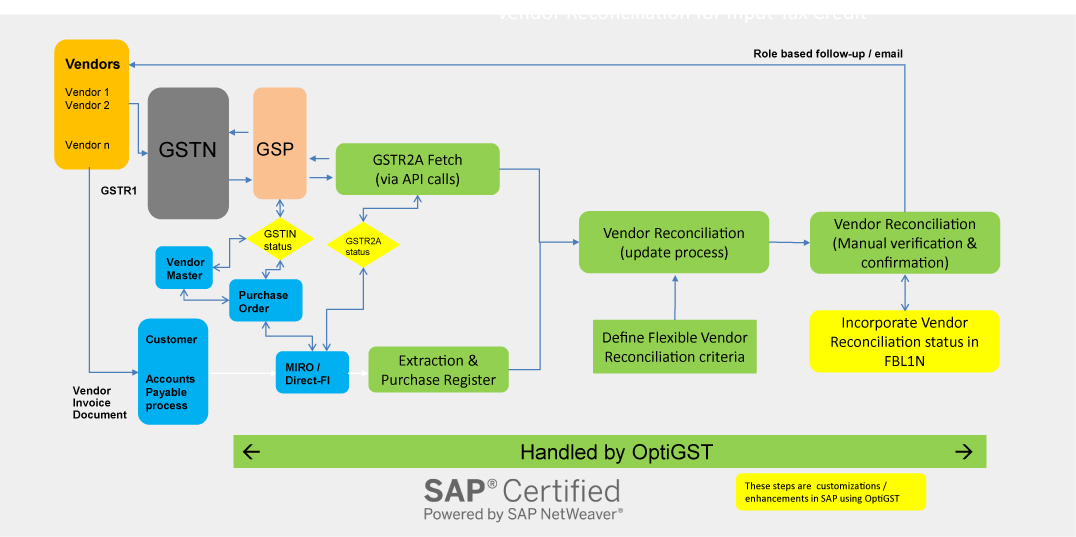
    https://www.ivldsp.com/wp-content/uploads/2021/07/Vendor-Reconciliation-for-Input-Tax-Credit-role-based.jpg

    Step 1: Log in to the GST Portal

    Use your GSTIN and credentials to access the dashboard.


    Step 2: Navigate to GSTR-2B

    Go to:

    • Returns Dashboard
    • Select Financial Year and Month
    • Click on GSTR-2B

    The system generates the statement automatically.


    Step 3: Download GSTR-2B

    You can download GSTR-2B in:

    • PDF format (summary view)
    • Excel format (detailed reconciliation)

    Excel format is recommended for professional reconciliation.


    Understanding GSTR-2B Structure

    GSTR-2B is divided into clear sections.

    ITC Available Section

    Includes:

    • Invoices eligible for ITC
    • Credit notes
    • ISD credits

    ITC Not Available Section

    Includes:

    • Blocked credits
    • Reverse charge supplies
    • Ineligible ITC under GST law

    This clear segregation helps avoid wrong claims.


    Reconciliation of GSTR-2B with Purchase Register

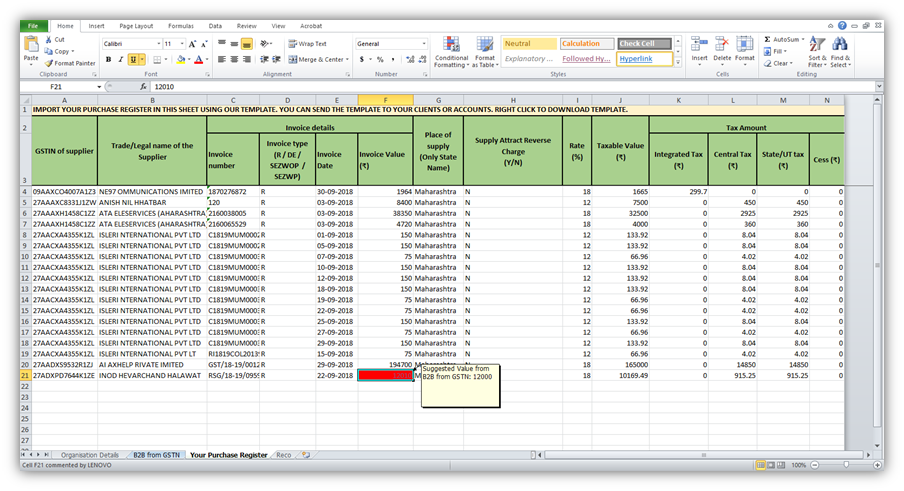
    https://help.gstplus.com/hc/article_attachments/360020664973/mceclip2.png
    https://docs.cleartax.in/product-help-and-support/~gitbook/ogimage/VvNiSHVX3eBNkrKtuXIo
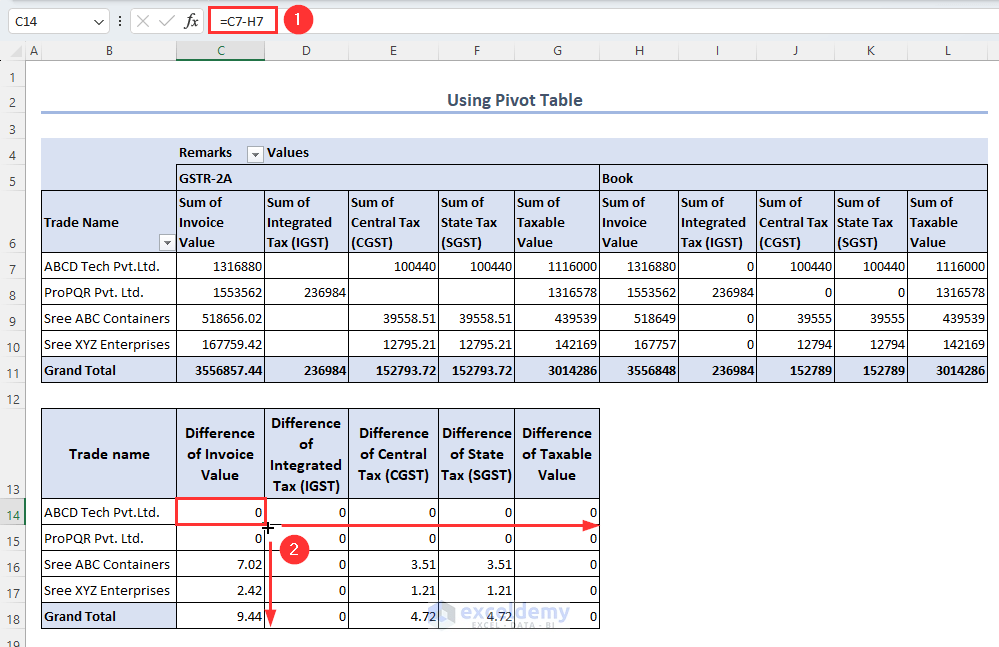
    https://www.exceldemy.com/wp-content/uploads/2023/07/19-Obtaining-the-difference-of-invoice-and-GST-values-from-the-Pivot-table-to-Do-GST-reconciliation-in-Excel.png

    Reconciliation is the most critical step.

    Reconciliation Process

    • Match supplier GSTIN
    • Match invoice number
    • Match taxable value and tax
    • Identify missing invoices
    StatusAction Required
    Invoice matchedClaim ITC
    Missing invoiceFollow up with supplier
    Ineligible creditDo not claim

    Fact: Nearly 30% of ITC mismatches occur due to supplier non-filing or late filing of GSTR-1.


    How to Claim ITC in GSTR-3B Using GSTR-2B

    Only ITC appearing in eligible section of GSTR-2B should be claimed.

    Best Practice

    • Claim ITC strictly as per GSTR-2B
    • Carry forward unmatched ITC
    • Avoid provisional or estimated credits

    This ensures zero variance between departmental data and your return.


    Common Errors While Using GSTR-2B

    MistakeConsequence
    Claiming ITC not in 2BGST notice
    Ignoring ineligible ITCPenalty
    No reconciliationInterest liability
    Supplier mismatchITC denial

    Avoiding these mistakes protects your compliance record.


    Monthly Compliance Workflow Using GSTR-2B

    https://go4gst.com/wp-content/uploads/2025/06/gst_workflow_diagram.svg
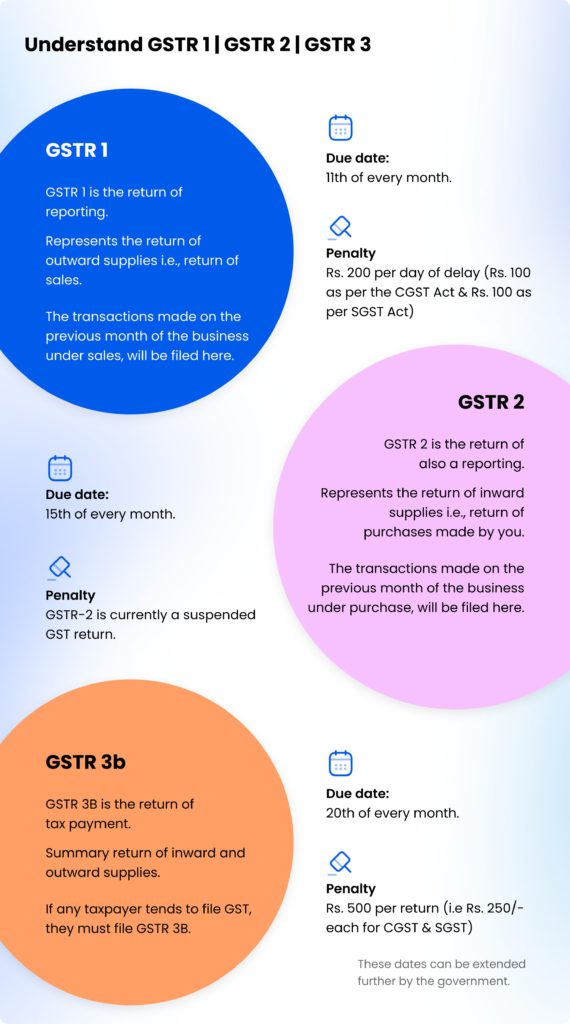
    https://zetran.com/wp-content/uploads/2018/10/draw-a-table-for-gstr-1-gstr-2-gstr-3b-compressed-570x1024.jpg
    https://media.licdn.com/dms/image/v2/D4D22AQFer2xWirM4iw/feedshare-shrink_800/B4DZs1jcypH4Ag-/0/1766130045686?e=2147483647&t=hXekOZMIsrnjThoimpZx3DCriq47Ba4VLPM4BkOaCo0&v=beta

    A disciplined workflow includes:

    1. Download GSTR-2B
    2. Reconcile with purchase data
    3. Communicate discrepancies
    4. Finalize eligible ITC
    5. File GSTR-3B

    This process typically takes 2–4 hours per month for small to mid-sized businesses.


    Practical Tips for Smooth GSTR-2B Compliance

    • Reconcile monthly, not quarterly
    • Educate vendors on timely filing
    • Maintain clean purchase records
    • Use Excel-based reconciliation
    • Track pending ITC separately

    Consistent compliance builds credibility with tax authorities.


    Legal Importance of GSTR-2B

    GST law clearly states that ITC eligibility depends on:

    • Supplier filing status
    • Invoice reporting
    • Tax payment by supplier

    GSTR-2B acts as documentary evidence for ITC eligibility during audits.


    FAQ: How to File GSTR-2B Step by Step

    1. Is GSTR-2B required to be filed?

    No, GSTR-2B is auto-generated and not filed by taxpayers.

    2. Can ITC be claimed without appearing in GSTR-2B?

    No, ITC should be claimed only if it appears in GSTR-2B.

    3. What is the frequency of GSTR-2B?

    It is generated monthly.

    4. Does GSTR-2B change after generation?

    No, it remains static for the period.

    5. What should be done for missing invoices?

    Follow up with suppliers to file or amend GSTR-1.

    6. Is GSTR-2A still relevant?

    GSTR-2A is for tracking, but GSTR-2B is for compliance.

    7. Can Excel be used for GSTR-2B reconciliation?

    Yes, Excel is widely used for professional reconciliation.


    Conclusion

    Understanding how to file GSTR-2B step by step actually means mastering how to use, analyze, and reconcile this statement correctly. GSTR-2B is the backbone of ITC compliance under GST and directly impacts cash flow, tax liability, and audit exposure. Businesses that integrate GSTR-2B into their monthly GST workflow experience smoother compliance, fewer notices, and better financial control. Treat GSTR-2B not as a formality, but as a strategic compliance tool.


    Disclaimer

    This article is intended for educational and informational purposes only. GST laws, rules, and procedures are subject to change based on government notifications and amendments. Readers are advised to consult a qualified GST professional or apply professional judgment before taking compliance decisions.


  • Why Udemy Personal Plan Is Not Worth It for Learners Who Want Real Skill Growth

    Understanding why Udemy Personal Plan is not worth it for learners is crucial before committing to a monthly subscription. While the Personal Plan promises “unlimited access” to learning content, many learners later realize that it does not support long-term learning goals, skill mastery, or career-focused outcomes.

    For beginners, professionals, job seekers, and serious upskillers, learning is not about watching more videos—it’s about retaining knowledge, revisiting content, practicing skills, and growing over time. This article explains, purely from a learner’s perspective, why the Udemy Personal Plan often fails to deliver real educational value despite its attractive pricing model.


    What Learners Expect From an Online Learning Platform

    Most learners enroll in online courses with clear expectations:

    • Permanent access to course material
    • Ability to revise lessons anytime
    • Strong course structure and progression
    • Motivation to complete courses
    • Long-term value for money

    Unfortunately, the Udemy Personal Plan falls short on many of these fronts, especially for learners who study with specific goals such as job preparation, certification, or skill mastery.


    Why Udemy Personal Plan Is Not Worth It for Learners Seeking Long-Term Value

    1. No Lifetime Access Is a Major Learning Barrier

    The biggest reason why Udemy Personal Plan is not worth it for learners is the lack of lifetime access.

    Once the subscription ends:

    • All courses disappear instantly
    • Notes linked to lectures become inaccessible
    • Learners cannot revise past lessons

    Learning research shows that 65–70% of learners revisit completed lessons during revision, interviews, or real-world application. Subscription-based access breaks this natural learning cycle.

    Skill-based subjects like Excel, programming, accounting, data analysis, or design require repeated review. Without permanent access, learning becomes temporary and shallow.


    2. Learning Stops the Moment You Pause Payment

    Life is unpredictable. Learners may pause studies due to:

    • Job changes
    • Exams
    • Health issues
    • Financial constraints

    With the Personal Plan:

    • A missed payment cuts off learning instantly
    • There is no grace period for revision
    • Learning momentum is lost

    In contrast, owned courses remain accessible forever, allowing learners to return at their own pace without pressure.


    Why Udemy Personal Plan Is Not Worth It for Focused Learning

    3. Too Many Choices Reduce Completion Rates

    Unlimited access sounds appealing, but it creates a serious learning problem: choice overload.

    Learners often:

    • Start multiple courses at once
    • Jump between topics without finishing
    • Lose focus due to endless browsing
    Learning ModelCompletion Behavior
    Owned CoursesHigh focus, higher completion
    Subscription AccessLow focus, frequent drop-offs

    Educational data consistently shows that subscription learners complete fewer than 10% of started courses, compared to significantly higher completion rates when learners own the course.


    4. Lack of Psychological Ownership Impacts Discipline

    When learners purchase a course individually:

    • They feel committed
    • They assign time consciously
    • They value the content more

    With the Personal Plan:

    • Courses feel disposable
    • “I’ll watch it later” becomes routine
    • Motivation steadily drops

    This lack of ownership weakens discipline, especially for beginners who already struggle with consistency.


    Why Udemy Personal Plan Is Not Worth It for Skill Mastery

    5. Not Designed for Deep, Repetitive Learning

    Serious learning requires:

    • Watching lessons multiple times
    • Practicing alongside videos
    • Revisiting concepts after weeks or months

    Because subscription access is temporary, learners tend to:

    • Rush through content
    • Skip practice
    • Focus on speed, not understanding

    As a result, learning becomes surface-level consumption rather than real skill development.


    6. Difficult to Build a Personal Learning Library

    One of the most powerful advantages of online learning is creating a personal knowledge library.

    With owned courses, learners can:

    • Build topic-wise collections
    • Return to lessons years later
    • Use courses as reference material

    The Personal Plan prevents this entirely. Once the subscription ends, the learning library disappears—leaving learners with no permanent resource to rely on.


    Why Udemy Personal Plan Is Not Worth It for Career-Oriented Learners

    7. Poor Fit for Job Preparation and Interviews

    Career-focused learners often:

    • Revisit specific lessons before interviews
    • Use courses to refresh technical skills
    • Reference examples during work tasks

    Without lifetime access:

    • Learners cannot revise when needed most
    • Knowledge fades due to lack of reinforcement
    • Confidence drops during real-world application

    Career learning is not linear. Learners may need the same lesson months later—something the Personal Plan does not support.


    8. Subscription Cost Becomes Inefficient Over Time

    Monthly pricing feels small, but long-term cost tells a different story.

    Learner behavior studies show:

    • Average learner completes 3–5 full courses per year
    • Subscription users often pay enough to buy 15–20 courses annually

    This makes the Personal Plan poor value for learners who:

    • Learn selectively
    • Prefer quality over quantity
    • Focus on specific skill paths

    In most cases, buying selected courses individually is more cost-effective.


    Hidden Learning Issues Most Learners Realize Late

    9. Progress Feels Temporary, Not Permanent

    When access can vanish any month:

    • Learning feels fragile
    • Motivation drops
    • Learners hesitate to go deep

    This creates a constant pressure to “finish fast,” which harms comprehension and retention.


    10. Not Ideal for Beginners Who Need Structure

    Beginners need:

    • Clear learning path
    • Repetition
    • Confidence-building progress

    With the Personal Plan:

    • Learners jump topics too quickly
    • Confusion replaces clarity
    • Dropout rates increase

    Structured, owned courses provide better guidance and learning continuity.


    Who Might Still Find Value as a Learner?

    Even though this article explains why Udemy Personal Plan is not worth it for learners, it may suit a limited group:

    • Casual learners
    • Short-term curiosity explorers
    • People sampling topics without goals

    However, for serious learners, students, job seekers, and professionals, the limitations outweigh the benefits.


    Smarter Learning Approach for Serious Learners

    A more effective learner-focused strategy is:

    • Buy focused courses individually
    • Learn one skill at a time
    • Build a permanent course library
    • Revisit lessons whenever needed

    Learning is not about unlimited access—it’s about lasting access.


    FAQs: Why Udemy Personal Plan Is Not Worth It for Learners

    1. Why is Udemy Personal Plan not good for learners?

    Because it does not offer lifetime access, weakens learning discipline, and limits long-term revision and skill retention.

    2. Do learners lose courses after cancelling the Personal Plan?

    Yes. Once the subscription ends, all course access is immediately lost.

    3. Is Udemy Personal Plan suitable for beginners?

    It may work for casual exploration, but beginners usually learn better with structured, owned courses.

    4. Does subscription-based learning reduce course completion?

    Yes. Studies consistently show lower completion rates in subscription learning models.

    5. Is it cheaper to buy individual courses instead?

    For most learners who complete only a few courses per year, individual purchases are more cost-effective.

    6. Can learners revise old lessons under Personal Plan?

    No. Revision is only possible while the subscription remains active.

    7. Does Personal Plan support long-term skill growth?

    No. Skill growth requires repetition, ownership, and continuity, which the Personal Plan does not provide.


    Conclusion: The Real Learner-Centric Truth

    When viewed purely from a learner’s perspective, it becomes clear why Udemy Personal Plan is not worth it for anyone serious about learning. Temporary access, low commitment, poor revision support, and declining motivation make it unsuitable for long-term skill development.

    Learning should empower learners—not pressure them to rush before access disappears. Ownership, continuity, and focus will always deliver better outcomes than unlimited but temporary access.


    Disclaimer

    This article is intended for educational and informational purposes only and reflects common learner experiences and learning behavior patterns. Platform features, pricing, and access models may change over time. Readers should evaluate learning options based on personal goals, learning style, and budget before making any decision.


  • Top 10 Online Learning Tools for Professionals to Upskill, Reskill, and Advance Careers

    Online Learning Tools for Professionals have shifted from being optional add-ons to becoming a core career survival skill. In today’s fast-moving job market, professionals are expected to update their skills every 12–18 months. Studies across HR and workforce development domains consistently show that over 65% of professionals who actively engage in continuous learning report faster promotions and improved job security. With remote work, digital transformation, and automation reshaping roles, structured online learning has become the most practical way to stay relevant.

    This article explores the Top 10 Online Learning Tools for Professionals, taking a deep dive into their features, benefits, and real-world use cases. Whether you are an accountant, developer, manager, marketer, or entrepreneur, these tools support career growth through flexible, measurable, and scalable learning.


    What Makes an Online Learning Tool Ideal for Professionals?

    Before ranking the tools, it’s important to understand the factors professionals should evaluate:

    • Skill relevance to industry demand
    • Certification value for resumes and appraisals
    • Learning flexibility for busy schedules
    • Progress tracking and analytics
    • Practical and project-based learning

    Professionals now spend an average of 3.5 to 5 hours per week on self-learning. The right platform ensures that time translates into tangible career outcomes.


    Top 10 Online Learning Tools for Professionals

    1. Learning Management Systems (LMS) for Structured Growth

    Learning Management Systems are the backbone of professional online education. They organize courses, assessments, certificates, and progress dashboards in one place. Corporate reports indicate that companies using LMS platforms see 42% higher knowledge retention among employees.

    Best Use Case: Corporate training, compliance learning, internal upskilling

    FeatureBenefit
    Centralized coursesConsistent learning experience

    2. MOOCs (Massive Open Online Courses)

    MOOCs enable professionals to learn from global subject-matter experts at scale. These platforms offer structured syllabi, quizzes, capstone projects, and completion credentials.

    Professionals who complete at least one MOOC per year are 28% more likely to transition into higher-value roles.

    FeatureBenefit
    University-style coursesStrong theoretical foundation

    3. Skill-Based Learning Platforms

    Unlike academic learning, skill-based tools focus on actionable outcomes. These platforms emphasize hands-on projects, simulations, and real-world case studies.

    They are particularly effective for technology, finance, marketing, and operations roles.

    FeatureBenefit
    Practical projectsJob-ready skill development

    4. Video-Driven Microlearning Platforms

    Microlearning platforms divide complex topics into short, focused video lessons. Research shows that short videos under 15 minutes improve completion rates by nearly 60%.

    These tools fit seamlessly into professional schedules and reduce cognitive overload.

    FeatureBenefit
    Bite-sized lessonsBetter retention and flexibility

    5. Certification-Focused Learning Tools

    Certifications continue to play a major role in promotions and salary negotiations. Credential-oriented platforms offer exam-aligned content, mock tests, and analytics-driven performance tracking.

    Professionals holding certifications earn 15–25% higher salaries on average.

    FeatureBenefit
    Exam-aligned trainingCareer credibility

    6. Corporate Training Platforms

    Designed for organizations rather than individuals, corporate learning tools help standardize employee skill levels and track performance across teams.

    Organizations investing in structured training observe 24% higher productivity.

    FeatureBenefit
    Team analyticsWorkforce skill visibility

    7. AI-Powered Personalized Learning Tools

    AI-based platforms adapt content based on learner behavior, assessment scores, and completion rates. Personalized learning improves skill acquisition speed by nearly 30%.

    These tools are ideal for professionals aiming to optimize learning efficiency.

    FeatureBenefit
    Adaptive contentFaster skill mastery

    8. Collaboration-Focused Learning Communities

    Learning communities blend education with peer interaction, mentorship, and group projects. Professionals engaged in communities report stronger accountability and long-term consistency.

    FeatureBenefit
    Peer discussionsDeeper conceptual clarity

    9. Mobile-First Learning Platforms

    Mobile learning tools enable professionals to learn anytime, anywhere. Statistics indicate that over 72% of professionals prefer mobile access for short learning sessions.

    FeatureBenefit
    App-based accessLearning on the go

    10. Knowledge Subscription Platforms

    Subscription-based platforms offer unlimited access to diverse topics under one plan. These are ideal for lifelong learners exploring cross-functional skills such as leadership, finance, and productivity.

    FeatureBenefit
    Broad content libraryCost-effective learning

    How Online Learning Tools for Professionals Boost Career Growth

    Skill Relevance and Market Alignment

    Professionals who actively reskill are 2.3 times more likely to retain employment during economic slowdowns. Online learning tools align skills with market demand in real time.

    Measurable ROI on Learning

    Unlike informal learning, these platforms provide metrics—course completion, skill benchmarks, and certification rates—helping professionals showcase tangible value during evaluations.

    Flexibility Without Career Disruption

    Online tools remove geographical and time constraints, enabling continuous learning without quitting jobs or taking long breaks.


    Common Mistakes Professionals Make While Choosing Learning Tools

    • Prioritizing quantity over quality
    • Ignoring practical assignments
    • Choosing tools without certification relevance
    • Skipping progress analytics

    Selecting tools aligned with specific career goals is far more effective than random course consumption.


    Future Trends in Online Learning for Professionals

    • AI-driven career path recommendations
    • Skill verification through digital credentials
    • Increased demand for short, outcome-based courses
    • Integration with performance management systems

    By 2030, experts project that over 90% of professionals will rely on online platforms for continuous skill updates.


    FAQs: Online Learning Tools for Professionals

    1. What are online learning tools for professionals?

    Online learning tools for professionals are digital platforms designed to help working individuals upgrade skills, gain certifications, and improve job performance through flexible learning formats.

    2. How effective are online learning tools compared to classroom training?

    Studies indicate that online learners retain 25–60% more information compared to traditional classroom learners due to self-paced and interactive content.

    3. How much time should professionals spend on online learning weekly?

    An ideal range is 3 to 6 hours per week, which balances learning effectiveness with work responsibilities.

    4. Do online learning tools really help in promotions?

    Yes. Professionals with relevant certifications and documented skill upgrades are significantly more likely to be considered for internal promotions.

    5. Are online certifications valuable for employers?

    Most employers value skill-based certifications, especially when they are aligned with job requirements and demonstrated through projects.

    6. Can online learning tools help career switching?

    Absolutely. Many professionals successfully transition careers using structured online learning and project-based skill validation.


    Conclusion

    Online Learning Tools for Professionals are no longer just educational resources—they are career accelerators. By choosing the right mix of structured courses, practical training, certifications, and community engagement, professionals can future-proof their skills and boost long-term employability. The key lies in consistent learning, strategic platform selection, and outcome-focused execution.


    Disclaimer

    This article is intended for educational and informational purposes only. Skill outcomes, career growth, and salary improvements depend on individual effort, industry conditions, and experience levels. The content is original, unbiased, and does not promote or link to any specific platform or provider.


  • Best Resume Tips for Data Entry and MIS Jobs to Get Shortlisted Faster: Complete Guide with Skills, Format, Examples, and Professional Structure

    A strong resume is the first and most important step toward securing a Data Entry or MIS (Management Information System) job. Whether you are a fresher or experienced professional, recruiters shortlist candidates within seconds by scanning the resume for clarity, skill match, speed indicators, accuracy metrics, and overall presentation. A powerful resume can increase your shortlisting chances by more than 70 percent, especially in competitive fields like data entry and MIS reporting.

    This detailed guide covers essential resume tips, correct formatting, must-have skills, common mistakes to avoid, tables for better understanding, and techniques to make your resume stand out. It is written in a simple, practical, and highly applicable way.


    Why a Strong Resume Matters for Data Entry and MIS Roles

    Data Entry and MIS roles are skill-based, performance-oriented, and depend on accuracy, speed, and reporting capabilities. Recruiters use the resume to identify candidates who have:

    • High typing speed
    • Accuracy level of 90 percent to 99 percent
    • Knowledge of Excel or Google Sheets
    • Ability to prepare MIS reports
    • Experience with data cleaning
    • Familiarity with dashboards
    • Basic accounting or admin support skills
    • Experience with ERP or CRM tools

    A well-structured resume shows professionalism, attention to detail, and understanding of job demands, all of which are essential to both roles.


    Resume Format Recommended for Data Entry and MIS Jobs

    The best resume format for these roles is the Reverse Chronological Format, where latest experience appears first.
    Recommended sections include:

    1. Header (Name, Phone, Email, City)
    2. Profile Summary
    3. Skills
    4. Professional Experience
    5. Key Achievements
    6. Technical Skills
    7. Education
    8. Certifications (Optional)
    9. Projects (Optional)

    Profile Summary Examples for Data Entry and MIS Jobs

    A profile summary should be clear, crisp, and highlight your core competencies. Keep it between 3 to 4 lines.

    Example 1: Data Entry Profile Summary
    Professional Data Entry Operator with 2 years of experience in typing, data management, document digitization, and spreadsheet-based tasks. Skilled in accuracy-driven data entry, error checking, and MIS updates.

    Example 2: MIS Executive Profile Summary
    MIS Executive with strong command over Excel, dashboards, and automated reporting. Experienced in handling large datasets, generating weekly and monthly MIS, and supporting management with data-driven insights.


    Essential Skills for Data Entry and MIS Resumes

    Use a mix of technical and soft skills.

    Technical Skills

    • Typing Speed (Enter your exact speed, e.g., 45 WPM or 60 WPM)
    • Accuracy Rate (Mention if above 95 percent)
    • MS Excel (VLOOKUP, Filter, Pivot Table, Conditional Formatting)
    • MS Word
    • Google Sheets
    • Power BI or basic dashboard knowledge
    • Data validation
    • Data cleaning
    • Data formatting
    • Basic tally or ERP entries
    • Email drafting

    Soft Skills

    • Time management
    • Attention to detail
    • Multitasking
    • Problem-solving
    • Communication
    • Reliability

    Table: Essential Skills Comparison for Data Entry vs MIS Jobs

    Data Entry Job SkillsMIS Job Skills
    Fast typing speedAdvanced Excel
    High accuracyDashboard creation
    Document handlingReport automation
    Basic computer skillsAnalytical ability
    Data formattingKPI and performance reports

    How to Highlight Experience for Data Entry and MIS Jobs

    Tips for Data Entry Experience Section

    • Highlight typing speed
    • Mention the number of records handled per day
    • Include error reduction achievements
    • Show experience with spreadsheets or ERPs
    • Mention deadlines successfully met

    Example:
    Entered and verified more than 2,000 records per day with 98 percent accuracy.

    Tips for MIS Experience Section

    • Mention the number of reports generated
    • Highlight Excel formulas you use regularly
    • Mention dashboards, charts, and monthly performance reports
    • Include tasks related to automation or macros (if any)
    • Mention data analysis responsibilities

    Example:
    Prepared over 25 weekly and monthly MIS reports covering sales, productivity, and operational KPIs.


    Action Words to Use in Your Resume

    Strong action verbs help your resume stand out.

    Examples:

    • Managed
    • Generated
    • Compiled
    • Analyzed
    • Entered
    • Updated
    • Created
    • Automated
    • Organized
    • Monitored

    How to Mention Achievements in Resume (Very Important)

    Achievements show your real capability and differentiate you from others.

    Examples for Data Entry:

    • Improved accuracy from 92 percent to 98 percent
    • Completed 10,000+ entries within project deadline
    • Reduced data duplication issues by 30 percent

    Examples for MIS:

    • Automated weekly sales report, saving 2 hours per week
    • Improved data processing time by 20 percent
    • Designed dashboard used by management for decision-making

    Technical Skills to Add for MIS Jobs

    MIS jobs demand detailed Excel knowledge. These skills can increase shortlisting chances significantly.

    Include:

    • VLOOKUP
    • HLOOKUP
    • INDEX + MATCH
    • Pivot Table
    • Pivot Chart
    • IF and nested IF
    • SUMIFS / COUNTIFS
    • Data Validation
    • NetworkDays
    • Conditional Formatting
    • Dashboard creation

    Example Table: Excel Skills and Impact

    Excel SkillImpact on MIS Job
    VLOOKUP & IFERRORFaster MIS report creation
    Pivot TablesQuick data summarization
    COUNTIFSAccurate data filtering
    Conditional FormattingBetter visualization

    Resume Tips for Freshers Applying for Data Entry or MIS Jobs

    Even without experience, you can create a strong resume.

    Tips:

    • Highlight your computer skills
    • Mention typing speed
    • Add Excel knowledge
    • Include internship, project, or volunteer work
    • Highlight accuracy and discipline
    • Mention course completion or certification
    • Use a clean, simple resume layout

    If you have completed practical tasks like maintaining Excel sheets, include them under Projects.


    Common Resume Mistakes to Avoid

    Avoiding mistakes is equally important.

    • Overloaded resume without structure
    • Too much text and long paragraphs
    • Wrong spellings or grammar
    • Not including typing speed
    • Not listing Excel skills specifically
    • Incorrect job titles
    • Overuse of decorative elements
    • Unprofessional email address
    • Using same resume for all jobs instead of tailoring

    Tips to Make Your Resume ATS-Friendly

    Most companies use Applicant Tracking Systems (ATS). To pass ATS:

    • Use simple fonts like Arial or Calibri
    • No tables for core details (use only where required)
    • Use standard section titles like Skills, Education, Experience
    • Use keywords from job descriptions
    • Avoid images or graphics
    • Keep resume in PDF (unless employer says otherwise)

    How to Write a Strong Career Objective (Optional)

    Examples:

    For Data Entry:
    Seeking a Data Entry Operator position to utilize my typing accuracy, data management skills, and discipline in maintaining high-quality records.

    For MIS Executive:
    Looking for an MIS Executive role to apply my Excel expertise, reporting skills, and analytical ability for business performance improvement.


    Education and Certification Section

    Education should be listed clearly:

    • Degree or diploma
    • Institution
    • Year of completion

    Certifications to include:

    • MS Office
    • Excel
    • Data Analytics basics
    • Typing course
    • Computer fundamentals
    • Data management training

    Conclusion

    A resume for Data Entry and MIS jobs must be simple, clear, and skill-focused. Employers look for speed, accuracy, discipline, and technical knowledge. Highlighting typing speed, Excel skills, reporting capability, and achievements will make your resume stand out in a competitive job market. Follow the structure and tips given in this guide to create a professional, ATS-friendly resume that increases your chances of getting shortlisted quickly.


    Disclaimer

    This article is intended for general informational and educational purposes. Resume requirements may vary based on company expectations, job roles, and industry standards. Users should customize their resume according to specific job descriptions.


  • Tally + Excel Combo Course Overview: Complete Professional Accounting & Data Management Training for Career Growth

    In today’s fast-growing digital business environment, employers expect accountants and office professionals to be skilled in both Tally (ERP 9 & TallyPrime) and Microsoft Excel (Basic to Advanced). The combination of these two tools has become the minimum requirement for jobs in accounting, GST, MIS reporting, financial analysis, billing, data entry, and business administration.

    To help learners achieve these skills in a structured and job-oriented manner, the Tally + Excel Combo Course provides a powerful, industry-focused curriculum covering not only basic features but also advanced concepts used in modern offices. This intensive training ensures that students, working professionals, business owners, and freelancers become confident in handling real-world accounting tasks and large datasets easily.

    If you want complete details of the program or wish to enroll, you can visit your course page here:
    Tally + Excel Combo Course (Basic to Advanced): https://www.iturninstitute.in/course/tally-erp-9-tallyprime-gst-microsoft-excel-training-basic-to-advanced/


    Why a Combo of Tally and Excel is Essential in 2025 Onwards

    Over 90 percent of small and medium businesses in India use TallyPrime for accounting and taxation. At the same time, more than 750 million users worldwide depend on Excel for reporting, analysis, pivot tables, budgeting, forecasting, and data management.

    In most job roles, Excel and Tally work together:

    • Tally for day-to-day accounting
    • Excel for analysis and reporting
    • Tally data exported to Excel for MIS
    • Excel sheets used for audits, GST checks, bank reconciliation, and budgeting

    This combination makes the course extremely relevant as almost every employer seeks these two skills in candidates.


    Course Highlights

    FeatureDescription
    Total Modules25+ Comprehensive Modules
    Software CoveredTally ERP 9, TallyPrime, MS Excel Basic to Advanced
    Practical Training100% Hands-on with Real-World Examples
    Suitable ForStudents, Accountants, Freshers, Business Owners, Freelancers
    Career OptionsAccountant, GST Executive, MIS Executive, Data Analyst (Entry), Back Office Staff

    Detailed Curriculum Breakdown

    The Tally + Excel course is divided into two major learning tracks: Tally (ERP 9 & TallyPrime) and Microsoft Excel. Each section is designed to provide step-by-step learning, practical assignments, and exposure to actual business scenarios.


    1. Tally ERP 9 + TallyPrime Training (Complete Accounting & GST)

    This part of the course covers detailed accounting training starting from fundamentals to advanced GST transactions. Learners understand how business accounting works practically.

    Key Topics Covered

    • Introduction to Tally ERP 9 & TallyPrime Dashboard
    • Creation of Company and Security Controls
    • Chart of Accounts: Ledgers, Groups, Vouchers
    • Double-Entry Accounting System
    • GST Setup, HSN/SAC Codes, and Tax Configurations
    • Purchase, Sales, Credit Note, Debit Note
    • Stock Management with Godowns, Units, and Categories
    • Bank Reconciliation
    • Cost Centres and Cost Categories
    • TDS and TCS
    • Payroll Basics (Attendance, Salary, PF, ESI)
    • Printing of Invoices, Reports, and Financial Statements
    • GSTR-1, GSTR-2A Matching, GSTR-3B Reports
    • Exporting Data to Excel

    Important Skills Developed

    • Ability to manage complete accounts independently
    • Knowledge of taxation workflows
    • Understanding of business reports and financial statements
    • Confidence in managing day-to-day bookkeeping

    More than 70 percent of accounting job openings specifically mention Tally as a must-have skill, which makes this training essential.


    2. Microsoft Excel Training (Basic to Advanced)

    The Excel part of the course focuses on building strong analytical abilities. It helps students master everything from basic spreadsheet functions to advanced reporting.

    Core Excel Modules

    • Excel Introduction, Ribbon Customization, Workbook Management
    • Data Entry & Formatting Techniques
    • Autofill, Flash Fill, Custom Lists
    • Basic Formulas: SUM, AVERAGE, COUNT, MAX, MIN
    • Conditional Formulas: IF, AND, OR, Nested IF
    • Lookup Formulas: VLOOKUP, HLOOKUP, INDEX, MATCH
    • Error-Handling: IFERROR, ISERROR
    • Text Functions: LEFT, RIGHT, MID, TRIM, CONCAT
    • Date & Time Functions: NETWORKDAYS, EOMONTH, TODAY
    • Pivot Tables & Pivot Charts
    • Data Validation, Dropdown Lists
    • Conditional Formatting
    • Filters & Advanced Filters
    • Chart Creation for Business Dashboards
    • Protect Sheet, Protect Workbook
    • Working With Large Datasets
    • Exporting & Importing Tally Data

    Why Excel Matters for Accounting

    • 80 percent of accountants prepare reports in Excel
    • Most tax audit files are prepared in spreadsheets
    • Advanced Excel skills increase employability by more than 60 percent

    Career Opportunities After Completing the Course

    After completing the Tally + Excel Combo Course, students can apply for multiple job roles such as:

    • Junior Accountant
    • Tally Operator
    • GST Executive
    • Accounts Assistant
    • Billing Executive
    • MIS Executive
    • Office Coordinator
    • Data Entry Professional
    • Back Office Executive

    Freshers with Tally + Excel skills generally earn between ₹12,000 to ₹20,000 per month, whereas experienced professionals can earn ₹30,000 to ₹60,000 per month depending on city and industry.


    Course Benefits

    BenefitExplanation
    Practical TrainingHands-on practice with real business examples
    GST IncludedCovers GST entries, filing preparation, and reporting
    Industry ToolsTeaches the most-demanded tools: Tally + Excel
    Job ReadyAligns with current employer requirements
    Suitable for AllNo prior accounting experience required

    Who Should Join This Course?

    This course is ideal for:

    • Students preparing for job placements
    • Commerce graduates wanting practical skills
    • Working professionals who want to upgrade
    • Business owners managing their own accounts
    • Freelancers who want to offer bookkeeping services
    • Housewives looking for part-time accounting work

    A combination of Tally + Excel covers almost 90 percent of day-to-day accounting and office tasks, making it the most practical skillset in the industry.


    Why Choose a Combo Instead of Separate Courses?

    Many learners study Tally and Excel separately, which often leaves gaps in practical understanding. A combined course helps you learn how both tools complement each other.

    Key Advantages

    • Faster learning with integrated workflow
    • Real-life examples connecting Tally and Excel
    • Improved efficiency in reporting and analysis
    • Smooth transition from accounting to MIS roles
    • More job-focused modules with minimum confusion

    Employers today prefer candidates who can manage accounts in Tally and prepare reports in Excel, making the combo much more valuable.


    How Tally and Excel Work Together in Real Businesses

    • Sales data exported from Tally gets analyzed in Excel
    • GST mismatch reports prepared in Excel by comparing Tally data
    • Bank reconciliation statements often done in Excel
    • Audit schedules created using Tally data in spreadsheets
    • Inventory analysis done using Excel pivot tables
    • Management reporting is entirely Excel-based

    This is why learning both tools together increases work efficiency by up to 40 percent.


    Conclusion

    The Tally + Excel Combo Course is a complete skill-building program designed for practical learning and job readiness. It empowers learners to handle accounting, taxation, data analysis, office documentation, MIS reporting, and financial tasks confidently. Whether you are a student, fresher, working professional, entrepreneur, or freelancer, this course helps you build strong foundational skills that are in demand across industries.

    To explore the course with complete details, modules, and enrollment options, you can visit:
    Tally + Excel Combo Course (Basic to Advanced): https://www.iturninstitute.in/course/tally-erp-9-tallyprime-gst-microsoft-excel-training-basic-to-advanced/


    Disclaimer

    This article is for informational and educational purposes only. Course features, modules, and benefits are based on general training structures and may evolve with updates. Readers should verify the latest details from the course page. No external links are provided except the official course link mentioned above.


  • Best Colleges to Apply Through MAT Exam Score in India: Detailed Guide for MBA Aspirants

    Choosing the right MBA college is one of the biggest decisions for any management aspirant, and the MAT (Management Aptitude Test) gives students access to a wide range of reputable B-schools across India. Every year, more than 2 lakh students appear for MAT, with the goal of securing seats in institutes that provide strong placements, experienced faculty, and industry-oriented management programs. Since MAT is conducted four times a year, it offers flexibility and enhances the chances of getting into a good college without extreme competition.

    In this detailed blog, you will find the best colleges under MAT exam, important details such as fees, placements, ranking, location, and specialization options. The information is structured in a clean and easy-to-read format, including tables and factual insights to help you make a confident decision.


    Why MAT Colleges Are Popular Among MBA Aspirants

    MAT colleges are widely preferred because:

    • They accept students across multiple MAT cycles (February, May, September, December).
    • More than 800+ B-schools consider MAT scores.
    • Many colleges offer average packages of 5 LPA to 12 LPA depending on specialization.
    • The exam is relatively easier compared to CAT or XAT, making good colleges accessible to more students.
    • Colleges accepting MAT are spread across metro cities and tier-2 locations, giving students many choices.

    Top 15 Best Colleges Under MAT Exam

    Below is a list of the most reputed and consistently ranked colleges accepting MAT scores. These institutes are known for quality academics, robust placements, strong industry connections, and experienced faculty.


    1. Christ University, Bangalore

    Christ University is one of the most respected private universities in India. The MBA program is well known for its rigorous curriculum and strong placement partnerships. The institution receives thousands of MAT applicants every year due to its reputation for excellence.

    FeatureDetails
    Average PackageApproximately 7 LPA
    Popular SpecializationsMarketing, HR, Finance, Business Analytics

    2. Jagan Institute of Management Studies (JIMS), Rohini

    JIMS Rohini is consistently ranked among the top management institutes in Delhi. It is well recognized for producing industry-ready managers.

    FeatureDetails
    Average Package6.5 LPA
    StrengthStrong industry interface and practical assignments

    3. Institute of Management Technology (IMT) – Nagpur and Hyderabad

    Both campuses of IMT offer excellent faculty, modern facilities, and a competitive curriculum. They attract a large number of MAT applicants each year.

    FeatureDetails
    Average PackageAround 7–8 LPA
    USPIndustry-focused courses and corporate tie-ups

    4. Xavier Institute of Management & Research (XIMR), Mumbai

    XIMR is one of Mumbai’s prestigious management institutes with a placement history largely focused in financial services, consulting, and marketing sectors.

    FeatureDetails
    Average Package6.2 LPA
    City AdvantageLocated in India’s financial hub

    5. Indus Business Academy (IBA), Bangalore

    IBA is known for its residential campus, robust pedagogy, and placement support with numerous multinational corporations.

    FeatureDetails
    Average Package6.5 LPA
    Unique FactorHighly rated teaching methodology and student diversity

    6. New Delhi Institute of Management (NDIM), Delhi

    NDIM is a top choice for MAT candidates due to its placement-oriented curriculum and excellent corporate network.

    FeatureDetails
    Average PackageApproximately 6.2 LPA
    HighlightsIndustry mentoring programs and corporate exposure

    7. ISBM – Pune, Bangalore, Kolkata

    ISBM offers a strong academic base with good industry connections. It has multiple campuses, but its Pune campus is the most preferred.

    FeatureDetails
    Average Package5.8–6 LPA
    Key StrengthCase-based learning environment

    8. VIT Business School, Vellore

    VIT Business School is part of VIT University, one of India’s top private universities. It offers excellent infrastructure and research-driven programs.

    FeatureDetails
    Average Package5.8 LPA
    Specialization StrengthBusiness Analytics and Finance

    9. IILM University, Gurugram and Greater Noida

    IILM is known for its global curriculum, modern infrastructure, and strong alumni network.

    FeatureDetails
    Average PackageAround 6.5 LPA
    Notable FeaturesSkill-based training and leadership modules

    10. Amity Business School, Noida

    Amity is one of India’s largest private universities, with large corporate networks and active placement cells.

    FeatureDetails
    Average Package5.5–6 LPA
    CampusesPresent across multiple cities in India

    11. KIIT School of Management (KSOM), Bhubaneswar

    KSOM consistently ranks as one of the best B-schools in eastern India and provides good placements and infrastructure.

    FeatureDetails
    Average Package7 LPA
    Academic StrengthStrong research environment

    12. AIMS Institutes, Bangalore

    AIMS is accredited and known for its industry-aligned curriculum, making it a preferred MAT college in South India.

    FeatureDetails
    Average Package5.5 LPA
    USPGood academic culture and campus life

    13. SCMS Cochin School of Business

    SCMS Cochin is a reputable B-school in Kerala, known for finance and marketing specializations.

    FeatureDetails
    Average Package5.5–6 LPA
    Focus AreaIndustry exposure and skill-based training

    14. ITM Business School, Navi Mumbai

    ITM has modern management programs with a focus on experiential learning and corporate internships.

    FeatureDetails
    Average Package6.5 LPA
    SpecialtiesMarketing, FinTech, Operations

    15. Jaipuria Institute of Management (Lucknow, Noida, Jaipur, Indore)

    Jaipuria has four well-recognized campuses. The group focuses on modern business practices and corporate engagement.

    FeatureDetails
    Average PackageAround 6.5–7 LPA
    Student AdvantageLarge alumni network and industry connect

    How to Choose the Best MAT College for Yourself

    Choosing the right MAT college is not just about cutoff scores. Consider these important factors:

    1. Placement Records

    Check the average package rather than the highest package. A college with an average package above 5.5 LPA is usually strong in placement.

    2. Faculty and Curriculum

    Institutions with experienced faculty and industry-oriented curriculum deliver better results.

    3. Location Advantage

    Cities like Bangalore, Delhi, Mumbai, Pune, and Hyderabad provide better internship and job opportunities.

    4. Student Reviews

    Look at peer experiences and campus culture.

    5. Accreditation

    Prefer colleges with NAAC, NBA, or AICTE accreditation, as these ensure academic standards.


    Approximate MAT Score vs Expected Colleges

    This table helps you understand which score range can get you into which category of colleges.

    MAT Score RangePossible College Category
    700+Top-tier private universities and reputed institutes
    600–700Good B-schools with strong placements
    500–600Mid-tier colleges with decent ROI

    Final Thoughts

    MAT opens the door to a wide variety of colleges with strong management programs and placement opportunities. Whether you aim for Bangalore, Pune, Delhi, or Mumbai, MAT gives you the flexibility to appear multiple times and improve your score. With more than 800 B-schools accepting MAT, choosing the right one can significantly impact your career.

    Evaluate colleges based on placements, curriculum, location, and accreditation instead of only brand names. This detailed list of the Best Colleges under MAT Exam will help you make a confident and informed decision for your MBA journey.


    Disclaimer

    All information in this article is presented for educational and reference purposes. Figures such as packages, scores, and rankings are approximate and may vary based on yearly updates, institute policies, and market conditions. Candidates should verify details from official sources before applying to any institution.


  • Black Friday Skill Upgrade Guide: Why Online Courses at Rs 399 Are the Smartest Investment for Career Growth in 2025

    Black Friday has become one of the biggest learning seasons in India over the last few years. With the rise of digital careers, automation, data-driven decision-making, and remote work, professionals across industries actively look for the right skills to stay competitive. This year, Black Friday brings an exceptionally valuable opportunity: premium online courses available at just Rs 399 per course.

    Whether you work in accounts, MIS, finance, HR, operations, sales, business analytics, office administration, or freelancing, upgrading your skills can directly impact your job performance, salary, and long-term growth.

    This article explains in-depth why Black Friday learning deals matter, what skills offer the highest returns, who should take advantage of the Rs 399 offer, and how spending a small amount can produce long-term measurable benefits.


    The Rising Demand for Digital Skills in India

    The Indian job market has undergone rapid transformation in the last five years:

    • Over 67% of office jobs now require Excel or Google Sheets
    • More than 80% of accountants use Tally or similar ERP platforms
    • Over 60% of MIS and reporting tasks rely on automation and formulas
    • 45% of HR and admin tasks now use digital tools
    • Remote work has increased dependence on Microsoft Office and Google Workspace

    According to industry studies, professionals who master tools like Excel, Tally, Power Query, Office 365, or Google Sheets earn 20%–50% higher salaries compared to those with basic skills.

    This makes online learning investments highly valuable.


    Why Black Friday Rs 399 Courses Are a Smart Investment

    Learning platforms typically price professional courses between Rs 1,299 and Rs 3,499. A flat Rs 399 offer gives learners access to:

    • High-quality structured curriculum
    • Lifetime access
    • Hands-on practical projects
    • Expert-designed lessons
    • Certificates upon completion

    For the price of a single restaurant meal, learners acquire skills that can boost salaries, job security, and long-term career stability.


    Table: What You Gain by Buying Courses During Black Friday

    BenefitValue to Learner
    Lowest pricing of the yearSaves 60%–80% on premium learning
    Lifetime course accessLearn at your own pace
    Career-focused skillsImmediate impact on job performance
    Skill-based certificatesBoosts resume strength
    Better job opportunitiesHigher salaries and promotions

    Top Skills That Offer Maximum Return on Investment

    Below are the most in-demand skills for 2024–2025:

    1. Microsoft Excel (Basic to Advanced)

    Excel remains the backbone of office operations. Skills such as formulas, pivot tables, dashboards, macros, and automation dramatically increase productivity.
    Around 78% of companies use Excel for daily reporting.

    2. MIS & Reporting

    MIS professionals earn between Rs 20,000 – 55,000 per month, and advanced skills can push salaries beyond Rs 80,000.

    3. Tally Prime + GST

    Tally is used by more than 8 million businesses in India.
    Understanding GST, ledgers, stock, and reconciliation makes job opportunities extremely stable.

    4. Google Workspace

    With increasing remote work, Google Sheets, Docs, and Drive have become essential corporate tools.

    5. MS Office (Word, PowerPoint, Excel)

    Still the core skill for administrative roles, HR, sales, training, and documentation.


    Why Investing Rs 399 in Skill Courses Pays Back 100x

    Here is a realistic comparison:

    • Average salary increase after Excel mastery → Rs 5,000–15,000 per month
    • Cost of the course → Rs 399
    • Return on investment → Over 1000% within the first month

    Even if you learn just two new skills, your job performance improves significantly.


    Who Should Use the Black Friday Rs 399 Opportunity?

    • Students preparing for job placements
    • Job seekers upgrading their resume
    • Working professionals stuck in low-growth roles
    • Freelancers wanting to expand their services
    • Entrepreneurs optimizing business operations
    • Accountants, HRs, and office admins
    • Anyone wanting to build a digital career


    Table: Common Job Roles That Benefit Immediately

    Job RoleSkills That Improve Salary
    MIS ExecutiveExcel, dashboards, automation
    AccountantTally Prime, GST, Excel
    Data Entry OperatorExcel formulas, Google Sheets
    HR ExecutiveMS Office, Google Workspace
    Office AdminExcel, Word, communication tools
    Business OwnerReporting, Tally, Sheets

    How Rs 399 Courses Help Improve Job Performance Fast

    1. Learn new techniques like PivotTables, VLOOKUP, Power Query
    2. Automate 40% to 60% of manual reporting work
    3. Reduce errors in accounting and GST
    4. Prepare professional-level dashboards
    5. Improve communication through better PPT and documentation skills
    6. Build practical confidence for interviews
    7. Handle office tasks more efficiently

    What Makes These Courses Worth Buying?

    • Designed by an experienced trainer
    • Includes real business examples
    • Covers step-by-step demonstrations
    • Beginner-friendly and job-oriented
    • Affordable learning at Black Friday pricing


    Final Thoughts: Don’t Miss the Rs 399 Learning Window

    Black Friday brings the most affordable learning opportunity of the entire year.
    If you want to upgrade your skills for better income, job security, or higher productivity, this is the perfect time.

    You can view all my available courses here:
    https://www.udemy.com/user/himanshu-dhar-3/

    Investing in your skills today will reward you many times in the coming months.


    Disclaimer

    This article is for educational and informational purposes only. Course content, duration, and pricing may change over time based on platform policies. The author may earn a small commission from the provided course page if a purchase is made. Always review course details before enrolling.