Tag: GST Accounting Software

  • Top 3 Reasons Why Companies Still Rely on Tally for Accounting, Compliance, and Business Control in India

    In an era dominated by cloud accounting platforms and AI-powered ERPs, Tally continues to be a backbone of accounting operations for millions of Indian businesses. From micro enterprises to large mid-sized organizations, companies still rely heavily on Tally for day-to-day accounting, statutory compliance, and financial control. This dependence is not accidental. It is driven by a combination of regulatory alignment, operational efficiency, and cost-effectiveness that few systems match in the Indian context.

    This article explores the top 3 reasons why companies still rely on Tally, backed by figures, practical insights, and real-world business use cases. The discussion is structured for clarity, depth, and SEO performance, making it ideal for business owners, accountants, students, and finance professionals.
    https://help.tallysolutions.com/docs/te9rel66/Tax_India/gst/images/gstr1_new1.gif
    https://help.tallysolutions.com/wp-content/uploads/2023/10/1-dashboard-tallyprime.gif

    Why Tally Still Dominates the Indian Accounting Landscape

    Developed by Tally Solutions, Tally has been in continuous use in India for over three decades. Industry estimates suggest that more than 7 million businesses actively use Tally across manufacturing, trading, services, and non-profit sectors. Even with the rise of cloud accounting tools, Tally’s offline-first stability and India-centric design keep it deeply relevant.

    Below are the three most powerful reasons behind this continued reliance.


    Reason 1: Deep Alignment with Indian Taxation and Statutory Compliance

    Built Specifically for Indian Laws

    One of the strongest reasons companies rely on Tally is its native alignment with Indian taxation systems. Tally is not a generic global accounting tool adapted for India; it is built from the ground up for Indian compliance.

    Tally supports:

    • GST (CGST, SGST, IGST, UTGST)
    • TDS and TCS
    • Income Tax computation basics
    • Statutory audit requirements
    • MSME compliance tracking

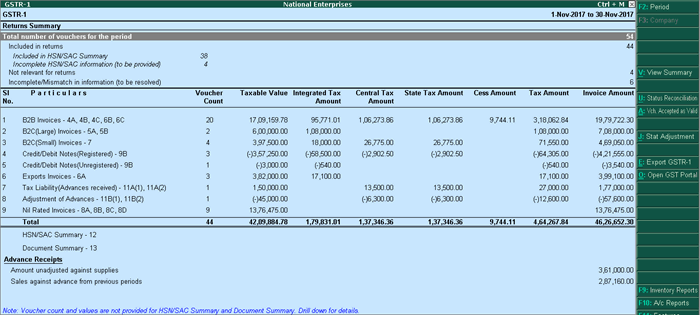
    As of recent financial years, India has over 1.4 crore GST-registered businesses, many of which must file monthly or quarterly returns. Tally simplifies this by automating tax calculations and maintaining audit-ready records.

    Compliance Accuracy Reduces Risk

    Manual compliance errors are among the top reasons for tax notices and penalties. Tally minimizes this risk through:

    • Automated GST classification
    • Real-time tax calculation
    • Consistent ledger structure
    • Error detection during return preparation

    Compliance Advantage at a Glance

    AspectTally Strength
    GST ReturnsAutomated, structured, audit-ready
    Tax AccuracyRule-based calculations
    Audit SupportLedger-level traceability

    For companies operating in India, compliance is not optional. Tally’s compliance-first architecture is a decisive advantage.


    Reason 2: Simplicity, Speed, and Operational Control

    Designed for Accountants, Not Just IT Teams

    Tally’s interface prioritizes keyboard-driven speed and logical workflows, which is why experienced accountants can complete complex tasks in minutes. Unlike many modern systems that rely heavily on mouse navigation and layered menus, Tally enables rapid data entry and report access.

    Key productivity facts:

    • Voucher entry can be completed 30–40% faster compared to mouse-heavy systems
    • Trial balance, P&L, and balance sheet are available instantly without processing delays
    • Large datasets (5–10 years of transactions) run smoothly on standard hardware

    Offline Reliability Matters

    Despite increased internet penetration, many Indian businesses still face:

    • Unstable connectivity
    • Data privacy concerns
    • Power and bandwidth constraints

    Tally’s offline-first model ensures uninterrupted work. Businesses can operate independently of the internet and sync data only when required.

    Real-Time Financial Visibility

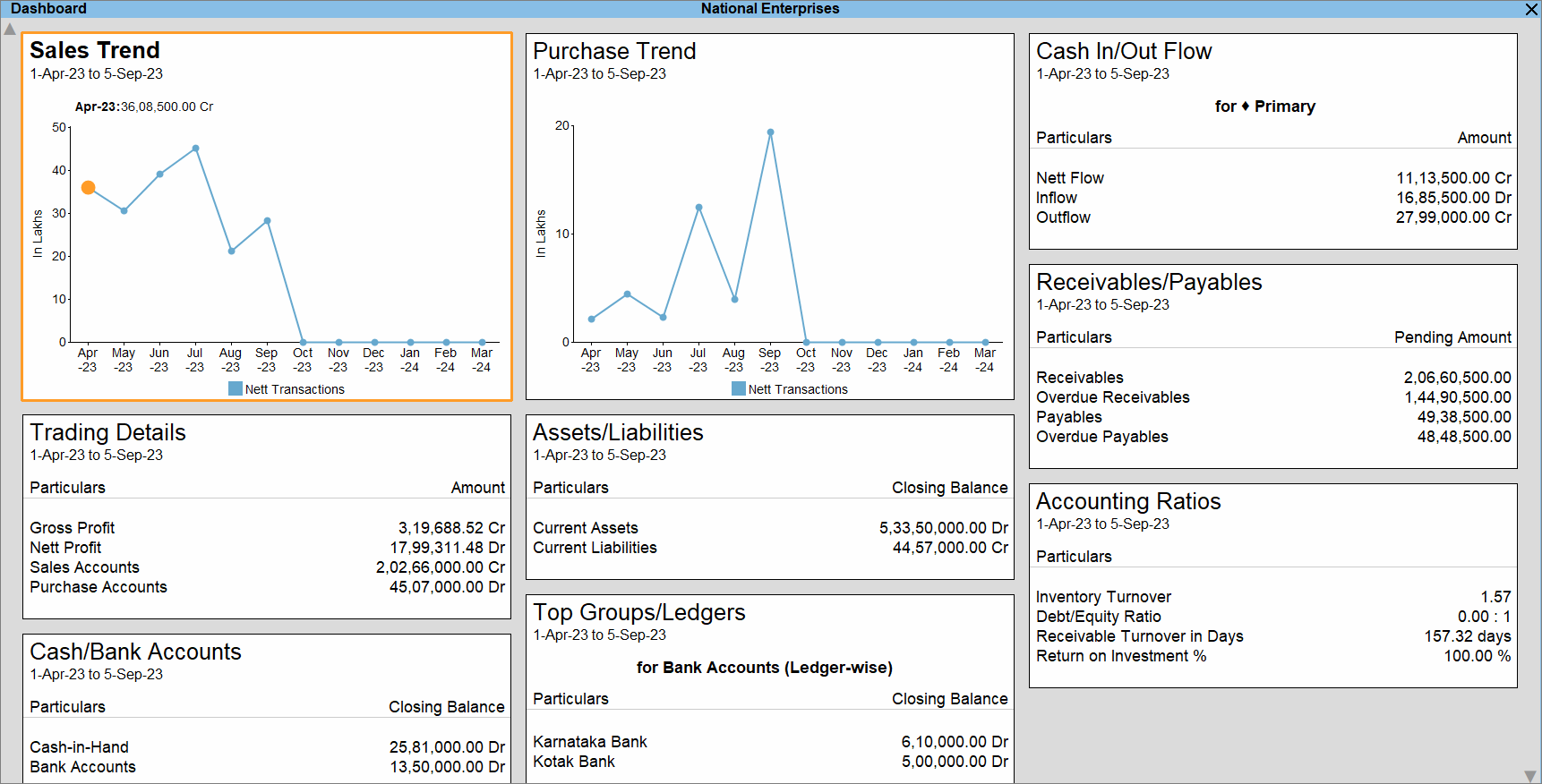
    Tally provides instant access to:

    • Outstanding receivables and payables
    • Stock summaries
    • Cost center performance
    • Cash and bank positions

    This level of real-time control helps owners make faster decisions without waiting for month-end reports.


    Reason 3: Cost Efficiency and Long-Term ROI

    Lower Total Cost of Ownership

    For many small and mid-sized businesses, cost is a deciding factor. Tally offers a one-time licensing model, which contrasts sharply with recurring subscription-based software.

    Typical cost advantages include:

    • No mandatory monthly fees
    • Minimal hardware requirements
    • Lower training costs due to widespread familiarity
    • Easy availability of skilled Tally operators

    Over a 5-year period, businesses often report 30–50% lower accounting software costs when using Tally compared to cloud subscription models.

    Talent Availability Reduces Dependency Risk

    India has an estimated 8–10 million accounting professionals with some level of Tally exposure. This means:

    • Faster hiring
    • Lower training investment
    • Reduced dependency on specialized consultants

    Cost Comparison Snapshot

    Cost FactorTally
    LicensingOne-time
    TrainingWidely available
    UpgradesControlled and optional

    For cost-conscious organizations, this predictability is invaluable.


    Additional Reasons That Reinforce Tally’s Relevance

    Customization Without Complexity

    • User-defined reports
    • Cost centers and categories
    • Voucher-level control
    • Simple configuration instead of heavy coding

    Data Ownership and Security

    • Data stored locally
    • Full control over backups
    • Reduced exposure to cloud-based breaches

    Scalability for Growing Businesses

    Many companies start with basic accounting and later expand into:

    • Inventory management
    • Payroll
    • MIS reporting
    • Branch accounting

    All within the same system.


    Frequently Asked Questions (FAQ)

    1. Why do companies still rely on Tally despite modern cloud accounting software?

    Companies rely on Tally because it is deeply aligned with Indian compliance, works offline, offers fast performance, and has a lower long-term cost compared to subscription-based tools.

    2. Is Tally suitable only for small businesses?

    No. Tally is widely used by medium and large organizations for multi-branch accounting, inventory management, and statutory reporting.

    3. How does Tally help with GST compliance?

    Tally automates GST calculations, maintains structured tax data, and prepares return-ready reports, reducing errors and compliance risks.

    4. Does Tally require internet connectivity?

    No. Tally works completely offline, which is a major advantage in areas with unreliable internet access.

    5. Is Tally still relevant for accountants in 2026 and beyond?

    Yes. Tally remains relevant due to its strong compliance framework, speed, and continued adoption by Indian businesses.

    6. What makes Tally cost-effective compared to other accounting software?

    Its one-time licensing model, low training costs, and minimal infrastructure requirements make it highly cost-efficient.

    7. Can Tally handle inventory along with accounting?

    Yes. Tally integrates inventory management with accounting, enabling real-time stock valuation and cost tracking.


    Conclusion

    The continued reliance on Tally is not due to resistance to change but due to practical business logic. Its unmatched compliance support, operational simplicity, and cost efficiency make it a trusted accounting backbone for Indian companies. While technology evolves, businesses prioritize reliability, control, and legal alignment—areas where Tally continues to deliver consistently.


    Disclaimer

    This article is intended for educational and informational purposes only. The figures and operational insights mentioned are based on industry observations and practical usage patterns. Software suitability may vary depending on business size, industry, and regulatory requirements. Readers should evaluate accounting solutions based on their specific operational needs.



  • Tally Prime Download: Features, Benefits & Why It’s a Must-Have for Modern Businesses

    In today’s fast-paced and regulation-heavy business environment, having a powerful, user-friendly accounting software isn’t a luxury—it’s a necessity. Tally Prime, the latest evolution from the house of Tally Solutions, delivers just that. If you’re looking for an easy and compliant way to manage your finances, inventory, GST, payroll, and more—Tally Prime is your answer.

    In this detailed guide, we’ll explore everything you need to know about Tally Prime download, key features, business benefits, and how it compares to earlier versions like Tally ERP 9. Plus, if you’re just starting out or looking to sharpen your skills, we’ll point you to a comprehensive training course that covers Tally ERP 9, Tally Prime, GST, and Microsoft Excel from beginner to advanced levels.


    ✅ What is Tally Prime?

    Tally Prime is the latest version of the Tally accounting software, developed to be smarter, faster, and more intuitive. It builds on the solid foundation of Tally ERP 9, offering a better user experience, increased flexibility, and compliance with India’s latest statutory requirements like GST and MCA guidelines.

    Whether you’re a small business, startup, or large enterprise, Tally Prime helps you manage your business operations efficiently—without needing extensive technical expertise.


    🔍 Key Features of Tally Prime

    1. Simplified Interface for Greater Usability

    Tally Prime introduces a cleaner, more modern UI. Navigation is seamless, even for first-time users, with a more intuitive menu structure.

    2. Edit Log for Compliance

    From Release 6.1 onwards, Tally Prime includes an Edit Log feature—especially crucial for MCA compliance. You can choose to:

    • Enable edit logs as needed
    • Or permanently activate it for internal audit and statutory purposes

    This adds a new layer of transparency and traceability, essential for businesses aiming for regulatory confidence.

    3. Powerful Reports at Your Fingertips

    Access 400+ business reports in real time—be it for finance, inventory, sales, purchases, or statutory filings. The drill-down capabilities allow decision-makers to analyze performance at a granular level.

    4. GST-Ready Software

    Tally Prime is fully compliant with India’s GST system. Features include:

    • GST invoices generation
    • Auto-calculation of GST returns
    • E-way bill management
    • Reconciliation of GSTR-2A

    5. Multi-Tasking Capability

    Unlike earlier versions, you can handle multiple tasks at once—switch between vouchers, reports, or masters without losing progress.

    6. Data Synchronization & Remote Access

    Tally Prime offers robust support for multi-location businesses. You can sync data between branches and even access reports securely while on the go.

    7. Inventory Management

    Track stock movements, reorder levels, batch numbers, expiry dates, and more with Tally’s rich inventory module.


    📥 How to Download Tally Prime

    Getting started with Tally Prime is simple.

    👉 Official Tally Prime Download Page:
    https://tallysolutions.com/download/

    Here you’ll find:

    • Latest Tally Prime Release versions (e.g., 6.1 and above)
    • TallyPrime Edit Log version for MCA compliance
    • Step-by-step installation guide
    • Licensing and activation details

    You can also try Tally Prime for free with a 7-day trial before purchasing a license.


    🏆 Benefits of Using Tally Prime in Business

    ✅ Improved Productivity

    Faster data entry, automated reports, and easier navigation significantly reduce the time needed for day-to-day operations.

    ✅ Regulatory Compliance

    Whether it’s GST, TDS, MCA audit trail, or payroll regulations, Tally Prime helps you stay compliant without errors.

    ✅ Cost-Effective Solution

    Tally Prime offers enterprise-grade features without the complexity or cost of large ERP systems.

    ✅ Scalability

    Whether you’re managing one branch or multiple, Tally Prime scales with your business.

    ✅ Data Security and Reliability

    With backup, restore, user control, and audit trails, your financial data stays secure and reliable.


    🎓 Want to Learn Tally the Right Way?

    If you’re serious about mastering Tally ERP 9, Tally Prime, GST, and Microsoft Excel, then consider enrolling in our Tally + Excel Masterclass.

    ✅ Course Highlights:

    • 🎥 18.5 hours of on-demand video
    • 📄 Includes 7 articles and 20 downloadable resources
    • 🧾 Covers Tally ERP 9, Tally Prime, GST, and Microsoft Excel (2016, 2019, 365)
    • 🏅 Certificate of Completion included

    Whether you’re a job-seeker, accountant, business owner, or aspiring freelancer, this course gives you practical skills with real-world applications.


    📝 Final Thoughts

    Tally Prime is more than just accounting software—it’s an all-in-one business management solution. With features tailored to modern compliance needs, simple navigation, and powerful reporting, it’s no surprise that over 2 million businesses trust Tally.

    If you’re planning a Tally Prime download, take the next step: explore the tool hands-on and consider upgrading your skillset with structured learning. Accounting efficiency, GST compliance, and Excel mastery can be your competitive edge in today’s job market or business landscape.


    👉 Ready to get started?
    🔗 Download Tally Prime now from the official site: https://tallysolutions.com/download/
    📚 Explore our full training course on Tally, GST, and Excel Click Here


    Latest Post


  • Top Tally Alternatives in India (2025): Pricing, Features, Pros & Market Share Comparison


    🇮🇳 Accounting Software Alternatives to Tally in India


    ✅ 1. TallyPrime (Tally Solutions)

    ➤ Overview:

    The dominant accounting software in India, especially in the SME and retail sector. Popular for GST compliance, offline functionality, and wide acceptance by accountants.

    ➤ Market Share:

    • Estimated to hold 70–90% of India’s accounting software market in the MSME sector.

    ➤ Pros:

    • Offline-first and reliable
    • Strong inventory and taxation features
    • Industry-standard format
    • Works well in low-connectivity environments

    ➤ Cons:

    • Desktop-based (limited cloud features)
    • Outdated UI compared to modern apps
    • Lacks real-time collaboration

    ➤ Pricing:

    • ₹18,000/year for single-user Silver license
    • ₹54,000/year for multi-user Gold license

    ✅ 2. Zoho Books

    ➤ Overview:

    A modern, cloud-based accounting platform developed by an Indian company. Designed for startups, freelancers, and small businesses.

    ➤ Market Share:

    • Single-digit percentage, but growing fast especially in urban and tech-savvy businesses.

    ➤ Pros:

    • Fully cloud-based and mobile-friendly
    • GST, e-invoice, e-waybill ready
    • Integrated with other Zoho tools (CRM, Inventory, Payroll)
    • Great UI and user experience

    ➤ Cons:

    • No offline access
    • Might not suit complex manufacturing needs

    ➤ Pricing:

    • Free for businesses under ₹25 lakh turnover
    • Paid plans from ₹899/month to ₹3,599/month

    ✅ 3. Marg ERP

    ➤ Overview:

    Focused on distributors, retailers, and pharma industries. Desktop-first but offers some cloud accessibility.

    ➤ Market Share:

    • Small, estimated under 5% nationally, but strong presence in pharma and FMCG sectors.

    ➤ Pros:

    • Industry-specific modules
    • Strong billing, inventory, and GST features
    • Customizable for business types

    ➤ Cons:

    • UI is dated
    • Requires local installation and support

    ➤ Pricing:

    • Starts from ₹7,200/year (desktop version)
    • Cloud starts from ₹12,000/year and varies by configuration

    ✅ 4. BUSY Accounting Software

    ➤ Overview:

    Desktop-based accounting tool popular among small manufacturers and traders.

    ➤ Market Share:

    • Low single-digit, mostly in Tier 2 & Tier 3 cities.

    ➤ Pros:

    • Strong reporting and inventory handling
    • Multi-branch and multi-location support
    • GST-compliant

    ➤ Cons:

    • Limited cloud access
    • Steep learning curve for new users

    ➤ Pricing:

    • ₹9,000 – ₹12,000 (one-time license)
    • Cloud version costs extra (~₹2,000/month)

    ✅ 5. Vyapar

    ➤ Overview:

    A mobile-first billing and accounting app aimed at small shops, freelancers, and micro-businesses.

    ➤ Market Share:

    • Fast-growing with wide adoption in small retail — estimated user base over 1 crore, though market share remains under 5%.

    ➤ Pros:

    • Simple, intuitive interface
    • Mobile and desktop support
    • Works offline
    • Affordable pricing

    ➤ Cons:

    • Lacks features for medium/large businesses
    • Not ideal for complex accounting needs

    ➤ Pricing:

    • Mobile version starts from ₹599/year
    • Desktop version ~₹2,399/year

    ✅ 6. myBillBook

    ➤ Overview:

    Designed for micro and small businesses for invoicing, billing, and basic accounting.

    ➤ Market Share:

    • Small but increasing rapidly in small business space, especially due to ease of use.

    ➤ Pros:

    • Easy invoice creation and sharing via WhatsApp
    • Barcode, inventory, and GST billing
    • Mobile-first solution

    ➤ Cons:

    • Not a full accounting suite
    • Limited financial reporting

    ➤ Pricing:

    • Basic: ₹399/year
    • Premium: ₹1,999/year

    ✅ 7. AlignBooks

    ➤ Overview:

    Indian-developed, cloud-first accounting and billing software with competitive pricing.

    ➤ Market Share:

    • Very small, but slowly expanding among startups and service professionals.

    ➤ Pros:

    • Web-based access from anywhere
    • Affordable
    • Payroll and POS options included
    • Multiple integrations

    ➤ Cons:

    • Still growing; fewer users
    • Limited offline support

    ➤ Pricing:

    • Free basic version
    • Paid plans: ₹250/month to ₹500/month

    ✅ 8. SAP Business One (India Localized)

    ➤ Overview:

    An enterprise-grade ERP with robust accounting, CRM, and inventory management features.

    ➤ Market Share:

    • Minimal in MSME; more in large organizations and corporates.

    ➤ Pros:

    • Highly scalable and secure
    • Extensive automation and reporting
    • Ideal for businesses with multiple verticals

    ➤ Cons:

    • Very expensive
    • Requires IT infrastructure and trained personnel

    ➤ Pricing:

    • Starts from ₹3–5 lakh/year (implementation + license)
    • Cloud options with monthly enterprise pricing also available

    🔢 Market Share Summary Table

    SoftwareEstimated Market ShareTarget Segment
    Tally70–90%SMEs, Traders, Accountants
    Zoho Books5–8% (growing)Startups, Freelancers, Online Biz
    Marg ERP~3–5%Pharma, FMCG, Retail
    BUSY~2–4%Manufacturers, Traders
    Vyapar<5% (high users)Kirana stores, Small shops
    myBillBook<3%Micro-business, Billing focused
    AlignBooks<2%Service providers, Startups
    SAP B1NicheEnterprises, Corporates

    🧾 Final Verdict

    • Tally is still the king but slowly being challenged by modern, cloud-based, or mobile-first tools.
    • Zoho Books and Vyapar are emerging stars for tech-savvy and mobile-first users.
    • Marg and BUSY serve niche needs well, especially in retail and manufacturing.
    • AlignBooks and myBillBook are worth watching for smaller setups needing value for money.


    TallyPrime Silver – Lifetime license for Single user/PC – Accounting, GST, Invoice, Inventory, MIS & more (No CD. E-mail delivery in 2 hours)


  • The Fall of QuickBooks in India: What Went Wrong and How Tally Benefited


    🧾 Why QuickBooks Shut Down in India

    1. Lack of Market Fit

    QuickBooks, though globally popular, couldn’t align with the unique business environment of India. Indian small and medium businesses (SMEs) have different needs—many still prefer offline tools, handwritten bills, and one-time licenses over monthly subscriptions. QuickBooks offered a cloud-based, subscription-only model that didn’t match the comfort zone of Indian users.


    2. Low User Base and Profitability

    QuickBooks never gained significant traction in India. Despite years of presence, its user base remained quite limited. The cost of maintaining operations, support, and compliance updates far outweighed the revenue generated from this small segment. It simply wasn’t profitable to continue investing in a market where growth was stagnant.


    3. Challenges with Indian Tax Compliance

    India’s tax environment—especially after GST—became more complex. Businesses had to deal with TDS, GST returns, e-invoicing, and regular changes in tax formats. QuickBooks, being a product originally built for Western markets, often lagged in adapting to Indian regulations on time. Indian businesses couldn’t afford this delay, and many migrated to tools that were always up-to-date with local compliance.


    4. Limited Local Support

    Indian users often expect quick, regional-language support—especially when it comes to financial software. QuickBooks’ support system was largely centralized, with limited availability for regional needs. Local businesses found it difficult to get hands-on assistance, which affected trust.


    5. Competition from Indian Players

    Tally, Zoho, and other Indian accounting solutions were already well-established and deeply embedded in the local business ecosystem. These tools offered offline functionality, flexible pricing, localized tax settings, and wider CA adoption. In contrast, QuickBooks felt like an “imported” solution with limited cultural and functional alignment.


    6. Resistance from Chartered Accountants

    In India, Chartered Accountants (CAs) play a huge role in business decision-making. Most CAs are trained in Tally and recommend it by default. Even when companies tried to switch to QuickBooks, they found friction with their accountants who insisted on using Tally. This indirect influence made it even harder for QuickBooks to gain market depth.


    7. Technical Hurdles

    There were other background issues too—compliance with Indian payment gateways, two-factor authentication norms, and bank integrations, which created friction for QuickBooks’ global infrastructure. Local tools already had these sorted, putting QuickBooks at a disadvantage.


    📈 How Tally Benefited from QuickBooks’ Exit

    1. Immediate Market Advantage

    The moment QuickBooks announced its closure in India, Tally became the first choice for migration. Businesses wanted a stable and trusted alternative. Since Tally already had the trust of Indian professionals, it naturally absorbed much of QuickBooks’ displaced user base.


    2. Migration Assistance

    Tally offered detailed guides, tools, and partner-led services to help businesses shift from QuickBooks with minimal disruption. This proactive move made businesses feel supported during the transition and further solidified Tally’s reputation.


    3. Built-In Compliance and Localization

    Tally had long been known for its built-in support for GST, TDS, TCS, audit-ready reports, e-invoicing, and MCA formats. These features gave Tally an edge, especially as Indian compliance needs kept changing frequently. Businesses no longer needed third-party plugins or custom setups—they got everything in one platform.


    4. One-Time License Model

    Unlike subscription-based tools, Tally allows users to buy the software outright—a big win for Indian SMEs. Many businesses prefer upfront costs over ongoing monthly charges, making Tally more financially convenient.


    5. Strong CA and Dealer Network

    Tally’s widespread presence among accountants, trainers, resellers, and institutes meant that anyone needing help could easily find it—either online or through a local expert. This deep network gave it unmatched grassroots support across urban and rural India.


    6. Trust Built Over Two Decades

    Tally is not just software—it’s a name synonymous with accounting in India. For many businesses, moving back to Tally wasn’t a new experience—it was like returning home. That brand trust made it the natural winner after QuickBooks’ departure.


    🧩 Final Thoughts

    QuickBooks entered India with promise, but misaligned pricing, regulatory delays, limited support, and cultural mismatches led to its exit. Tally, on the other hand, continued to serve Indian businesses with a local-first mindset, practical features, and deep ecosystem support. The exit of QuickBooks gave Tally the chance to reinforce its dominance—and it made the most of it.


    Top rated products