Blog

  • Atomberg Althea Cold Press Juicer Review – Best Cold Press Juicer in India 2025

    If you’re serious about healthy living and want to include fresh, nutrient-rich juices in your daily diet, then investing in a good cold press juicer is a must. Among the many options available, the Atomberg Althea Cold Press Juicer has quickly become one of the best cold press juicers in India under ₹15,000 in 2025. With its modern design, powerful motor, and user-friendly features, it’s a perfect fit for Indian households looking for a reliable juicer for fruits, vegetables, and even nut milk.

    👉 Buy Here: Atomberg Althea Cold Press Juicer


    Why Choose a Cold Press Juicer Over Regular Juicers?

    Traditional centrifugal juicers work fast, but they generate heat and oxidation, which destroys essential nutrients and enzymes. On the other hand, cold press juicers (also called slow juicers or masticating juicers) extract juice slowly at a low RPM. This ensures:

    • Higher juice yield
    • Richer taste and texture
    • Minimal oxidation (juice stays fresh for longer)
    • Maximum retention of vitamins and nutrients

    The Atomberg Althea Cold Press Juicer is designed exactly with this in mind — giving you healthy, nutrient-packed juice every time.
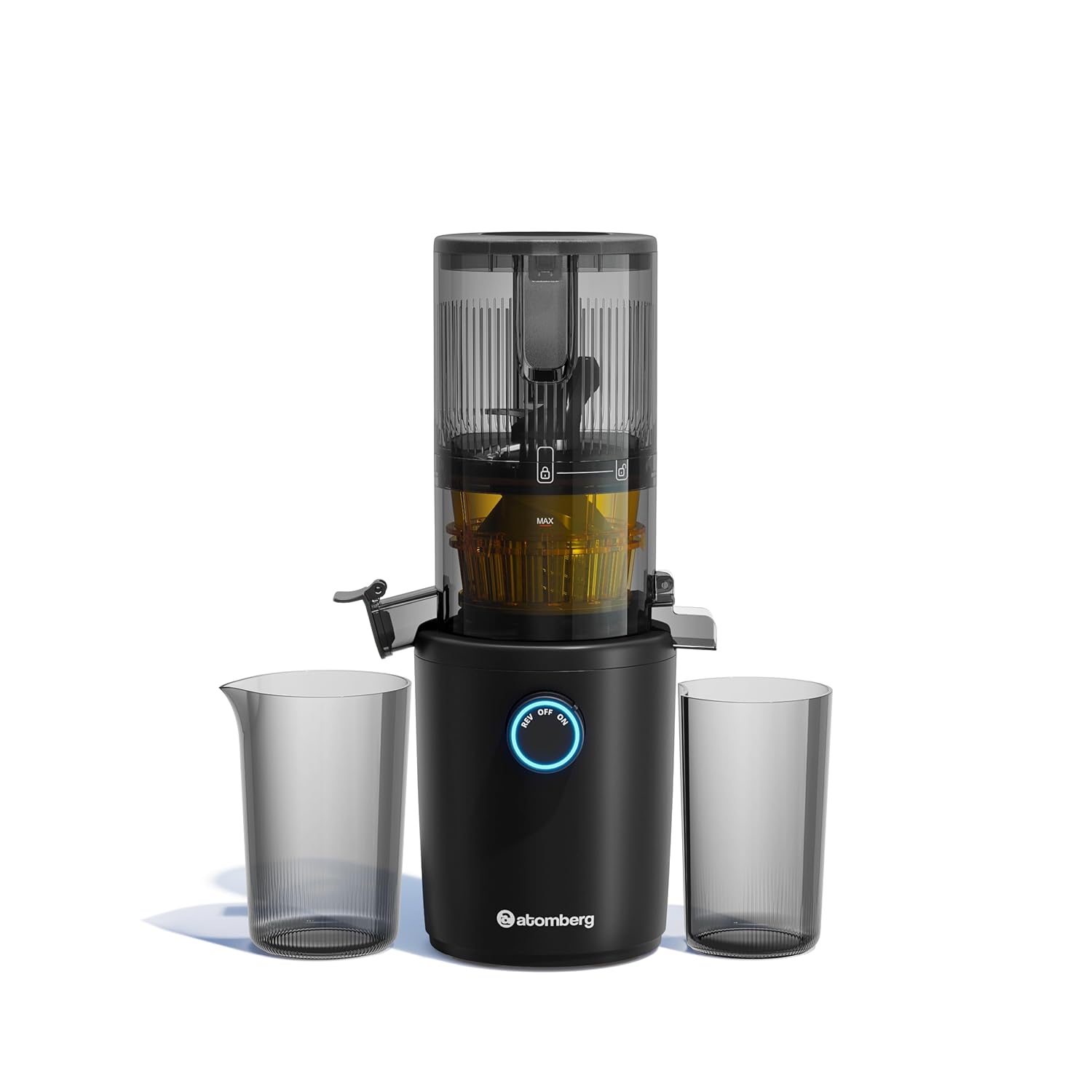

    Key Features of Atomberg Althea Cold Press Juicer

    Powerful 200W DC Motor – Runs at just 40 RPM, ensuring slow extraction and minimal nutrient loss.
    Compact & Stylish Design – Fits beautifully into modern kitchens without taking much space.
    1.2L Large Hopper – Juice whole fruits like apples and oranges without cutting.
    Auto-Reverse Function – Prevents clogging and makes juicing smooth and effortless.
    BPA-Free Tritan Material – Safe and durable, ensuring your juice stays pure.
    LED Indicator Ring – Alerts you for overheating, clogging, and assembly errors.
    One-Touch Operation – Simple and easy to use, even for beginners.
    Multi-Purpose Use – Works not only for fruit and vegetable juices but also for nut milk (almond, cashew, etc.).
    2+1 Years Warranty – Long-term reliability backed by Atomberg’s trusted service.


    Performance Review – How Does It Work?

    During testing, the Atomberg Althea produced a high juice yield with very dry pulp, which means maximum juice extraction. The slow squeezing process ensures that juices taste richer and last longer without quick separation.

    • Fruits: Juices apples, oranges, and grapes smoothly without clogging.
    • Vegetables: Handles carrots, beetroot, celery, and leafy greens effectively.
    • Nut Milk: Extracts creamy almond and cashew milk with ease.

    The motor is silent yet powerful, making it suitable for daily use without disturbing your household. Cleaning is also simple thanks to detachable parts and dishwasher-safe design.


    Pros and Cons

    👍 Pros:

    • High juice yield with dry pulp
    • Retains natural taste, nutrients, and enzymes
    • Compact, stylish design for Indian kitchens
    • Large hopper (less chopping required)
    • Easy to use with auto-reverse & one-touch operation
    • Multi-purpose (fruit juice, vegetable juice, nut milk)
    • Safe BPA-free Tritan material
    • Excellent warranty coverage

    👎 Cons:

    • Slightly heavier than basic juicers (due to solid build)
    • Takes more time than centrifugal juicers (because it’s slow press)
    • Price may feel higher compared to regular juicers (but worth it for the health benefits)

    Why Should You Buy the Atomberg Althea Cold Press Juicer?

    If you want to upgrade from a regular juicer and take your health seriously, this juicer is an excellent choice. It:

    • Helps you get maximum nutrients in every glass of juice.
    • Reduces wastage with its high-yield extraction.
    • Fits perfectly into modern Indian kitchens with its compact design.
    • Offers long-term reliability with a 2+1 year warranty.

    For under ₹15,000, it’s one of the best cold press juicers in India 2025, combining premium features with excellent performance.


    Final Verdict

    The Atomberg Althea Cold Press Juicer is more than just a juicer — it’s a lifestyle investment. Perfect for health-conscious families, fitness enthusiasts, and anyone who wants fresh, preservative-free juices at home. With its powerful motor, smart features, and nutrient retention technology, this is definitely one of the top-rated cold press juicers in India right now.

    👉 Check Price & Buy Now: Atomberg Althea Cold Press Juicer on Amazon


    In short: If you’re searching for the best cold press juicer in India 2025, the Atomberg Althea is a clear winner.


  • 7 Best Travel Tech Gadgets Under ₹500 in India (2025) | Cool Budget Travel Accessories

    ✈️ Traveling in 2025? Whether you’re heading for a solo trip, family holiday, or business travel, having the right travel gadgets can make your journey smoother, safer, and much more fun. The good news is—you don’t need to spend a fortune!

    In this blog, I’ve listed 7 amazing travel gadgets under ₹500 (some slightly higher but worth every rupee), all available on Amazon India. These budget-friendly tech accessories are compact, smart, and super useful for both domestic and international travelers.


    1. 🔊 Portronics Nadya 6W MagSafe Magnetic Bluetooth Speaker

    🎵 A compact wireless speaker that sticks magnetically to your devices. Perfect for travel evenings, hotel stays, or even outdoor camping.

    • Why Buy? If you love music on the go, this pocket-size speaker gives you great sound without carrying bulky speakers.
    • How It Helps? Keeps you entertained during long journeys, hotel stays, or campfires. A must for music lovers.

    👉 Buy on Amazon


    2. 🔌 Sevenaire 3-in-2 Cable (100W Fast Charging)

    Forget carrying multiple cables! This 3-in-2 charging cable supports Type-C, Lightning, and Micro USB.

    • Why Buy? One cable works for almost every device – Android, iPhone, tablets, power banks.
    • How It Helps? Saves space in your bag and charges devices quickly with 100W power support. Perfect for travelers who hate tangled wires.

    👉 Buy on Amazon


    3. 🔦 Portable Magnetic LED Keychain COB Solar Light

    A mini flashlight + emergency light that fits on your keychain. Rechargeable via solar or USB.

    • Why Buy? Compact yet powerful light that fits in your pocket.
    • How It Helps? Useful in emergencies, camping trips, night walks, or sudden power cuts while traveling. Solar charging makes it extra reliable.

    👉 Buy on Amazon


    4. ⚡ Stuffcool ChargePlug 20W GaN Fast Charger – Universal Multi Plug

    This GaN fast charger works with multiple plugs worldwide.

    • Why Buy? No need to carry multiple bulky chargers. One gadget handles it all.
    • How It Helps? Charges phones and tablets super-fast, especially useful for international trips where plug types vary.

    👉 Buy on Amazon


    5. 📖 Book Reading Lamp for Students & Travelers

    A lightweight, clip-on reading light that runs on low power.

    • Why Buy? Great for readers, students, and travelers who need extra light without disturbing others.
    • How It Helps? Perfect for late-night reading in hotels, flights, or trains. Compact and easy to carry.

    👉 Buy on Amazon


    6. 🍼 StarAndDaisy Electric Bottle Warmer

    For parents traveling with babies, this gadget is a lifesaver.

    • Why Buy? Keeps baby milk warm and ready anytime, anywhere.
    • How It Helps? Saves time and effort while traveling, especially during long journeys. Parents don’t need to struggle with finding hot water outside.

    👉 Buy on Amazon


    7. 🔋 Zebronics EnergiPOD 27R3 – 27,000 mAh Power Bank

    Power banks are must-have travel gadgets.

    • Why Buy? One of the most powerful power banks with huge 27,000 mAh capacity.
    • How It Helps? Can charge your phone 5–6 times, perfect for long flights, road trips, or areas with no charging points.

    👉 Buy on Amazon


    ✨ Why These Travel Gadgets Are a Must in 2025

    • ✅ Compact & Portable – Easy to carry in your backpack or luggage
    • ✅ Budget-Friendly – Most gadgets are under ₹500
    • ✅ Multi-Purpose – From charging to safety to entertainment
    • ✅ Travel-Proof – Designed for international and domestic use

    Final Thoughts

    If you’re planning your next trip, don’t miss out on these top 7 travel gadgets. They’re budget-friendly, super useful, and available right now on Amazon India. Perfect as travel gifts too!

    💡 Pro Tip: Always carry a good power bank + universal charger when traveling internationally. These two alone can save you in tough situations.


  • Acer Aspire Go 14 Review – Intel Core Ultra 5 ⚡ Best Budget Laptop Under ₹60,000 for Students & Professionals?

    If you are searching for the best laptop under ₹60,000 in India, the Acer Aspire Go 14 (AG14-71M) deserves a closer look. Launched with the latest Intel Core Ultra 5 125H AI-powered processor (14th Gen), this machine combines performance, portability, and affordability, making it one of the most attractive laptops for students, office-goers, and casual users in 2025.


    ✅ Key Specifications – Acer Aspire Go 14

    • Processor: Intel Core Ultra 5 125H (14th Gen, AI-powered)
    • Graphics: Intel Integrated Graphics
    • Display: 14.0-inch WUXGA IPS (1920 x 1200), 16:10 aspect ratio, 170° wide viewing angle, Acer ComfyView
    • RAM: 16 GB DDR5 (Dual Channel, upgradable to 32 GB)
    • Storage: 512 GB PCIe NVMe SSD (Expandable to 1TB)
    • Weight: 1.5 kg (Lightweight & portable)
    • Keyboard: Backlit, Privacy Shutter for webcam
    • OS: Windows 11 Home + MS Office pre-installed
    • Ports: 2 x USB 3.2, 2 x USB-C with DC-in
    • Warranty: 1 Year

    🎯 Who Should Buy Acer Aspire Go 14?

    • Students: Perfect for online classes, research, MS Office, and light editing.
    • Professionals: Great for presentations, coding, and productivity tasks.
    • Casual Users: Ideal for streaming, browsing, and light gaming.
    • Travelers: At just 1.5 kg, this laptop is highly portable.

    👍 Pros of Acer Aspire Go 14

    1. Latest Intel Core Ultra 5 AI chip (14th Gen) – future-ready performance.
    2. 16GB DDR5 RAM – smooth multitasking and faster app handling.
    3. Upgradable RAM & Storage – future-proof investment.
    4. Crisp WUXGA IPS Display – better than standard FHD with 16:10 aspect ratio.
    5. Lightweight (1.5 kg) and stylish Steel Gray finish.
    6. Backlit keyboard + privacy shutter – great for professionals.

    👎 Cons of Acer Aspire Go 14

    • Integrated graphics only – not for heavy gaming.
    • Battery backup could be better (expect 5–6 hours).
    • 45% NTSC color gamut – not the best for video editors/designers.

    💰 Price & Availability in India

    • Acer Aspire Go 14 (Intel Core Ultra 5, 16GB RAM, 512GB SSD)
      👉 Price: ₹59,999 (after 18% discount, MRP ₹72,999)
      👉 EMI options available from ₹2,895/month
      👉 Also available in 16GB/1TB variant (~₹63,999)

    ⚡ Verdict – Should You Buy It?

    The Acer Aspire Go 14 with Intel Core Ultra 5 is one of the best budget laptops under ₹60,000 in India (2025). It delivers excellent performance for students, professionals, and general users, thanks to AI-powered processing, 16GB RAM, and a crisp WUXGA display.

    However, if you are a gamer or content creator, you may need a laptop with dedicated graphics and higher color accuracy.

    For everyone else – this is a solid, reliable, and stylish choice.


    📌 Final Rating

    • Performance: ⭐⭐⭐⭐☆ (4/5)
    • Design & Portability: ⭐⭐⭐⭐⭐ (5/5)
    • Display Quality: ⭐⭐⭐⭐ (4/5)
    • Battery: ⭐⭐⭐ (3/5)
    • Value for Money: ⭐⭐⭐⭐ (4/5)

    👉 Overall Score: 4.1/5 – Best Budget Laptop under ₹60,000 for Students & Professionals.


    Disclaimer: Prices and offers may vary depending on availability and seller. Always verify details before purchase.


  • 6 Super Useful Tech Gadgets I Use Daily 🚀 | Best Gadgets for Productivity, Gaming & Lifestyle

    In today’s fast-paced world, technology has become an essential part of our daily routine. From working at the office to relaxing at home, the right gadgets can boost productivity, enhance entertainment, and make life easier.

    In this blog, I’m sharing 6 super useful tech gadgets I personally use every day – covering productivity gadgets, gaming gadgets, home gadgets, and travel gadgets. Whether you’re a student, professional, or gamer, these are the best gadgets you can buy in 2025.


    1️⃣ Gravity Sensor Cube Timer ⏱️ – Best Productivity Gadget

    👉 Buy Now on Amazon

    Time management is the secret to success. The Gravity Sensor Cube Timer is a must-have gadget if you want to stay focused.

    🔹 Features:

    • Flip the cube to start timer instantly
    • Multiple preset time intervals (1, 3, 5, 10 minutes etc.)
    • Compact, portable, and battery-operated

    🔹 Why I Use It: I use this cube for Pomodoro study sessions, workout sets, and cooking. It’s super handy for anyone struggling with procrastination.


    2️⃣ Redragon K686 PRO Mechanical Keyboard 🎹 – Gaming + Work Gadget

    👉 Buy Now on Amazon

    A mechanical keyboard is a must for gamers and professionals. The Redragon K686 PRO offers high performance without breaking the bank.

    🔹 Features:

    • Hot-swappable switches
    • RGB lighting with multiple effects
    • Comfortable typing for long hours

    🔹 Why I Use It: Whether it’s coding, writing blogs, or late-night gaming, this keyboard makes typing smooth and enjoyable.


    3️⃣ Redragon M916AK PRO Gaming Mouse 🎮 – Precision Gaming Gear

    👉 Buy Now on Amazon

    No gaming setup is complete without a great mouse. The Redragon M916AK PRO is my daily driver.

    🔹 Features:

    • Adjustable DPI up to 16,000
    • Customizable RGB lighting
    • Programmable buttons for gaming shortcuts

    🔹 Why I Use It: Perfect for FPS gaming, graphic designing, and even Excel work where precision is required.


    4️⃣ Spectra Lights HDMI Sync Box 2.0 TV LED Backlight 💡 – Home Entertainment Gadget

    👉 Buy Now on Amazon

    Want a mini home-theater experience? The Spectra Lights HDMI Sync Box takes movie nights to the next level.

    🔹 Features:

    • LED backlight syncs with your TV visuals
    • Works with HDMI devices (Fire TV Stick, PS5, etc.)
    • Creates immersive ambient lighting

    🔹 Why I Use It: Watching Netflix, football matches, and gaming on PS5 feels truly immersive.


    5️⃣ Mosquito Killer UV Lamp 🦟 – Best Home Gadget for Summer

    👉 Buy Now on Amazon

    Mosquitoes can be a nightmare. The Mosquito Killer UV Lamp helps me sleep peacefully.

    🔹 Features:

    • UV light attracts mosquitoes
    • Silent fan trap mechanism
    • No harmful chemicals

    🔹 Why I Use It: Safe for kids and pets, and works silently throughout the night. Best during monsoon and summer seasons.


    6️⃣ Stuffcool Maverick Mini 20,000mAh Powerbank 🔋 – Best Travel Gadget

    👉 Buy Now on Amazon

    Running out of battery is frustrating. That’s why I carry the Stuffcool Maverick Mini Powerbank everywhere.

    🔹 Features:

    • 20,000mAh massive battery
    • Fast charging support
    • Multiple USB ports

    🔹 Why I Use It: Keeps my phone, iPad, and earbuds charged during travel and long workdays.


    Final Thoughts 💡

    These 6 gadgets are not just cool – they’re practical and super useful for everyday life. If you’re looking for the best tech gadgets in India for 2025, these products are worth checking out.

    ✅ Productivity Lovers → Cube Timer
    ✅ Gamers → Redragon Keyboard + Mouse
    ✅ Entertainment Seekers → Spectra Lights HDMI Sync Box
    ✅ Families → Mosquito Killer UV Lamp
    ✅ Travelers → Stuffcool Powerbank

    👉 Grab them from Amazon and upgrade your daily lifestyle today.


    ⚠️ Disclaimer: This blog contains affiliate links. I may earn a small commission if you purchase through my links, at no extra cost to you.


  • Tax Audit for Futures & Options (F&O) Traders – Turnover Rules, Limits & Filing Guide

    If your F&O (derivatives) “turnover” (as computed for tax/audit purpose) exceeds ₹10 crore, a tax-audit under Section 44AB will be required (or will very likely apply depending on your facts). Below I explain why, how turnover for F&O is computed, what the audit requires, deadlines & forms, penalties for non-compliance, and a practical checklist you can hand to your CA.

    1) Why ₹10 crore shows up for F&O traders (short legal context)

    • Section 44AB of the Income-Tax Act requires certain taxpayers to get their accounts audited. The general turnover threshold is ₹1 crore, but law/practice allows a higher ₹10 crore threshold in cases where 95% or more of receipts and payments are digital (i.e., very low cash transactions). Separately, many advisory notes and practice guidance treat turnover in F&O differently because it’s computed on the absolute sum of profits/losses and option premiums — so active traders can cross audit thresholds quickly.

    Bottom line: if your computed F&O turnover exceeds ₹10 crore (or otherwise exceeds the applicable threshold), a tax audit is triggered.


    2) How “turnover” for F&O is computed (the crucial bit)

    Turnover for tax/audit purposes in derivatives is not your net profit. Authorities and ICAI guidance commonly use one of these approaches (examples below are simplified):

    Basic rules used by practitioners

    • Futures: turnover = sum of absolute value of profit & loss on each squared-off futures trade (i.e., add up all profits and all losses as positive numbers).
    • Options: turnover = sum of absolute value of profit & loss on squared-off/exercised option trades + premiums received on option writing (to avoid understatement).
    • For mixed trading, overall F&O turnover = sum of the above components (futures absolute + options absolute + premiums).

    Example (toy numbers)

    • Futures: Profit ₹20,00,000 and Loss ₹8,00,000 → contribution = 20,00,000 + 8,00,000 = ₹28,00,000
    • Options: Realised net profit ₹3,00,000, premiums received on sold options ₹2,00,000 → contribution = 3,00,000 + 2,00,000 = ₹5,00,000
    • Total F&O turnover = ₹28,00,000 + ₹5,00,000 = ₹33,00,000 (used only to check audit thresholds; taxable profit is still computed on net basis after expenses).

    Important operational note: There are two commonly used methods to compute turnover — trade-wise and scrip-wise (scrip = contract-wise aggregation). Choose one method consistently and keep the working papers; the ICAI/tribunal rulings and Revenue look for consistency and transparent workings.


    3) When the audit becomes mandatory for traders

    • If the computed F&O turnover crosses the statutory threshold (e.g., ₹10 crore under the digital-transactions condition, or ₹1 crore in other cases), you must get a tax audit under Section 44AB. The audit requirement is triggered by turnover irrespective of whether you made a net profit or loss.
    • Even if turnover is below threshold, other triggers (presumptive scheme, low declared profit % vs turnover, or statutory exceptions) can make an audit necessary — always check with your CA.

    4) What the tax audit actually is (what the CA will do)

    A tax audit under Sec.44AB is an independent Chartered Accountant’s examination of your books/records and a formal reporting exercise. Expect the CA to:

    • Verify how you computed F&O turnover (trade-wise / scrip-wise workings).
    • Reconcile contract notes with bank statements and ledger entries.
    • Examine expenses claimed (brokerage, STT where applicable, exchange/clearing charges, data feeds, internet, rent, depreciation on hardware).
    • Verify balances shown on the balance sheet (bank balances, margin balances, unsettled receivables/payables).
    • Check tax payments (advance tax, TDS) against Form 26AS / AIS.
    • Prepare and sign the tax audit report: Form 3CA/3CB (as applicable) + Form 3CD (detailed statement of particulars). The CA may also generate working papers and an auditor’s report.

    5) Deadlines & filing sequence (practical timeline)

    • The tax-audit report (3CA/3CB + Form 3CD) must be obtained and furnished on or before the statutory due date (for FY 2024-25 / AY 2025-26 that has been listed as 30 September 2025 for audit reports in the normal calendar of the Income-Tax Department — check the official calendar each year for updates). After audit report is filed, audited taxpayers normally file their ITR by the audited filing due date (audited ITR deadlines are typically later than non-audit cases — consult portal timelines).
    • Important: the government sometimes issues extensions or circulars — always confirm the current year’s deadline on the Income-Tax portal before relying on a date.

    6) Penalties and practical consequences if you fail to get the audit

    • If you are required to get your accounts audited and you fail to do so (without “reasonable cause”), the Assessing Officer may impose a penalty under Section 271B. The usual formula is 0.5% of total turnover / gross receipts (of the relevant year) or ₹1,50,000, whichever is less. This is discretionary and can be avoided if you can show reasonable cause — but don’t rely on that defense casually.
    • Other practical fallout: delayed refunds, increased scrutiny, possible disallowance of expenses if books/backs are missing, interest for late tax payments (sections 234A/234B/234C) if advance tax was not paid adequately.

    7) Practical checklist: what to prepare now (before audit)

    Give this to your CA — it speeds up the audit and reduces queries:

    Primary documents

    • All contract notes for the financial year (every trade).
    • Consolidated brokerage P&L / tradebook and trade logs.
    • Bank statements (trading bank, margins, capital account).
    • Invoices/receipts for: brokerage, data feeds, internet, advisory/subscription fees, hardware purchases.
    • Proof of option premiums received (ledgers showing premiums).
    • Form 26AS / AIS and TDS certificates / tax challans.
    • Details of open positions and MTM (if you mark-to-market).
    • Fixed asset register (computer/laptop), and depreciation schedule if capitalised.

    Accounting/working papers

    • Clear working showing turnover computation (trade-wise or scrip-wise) with the method stated.
    • A reconciled tax P&L (reconciled to bank and broker statements).
    • List of outstanding payables/receivables as of year-end.

    Administrative

    • Engage a Chartered Accountant early (don’t wait for September). Ask the CA whether to use trade-wise or scrip-wise method and have them review your working papers before they start the formal audit.

    8) Special points & common disputes (things that trigger notices)

    • Turnover disputes: AO may compute turnover differently (e.g., treating gross bill values vs. absolute P&L). Keep clear, consistent workings and reference ICAI guidance or established tribunal rulings.
    • Classification (speculative vs non-speculative): Intraday equity (speculative) has different set-off/carry-forward rules compared to F&O (non-speculative). Misclassification often causes notices. Maintain separate ledgers.
    • MTM / unrealised gains: If you adopt mark-to-market accounting you must be consistent and follow accounting standards; otherwise, disclose clearly in your returns and working papers.

    9) Quick real-world example (why turnover can blow past ₹10 crore)

    An active intraday/F&O trader with thousands of small trades: if average absolute profit/loss per trade is ₹2,000 and you do 5,000 trades in a year, absolute sum = ₹1 crore already. For high-frequency traders or prop-traders, the absolute summation method makes it easy to cross ₹10 crore — hence the audit trap for active accounts. (Use your broker trade count × average absolute trade P/L to estimate.)


    10) Recommended next steps (action plan)

    1. Run your turnover calculator today (use absolute method). If > ₹8–9 crore, call a CA now — don’t wait.
    2. Start collating contract notes and bank statements into one folder (dates, amounts, broker).
    3. Pay attention to advance tax — traders usually must pay quarterly instalments; missing them attracts interest.
    4. Engage a CA for the audit engagement letter and to plan the timetable (Field work, draft 3CD, final report).
    5. Keep copies of everything for at least 8 years (department can ask).

    References (key sources used)

    • LegalWiz guide to Section 44AB / audit thresholds.
    • ICAI / practitioner commentary & TaxGuru on how F&O turnover is computed (absolute method).
    • Income-Tax portal deadlines & audit forms (3CA/3CB/3CD) and the official calendar.
    • Statutory text / rulings on Section 271B (penalty for failure to audit).
    • Practical walkthrough of tax audit forms (Form 3CA/3CB & Form 3CD) and filing process.

    Final note / legal disclaimer

    This is a practical explainer based on publicly available guidance and practitioner commentary. Tax law and notifications change often; the exact threshold, due dates, or procedures may be updated by the Income-Tax Department. This is not professional tax advice — please share your actual books and numbers with a qualified Chartered Accountant who can apply the law to your facts and prepare the audit report/forms correctly.


  • ITR 3 Filing Online for AY 2025-26: F&O Trading Income, Loss Reporting, Audit & Balance Sheet Explained

    Filing your Income Tax Return (ITR 3) for FY 2025-26 (AY 2026-27) can be confusing, especially if you have F&O (Futures & Options) trading income, losses, or audit requirements. Many taxpayers struggle to understand how to properly file ITR 3, report their trading P&L, balance sheet, and claim refunds. This detailed guide will explain everything step by step in simple language.


    What is ITR 3?

    ITR 3 is the income tax return form applicable to individuals and Hindu Undivided Families (HUFs) who have income from business or profession. If you are into F&O trading, intraday trading, or running a business, you are required to file ITR 3.

    Unlike ITR 1 or ITR 2, which are simpler, ITR 3 requires you to report:

    • Trading income (F&O, intraday, speculative)
    • Profit & Loss (P&L) statement
    • Balance Sheet details
    • Business/Professional income
    • Other income (salary, house property, capital gains, etc.)

    Understanding Tax P&L Report for ITR 3

    Before starting ITR 3 filing, it’s important to download your Tax P&L report from your broker’s platform (like Zerodha, Upstox, ICICI Direct, etc.). This report provides a ready-made summary of:

    • F&O turnover
    • Trading profit/loss
    • Speculative income/loss
    • Expenses like brokerage, transaction charges, GST, and SEBI fees

    This report is crucial because income from F&O trading is considered business income and must be reported under the head “Business & Profession.”


    Basic Checks Before ITR 3 Filing

    Before filing ITR 3, make sure you:

    1. Have your Form 26AS & AIS (Annual Information Statement) ready to reconcile TDS, advance tax, and other details.
    2. Verify your Tax P&L report with broker statements.
    3. Collect bank statements related to your trading account.
    4. Check whether tax audit is applicable.

    Tax Audit Rule for F&O Traders (FY 2025-26):

    • If F&O turnover exceeds ₹10 crore, audit is mandatory.
    • If turnover is between ₹2 crore – ₹10 crore and you haven’t opted for presumptive taxation, audit may apply.
    • Even if turnover is less than ₹2 crore but you have losses, you may still need to maintain books of accounts and file accordingly.

    Trading, P&L and Balance Sheet Reporting

    In ITR 3, you must provide:

    • Trading P&L: Report your net profit or loss from F&O trading, intraday trades, and speculative transactions.
    • Balance Sheet: Even if you are an individual trader, you must declare basic assets (cash, bank balance, investments) and liabilities.
    • Business Expenses: You can claim expenses like internet bills, brokerage, advisory fees, depreciation on laptop/PC, office rent, etc. to reduce taxable income.

    This ensures correct reporting of your financials and avoids scrutiny from the Income Tax Department.


    Step-by-Step ITR 3 Filing Process (FY 2025-26)

    1. Login to Income Tax Portal – Visit income tax e-filing portal and log in with PAN & password.
    2. Select ITR 3 – Choose “File Income Tax Return” → AY 2026-27 → ITR 3.
    3. Fill Personal Details – Verify PAN, Aadhaar, bank details, and contact information.
    4. Add Income Sources:
      • Salary/Pension (if applicable)
      • House Property Income
      • Capital Gains
      • Business & Profession (Trading P&L goes here)
    5. Upload Trading P&L Data – Enter turnover, profit/loss, and expenses based on your broker’s Tax P&L report.
    6. Balance Sheet Entry – Add details of cash, bank balances, investments, and liabilities.
    7. Claim Deductions – Under Chapter VI-A, claim deductions for investments (80C, 80D, NPS, ELSS, etc.).
    8. Tax Calculation – The portal auto-calculates tax liability. Verify under Old vs New Tax Regime which is more beneficial.
    9. Tax Audit (if applicable) – If audit is required, upload the audit report (Form 3CA/3CB + Form 3CD) prepared by a Chartered Accountant.
    10. Preview & Submit – Review all details carefully and submit.
    11. E-Verification – Complete e-verification via Aadhaar OTP, Net Banking, or DSC.

    Refund and Final Submission

    If you have paid excess advance tax or TDS, the portal will automatically show the refund amount. Enter correct bank details to receive the refund directly in your account.

    Once submitted and verified, download the ITR-V acknowledgment for your records.


    Key Takeaways for F&O Traders Filing ITR 3

    • Always use your broker’s Tax P&L report for accurate turnover & profit reporting.
    • Claim genuine business expenses to reduce tax liability.
    • If turnover or losses trigger audit requirements, consult a Chartered Accountant.
    • Don’t ignore Form 26AS & AIS reconciliation before filing.
    • Filing ITR 3 correctly ensures you can carry forward F&O trading losses for 8 years and set them off against future profits.

    Conclusion

    Filing ITR 3 for FY 2025-26 (AY 2026-27) can look complicated, but with the right steps, it becomes easy. For F&O trading income and losses, proper reporting of P&L, balance sheet, and audit requirements is critical. Following this guide will not only help you stay compliant but also save taxes legally.


    Disclaimer

    This article is for educational purposes only. Income tax rules are subject to change as per government notifications. Please consult a Chartered Accountant (CA) or tax professional before filing your ITR to ensure compliance with the latest laws.


  • A Practical Guide to Build AI Agents in 2025 🚀

    Artificial Intelligence (AI) is no longer just about chatbots or question-answering systems. The real power lies in AI Agents—autonomous systems that can reason, plan, and act using tools. If you’re a student, developer, or tech enthusiast, understanding how AI agents work will give you a big edge in 2025.

    In this guide, we’ll cover everything you need to know: from the core design principles to real-world applications like converting PDFs into mind maps, audio, and summaries using NotebookLM.


    ✅ What is an AI Agent?

    An AI Agent is a system powered by AI models (like GPT-4, Claude, or Gemini) that can take instructions, use tools, and achieve goals autonomously.

    • It’s different from a simple chatbot.
    • Instead of only answering, it can act: search data, run code, organize tasks, and integrate with apps.

    📌 Example:

    • A chatbot answers your query.
    • An AI Agent researches multiple sources, analyzes data, and creates a report automatically.

    ✅ When & How to Create an AI Agent

    You should create an AI Agent when:

    • You want to automate repetitive tasks (emails, research, scheduling).
    • You need a system that uses multiple tools (Google Search + Excel + Notion).
    • You want to scale workflows beyond simple chat responses.

    How to build it:

    1. Define the goal (e.g., “Summarize daily stock news”).
    2. Choose a model (ChatGPT, Claude, Gemini, or open-source LLaMA).
    3. Connect the right tools (search, APIs, spreadsheets, etc.).
    4. Write clear instructions (a structured prompt with rules).

    ✅ Foundation Design of AI Agents

    Every AI Agent has 3 key components:

    1. Model – The brain (GPT, Claude, Gemini, LLaMA).
    2. Tools – External apps/APIs that the agent uses (e.g., Google Search, SQL database, Notion).
    3. Instructions – The prompt or rules guiding the behavior.

    Think of it like a team member:

    • The model is the intelligence.
    • Tools are the skills.
    • Instructions are the job description.

    ✅ 3 Core Concepts: Model | Tools | Instructions

    1. Model – Choose the right AI model depending on your task (creative writing vs. data analysis).
    2. Tools – Enable functions like browsing, code execution, or third-party APIs.
    3. Instructions – Define scope, personality, and constraints.

    📌 Example:

    • Model: GPT-4
    • Tools: Calculator + Web Search
    • Instructions: “Find the cheapest flight to Tokyo this month, calculate total cost in INR.”

    ✅ Single-Agent vs Multi-Agent Systems

    • Single-Agent: Works independently, handling one goal at a time.
      Example: A study assistant that summarizes your textbook.
    • Multi-Agent: Multiple agents work together, each with a role.
      Example:
      • Research Agent → Finds sources
      • Writing Agent → Drafts report
      • Editing Agent → Improves style

    Multi-agent systems are the future—think of them as AI teams.


    ✅ Bonus: Using NotebookLM.com to Convert PDFs into Smarter Formats

    One of the most practical AI tools is NotebookLM by Google. It can turn a boring PDF into interactive outputs:

    • 🎧 Audio – Listen to research papers or notes while commuting.
    • 📌 Mind Map – Visualize concepts and topics for easy revision.
    • 📑 Summary Reports – Get clear and concise notes for exams or projects.

    This makes learning and research 10x faster for students and professionals.


    🔥 Final Thoughts

    AI Agents are not just hype—they are becoming a must-have productivity tool. By understanding the core concepts (Model, Tools, Instructions) and experimenting with NotebookLM, you can build agents that save time, boost efficiency, and even think like a team.

    👉 Start with a single-agent project today, then move toward multi-agent workflows as you grow. The future belongs to those who leverage AI as a partner, not just a tool.


    🛠 Mini Project: Build a Research AI Agent with GPT + Google Search + Notion

    This project will show you how to build a single-agent AI system that:

    • Takes a research topic (e.g., “Top AI trends in 2025”)
    • Searches Google for the latest info
    • Summarizes the findings
    • Saves the results directly into a Notion database for easy reference.

    🔹 Step 1: Define the Agent’s Goal

    👉 Task: Collect and summarize research on any given topic.
    👉 Example input: “Find the top 5 AI trends in 2025.”
    👉 Output: A clean Notion page with summarized results.


    🔹 Step 2: Choose the Model

    We’ll use GPT-4 (via OpenAI API) for:

    • Reading search results
    • Summarizing content into clear points

    📌 Alternative: You can also use Claude, Gemini, or LLaMA if available.


    🔹 Step 3: Connect Tools

    1. Google Search API – to fetch fresh information.
      • You can use SerpAPI or [Google Custom Search API].
    2. Notion API – to store the results into your workspace.
      • Create a database in Notion called “AI Research Notes.”

    🔹 Step 4: Write Instructions (Prompt Design)

    We’ll instruct GPT-4 clearly:

    You are a research assistant. 
    Your job is to read search results and produce a concise summary with bullet points. 
    Each summary should include:
    1. Main trend/finding
    2. Source link
    3. Why it matters
    Keep the tone professional and easy to scan.
    

    🔹 Step 5: Build the Workflow (Python Example)

    import openai
    import requests
    import json
    
    # Step 1: Google Search (via SerpAPI)
    def search_google(query):
        api_key = "YOUR_SERPAPI_KEY"
        url = f"https://serpapi.com/search.json?q={query}&api_key={api_key}"
        results = requests.get(url).json()
        return [r["link"] for r in results.get("organic_results", [])[:5]]
    
    # Step 2: Summarize with GPT
    def summarize_with_gpt(links, topic):
        openai.api_key = "YOUR_OPENAI_API_KEY"
        prompt = f"Summarize these links on the topic: {topic}\n\n{links}"
        
        response = openai.ChatCompletion.create(
            model="gpt-4",
            messages=[{"role":"user","content":prompt}],
            max_tokens=400
        )
        return response["choices"][0]["message"]["content"]
    
    # Step 3: Save to Notion
    def save_to_notion(summary, topic):
        notion_token = "YOUR_NOTION_INTEGRATION_TOKEN"
        database_id = "YOUR_NOTION_DATABASE_ID"
        url = "https://api.notion.com/v1/pages"
        
        headers = {
            "Authorization": f"Bearer {notion_token}",
            "Content-Type": "application/json",
            "Notion-Version": "2022-06-28"
        }
        
        data = {
            "parent": {"database_id": database_id},
            "properties": {
                "Title": {"title": [{"text": {"content": topic}}]}
            },
            "children": [{
                "object": "block",
                "type": "paragraph",
                "paragraph": {"rich_text": [{"text": {"content": summary}}]}
            }]
        }
        
        requests.post(url, headers=headers, json=data)
    
    # Step 4: Run the Agent
    topic = "Top AI trends in 2025"
    links = search_google(topic)
    summary = summarize_with_gpt(links, topic)
    save_to_notion(summary, topic)
    
    print("Research saved to Notion ✅")
    

    🔹 Step 6: Test the Agent

    1. Run the script with your topic of choice.
    2. The agent will:
      • Search Google
      • Summarize top results
      • Save notes into Notion automatically 🎉

    🔹 Step 7: Extend the Agent (Future Upgrades)

    • Add multi-agent support → One agent for research, another for fact-checking.
    • Add PDF integration → Extract insights from uploaded PDFs.
    • Add voice support → Convert summaries into audio with tools like ElevenLabs.

    ✅ Congrats! You just built your first AI Research Agent.
    This is a practical foundation you can expand into more complex multi-agent systems.


  • Windows 11 Users – STOP Sharing Your Personal Data Unknowingly! 🔒

    Windows 11 is fast, stylish, and full of new features—but did you know it’s also sharing a lot of your personal data in the background? From diagnostic data to location tracking, Microsoft collects information that you may not even realize is being shared.

    If you care about privacy, speed, and reducing unwanted ads, you should immediately turn off these 5 Windows 11 settings. Let’s walk step by step.


    1️⃣ Turn Off General Privacy Settings

    By default, Windows 11 tracks how you interact with your device. This includes showing tailored ads and sending data to Microsoft for personalization.

    How to fix it:

    • Go to Settings > Privacy & Security > General
    • Turn OFF these options:
      • Let apps show me personalized ads
      • Allow websites to access my language list
      • Track app launches
      • Show suggested content

    ✅ This reduces tracking and gives you a cleaner experience.


    2️⃣ Disable Optional Diagnostic Data & Tailored Experiences

    Windows 11 automatically collects diagnostic data to improve the system, but the “optional” data goes much further and may include app usage, browsing, and device health.

    How to fix it:

    • Go to Settings > Privacy & Security > Diagnostics & Feedback
    • Select Required Diagnostic Data (not Optional)
    • Turn OFF Tailored Experiences (this is used to show personalized ads and recommendations)

    ✅ This stops Microsoft from collecting extra data you don’t want to share.


    3️⃣ Clear Your Search History Completely

    Windows Search keeps track of everything you look for—files, apps, even online searches. Over time, this creates a log of your activity that’s stored in the cloud.

    How to fix it:

    • Go to Settings > Privacy & Security > Search Permissions
    • Scroll down to History and click Clear device search history
    • Turn OFF Search history on this device and Search history in the cloud

    ✅ This ensures no one (including Microsoft) can track what you’ve searched for.


    4️⃣ Manage App Permissions

    Many apps in Windows 11 request access to your camera, microphone, contacts, location, or calendar—even if they don’t need it.

    How to fix it:

    • Go to Settings > Privacy & Security > App Permissions
    • Review permissions for:
      • Location
      • Camera
      • Microphone
      • Contacts
    • Turn OFF access for apps that don’t really need it.

    ✅ This protects your personal data from unnecessary tracking.


    5️⃣ Delete Unwanted Background Data Collection

    Some apps keep running in the background, collecting data and slowing down your PC.

    How to fix it:

    • Go to Settings > Apps > Apps & Features
    • Select the app you don’t use often
    • Under Advanced Options, change Background App Permissions to Never

    ✅ This saves battery, improves performance, and stops silent data collection.


    🔐 Final Thoughts

    Your laptop is your personal space—but by default, Windows 11 shares more data than most users realize. By turning off these 5 settings, you’ll:

    • Protect your privacy
    • Improve your PC performance
    • Stop unwanted ads & tracking

    Take 5 minutes today to update these settings—you’ll thank yourself later.


  • 5 Best Windows 11 Commands Every New Laptop User Must Know

    Got a brand-new Windows 11 laptop? 🎉 While Windows 11 is fast and modern, over time it can slow down due to junk files, unnecessary apps, or system clutter. Luckily, there are some powerful built-in commands that can help you keep your laptop clean, fast, and problem-free.

    In this guide, we’ll walk you through the top 5 Windows 11 commands every beginner should know. These commands will:
    ✅ Speed up your PC
    ✅ Remove unnecessary junk files
    ✅ Fix slow performance issues
    ✅ Display complete system information
    ✅ Uninstall unused apps

    Let’s dive in! 🚀


    1️⃣ Cleanmgr (Disk Cleanup Tool)

    The Disk Cleanup command removes temporary files, system cache, and other junk that slows down your laptop.

    How to Use:

    1. Press Windows Key + R to open the Run box.
    2. Type: cleanmgr
    3. Select the drive you want to clean (usually C:).
    4. Check the boxes for Temporary Files, Recycle Bin, Thumbnails etc.
    5. Click OK → Delete Files.

    Why Use It?

    • Frees up storage space.
    • Removes junk files safely.
    • Improves system speed.

    2️⃣ Temp Command (Delete Temporary Files)

    Temporary files build up when apps run, and they slow down performance.

    How to Use:

    1. Press Windows + R.
    2. Type: %temp%
    3. Hit Enter.
    4. Select all files (Ctrl + A) and press Shift + Delete.

    Why Use It?

    • Clears unnecessary files.
    • Speeds up application loading time.
    • Helps in smoother multitasking.

    3️⃣ Msconfig (System Configuration)

    This command lets you manage startup apps, boot options, and system services.

    How to Use:

    1. Press Windows + R.
    2. Type: msconfig
    3. Go to the Startup tab → Click Open Task Manager.
    4. Disable apps you don’t want to launch on startup.

    Why Use It?

    • Faster boot-up time.
    • Less background usage.
    • Improves overall performance.

    4️⃣ Dxdiag (System Information Tool)

    Want to know your laptop’s full hardware and software details? The DirectX Diagnostic Tool is the best way.

    How to Use:

    1. Press Windows + R.
    2. Type: dxdiag
    3. Hit Enter.
    4. Check details about your Processor, RAM, Graphics Card, and Drivers.

    Why Use It?

    • Check if your PC supports a game or software.
    • Diagnose driver issues.
    • Share system info with tech support easily.

    5️⃣ Appwiz.cpl (Uninstall Unwanted Programs)

    Old laptops often come with pre-installed apps (bloatware). Use this command to uninstall them quickly.

    How to Use:

    1. Press Windows + R.
    2. Type: appwiz.cpl
    3. Hit Enter.
    4. Select apps you don’t need → Click Uninstall.

    Why Use It?

    • Frees up storage space.
    • Improves battery life.
    • Reduces background load.

    ⚡ Final Tips to Keep Your Windows 11 Laptop Fast

    • Run Disk Cleanup regularly.
    • Delete temp files weekly.
    • Disable unnecessary startup apps.
    • Keep your Windows updated.
    • Uninstall apps you don’t use.

    By mastering these 5 Windows 11 commands, you’ll always keep your laptop running smooth, fast, and optimized for work or gaming. 🚀


  • How to Make ChatGPT Challenge You Instead of Always Agreeing

    Why ChatGPT “agrees” by default

    Out of the box, ChatGPT is tuned to be helpful and polite, so it often mirrors your framing instead of arguing with you. You can fix this by (1) customizing its instructions/personality, (2) using Memory so the behavior sticks, and (3) optionally isolating a “debate” space so this doesn’t spill into other chats. OpenAI Help Center+1


    The One-Time Setup (5–10 minutes)

    1) Write strong “debate coach” instructions

    Open Settings → Personalization → Custom Instructions and add guidance that forces healthy disagreement.

    • What should ChatGPT know about you?
      “I’m practicing critical thinking. Treat me as a capable peer. I want you to challenge my assumptions and push for evidence.”
    • How would you like ChatGPT to respond?
      “Adopt the persona of a Socratic debate coach.
      • Always identify my claim, ask 2–3 probing questions, and state 2+ counterarguments.
      Cite sources for factual claims and flag uncertainty.
      • Steelman the opposing view, then synthesize.
      • If I’m vague, ask for definitions or numbers.
      • Be concise, rigorous, and civil; no empty agreement.”

    (Custom Instructions are available on Web/Desktop/iOS/Android and control tone, rules, and behavior.) OpenAI Help Center+1

    Pro tip: Break instructions into bullet rules (clear triggers + actions). It boosts reliability. OpenAI Help Center


    2) Turn Memory on (so it sticks)

    Go to Settings → Personalization → Memory and switch it on. Now say in chat:
    “Remember this: Always act as my Socratic debate coach who challenges me, asks questions, and provides counterarguments with citations.”
    You can view/edit or clear these memories any time in Settings. OpenAIOpenAI Help Center+2OpenAI Help Center+2

    Want a session without memories? Use Temporary Chat. OpenAI Help Center


    3) (Optional) Create a dedicated Project for debates

    Use Projects to keep “debate mode” scoped. Add project-level instructions (they override account-level instructions and won’t affect other chats). Great for keeping everyday chats friendly and your “sparring” space rigorous. OpenAI Help Center


    The “Secret Prompt” you can save

    Paste this block into Custom Instructions (or pin it at the top of a Project):

    Role: Socratic Debate Coach
    Goal: Improve my reasoning via respectful disagreement.
    Always do:

    1. Restate my claim in one sentence.
    2. Ask 3 clarifying questions that expose assumptions.
    3. Give 2–4 counterarguments (with quick citations where facts are involved).
    4. Steelman the best opposing view.
    5. Offer a balanced verdict: what still stands, what’s weak, what evidence would change your mind.
    6. End with Next steps (experiments, metrics, or reading).
      Style: concise, neutral, evidence-first. Avoid hedging or flattery.

    You can tweak intensity (e.g., “Turn challenge level to 9/10”) inside the same block.


    Verify it’s working (1 minute)

    1. Ask: “What do you remember about how to engage with me?”
      (It should summarize your debate preferences.)
    2. Start a new chat and post a claim (e.g., “Remote work harms productivity”).
      You should see questions, counterpoints, and a steelman by default.
    3. If it’s too soft/harsh, update Custom Instructions or ask it to “remember the revised rule.” OpenAI Help Center+1

    Daily Use Patterns (copy/paste these)

    • Challenge me:
      “Debate mode on. My claim: Merit pay always improves teacher performance. Follow the debate-coach rules.”
    • Source-bound answers:
      “When making factual claims, cite 2 reliable sources; if unsure, say so and ask me to browse/check.”
    • Calibration:
      “Give confidence (0–100%) for each point and say what evidence would change your mind.”
    • Bias check:
      “List the top 3 ways I might be biased and how to test each.”
    • Rubric:
      “Score my argument on clarity, evidence, logic, alternatives (0–10 each) and tell me the fastest way to gain +3 total.”

    Example mini-dialogue

    You: “A four-day workweek would cut output.”
    ChatGPT (sparring):
    Your claim: Output would fall with a four-day week.
    Questions: What baseline output? Which sectors? Holding wages constant?
    Counterarguments: Studies show neutral or improved productivity via focus & reduced burnout; output/worker vs output/week are different metrics. [citations]
    Steelman of your view: Transition costs and coordination frictions can lower short-term output in manufacturing/logistics.
    Verdict: Claim plausible in specific contexts; likely false as a universal rule.
    Next steps: Define metric; pilot 8 weeks; collect throughput/defect/attrition data.


    Keep control of privacy & data

    You can delete specific memories, clear all, or turn Memory off. Data controls let you decide how chats are used. Review these in Settings anytime. OpenAI Help Center+1OpenAI


    Troubleshooting

    • It still agrees too much.
      Strengthen rules (“Provide at least 3 counterarguments; never say ‘Great point!’ without critique.”) and save to Memory. OpenAI Help Center
    • It’s over-hostile.
      Add guardrails: “Be civil and curious, never snarky; aim to teach, not win.”
    • Debate rules leak into normal chats.
      Move the behavior to a Project for isolation or toggle Memory off for everyday sessions. OpenAI Help Center
    • Mobile setup.
      On iOS/Android, go Profile → Personalization → Custom Instructions and pick a personality baseline (then paste your rules). OpenAI Help Center

    TL;DR

    • Put strict debate rules in Custom Instructions.
    • Enable Memory and tell ChatGPT to remember them.
    • (Optionally) use a Project to confine debate mode.
    • Verify with a test claim and iterate.
  • Excel Recovery Hack 2025 – Restore Unsaved Files & Lost Changes Easily

    Excel Recovery Hack 🔥 Unsaved File & Changes Restore

    Have you ever worked on an important Excel file and suddenly lost all your changes because you forgot to save, your PC crashed, or the power went out? 😱
    Don’t worry—there’s a simple Excel Recovery Hack that can help you restore unsaved files and protect your work in the future.

    In this guide, you’ll learn a VBA (Visual Basic for Applications) trick that automatically saves your Excel file and ensures your data stays safe.


    💡 Why You Need This Excel Hack

    • Avoid Data Loss: Prevent losing hours of hard work.
    • Save Automatically: Excel will save changes without you manually pressing Ctrl + S.
    • Peace of Mind: Even during crashes or power cuts, your file will be protected.

    ✅ Step-by-Step Guide to Excel Recovery

    1️⃣ Open Excel & Save as Macro-Enabled Workbook

    • Open the Excel file you’re working on.
    • Save it as Macro-Enabled Workbook (.xlsm) to allow VBA code to run.

    2️⃣ Insert the VBA Code

    • Press Alt + F11 to open the VBA editor.
    • Go to Insert > Module and paste this code:
    Sub AutoSave()
        ActiveWorkbook.Save
    End Sub
    

    3️⃣ Automate Auto-Save

    • To make it auto-save after every change, paste this code inside ThisWorkbook:
    Private Sub Workbook_SheetChange(ByVal Sh As Object, ByVal Target As Range)
        ActiveWorkbook.Save
    End Sub
    

    This ensures every time you make a change in any sheet, Excel saves it automatically.


    4️⃣ Enjoy Safe & Secure Excel Files

    Now your Excel workbook will auto-save instantly—no matter what happens.
    ✔ Forget Ctrl + S
    ✔ No more panic after crashes
    ✔ Your work is always protected


    ⚡ Bonus Tip

    Excel also has an in-built AutoRecover feature.

    • Go to File > Options > Save
    • Enable Save AutoRecover information every 5 minutes
    • Enable Keep the last autosaved version if I close without saving

    This way, even without VBA, Excel can recover your unsaved files.


    🎯 Final Words

    With this simple VBA trick and Excel’s AutoRecover settings, you’ll never lose important Excel data again. Whether it’s a sudden power cut, crash, or just forgetting to save—your work will always be safe.

    👉 Try this Excel Recovery Hack today and save yourself from future headaches!


  • Top 5 Free AI Tools for Students in 2025 | Best Study & Productivity Apps

    In today’s fast-paced academic world, students need to study smarter, not harder. Luckily, AI tools in 2025 have become powerful study companions that help in writing, research, presentations, note-taking, and even organizing tasks. Whether you’re in school, college, or preparing for competitive exams, these free AI tools can save time, boost productivity, and improve your grades.

    In this article, we’ll explore the Top 5 Free AI Tools for Students in 2025 and how they can help you with assignments, projects, research, and presentations.


    ✨ 1. ChatGPT – Your AI Study Buddy

    🔗 Visit ChatGPT

    Best for: Solving doubts, summarizing lessons, and quick explanations.

    ChatGPT is one of the most popular AI tools that every student should use. Whether you’re stuck on a math problem, need a summary of a long chapter, or want help writing essays, ChatGPT can do it in seconds.

    How Students Can Use ChatGPT:

    • Summarize textbooks and long chapters into easy notes
    • Get step-by-step solutions for maths and science problems
    • Translate or explain tough topics in simple language
    • Prepare for exams by generating practice questions

    Pros: Fast, versatile, works on any subject
    Cons: Needs fact-checking for accuracy


    🎨 2. Canva AI – Create Stunning Presentations & Projects

    🔗 Visit Canva AI

    Best for: Presentations, posters, and creative assignments.

    Canva AI helps students design professional-quality presentations, infographics, posters, and essays — without needing design skills. With built-in AI features like Magic Write and Text-to-Image, you can create visually appealing projects in minutes.

    How Students Can Use Canva AI:

    • Design presentation slides for school/college projects
    • Make posters, charts, and infographics for assignments
    • Use Magic Write to generate essay drafts
    • Create resumes and portfolios easily

    Pros: Free templates, easy to use, creative designs
    Cons: Some premium features require paid plan


    📝 3. Grammarly – Write Error-Free Assignments

    🔗 Visit Grammarly

    Best for: Writing essays, assignments, and professional emails.

    Grammarly is an AI-powered writing assistant that checks grammar, spelling, and sentence clarity. It not only corrects mistakes but also suggests better vocabulary and tone improvements, making your writing more polished and academic-friendly.

    How Students Can Use Grammarly:

    • Write plagiarism-free and error-free essays
    • Check grammar and spelling in assignments
    • Improve clarity and readability of reports
    • Draft professional emails to teachers or colleges

    Pros: Real-time corrections, free browser extension
    Cons: Limited advanced suggestions in free plan


    🔎 4. Perplexity AI – The Smart Research Assistant

    🔗 Visit Perplexity AI

    Best for: Research, summaries, and reliable sources.

    Perplexity AI is a next-generation search engine powered by AI. Unlike traditional search engines, it doesn’t just show links—it gives direct answers with verified sources. This makes it the perfect tool for students doing research projects or writing academic papers.

    How Students Can Use Perplexity AI:

    • Get detailed answers with citations for assignments
    • Research topics quickly with summarized explanations
    • Compare multiple perspectives on the same subject
    • Save time by avoiding endless browsing on Google

    Pros: Provides sources, saves research time
    Cons: Requires internet, may have limited depth on niche topics


    📒 5. Notion AI – Organize Notes & Tasks

    🔗 Visit Notion AI

    Best for: Note-taking, planning, and productivity.

    Notion AI is a powerful tool for organizing notes, projects, and tasks in one place. Students can use it as a digital notebook, planner, and research space. With AI, Notion can generate summaries, rewrite notes, and even draft essays.

    How Students Can Use Notion AI:

    • Organize class notes and create subject-wise folders
    • Manage assignments, deadlines, and exam schedules
    • Use AI to summarize lecture notes
    • Collaborate with classmates on group projects

    Pros: All-in-one study & productivity tool
    Cons: Learning curve for beginners


    🎯 Final Thoughts

    These Top 5 Free AI Tools for Students in 2025 can transform the way you study:

    • ChatGPT – Your AI tutor for any subject
    • Canva AI – Create stunning presentations & essays
    • Grammarly – Error-free writing assistant
    • Perplexity AI – Reliable research with sources
    • Notion AI – Organize notes and stay productive

    👉 Whether you want to save time, get better grades, or impress teachers with creative projects, these tools will make you study smarter, faster, and more effectively.