Tag: laptop for online classes india

  • Best 2-in-1 Laptops for Students and Professionals in India (2026): Detailed Comparison, Pros & Buying Guide

    Choosing the right 2-in-1 laptop in 2026 is more important than ever, especially when students and professionals need flexibility for work, study, and entertainment. Whether you are attending online classes, working on Excel dashboards, or multitasking between meetings and presentations, a convertible laptop can significantly improve productivity.

    In this article, we review three popular 2-in-1 laptops available in India, compare their real-world performance, and help you decide which one suits your needs best.


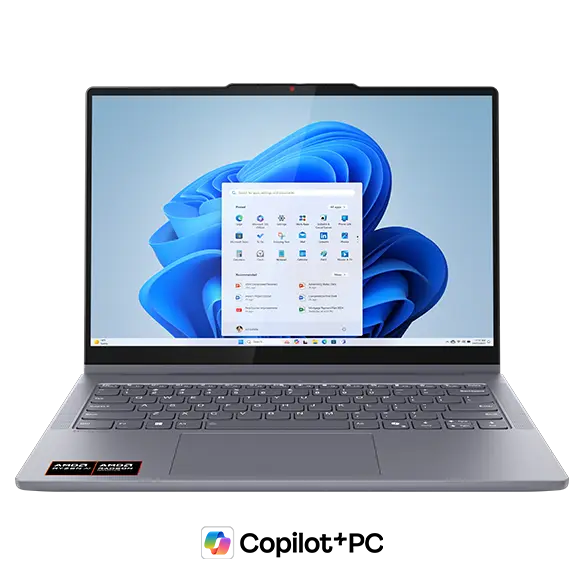
    Lenovo Smartchoice Ideapad 5 2-in-1 (Core i5-13420H)
    https://p2-ofp.static.pub//fes/cms/2025/09/24/6l3zuh832ykkh2o00usibteakd7i4v813090.png

    The Lenovo Ideapad 5 2-in-1 is a powerful and balanced machine designed for users who need performance along with flexibility.

    Key Specifications

    FeatureDetails
    ProcessorIntel Core i5-13420H
    RAM & Storage16GB RAM, 512GB SSD
    Display14-inch WUXGA IPS Touch
    Weight1.6 kg

    Performance & Use Case

    This laptop stands out because of the H-series processor, which is significantly more powerful than standard U-series chips. It is ideal for:

    • Excel, Power BI, and data analysis
    • Light video editing
    • Multitasking with multiple apps

    Pros

    • Strong performance (best in this list)
    • Smooth multitasking with 16GB RAM
    • Premium display quality
    • Comes with Office 2024

    Cons

    • Slightly heavier than competitors
    • Battery life is decent but not exceptional

    👉 Buy Here


    HP Pavilion x360 (Core i5-1335U)

    https://m.media-amazon.com/images/I/81LaRDm7leL.jpg

    The HP Pavilion x360 is a stylish and versatile laptop aimed at students and office users who want reliability and features.

    Key Specifications

    FeatureDetails
    ProcessorIntel Core i5-1335U
    RAM & Storage16GB RAM, 1TB SSD
    Display14-inch FHD Touch
    Weight1.51 kg

    Performance & Use Case

    The U-series processor focuses on efficiency and battery life, making it suitable for:

    • Online classes and office work
    • Browsing and content consumption
    • Light productivity tasks

    Pros

    • Large 1TB SSD storage
    • Good battery efficiency
    • Premium design and build
    • Better webcam (5MP)

    Cons

    • Slightly weaker performance than Lenovo
    • Average display brightness

    👉 Check Price Here


    HP Chromebook x360 (Celeron N4020)

    https://m.media-amazon.com/images/I/71NTBf1B56L.jpg

    The HP Chromebook x360 is a budget-friendly option designed for basic users and students.

    Key Specifications

    FeatureDetails
    ProcessorIntel Celeron N4020
    RAM & Storage4GB RAM, 64GB eMMC
    OSChrome OS
    Weight1.49 kg

    Performance & Use Case

    This device is best suited for:

    • Online classes
    • Web browsing
    • Google Docs and basic tasks

    Pros

    • Very affordable
    • Lightweight and portable
    • Fast boot with Chrome OS

    Cons

    • Limited performance
    • Not suitable for heavy software (Excel advanced, coding, editing)
    • Low storage

    👉 Buy Here


    Which Laptop Should You Choose?

    Use CaseRecommended Laptop
    Heavy work, Excel, multitaskingLenovo Ideapad 5
    Balanced use, office + studentsHP Pavilion x360
    Budget, basic usageHP Chromebook x360

    Practical Buying Advice (Indian Users)

    If you are:

    • A student learning Excel, VBA, or Tally → Go for Lenovo Ideapad 5
    • A working professional handling documents and meetings → Choose HP Pavilion x360
    • On a tight budget and only need basic usage → Chromebook is sufficient

    Key Factors to Consider Before Buying

    1. Processor Type

    • H-series = Performance
    • U-series = Efficiency
    • Celeron = Basic usage

    2. RAM

    • Minimum 8GB (16GB recommended for future-proofing)

    3. Storage

    • SSD is mandatory
    • 512GB minimum recommended

    4. Usage Type

    Always match your laptop with your actual usage, not just specifications.


    Frequently Asked Questions (FAQ)

    1. Which is the best 2-in-1 laptop under ₹80,000 in India?

    The Lenovo Ideapad 5 offers the best performance in this range.

    2. Is HP Pavilion x360 good for students?

    Yes, it is ideal for students who need balanced performance and portability.

    3. Can Chromebook run MS Excel?

    It can run web-based Excel but not full desktop Excel features.

    4. Which laptop is best for Excel and data work?

    Lenovo Ideapad 5 due to its powerful processor.

    5. Are 2-in-1 laptops durable?

    Yes, but hinge quality matters. Lenovo and HP both offer reliable builds.

    6. Is 16GB RAM necessary?

    For long-term usage and multitasking, 16GB is highly recommended.


    Final Verdict

    If performance is your priority, the Lenovo Ideapad 5 clearly leads. For a balanced and stylish device, HP Pavilion x360 is a solid choice. If budget is your main concern, the Chromebook offers value but with limitations.

    Choosing the right laptop depends on your usage, not just price or brand.


    Disclaimer

    This article is for informational purposes only. Prices, specifications, and availability may change over time. Please verify details before making a purchase decision.


  • Best Laptop for MS Office Under ₹25,000 – HP Professional 15 with Windows 11 Pro & Office 2021

    Best Laptop for MS Office Use Under ₹25,000 – HP Professional 15 with MS Office 2021 Pro

    If you’re looking for a dependable laptop that offers seamless Microsoft Office performance under a ₹25,000 budget, the HP Professional 15 stands out as an unbeatable choice. Priced at just ₹22,390, this business-ready machine is perfect for students, professionals, freelancers, and entrepreneurs who want smooth day-to-day computing without burning a hole in their pocket.

    👉 Buy Now on Amazon for ₹22,390


    🔹 Why the HP Professional 15 is the Best Laptop for MS Office Use?

    1. Pre-Installed Microsoft Office 2021 Professional (Lifetime License)
    Most budget laptops either offer no Office software or come with a trial version that expires quickly. But this HP laptop comes with a full version of MS Office 2021 Professional pre-installed, including essential tools like Word, Excel, PowerPoint, Outlook, Access, and Publisher. That’s a huge value-add, especially for office users, students, and small businesses.

    2. Powered by Intel’s 12th Gen Celeron N4500 with Turbo Boost
    The dual-core Intel Celeron N4500 is no ordinary entry-level chip. With Turbo Boost support, it gives you extra performance when you need it—whether you’re juggling Excel sheets, preparing PowerPoint presentations, or managing emails in Outlook. It’s built to handle office tasks and light multitasking with ease.

    3. Fast Bootups and Responsive Operation with 256GB SSD
    Unlike outdated HDD models, this laptop features a 256GB SSD. This means your system boots up in seconds, files open instantly, and applications launch without lag. It’s a major performance advantage over similarly priced models that still rely on slower hard drives.

    4. Smooth Multitasking with 8GB DDR4 RAM
    With 8GB of DDR4 RAM, switching between multiple MS Office applications and browser tabs is effortless. You’ll never feel bogged down while preparing reports, managing spreadsheets, or attending online meetings.

    5. 15.6-inch Full HD Display with Intel UHD Graphics
    A large 15.6-inch display with sharp visuals ensures a comfortable viewing experience whether you’re editing documents or watching training videos. The Intel UHD Graphics chipset further ensures smooth video playback and enhanced visual clarity for basic graphic tasks.

    6. Professional Design & Lightweight Build – Just 1.59 kg
    Whether you’re a remote worker, student, or on-site professional, portability matters. The sleek black-gray finish and 1.59kg lightweight design make this laptop ideal for users on the go. It fits perfectly in a backpack and looks sharp in any professional setting.

    7. Enhanced Security with Windows 11 Pro
    The inclusion of Windows 11 Pro instead of the standard Home edition brings enterprise-grade features like BitLocker encryption, Group Policy management, and Remote Desktop, making it suitable for secure environments like schools, offices, and startups.

    8. Seamless Connectivity – USB, HDMI, Wi-Fi, and Bluetooth
    The laptop includes all essential ports and connectivity options:

    • USB 3.0 Ports
    • HDMI Output for external display
    • Wi-Fi and Bluetooth for smooth internet access and wireless peripheral integration

    🔸 Who Should Buy This Laptop?

    ✅ Students who need a reliable device for assignments, presentations, and online classes
    ✅ Professionals using Excel, Word, and PowerPoint for daily business tasks
    ✅ Teachers & Educators creating lesson plans, documents, and conducting online lectures
    ✅ Entrepreneurs who need productivity tools without investing in expensive laptops
    ✅ Freelancers & Home Users who want speed, Office software, and mobility


    🏆 Why It Beats the Competition

    At under ₹25,000, most laptops either compromise on:

    • RAM (usually 4GB or lower)
    • Storage (slow HDD)
    • Screen size (many offer only 14-inch or less)
    • No full-version of MS Office
    • Lower Windows version (Home edition or no OS at all)

    But the HP Professional 15 checks all the boxes:
    ✔️ 8GB RAM
    ✔️ 256GB SSD
    ✔️ 15.6″ Display
    ✔️ Windows 11 Pro
    ✔️ MS Office 2021 Professional
    ✔️ Business-grade design
    ✔️ Priced at just ₹22,390


    💰 Final Verdict: The Smart Buy for MS Office Users

    If Microsoft Office is your main tool, and you’re working with a budget under ₹25,000, the HP Professional 15 delivers outstanding value for money. From student projects to office presentations and light multitasking, it’s more than capable—and built to keep up with your day.


    🔗 Buy Now from Amazon – HP Professional 15 – ₹22,390