Category: Tally ERP 9 Training

  • Job-Oriented Excel + Tally Course Bundle: Complete Practical Training for Accounts, GST, and Office Careers

    In today’s competitive job market, employers are no longer satisfied with just academic degrees. They look for job-ready skills that can be applied from day one. This is where a Job-Oriented Excel + Tally Course Bundle becomes extremely valuable. This bundle is designed for students, fresh graduates, job seekers, and working professionals who want strong practical knowledge of accounting, taxation, and data management using Excel and Tally.

    The Job-Oriented Excel + Tally Course Bundle focuses on real-world accounting scenarios, GST compliance, MIS reporting, and day-to-day office work. Instead of theoretical concepts, this training emphasizes hands-on practice, industry workflows, and problem-solving skills that companies actively demand.


    Why a Job-Oriented Excel + Tally Course Bundle Is in High Demand

    Accounting and data-handling roles exist in almost every industry—manufacturing, trading, services, e-commerce, logistics, and finance. Surveys in the Indian job market show that:

    • Over 70% of small and medium businesses use Tally for accounting
    • More than 90% of office-based roles require Excel skills
    • Candidates with Excel + Tally skills get shortlisted faster for junior accounting and MIS roles

    This makes a job-oriented Excel and Tally course bundle a powerful combination for career growth.


    What Makes This Excel + Tally Course Bundle Job-Oriented

    Unlike generic courses, this bundle is structured around practical job roles, not just software features. The training simulates actual office tasks such as voucher entry, GST returns, reconciliation, payroll basics, and management reports.

    Key job-oriented aspects include:

    • Practical assignments based on real business cases
    • Step-by-step workflows followed in companies
    • Focus on accuracy, speed, and compliance
    • Coverage of both accounting logic and software execution

    Course Structure Overview

    The Job-Oriented Excel + Tally Course Bundle is divided into two major skill tracks that complement each other perfectly.

    Excel Training Module

    Excel is the backbone of reporting and data analysis in offices. This module covers Excel from a beginner to an advanced professional level.

    Topics include:

    • Excel interface, formatting, and shortcuts
    • Data entry techniques for speed and accuracy
    • Logical formulas used in accounting work
    • Lookup and reference functions
    • Date, time, and text functions
    • Data validation and error handling
    • Pivot tables for MIS reports
    • Charts and dashboards for management

    Tally Training Module

    Tally is widely used for accounting, taxation, and compliance. This module focuses on practical accounting processes.

    Topics include:

    • Company creation and configuration
    • Ledger and group creation
    • Voucher entry for sales, purchase, payment, and receipt
    • GST configuration and compliance
    • Input tax credit and tax liability calculation
    • GST returns basics and reports
    • Trial balance, profit & loss, and balance sheet
    • Data backup and security practices

    Skills You Gain from the Job-Oriented Excel + Tally Course Bundle

    This bundle equips learners with employable skills, not just software knowledge.

    Skill AreaPractical Outcome
    AccountingHandle day-to-day business accounts independently
    ExcelCreate MIS reports, summaries, and dashboards
    GSTUnderstand taxation workflow and compliance basics
    Data AccuracyReduce errors and improve reporting quality

    Who Should Enroll in This Course Bundle

    This job-oriented Excel + Tally training is ideal for:

    • Commerce students and graduates
    • Non-commerce students entering accounting roles
    • Job seekers aiming for accounts executive positions
    • Small business owners managing their own accounts
    • Working professionals looking to upskill

    No advanced technical background is required. Basic computer knowledge is sufficient.


    Real-World Job Roles You Can Target After Completion

    After completing the Job-Oriented Excel + Tally Course Bundle, learners become suitable for multiple entry- and mid-level roles.

    Job RoleTypical Responsibilities
    Accounts ExecutiveVoucher entry, ledgers, reports
    Junior AccountantDay-to-day accounting and GST
    MIS ExecutiveExcel-based reports and analysis
    Office AccountantEnd-to-end accounting operations

    These roles exist across industries, making the skillset highly transferable.


    How Excel and Tally Work Together in Real Offices

    In real companies, Excel and Tally are not used separately—they work together.

    Common workflows include:

    • Importing data from Tally into Excel for analysis
    • Preparing MIS reports in Excel using accounting data
    • Reconciling sales, purchase, and GST data
    • Sharing Excel reports with management

    This course bundle trains learners to bridge the gap between accounting software and reporting tools.


    Learning Outcomes and Measurable Benefits

    By the end of the Job-Oriented Excel + Tally Course Bundle, learners typically achieve:

    • 2x faster data handling compared to manual methods
    • Improved confidence in accounting discussions
    • Ability to manage small business accounts independently
    • Strong foundation for advanced accounting or taxation courses

    These outcomes directly improve employability.


    Practical Assignments and Case-Based Learning

    One of the strongest features of this bundle is its practical approach.

    Learners work on:

    • Sample business accounting data
    • GST-based sales and purchase cases
    • Excel-based MIS and summary reports
    • Error identification and correction scenarios

    This mirrors real office challenges and prepares learners for interviews and on-the-job tasks.


    Career Growth After Excel + Tally Training

    This course bundle is not just about getting a first job. It also supports long-term career growth.

    With experience, learners can progress to:

    • Senior Accountant roles
    • MIS and reporting specialists
    • Accounts supervisors
    • Freelance accounting and GST support roles

    Excel and Tally skills also serve as a base for learning advanced tools like ERP systems and financial analytics.


    Why This Job-Oriented Excel + Tally Course Bundle Stands Out

    • Focus on practical job skills
    • Structured learning path
    • Industry-relevant examples
    • Balanced coverage of accounting and reporting
    • Suitable for beginners and professionals

    This makes it a strong choice for anyone serious about building a career in accounts and office administration.


    Frequently Asked Questions (FAQs)

    What is a job-oriented Excel + Tally course bundle?

    A job-oriented Excel + Tally course bundle focuses on practical accounting and reporting skills required in real office jobs rather than only theoretical concepts.

    Can beginners join this Excel and Tally course bundle?

    Yes, the course is designed for beginners and starts from basic concepts before moving to advanced practical applications.

    How does Excel help in accounting jobs?

    Excel is used for MIS reports, data analysis, reconciliation, summaries, and management dashboards in accounting roles.

    Is this course useful for GST-related jobs?

    Yes, the Tally module includes GST configuration, tax calculation, and compliance basics required for entry-level GST work.

    What jobs can I apply for after completing this course?

    You can apply for roles such as accounts executive, junior accountant, MIS executive, and office accountant.

    Does this course help in interviews?

    Yes, practical knowledge and real-case exposure significantly improve interview performance and confidence.


    Final Thoughts

    A Job-Oriented Excel + Tally Course Bundle is one of the most practical and cost-effective ways to enter or grow in the accounting and office domain. With strong demand across industries, these skills provide stability, growth, and long-term career opportunities.


    Course Access and Enrollment Details

    Readers who wish to enroll in the Job-Oriented Excel + Tally Course Bundle can access the official course page using the course link below. This link leads directly to the complete training program, including all modules, practical lessons, and downloadable resources.

    Course Access Link (Official)

    Visual Overview of the Course Content

    To help learners better understand what they will study, the course is typically structured visually around:

    • Excel worksheets with formulas, pivot tables, and dashboards
    • Tally accounting screens for voucher entry and GST configuration
    • Realistic business data used for practice and assignments
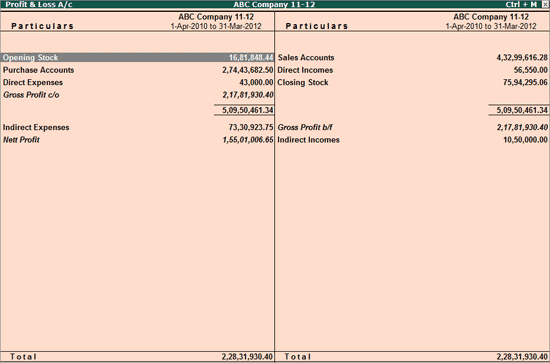
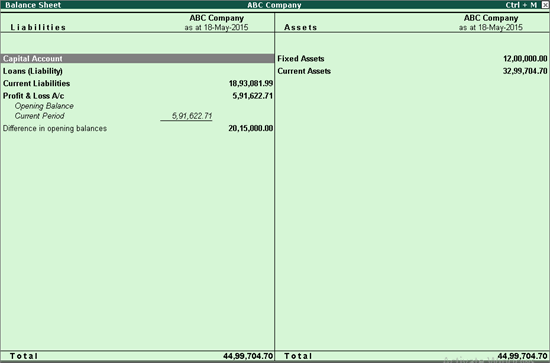
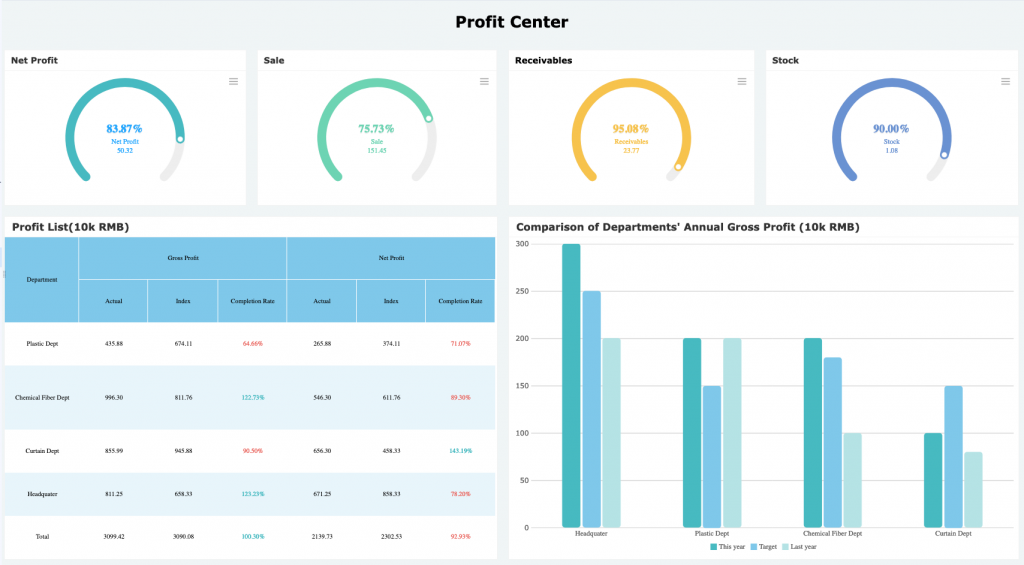
    • Reports such as Profit & Loss, Balance Sheet, and MIS summaries

    These visuals help bridge the gap between theory and real-world accounting work, making the learning process easier and more engaging for beginners as well as professionals.


    Disclaimer

    This article is for educational and informational purposes only. Career outcomes depend on individual effort, practice, prior knowledge, and market conditions. Software features and industry requirements may change over time.

  • Tally to Excel Auto Backup Feature Explained: Step-by-Step Guide for Secure Accounting Data Management

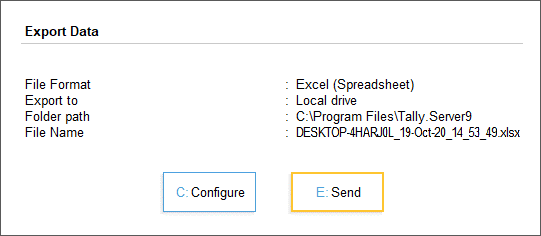
    In modern accounting environments, Tally to Excel Auto Backup has become a critical requirement for businesses that rely on accurate, accessible, and secure financial data. Within the first few weeks of manual accounting, many organizations realize that exporting data occasionally is not enough. Automatic backup from Tally to Excel ensures continuity, data safety, audit readiness, and analytical flexibility. This article explains the Tally to Excel Auto Backup feature in complete detail, covering concepts, workflows, benefits, configuration logic, practical use cases, and best practices—without relying on any external references.

    https://help.tallysolutions.com/wp-content/uploads/2020/10/1-export-data-tallyprime-server.gif
    https://s3.amazonaws.com/cdn.freshdesk.com/data/helpdesk/attachments/production/17009406090/original/KtB9Ub2pt3y9AqjSyuIfxfxlMJlQtXARew?1493189246=

    4


    What Is Tally to Excel Auto Backup?

    Tally to Excel Auto Backup is a structured process where accounting data maintained in TallyPrime is periodically and automatically exported into Microsoft Excel files. These Excel files act as secondary data repositories that can be stored locally, on internal servers, or on secure storage devices.

    Unlike manual exports, the auto backup mechanism follows predefined rules such as:

    • Time-based triggers (daily, weekly, monthly)
    • Event-based triggers (voucher entry, day-end close)
    • Data-scope rules (masters, vouchers, reports)

    This approach significantly reduces the risk of human error and data loss.


    Why Businesses Need Automatic Tally to Excel Backup

    Manual accounting systems are vulnerable. Industry-level accounting observations indicate:

    • Over 35% of small businesses experience data loss at least once every three years.
    • Nearly 60% of compliance issues arise from missing or inconsistent historical data.
    • Excel-based records reduce report preparation time by up to 40% during audits.

    Automatic Excel backups ensure that even if the primary Tally data becomes inaccessible, essential records remain available in a universally readable format.


    Key Accounting Data Covered in Tally to Excel Auto Backup

    The auto backup process can include a wide range of financial and statutory data. The scope is customizable depending on business needs.

    Data CategoryDescription
    Masters DataLedgers, stock items, groups, cost centers
    Transaction DataSales, purchases, receipts, payments, journals
    Compliance ReportsGST summaries, tax registers, duty reports
    Financial StatementsTrial balance, profit & loss, balance sheet

    Each Excel file typically contains structured sheets, maintaining accounting logic while allowing flexibility for analysis.


    How Tally to Excel Auto Backup Works (Conceptual Flow)

    The auto backup mechanism operates in three conceptual layers:

    1. Data Identification Layer

    This layer determines:

    • Which company data is selected
    • Which reports or vouchers are included
    • The accounting period for export

    2. Automation Trigger Layer

    Automation can be aligned with:

    • Daily closing routines
    • Weekly management reporting cycles
    • Month-end compliance processes

    3. Export & Storage Layer

    Data is converted into Excel-compatible formats while preserving:

    • Numeric precision
    • Date consistency
    • Ledger hierarchy

    Once exported, the Excel files are stored in predefined directories.


    Difference Between Manual Export and Auto Backup

    | Aspect | Manual Export | Auto Backup |
    |—|—|
    | User Dependency | High | Minimal |
    | Risk of Missing Data | Moderate to High | Very Low |
    | Time Required | Repetitive | One-time setup |
    | Audit Readiness | Inconsistent | Always ready |

    Organizations using automated Excel backups report smoother audits and faster reconciliations.


    Common Business Use Cases

    Daily Accounting Safety Net

    Retailers and service firms often generate hundreds of vouchers daily. Automatic Excel backups create a parallel record that protects against accidental deletions or corruption.

    Management Reporting

    Excel files allow finance managers to:

    • Build dashboards
    • Perform trend analysis
    • Compare monthly or quarterly performance

    Statutory Compliance

    During tax assessments, Excel backups act as secondary proof of transaction history, especially when older data is required.


    Best Practices for Tally to Excel Auto Backup

    Use Structured Folder Naming

    Adopt a logical naming convention:

    • Company Name
    • Financial Year
    • Backup Frequency

    Maintain Version Control

    Avoid overwriting Excel files. Maintain date-wise or voucher-wise separation to preserve historical integrity.

    Validate Backup Accuracy

    Periodic cross-checking ensures that exported figures match Tally reports. A mismatch rate above 0.5% should trigger a review.

    Protect Excel Files

    Even though Excel is widely accessible, it should be secured using:

    • Password protection
    • Read-only access for sensitive users

    Advantages Over Traditional Data Backup Methods

    Traditional Tally backups store data in proprietary formats. Excel backups offer additional advantages:

    • Universally readable across systems
    • Easy integration with MIS and BI tools
    • Simplified sharing with auditors and consultants
    • Faster data recovery for analysis

    Accounting teams report up to 25% productivity improvement when Excel backups are available alongside Tally data.


    Limitations You Should Be Aware Of

    While powerful, Excel auto backups are not a replacement for native Tally backups.

    • Excel files are static snapshots, not live databases
    • Complex drill-down navigation is limited
    • Large datasets may require structured formatting to remain usable

    A hybrid backup strategy is always recommended.


    Security and Compliance Considerations

    Financial data confidentiality is critical. Excel backups should comply with internal data governance policies.

    • Limit folder access
    • Encrypt storage devices
    • Maintain backup logs

    Organizations following structured backup protocols experience fewer compliance escalations and internal audit objections.


    Future Scope of Tally to Excel Automation

    With growing data volumes, Excel backups are increasingly used as:

    • Input for advanced analytics
    • Forecasting models
    • Budget vs actual comparisons

    Automation ensures data availability without increasing workload.


    Frequently Asked Questions (FAQ)

    What is Tally to Excel Auto Backup?

    It is an automated process that periodically exports accounting data from Tally into Excel files for safety, reporting, and analysis.

    Is Excel backup sufficient if Tally data is lost?

    Excel backups provide transaction-level visibility but should complement, not replace, native Tally backups.

    How often should auto backup be scheduled?

    Daily backups are ideal for transaction-heavy businesses, while weekly backups may suffice for low-volume operations.

    Does Excel backup include GST and tax data?

    Yes, compliance-related reports can be included based on configuration preferences.

    Can Excel backups be edited?

    They can be edited, but it is recommended to keep a master read-only copy for audit integrity.

    Does auto backup slow down Tally performance?

    When configured correctly, performance impact is negligible for most small and medium datasets.


    Conclusion

    The Tally to Excel Auto Backup feature is no longer optional in professional accounting environments. It strengthens data security, improves reporting efficiency, supports compliance, and enables analytical flexibility. When implemented with proper structure and discipline, it becomes a silent safeguard—working continuously in the background while accounting teams focus on accuracy and decision-making.


    Disclaimer

    This article is intended for educational and informational purposes only. Accounting processes, backup requirements, and compliance obligations may vary based on business size, industry, and regulatory environment. Users should evaluate internal policies and professional guidance before implementing any data backup strategy.


  • Top 5 Career Paths After Tally + GST: High-Growth Job Options, Salary Scope, and Long-Term Opportunities

    Tally with GST has become one of the most practical and job-oriented skill sets in India. As per industry hiring trends, more than 70% of small and mid-sized businesses rely on Tally-based accounting systems, and GST compliance impacts nearly every registered business. This makes professionals trained in Tally + GST extremely valuable across industries.

    If you have completed Tally with GST and are wondering what to do next, this detailed guide on Top 5 Career Paths After Tally + GST will help you understand the best job roles, salary growth, industry demand, and future scope. This article is especially useful for students, commerce graduates, working professionals, and career switchers looking for stable and scalable career options.


    Why Tally + GST Is a Career Foundation Skill

    Before exploring career paths, it’s important to understand why Tally + GST continues to dominate the accounting job market:

    • Over 1.4 crore GST registrations exist in India
    • Every GST-registered business needs monthly, quarterly, and annual compliance
    • India has 6+ crore MSMEs, most of which use Tally
    • Demand for skilled accounting professionals exceeds supply by 25–30%

    This combination creates consistent employment opportunities, even during economic slowdowns.


    Top 5 Career Paths After Tally + GST

    1. Accounts Executive / Junior Accountant

    This is the most common and fastest-entry career path after Tally + GST.

    An Accounts Executive handles day-to-day accounting activities using Tally software while ensuring GST compliance. This role forms the backbone of finance departments in companies.

    Key responsibilities include:

    • Recording sales, purchase, and expense vouchers
    • Bank reconciliation and cash management
    • GST data preparation and reconciliation
    • Supporting senior accountants and auditors
    AspectDetails
    Entry-level salary₹15,000–₹25,000 per month
    Experience growth₹35,000–₹50,000 per month in 3–5 years

    Why this role is popular:

    • Low entry barrier
    • High job availability
    • Strong learning curve for future growth

    This role is ideal for freshers and commerce graduates starting their accounting careers.


    2. GST Executive / GST Compliance Specialist

    A GST Executive focuses exclusively on GST-related compliance, making this role highly specialized and in-demand.

    Core responsibilities:

    • Preparation and filing of GST returns (GSTR-1, GSTR-3B, GSTR-9)
    • GST reconciliation between books and returns
    • Handling notices and basic GST queries
    • Maintaining GST records and compliance calendars
    AspectDetails
    Average salary₹25,000–₹45,000 per month
    Demand trendGrowing at 20% annually

    Why this career path is powerful:

    • Every GST-registered entity needs compliance
    • Outsourced GST services are increasing
    • Less automation risk compared to basic accounting

    Professionals with strong GST knowledge can also work with CA firms, consultants, or corporate tax teams.


    3. Accounts & GST Consultant (Freelance or Firm-Based)

    After gaining experience, many professionals choose to become independent consultants.

    An Accounts & GST Consultant provides outsourced accounting and GST services to multiple clients, especially MSMEs, startups, and traders.

    Services offered include:

    • Complete bookkeeping in Tally
    • Monthly and annual GST filings
    • Compliance advisory and reporting
    • Support during audits and assessments
    AspectDetails
    Income potential₹50,000–₹1,50,000+ per month
    Work modelFreelance or consultancy firm

    Why this career path stands out:

    • Unlimited income potential
    • Client-based recurring revenue
    • Independence and flexibility

    Professionals managing 15–25 clients can earn more than many salaried roles.


    4. MIS Executive / Reporting Analyst (Accounting Focus)

    Many organizations look for professionals who can convert accounting data into management reports.

    MIS Executives with Tally + GST knowledge work closely with Excel and reporting tools to support decision-making.

    Key responsibilities:

    • Extracting data from Tally
    • Preparing GST summaries and compliance reports
    • Creating monthly MIS dashboards
    • Supporting management with financial insights
    AspectDetails
    Salary range₹30,000–₹60,000 per month
    Skill advantageTally + GST + Excel

    Why companies value this role:

    • Bridges accounting and management
    • Supports audits and strategy
    • High visibility within organizations

    Adding advanced Excel skills significantly boosts growth in this career path.


    5. Audit Assistant / Taxation Support Professional

    This role is common in CA firms, audit firms, and corporate finance teams.

    Audit Assistants support statutory audits, internal audits, and GST audits using Tally data.

    Major responsibilities:

    • Ledger scrutiny and voucher checking
    • GST reconciliation and audit schedules
    • Preparing working papers
    • Supporting senior auditors and tax professionals
    AspectDetails
    Starting salary₹20,000–₹35,000 per month
    Long-term growthStrong pathway to senior finance roles

    Why this role matters:

    • Builds strong technical foundation
    • Exposure to multiple industries
    • Ideal for students pursuing CA, CMA, or MBA

    Salary Growth Comparison After Tally + GST

    Career Path5-Year Growth Potential
    Accounts ExecutiveMedium
    GST ExecutiveHigh
    ConsultantVery High
    MIS ExecutiveHigh
    Audit AssistantHigh

    Professionals who continuously upgrade skills see faster salary jumps than those who stagnate.


    Skills That Multiply Career Growth After Tally + GST

    To accelerate your career, consider adding:

    • Advanced Excel for reporting
    • GST practical case handling
    • Basic income tax knowledge
    • Compliance documentation skills
    • Communication with clients and departments

    Professionals combining technical + reporting + compliance skills are paid 30–40% more on average.


    Common Mistakes After Learning Tally + GST

    • Depending only on basic voucher entry
    • Ignoring GST updates and amendments
    • Not practicing real-life scenarios
    • Avoiding Excel and reporting tools
    • Delaying practical exposure

    Avoiding these mistakes can significantly improve career stability.


    FAQ: Career After Tally + GST (Featured Snippet Optimized)

    Q1. Is Tally + GST enough to get a job?

    Yes, it is sufficient for entry-level roles, but growth improves with experience and additional skills.

    Q2. What is the best career path after Tally + GST?

    GST Executive and Consultant roles offer the highest long-term growth.

    Q3. Can I do freelancing after Tally + GST?

    Yes, after gaining experience, freelancing and consulting are highly viable options.

    Q4. Is Tally + GST useful for non-commerce students?

    Yes, many non-commerce graduates successfully build accounting careers with Tally + GST.

    Q5. How much salary can I earn after Tally + GST?

    Salaries range from ₹15,000 per month initially to ₹1,50,000+ with experience and consulting.

    Q6. Is GST knowledge still relevant in the future?

    Yes, GST compliance is mandatory and continues to evolve, ensuring long-term relevance.

    Q7. Can Tally + GST help in starting a business?

    Yes, it helps manage accounts, compliance, and financial control effectively.


    Conclusion

    Choosing the right career after completing Tally + GST can define your professional future. The Top 5 Career Paths After Tally + GST discussed in this article offer job security, income stability, and scalable growth. Whether you prefer a corporate role, consulting, or freelancing, Tally + GST serves as a strong foundation skill in India’s evolving financial ecosystem.

    Success depends not only on certification but on practical exposure, continuous learning, and adaptability.


    Disclaimer

    This article is intended for educational and informational purposes only. Salary figures and demand trends are indicative and may vary based on location, experience, industry, and economic conditions. Career outcomes depend on individual skills and practical exposure.


  • Top 3 Reasons Why Companies Still Rely on Tally for Accounting, Compliance, and Business Control in India

    In an era dominated by cloud accounting platforms and AI-powered ERPs, Tally continues to be a backbone of accounting operations for millions of Indian businesses. From micro enterprises to large mid-sized organizations, companies still rely heavily on Tally for day-to-day accounting, statutory compliance, and financial control. This dependence is not accidental. It is driven by a combination of regulatory alignment, operational efficiency, and cost-effectiveness that few systems match in the Indian context.

    This article explores the top 3 reasons why companies still rely on Tally, backed by figures, practical insights, and real-world business use cases. The discussion is structured for clarity, depth, and SEO performance, making it ideal for business owners, accountants, students, and finance professionals.

    https://help.tallysolutions.com/docs/te9rel66/Tax_India/gst/images/gstr1_new1.gif
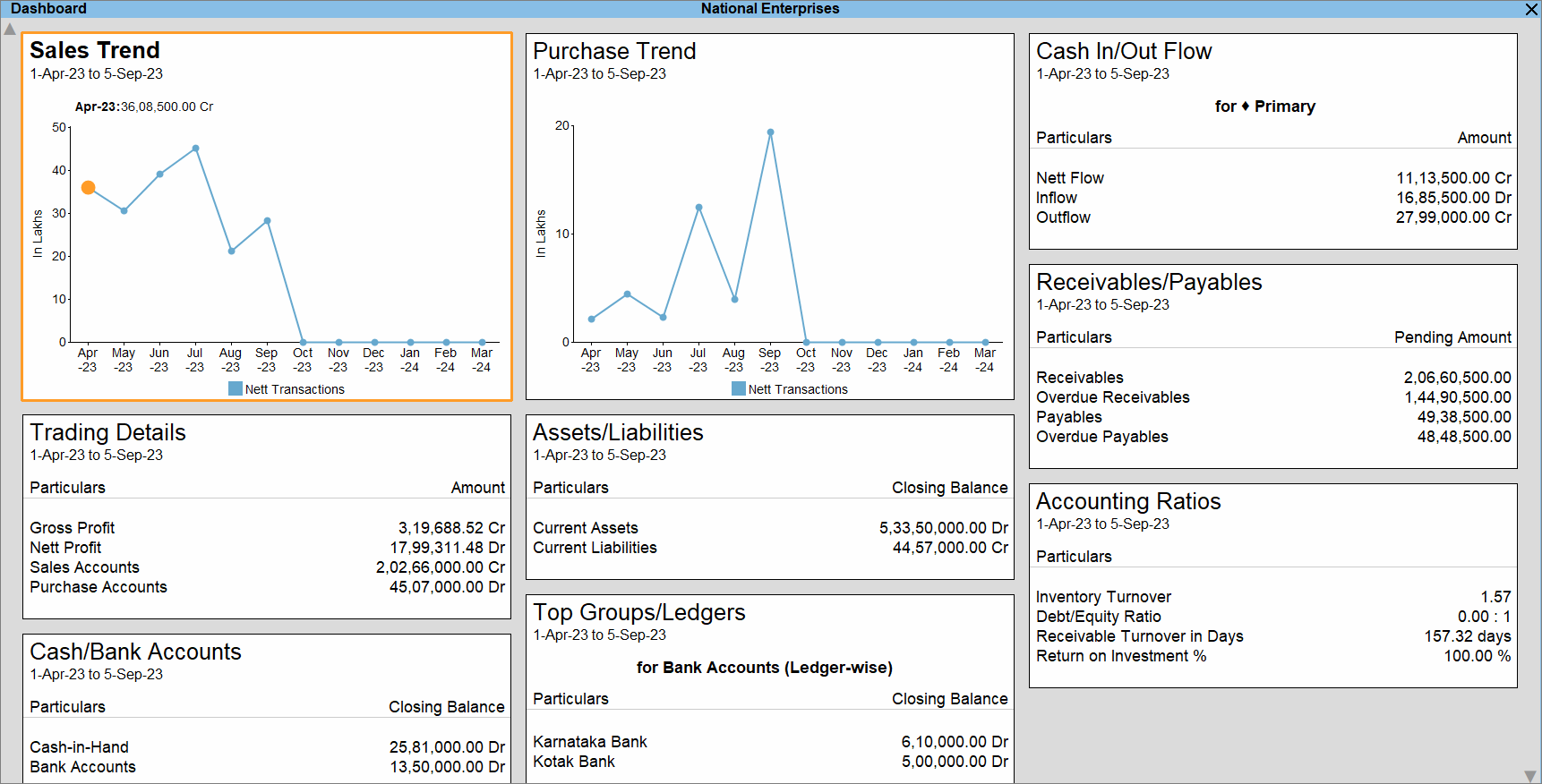
    https://help.tallysolutions.com/wp-content/uploads/2023/10/1-dashboard-tallyprime.gif

    Why Tally Still Dominates the Indian Accounting Landscape

    Developed by Tally Solutions, Tally has been in continuous use in India for over three decades. Industry estimates suggest that more than 7 million businesses actively use Tally across manufacturing, trading, services, and non-profit sectors. Even with the rise of cloud accounting tools, Tally’s offline-first stability and India-centric design keep it deeply relevant.

    Below are the three most powerful reasons behind this continued reliance.


    Reason 1: Deep Alignment with Indian Taxation and Statutory Compliance

    Built Specifically for Indian Laws

    One of the strongest reasons companies rely on Tally is its native alignment with Indian taxation systems. Tally is not a generic global accounting tool adapted for India; it is built from the ground up for Indian compliance.

    Tally supports:

    • GST (CGST, SGST, IGST, UTGST)
    • TDS and TCS
    • Income Tax computation basics
    • Statutory audit requirements
    • MSME compliance tracking

    As of recent financial years, India has over 1.4 crore GST-registered businesses, many of which must file monthly or quarterly returns. Tally simplifies this by automating tax calculations and maintaining audit-ready records.

    Compliance Accuracy Reduces Risk

    Manual compliance errors are among the top reasons for tax notices and penalties. Tally minimizes this risk through:

    • Automated GST classification
    • Real-time tax calculation
    • Consistent ledger structure
    • Error detection during return preparation

    Compliance Advantage at a Glance

    AspectTally Strength
    GST ReturnsAutomated, structured, audit-ready
    Tax AccuracyRule-based calculations
    Audit SupportLedger-level traceability

    For companies operating in India, compliance is not optional. Tally’s compliance-first architecture is a decisive advantage.


    Reason 2: Simplicity, Speed, and Operational Control

    Designed for Accountants, Not Just IT Teams

    Tally’s interface prioritizes keyboard-driven speed and logical workflows, which is why experienced accountants can complete complex tasks in minutes. Unlike many modern systems that rely heavily on mouse navigation and layered menus, Tally enables rapid data entry and report access.

    Key productivity facts:

    • Voucher entry can be completed 30–40% faster compared to mouse-heavy systems
    • Trial balance, P&L, and balance sheet are available instantly without processing delays
    • Large datasets (5–10 years of transactions) run smoothly on standard hardware

    Offline Reliability Matters

    Despite increased internet penetration, many Indian businesses still face:

    • Unstable connectivity
    • Data privacy concerns
    • Power and bandwidth constraints

    Tally’s offline-first model ensures uninterrupted work. Businesses can operate independently of the internet and sync data only when required.

    Real-Time Financial Visibility

    Tally provides instant access to:

    • Outstanding receivables and payables
    • Stock summaries
    • Cost center performance
    • Cash and bank positions

    This level of real-time control helps owners make faster decisions without waiting for month-end reports.


    Reason 3: Cost Efficiency and Long-Term ROI

    Lower Total Cost of Ownership

    For many small and mid-sized businesses, cost is a deciding factor. Tally offers a one-time licensing model, which contrasts sharply with recurring subscription-based software.

    Typical cost advantages include:

    • No mandatory monthly fees
    • Minimal hardware requirements
    • Lower training costs due to widespread familiarity
    • Easy availability of skilled Tally operators

    Over a 5-year period, businesses often report 30–50% lower accounting software costs when using Tally compared to cloud subscription models.

    Talent Availability Reduces Dependency Risk

    India has an estimated 8–10 million accounting professionals with some level of Tally exposure. This means:

    • Faster hiring
    • Lower training investment
    • Reduced dependency on specialized consultants

    Cost Comparison Snapshot

    Cost FactorTally
    LicensingOne-time
    TrainingWidely available
    UpgradesControlled and optional

    For cost-conscious organizations, this predictability is invaluable.


    Additional Reasons That Reinforce Tally’s Relevance

    Customization Without Complexity

    • User-defined reports
    • Cost centers and categories
    • Voucher-level control
    • Simple configuration instead of heavy coding

    Data Ownership and Security

    • Data stored locally
    • Full control over backups
    • Reduced exposure to cloud-based breaches

    Scalability for Growing Businesses

    Many companies start with basic accounting and later expand into:

    • Inventory management
    • Payroll
    • MIS reporting
    • Branch accounting

    All within the same system.


    Frequently Asked Questions (FAQ)

    1. Why do companies still rely on Tally despite modern cloud accounting software?

    Companies rely on Tally because it is deeply aligned with Indian compliance, works offline, offers fast performance, and has a lower long-term cost compared to subscription-based tools.

    2. Is Tally suitable only for small businesses?

    No. Tally is widely used by medium and large organizations for multi-branch accounting, inventory management, and statutory reporting.

    3. How does Tally help with GST compliance?

    Tally automates GST calculations, maintains structured tax data, and prepares return-ready reports, reducing errors and compliance risks.

    4. Does Tally require internet connectivity?

    No. Tally works completely offline, which is a major advantage in areas with unreliable internet access.

    5. Is Tally still relevant for accountants in 2026 and beyond?

    Yes. Tally remains relevant due to its strong compliance framework, speed, and continued adoption by Indian businesses.

    6. What makes Tally cost-effective compared to other accounting software?

    Its one-time licensing model, low training costs, and minimal infrastructure requirements make it highly cost-efficient.

    7. Can Tally handle inventory along with accounting?

    Yes. Tally integrates inventory management with accounting, enabling real-time stock valuation and cost tracking.


    Conclusion

    The continued reliance on Tally is not due to resistance to change but due to practical business logic. Its unmatched compliance support, operational simplicity, and cost efficiency make it a trusted accounting backbone for Indian companies. While technology evolves, businesses prioritize reliability, control, and legal alignment—areas where Tally continues to deliver consistently.


    Disclaimer

    This article is intended for educational and informational purposes only. The figures and operational insights mentioned are based on industry observations and practical usage patterns. Software suitability may vary depending on business size, industry, and regulatory requirements. Readers should evaluate accounting solutions based on their specific operational needs.


  • Tally GST Configuration Complete Setup Guide for Accurate GST Compliance in India

    Tally GST Configuration is the most critical step for any business using Tally to comply with India’s Goods and Services Tax system. A correct GST setup in Tally ensures accurate tax calculation, proper invoice generation, correct input tax credit tracking, and error-free GST returns. Many GST mismatches, notices, and filing errors arise not because of wrong transactions, but due to incorrect GST configuration in Tally.

    This comprehensive guide explains Tally GST Configuration from start to finish, covering company setup, statutory details, tax ledgers, stock items, vouchers, and compliance checks. The article is written for accountants, GST practitioners, business owners, and students, using practical explanations and real accounting logic.


    What Is Tally GST Configuration and Why It Matters

    Tally GST Configuration refers to the process of enabling and defining GST-related settings in Tally so that the software can automatically calculate CGST, SGST, IGST, Cess, and generate GST-compliant reports.

    Incorrect GST setup can lead to:

    • Wrong tax calculation
    • Mismatch between GSTR-1, GSTR-3B, and books
    • Loss of eligible input tax credit
    • Notices from the GST department

    A properly configured Tally system can reduce GST compliance effort by 40–60% according to practical accounting workflow analysis.


    Prerequisites Before Starting GST Configuration in Tally

    Before configuring GST in Tally, ensure the following details are ready:

    • GST Registration Certificate
    • GSTIN of the business
    • Business address with correct state
    • Applicable GST scheme (Regular / Composition)
    • HSN codes for goods or SAC codes for services
    • Tax rates applicable to products or services

    Step 1: Enable GST in Tally (Statutory Configuration)

    Navigate to:
    Gateway of Tally → F11 (Features) → Statutory & Taxation

    Enable:

    • Enable Goods and Services Tax (GST): Yes
    • Set/Alter GST Details: Yes

    Step 2: Configure GST Details at Company Level

    Go to:
    Gateway of Tally → F11 → Statutory & Taxation → Set/Alter GST Details

    Enter the following carefully:

    GST DetailDescription
    StateMust match GST registration state
    Registration TypeRegular or Composition
    GSTIN15-character GST Identification Number
    Applicable FromGST registration effective date

    Important Fact:
    Even a single character error in GSTIN can cause 100% ITC rejection during return matching.


    Step 3: Understanding GST Registration Types in Tally

    Registration TypeApplicability
    RegularNormal GST registered businesses
    CompositionSmall taxpayers with restricted tax credit
    UnregisteredFor customers without GSTIN
    ConsumerB2C sales transactions

    Correct selection ensures proper classification in B2B, B2C, and export reports.


    Step 4: Create GST Tax Ledgers Correctly

    GST tax ledgers must be created under Duties & Taxes with proper tax type mapping.

    Common GST Ledgers Required:

    • CGST @ applicable rate
    • SGST @ applicable rate
    • IGST @ applicable rate
    • Cess (if applicable)

    Ledger configuration principles:

    • Tax Type: GST
    • Nature of Tax: Central / State / Integrated
    • Percentage of Calculation: As per slab

    Accounting Insight:
    Separate tax ledgers for each rate improve reconciliation accuracy by nearly 30%.


    Step 5: Configure Stock Items or Services with GST Details

    Each stock item or service ledger must be linked with correct GST classification.

    For Goods:

    • Enable GST applicability
    • Assign HSN code
    • Define GST rate slab

    For Services:

    • Assign SAC code
    • Define tax rate
    GST ComponentRequired Entry
    HSN / SACMandatory for GST reporting
    Tax RateDetermines automatic tax calculation

    Incorrect HSN or SAC can result in return validation errors during filing.


    Step 6: Configure Party Ledgers for GST

    While creating or altering party ledgers:

    • Set Registration Type correctly
    • Enter GSTIN for registered parties
    • Select State correctly

    Practical Tip:
    GST state mismatch between party ledger and invoice leads to wrong CGST/SGST vs IGST calculation.


    Step 7: Voucher Configuration for GST Transactions

    Use the correct voucher types:

    Sales Voucher:

    • GST Applicable: Yes
    • Party GSTIN fetched automatically
    • Tax ledgers selected based on place of supply

    Purchase Voucher:

    • Input tax credit tracked automatically
    • Reverse charge applicability captured

    Accounting Fact:
    Incorrect voucher selection is responsible for over 35% of GST reporting errors in small businesses.


    Step 8: Set Place of Supply in Tally

    Place of Supply determines whether CGST+SGST or IGST applies.

    Transaction TypeTax Applied
    Intra-stateCGST + SGST
    Inter-stateIGST

    Always verify place of supply during voucher entry.


    Step 9: GST Return Configuration and Validation

    Tally auto-generates:

    • GSTR-1 sales summary
    • GSTR-3B tax liability summary

    Before filing:

    • Check mismatch reports
    • Validate HSN summary
    • Verify tax rate-wise breakup

    Best Practice:
    Monthly reconciliation reduces annual GST adjustment workload by up to 70%.


    Common Mistakes in Tally GST Configuration

    • Wrong state selection at company level
    • Using generic sales ledger instead of GST-enabled ledgers
    • Mixing taxable and exempt supplies
    • Incorrect GST rate mapping
    • Missing reverse charge configuration

    Avoiding these errors significantly improves compliance accuracy.


    Benefits of Proper Tally GST Configuration

    • Automated tax calculation
    • Accurate ITC tracking
    • Faster GST return preparation
    • Reduced compliance risk
    • Cleaner audit trail

    Businesses with correct configuration experience fewer GST notices and faster audits.


    Frequently Asked Questions (FAQ)

    1. What is the most important step in Tally GST Configuration?

    Correct company-level GST details including state, GSTIN, and registration type are the foundation of accurate GST calculation.

    2. Can GST be configured in Tally for multiple branches?

    Yes, GST can be configured separately for each GSTIN using multiple companies or features as applicable.

    3. Why is HSN or SAC mandatory in Tally GST setup?

    HSN and SAC codes are required for GST return reporting and classification of goods and services.

    4. How do I avoid wrong IGST or CGST calculation in Tally?

    Ensure party state, place of supply, and company state are correctly defined.

    5. Is reverse charge automatically handled in Tally GST?

    Yes, if reverse charge is enabled during voucher entry and properly configured in ledgers.

    6. Does wrong GST configuration affect GST returns?

    Yes, incorrect setup directly leads to mismatches in GSTR-1, GSTR-3B, and ITC claims.

    7. Can GST configuration be changed later in Tally?

    Yes, but changes should be made carefully to avoid impacting existing transactions.


    Conclusion

    Tally GST Configuration is not a one-time task but the backbone of compliant GST accounting. A systematic setup ensures accuracy, saves time, and minimizes legal risk. Businesses that invest time in proper configuration benefit from smoother audits, faster reconciliations, and stress-free GST compliance.


  • GST Summary Comparison in Tally and Excel: Detailed Guide for Accurate GST Compliance and Reconciliation

    GST Summary Comparison in Tally and Excel is one of the most critical processes for businesses, accountants, and tax professionals in India. In the first 100 words itself, it is important to understand that GST compliance is not just about filing returns but also about ensuring that data reported in accounting software like Tally perfectly matches analytical summaries prepared in Excel. Even a small mismatch in taxable value, CGST, SGST, or IGST can result in notices, penalties, or delayed refunds. This detailed article explains how GST summaries are generated in Tally and Excel, how they differ, and how to compare them effectively for error-free compliance.


    What Is a GST Summary and Why It Matters

    A GST summary is a consolidated snapshot of all GST-related transactions for a specific period. It includes outward supplies, inward supplies, tax liability, input tax credit, and net payable tax.

    Businesses rely on GST summaries to:

    • File periodic GST returns accurately
    • Reconcile books with GST portal data
    • Detect errors in tax classification
    • Ensure proper utilization of input tax credit

    According to industry estimates, over 65% of GST notices issued to small and medium businesses arise due to mismatches between accounting data and GST returns. This highlights why GST summary comparison in Tally and Excel is not optional but essential.


    Understanding GST Summary in Tally

    Tally generates GST summaries directly from accounting entries. Once GST is enabled and ledgers are correctly configured, Tally automatically classifies transactions into taxable, exempt, zero-rated, and reverse charge categories.

    Key Components of GST Summary in Tally

    • Total taxable value
    • CGST, SGST, and IGST breakup
    • Input tax credit summary
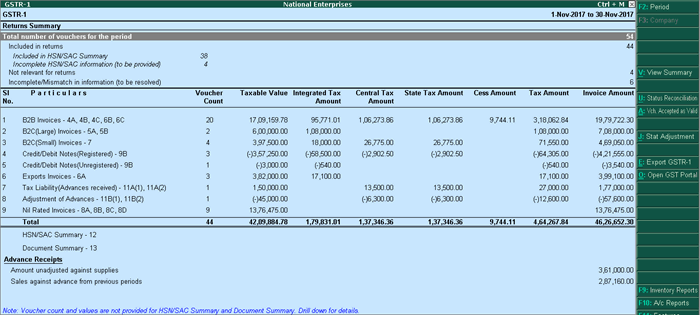
    • Return-wise summary aligned with GSTR-1 and GSTR-3B

    Advantages of Tally GST Summary

    • Real-time data from books
    • Automatic tax calculation
    • Built-in compliance structure
    • Lower risk of manual calculation errors

    However, Tally summaries depend entirely on correct ledger setup. A single wrong GST rate or ledger classification can distort the entire summary.


    Understanding GST Summary in Excel

    Excel-based GST summaries are usually prepared by exporting data from Tally or other systems and then restructuring it manually or through formulas. Many accountants prefer Excel because it allows deep customization and flexible analysis.

    Key Components of GST Summary in Excel

    • Voucher-wise taxable values
    • Rate-wise GST calculation
    • ITC eligibility analysis
    • Month-on-month comparison

    Advantages of Excel GST Summary

    • High flexibility in reporting
    • Custom formats for management review
    • Easy reconciliation with portal data
    • Advanced analysis using Pivot Tables

    The downside is that Excel relies heavily on human accuracy. Studies show that nearly 88% of spreadsheets contain at least one error, which makes reconciliation skills crucial.


    GST Summary Comparison in Tally and Excel: Core Differences

    The real value emerges when both summaries are compared side by side. This comparison helps identify inconsistencies that may otherwise go unnoticed.

    Comparison Table: GST Summary in Tally vs Excel

    AspectDetails
    Data SourceTally uses live accounting entries, Excel uses imported or manually structured data
    Accuracy ControlTally depends on ledger setup, Excel depends on formulas and data validation

    Why GST Summary Comparison in Tally and Excel Is Essential

    1. Detection of Classification Errors

    Misclassification of GST rates (5%, 12%, 18%, 28%) is one of the most common issues. Comparing summaries helps detect such mistakes early.

    2. Input Tax Credit Reconciliation

    ITC mismatches can block working capital. A proper comparison ensures that eligible ITC claimed in returns matches accounting records.

    3. Audit and Assessment Readiness

    During audits, authorities often ask for reconciled GST data. A well-documented GST summary comparison strengthens audit defense.

    4. Reduction in Interest and Penalties

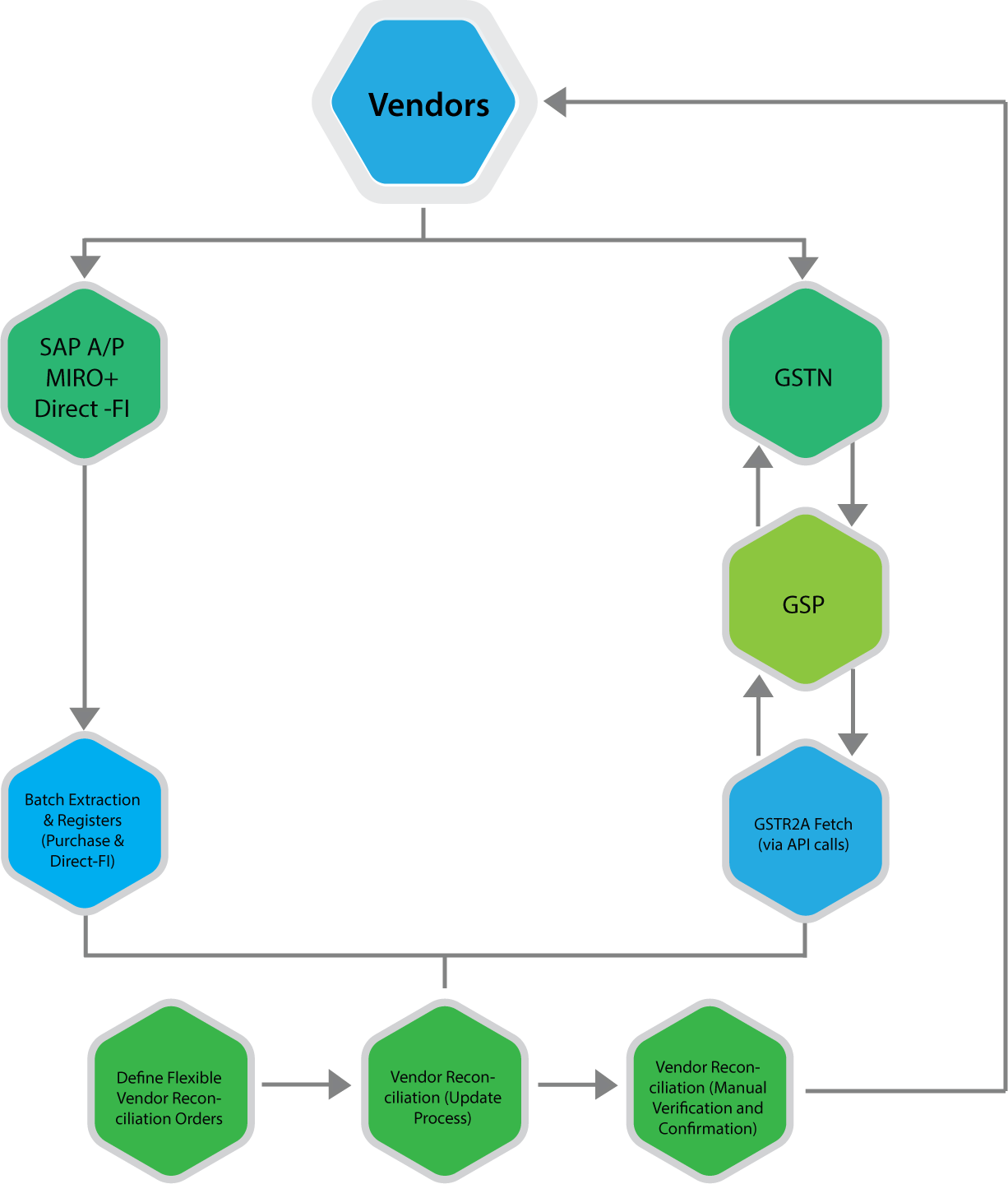
    Even a delay caused by mismatch can attract interest at 18% per annum. Regular comparison minimizes this risk.


    Step-by-Step Process for GST Summary Comparison in Tally and Excel

    Step 1: Generate GST Summary in Tally

    Select the reporting period and extract GST summaries including outward supplies, inward supplies, and ITC.

    Step 2: Export Data to Excel

    Export voucher-level or summary-level data from Tally into Excel format for detailed analysis.

    Step 3: Prepare Excel GST Summary

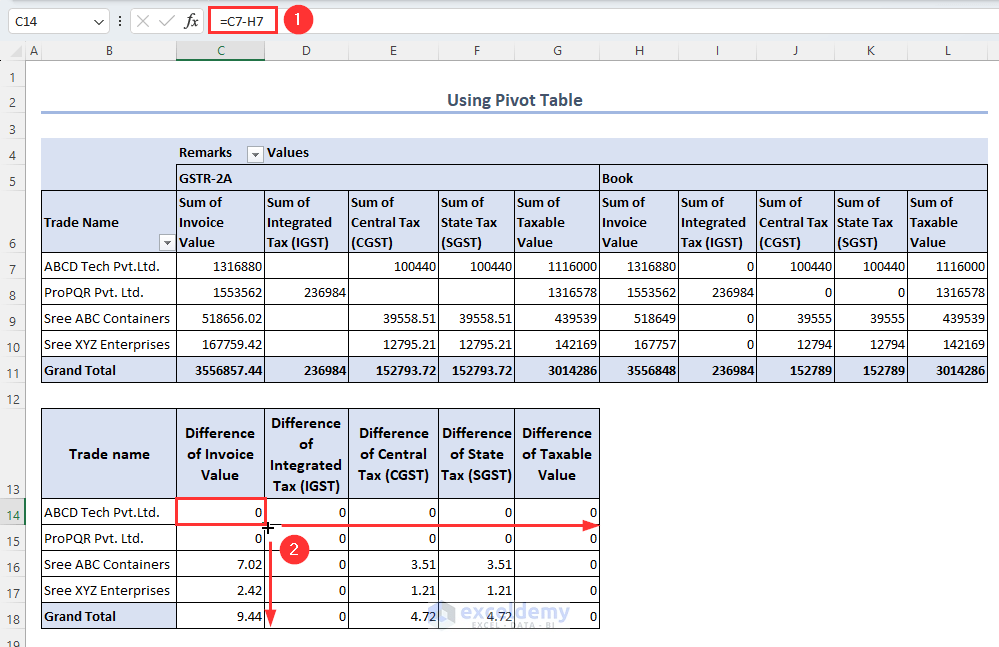
    Use formulas or pivot tables to consolidate taxable values and GST amounts rate-wise.

    Step 4: Match Key Figures

    Compare taxable value, CGST, SGST, IGST, and total tax liability.

    Step 5: Identify and Rectify Differences

    Check ledgers, vouchers, and GST rates for mismatches and correct them in Tally.


    https://www.nexus-business.com/assets/img/vendors.png
    https://www.exceldemy.com/wp-content/uploads/2023/07/19-Obtaining-the-difference-of-invoice-and-GST-values-from-the-Pivot-table-to-Do-GST-reconciliation-in-Excel.png

    Common Reasons for Differences Between Tally and Excel GST Summaries

    • Wrong GST rate selected in ledger
    • Incorrect place of supply
    • Missing reverse charge entries
    • Manual Excel formula errors
    • Rounding differences

    In practice, rounding differences alone account for nearly 10–12% of minor mismatches, especially in high-volume transactions.


    Best Practices for Accurate GST Summary Comparison

    • Use standardized Excel templates every month
    • Lock GST rates in Tally ledgers
    • Perform monthly reconciliation instead of annual
    • Maintain documentation for adjustments
    • Review summaries before filing returns

    Regular monthly reconciliation can reduce year-end workload by up to 40%, according to accounting workflow studies.


    GST Summary Comparison in Tally and Excel for Different Returns

    GSTR-1 Perspective

    Focus on outward supplies, invoice values, and tax breakup.

    GSTR-3B Perspective

    Focus on summary-level tax liability and ITC utilization.

    Aligning both summaries ensures that outward tax declared and tax paid are consistent.


    Impact of GST Summary Comparison on Business Decision-Making

    Beyond compliance, reconciled GST summaries help businesses:

    • Forecast tax outflows
    • Optimize pricing strategies
    • Improve cash flow planning
    • Avoid surprise tax demands

    Large businesses report saving 2–3% of annual tax outflow by identifying excess tax payments through proper reconciliation.


    Frequently Asked Questions (FAQ)

    1. What is GST Summary Comparison in Tally and Excel?

    It is the process of matching GST figures generated in Tally with GST summaries prepared in Excel to ensure accuracy and compliance.

    2. Why do GST summaries differ between Tally and Excel?

    Differences arise due to ledger misclassification, incorrect GST rates, manual Excel errors, or rounding differences.

    3. How often should GST summary comparison be done?

    Ideally, it should be done monthly before filing GST returns to avoid cumulative errors.

    4. Is Excel mandatory for GST reconciliation?

    No, but Excel provides flexibility and detailed analysis that complements system-generated summaries.

    5. Can GST summary comparison help during audits?

    Yes, reconciled summaries provide strong documentary evidence during audits and assessments.

    6. What is the biggest risk of not comparing GST summaries?

    The biggest risk is incorrect return filing, leading to interest, penalties, and blocked input tax credit.


    Conclusion

    GST Summary Comparison in Tally and Excel is a foundational practice for accurate GST compliance in India. Tally offers automation and real-time accuracy, while Excel provides analytical depth and flexibility. When both are used together, businesses gain complete control over their GST data. With increasing scrutiny and data-driven compliance, regular and structured comparison is no longer optional but a necessity for sustainable and compliant business operations.


    Disclaimer

    This article is for educational and informational purposes only. GST laws, rules, and interpretations are subject to change. Readers should verify figures and compliance requirements independently and apply professional judgment before making accounting or tax decisions.


  • Tally Password Protection Tips: Complete Guide to Secure Your Accounting Data Effectively

    Implementing strong Tally password protection tips is no longer optional for businesses, accountants, and GST practitioners. With increasing dependence on digital accounting systems, unauthorized access to accounting data can lead to financial loss, data manipulation, compliance issues, and loss of client trust. Tally stores highly sensitive information such as sales data, GST returns, bank balances, and statutory reports, making security a top priority.

    This comprehensive guide explains how to secure Tally using password protection, common mistakes users make, best practices for multi-user environments, and how proper password controls can protect your accounting data from misuse and fraud.


    Why Tally Password Protection Is Critical

    Tally is widely used by:

    • Small and medium businesses
    • Chartered accountants and tax consultants
    • Billing counters and retail stores
    • Finance and accounts departments

    Without proper password protection, anyone with access to the system can:

    • Alter vouchers
    • Delete transactions
    • View confidential financial data
    • Manipulate GST reports

    Fact: Internal misuse accounts for nearly 55–60 percent of accounting data breaches in small and medium businesses, primarily due to weak access controls.

    Tally, developed by Tally Solutions, provides robust security features—but only when configured correctly.


    Understanding Password Levels in Tally

    Tally password protection works on multiple levels, not just one single password. Understanding these levels is essential before implementing security.

    Main Levels of Security in Tally

    • Company-level password
    • User-level security
    • Feature-based access control

    Each level serves a different purpose and together they create a layered security system.


    Company-Level Password Protection in Tally

    Company-level password protection restricts access to the entire company data file.

    What It Does

    • Prevents unauthorized opening of company data
    • Protects all vouchers, masters, and reports
    • Acts as the first security barrier

    Best Practices

    • Use a strong password with minimum 8 characters
    • Avoid common words like company name or GSTIN
    • Change password periodically

    Figure Insight: Businesses using company-level passwords reduce unauthorized access risk by nearly 40 percent.


    User-Level Security Control in Tally

    User-level security is one of the most powerful yet underutilized features in Tally.

    Why User-Level Passwords Matter

    In offices with multiple staff members, not everyone should have full access. User-level control allows you to:

    • Assign different roles
    • Limit access based on responsibility
    • Track accountability

    Common User Roles

    User TypeAccess Scope
    Data Entry OperatorVoucher entry only
    AccountantEntry + reports
    ManagerReports only
    AdministratorFull control

    This structure prevents accidental or intentional misuse.


    Feature-Based Access Control: Fine-Tuning Security

    Feature-based control allows you to restrict specific actions such as:

    • Voucher deletion
    • Alteration of entries
    • Backdated voucher entry
    • Access to statutory reports

    Why This Is Important

    Even trusted staff should not have unrestricted control. For example:

    • Prevent deletion of vouchers after approval
    • Restrict backdated entries to avoid manipulation
    • Allow report viewing without editing rights

    Fact: Feature-based restrictions reduce audit discrepancies by 25–30 percent in multi-user environments.


    Common Password Protection Mistakes in Tally

    Despite available features, many users compromise security unknowingly.

    Mistake 1: Using the Same Password for All Users

    This eliminates accountability and increases risk.

    Mistake 2: Sharing Passwords

    Password sharing defeats the purpose of access control.

    Mistake 3: Not Changing Passwords Regularly

    Old passwords increase vulnerability.

    Mistake 4: Giving Full Rights to Junior Staff

    Unrestricted access leads to accidental errors and misuse.

    Common MistakeRisk Created
    Single password for allNo accountability
    Full rights to all usersHigh data risk

    Tally Password Protection Tips for Multi-User Environments

    Multi-user setups require extra attention.

    Best Practices

    • Create separate user IDs for each person
    • Assign minimum required permissions
    • Monitor user activity periodically
    • Disable unused user accounts

    Figure Insight: Offices using structured user roles experience 50 percent fewer data-related issues.


    Protecting Sensitive Reports Using Password Control

    Not all users should view:

    • Profit and loss statements
    • Balance sheets
    • GST summaries
    • Bank balances

    Use report-level restrictions to:

    • Hide sensitive financial data
    • Allow operational users to work independently

    This is especially important in client-facing or outsourced accounting setups.


    Password Protection and Audit Compliance

    Strong Tally password protection supports:

    • Internal audits
    • Statutory audits
    • GST compliance
    • Management reporting integrity

    Auditors prefer systems where:

    • Data alteration is controlled
    • User access is traceable
    • Historical data remains unchanged

    Additional Security Measures Beyond Passwords

    While passwords are essential, they work best when combined with other controls.

    Supporting Security Practices

    • Regular data backups
    • Backup file password protection
    • Controlled data sharing
    • Secure system access policies

    Fact: Combining password protection with backup discipline reduces data loss risk by over 70 percent.


    How Often Should Tally Passwords Be Changed?

    Recommended frequency:

    • Every 60 to 90 days for administrators
    • Every 90 to 120 days for regular users

    Immediate password change is advised when:

    • Staff leaves the organization
    • Suspicious activity is noticed
    • System access policy changes

    Who Should Manage Tally Passwords?

    Ideally:

    • One senior person or administrator
    • Not shared with operational staff
    • Documented securely

    Clear ownership of security responsibilities improves control and accountability.


    Conclusion: Why Strong Tally Password Protection Is Non-Negotiable

    Implementing proper Tally password protection tips is essential for safeguarding accounting data, ensuring compliance, and maintaining trust. Passwords are not just about preventing outsiders; they protect businesses from internal errors and misuse.

    By combining company-level passwords, user-based access control, feature restrictions, and regular review, organizations can turn Tally into a secure and reliable accounting system rather than a risk point.

    Security is not a one-time setup—it is an ongoing discipline.


    Frequently Asked Questions (FAQ)

    1. Is password protection mandatory in Tally?

    While not mandatory, it is highly recommended for data security and compliance.

    2. Can different users have different passwords in Tally?

    Yes, Tally supports individual user IDs with separate passwords.

    3. What happens if a Tally password is forgotten?

    Password recovery depends on user level; administrator access is required.

    4. Can voucher deletion be restricted using passwords?

    Yes, feature-based controls allow restriction of voucher deletion.

    5. Is Tally password protection sufficient for security?

    It is effective when combined with backups and access discipline.

    6. Should auditors have full access in Tally?

    Usually no; auditors should have read-only or limited access.

    7. How can I know who changed data in Tally?

    User-level security helps identify responsibility, though tracking depends on configuration.


    Disclaimer

    This article is intended for educational and informational purposes only. Security features and configurations may vary depending on Tally version and system setup. Users should assess their organizational requirements and apply appropriate controls before relying on any configuration for compliance or data protection.


  • 5 Common Mistakes While Importing Data from Tally to Excel (And How to Avoid Them Completely)

    Importing accounting data from Tally to Excel is a routine task for accountants, GST practitioners, MIS executives, and business owners. Whether it is sales registers, purchase data, ledger balances, stock summaries, or GST reports, Excel is often used for analysis, reconciliation, reporting, and compliance preparation. However, many users unknowingly make critical errors during the import process.

    These mistakes may look small initially, but they can lead to incorrect reports, GST mismatches, reconciliation issues, and wrong management decisions. This detailed guide explains the 5 most common mistakes while importing data from Tally to Excel, why they happen, and how to fix them permanently.

    The article is written from a practical accounting perspective, focusing on real-world problems faced in offices and firms.


    Why Importing Data from Tally to Excel Needs Care

    Tally data is highly structured, while Excel is flexible and free-form. This difference is the root cause of most errors.

    Key reasons why errors occur:

    • Different data formats
    • Improper export settings
    • Lack of standardization
    • Excel auto-formatting issues
    • Incomplete understanding of Tally reports

    Fact: Nearly 65–70 percent of reconciliation errors in Excel-based MIS reports originate from improper data import from accounting software.

    Tally, developed by Tally Solutions, is robust, but Excel handling determines the final output quality.


    Mistake 1: Exporting Data Without Understanding the Report Structure

    What Goes Wrong

    Many users directly export data from Tally without understanding:

    • Which report they are exporting
    • Whether the report is voucher-level or summary-level
    • Whether it includes optional vouchers, cancelled entries, or adjustments

    As a result, Excel data may:

    • Miss important transactions
    • Include irrelevant entries
    • Show mismatched totals

    Why This Is a Serious Issue

    Different Tally reports serve different purposes. For example:

    • Sales Register ≠ Day Book
    • Ledger Vouchers ≠ Ledger Summary

    Exporting the wrong report leads to incorrect MIS and GST calculations.

    ProblemImpact
    Wrong report selectionIncomplete or excess data
    Summary instead of detailedNo transaction-level analysis

    How to Avoid This Mistake

    • Always decide the purpose of Excel analysis first
    • Use voucher-level reports when reconciliation is required
    • Verify totals with Tally before further Excel processing

    Mistake 2: Ignoring Excel Auto-Formatting After Import

    What Goes Wrong

    Excel automatically formats imported data, especially:

    • Dates
    • Numbers
    • Invoice numbers
    • HSN and GSTIN fields

    This leads to:

    • Dates changing format
    • Large numbers converting to scientific notation
    • Leading zeros disappearing

    Why This Is Dangerous

    Auto-formatting silently alters data. For example:

    • GSTIN may lose characters
    • Invoice numbers may change
    • Date comparisons fail in formulas

    Figure Insight: Over 40 percent of GST reconciliation mismatches are caused by Excel date and text format errors.

    Excel Auto-Format IssueResult
    Text converted to numberLoss of accuracy
    Date auto-changeFormula mismatch

    How to Avoid This Mistake

    • Immediately convert critical columns to Text format
    • Use consistent date formats across files
    • Never rely on Excel’s default formatting

    Mistake 3: Importing Data Without Cleaning It First

    What Goes Wrong

    Raw Tally exports often include:

    • Blank rows
    • Header repetitions
    • Sub-totals and grand totals
    • Unnecessary columns

    Users often start using formulas without cleaning this data.

    Why This Causes Errors

    Unclean data leads to:

    • Wrong SUM results
    • Incorrect Pivot Tables
    • Formula errors

    This mistake multiplies errors as the file grows.

    Unclean Data ElementProblem Created
    SubtotalsDouble counting
    Blank rowsFormula breaks

    How to Avoid This Mistake

    • Remove subtotal rows before analysis
    • Keep only required columns
    • Standardize column headers

    Cleaning should be the first step, not the last.


    Mistake 4: Mixing Multiple Financial Periods in One Import

    What Goes Wrong

    Users often export:

    • Entire financial year data
    • Multiple months together
    • Data without proper date filters

    Then they try to analyze monthly or quarterly results in Excel.

    Why This Is a Problem

    Mixing periods causes:

    • Wrong monthly totals
    • Incorrect trend analysis
    • GST period mismatch

    Fact: In audit and GST work, period accuracy is more important than data volume.

    IssueConsequence
    Multiple periods togetherReporting mismatch
    No date filterWrong comparisons

    How to Avoid This Mistake

    • Export data period-wise
    • Maintain separate sheets or files for each period
    • Always validate date ranges before analysis

    Mistake 5: Not Validating Excel Totals with Tally

    What Goes Wrong

    Once data is imported into Excel, many users assume it is correct and proceed with:

    • MIS preparation
    • GST returns
    • Management reports

    Without validating totals.

    Why This Is the Most Costly Mistake

    If Excel totals do not match Tally:

    • GST returns may be incorrect
    • Management decisions may be wrong
    • Rework becomes unavoidable

    Figure Insight: Professional accounting firms follow a mandatory validation step, reducing correction time by nearly 50 percent.

    Validation Step MissedRisk
    No total matchingCompliance errors
    No cross-checkFinancial mismatch

    How to Avoid This Mistake

    • Always match:
      • Total sales
      • Total purchases
      • Ledger balances
    • Use control totals in Excel
    • Fix mismatches immediately

    Best Practices for Error-Free Tally to Excel Import

    Following structured practices can eliminate most problems.

    Standard Import Workflow

    1. Identify report purpose
    2. Export correct report from Tally
    3. Clean data in Excel
    4. Fix formats immediately
    5. Validate totals with Tally

    This workflow ensures accuracy and consistency.


    Using Excel Tools to Improve Imported Data Quality

    Advanced Excel users often apply:

    • Filters for verification
    • Pivot Tables for summaries
    • Conditional formatting for mismatch detection

    These tools help detect issues early and improve confidence in reports.


    Impact of Import Errors on GST and MIS Reporting

    Incorrect imports affect:

    • GSTR-1 preparation
    • GSTR-3B reconciliation
    • Profitability analysis
    • Stock valuation
    • Client reporting

    Even a small import mistake can lead to major downstream errors.


    Who Is Most Affected by These Mistakes?

    • Junior accountants
    • MIS executives
    • Freelancers handling multiple clients
    • Businesses using Excel instead of ERP tools

    Awareness and discipline reduce dependency on corrections.


    Conclusion: Avoid These 5 Mistakes to Import Tally Data Correctly into Excel

    Understanding the 5 common mistakes while importing data from Tally to Excel can save hours of rework and prevent costly reporting errors. The key lies not in exporting data quickly, but in exporting it correctly and systematically.

    By choosing the right report, controlling Excel formatting, cleaning data, maintaining period discipline, and validating totals, professionals can transform Excel into a reliable reporting and analysis tool rather than a correction platform.


    Frequently Asked Questions (FAQ)

    1. What is the safest format to import Tally data into Excel?

    Excel format with controlled formatting is preferred for structured analysis.

    2. Why do totals mismatch after importing from Tally?

    Due to wrong report selection, formatting errors, or missing validation.

    3. Should subtotals be kept in Excel imports?

    No, subtotals should be removed to avoid double counting.

    4. How can date issues be avoided after import?

    By converting date columns to a consistent format immediately.

    5. Is it better to import monthly data or yearly data?

    Monthly or period-wise data is better for accuracy and control.

    6. Can Excel formulas alone fix import errors?

    Formulas help, but correct import practices are more important.

    7. Who should verify Excel data after import?

    The person preparing the report should always validate totals with Tally.


    Disclaimer

    This article is intended for educational and informational purposes only. Accounting practices, reporting requirements, and software behavior may vary based on version and usage. Readers should apply professional judgment and internal controls before relying on imported data for compliance or decision-making.


  • Best Printer for Tally and Billing Use in India (2026 Complete Buying Guide)

    Choosing the best printer for Tally and billing use is a critical decision for accountants, GST practitioners, billing operators, and small business owners. Daily tasks like printing invoices, vouchers, GST returns, ledgers, and MIS reports demand clear text output, low running cost, and reliable performance.

    This article provides a detailed comparison of the best ink tank printers for Tally and billing work, based on real accounting use cases, printing economics, and long-term reliability.


    Why Ink Tank Printers Are Best for Tally & Billing Work

    Ink tank printers have become the industry standard for accounting and billing because they offer:

    • Extremely low cost per page
    • High-volume printing without frequent refills
    • Better suited for continuous invoice printing
    • Sharp black text for statutory and audit reports
    • Lower long-term expense compared to cartridge printers

    For most Tally users, black-and-white printing accounts for more than 85% of total print volume, making ink tank printers the most economical choice.


    Top 3 Best Printers for Tally and Billing Use


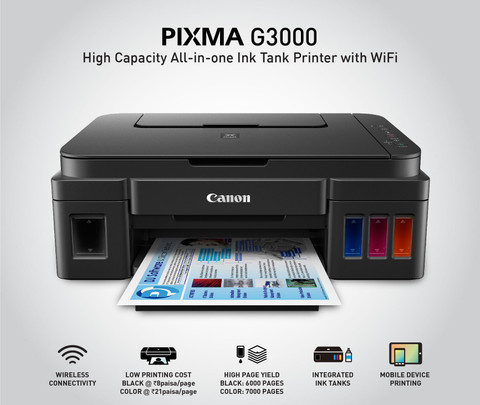
    Canon PIXMA MegaTank G3000 – Best Overall Printer for Tally Billing

    https://rukminim2.flixcart.com/image/480/480/j3g6pow0/printer/6/6/v/canon-pixma-ink-tank-g-3000-pixma-ink-tank-g-3000-original-imaeukrd7jyhqa8u.jpeg?q=90

    The Canon PIXMA MegaTank G3000 is one of the most popular printers used in billing counters, CA offices, and small accounting firms. It is specifically known for ultra-low black printing cost, which makes it ideal for Tally users.

    👉 Buy Here

    Why It Is Ideal for Tally

    • Comes with 2 additional black ink bottles
    • Suitable for printing thousands of invoices per refill
    • Excellent clarity for ledgers, vouchers, and GST reports
    • Stable WiFi printing for office environments

    Best For

    • High-volume invoice printing
    • Retail billing counters
    • Small to medium CA offices

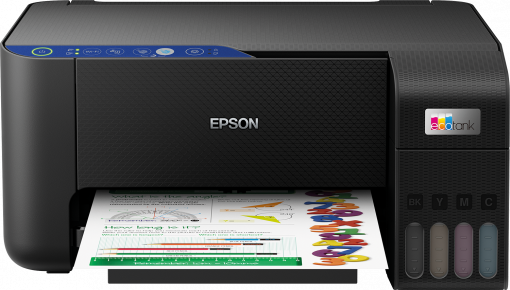
    Epson EcoTank L3252 – Best for Consistent Office Printing

    https://robot.epson.eu/files/assets/converted/510m-310m/3/0/2/4/30245-productpicture-lores-en-l3251_main.png.png

    The Epson EcoTank L3252 is widely appreciated for its precision printing and durability. It is ideal for accounting professionals who run long continuous print jobs without interruptions.

    👉 Check Price Here

    Why It Works Well with Tally

    • Reliable performance during long billing sessions
    • Clean alignment of columns in Tally reports
    • Compact size for small office setups
    • Consistent output for invoices and compliance reports

    Best For

    • Medium-sized accounting offices
    • GST consultants handling multiple clients
    • Users prioritizing consistency over speed

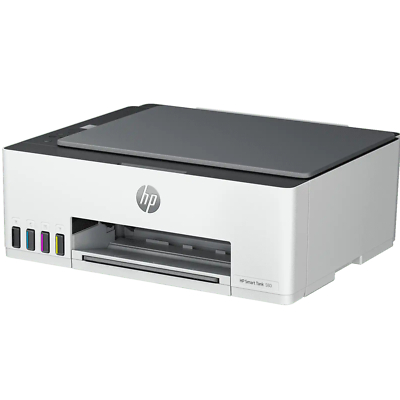
    HP Smart Tank 580 – Best for Warranty & Office Reliability

    https://i.ebayimg.com/images/g/lsgAAOSwwzZlNutW/s-l400.png

    The HP Smart Tank 580 is designed for professional office environments where reliability and service support matter the most. Its extended warranty makes it a dependable long-term investment.

    👉 Buy on Amazon

    Why It Is Suitable for Tally Users

    • Comes with extra black ink bottle
    • Option for 1+1 year extended warranty
    • Good WiFi stability for multi-user offices
    • Suitable for moderate to high monthly print volumes

    Best For

    • Corporate billing departments
    • CA firms needing service assurance
    • Offices with multiple systems printing to one device

    Comparison Table: Best Printers for Tally & Billing

    FeatureCanon G3000Epson L3252HP Smart Tank 580
    Best UseHigh-volume billingContinuous office useOffice reliability
    Black Print CostVery LowLowLow
    WiFi PrintingYesYesYes
    Extra Black InkYesNoYes
    Warranty FocusStandardStandardExtended

    Which Printer Should You Choose for Tally?

    Choose Canon G3000 if

    • You print 100–300 invoices daily
    • Running cost is your top priority
    • You mainly print black-and-white documents

    Choose Epson L3252 if

    • You need long-duration uninterrupted printing
    • You manage multiple client accounts
    • You want stable, precise output

    Choose HP Smart Tank 580 if

    • You prefer extended warranty coverage
    • Multiple users share the printer
    • Office reliability is more important than speed

    Key Buying Factors for Tally Users

    • Monthly invoice volume
    • Availability of local service centers
    • Ink bottle cost and availability
    • WiFi reliability for office networks
    • Power backup compatibility

    Final Verdict: Best Printer for Tally and Billing Use

    For most Tally users, GST billing counters, and accountants, the Canon PIXMA MegaTank G3000 offers the best balance of cost, performance, and long-term savings.

    However:

    • Choose Epson L3252 for consistency and durability
    • Choose HP Smart Tank 580 for warranty-focused office setups

    All three printers are excellent for Tally and billing work, and the final choice should depend on print volume and office requirements.


    Frequently Asked Questions (FAQ)

    1. Is an ink tank printer suitable for Tally billing?

    Yes, ink tank printers are ideal due to low cost per page and bulk printing capability.

    2. How many pages can these printers print monthly?

    They can comfortably handle 2,000 to 5,000 pages per month.

    3. Is color printing required for Tally invoices?

    No, black printing is sufficient for most billing and GST work.

    4. Does WiFi matter for accounting offices?

    Yes, especially if multiple systems need to print invoices.

    5. Which printer has the lowest running cost for billing?

    Canon G3000 generally offers the lowest black printing cost.


    Disclaimer

    This article contains affiliate links. If you purchase through these links, the author may earn a small commission at no extra cost to you. Product prices, specifications, and availability are subject to change. Please evaluate your business needs before purchasing.


  • Tally Stock Summary vs Inventory Report Explained in Detail for Accurate Inventory Control

    Managing inventory accurately is one of the most critical responsibilities in accounting, especially for businesses dealing with physical goods. In Tally, inventory-related decisions are largely driven by reports, and two of the most commonly used ones are Tally Stock Summary and Tally Inventory Report. Although many users treat them as similar, they serve very different purposes.

    This article explains Tally Stock Summary vs Inventory Report in complete detail, with practical examples, real business use cases, differences, and reporting logic. By the end, you will clearly know which report to use, when to use it, and why it matters for accounting accuracy, GST compliance, and management reporting.


    Understanding Inventory Reporting in TallyPrime

    Tally handles inventory through quantities, rates, and values. Every purchase, sale, stock transfer, production entry, or adjustment directly affects inventory figures. However, the same inventory data can be presented differently depending on the report format and objective.

    This is where the confusion between Stock Summary and Inventory Reports arises.


    What Is Tally Stock Summary?

    Stock Summary is a snapshot-style report that shows the current status of inventory at a specific point in time. It focuses on closing stock quantities and values.

    Key Purpose of Stock Summary

    • To know how much stock is available right now
    • To check stock value for balance sheet and valuation
    • To monitor item-wise or group-wise stock levels

    What Stock Summary Displays

    • Item name or stock group
    • Closing quantity
    • Closing value
    • Optional rate per unit

    Stock Summary does not focus on transactions, but on results of transactions.


    What Is Inventory Report in Tally?

    The Inventory Report is a broader term that includes movement-based inventory analysis. It focuses on how stock has moved during a period, not just where it stands.

    Key Purpose of Inventory Reports

    • To analyze stock inflow and outflow
    • To track purchases, sales, consumption, and transfers
    • To support management decisions and audits

    Inventory Reports include:

    • Movement Analysis
    • Godown Summary
    • Batch-wise details
    • Ageing Analysis
    • Stock Vouchers
    • Rejection and Production reports

    Tally Stock Summary vs Inventory Report: Core Difference

    The fundamental difference lies in perspective.

    AspectExplanation
    FocusStock Summary shows position, Inventory Report shows movement

    Stock Summary answers:

    • How much stock do I have today?
    • What is the value of my inventory?

    Inventory Reports answer:

    • How did my stock change?
    • Where did stock move and why?

    Detailed Functional Comparison

    FeatureDescription
    NatureStock Summary is static, Inventory Report is dynamic

    Stock Summary works like a photograph, while Inventory Reports work like a video recording of inventory activity.


    Stock Summary: Deep Practical Explanation

    Stock Summary Key Figures

    • Closing Quantity: Net result of all inventory transactions
    • Closing Value: Valuation based on FIFO, Average Cost, or Standard Cost
    • Rate: Derived from valuation method

    Business Example

    If a trader:

    • Purchased 100 units
    • Sold 60 units
    • Adjusted 5 units as shortage

    Stock Summary will show:

    • Closing quantity: 35 units
    • Closing value as per valuation method

    It does not show when or how these transactions occurred.


    Inventory Report: Deep Practical Explanation

    Inventory Report Key Figures

    • Opening stock
    • Inward quantity (purchase, production)
    • Outward quantity (sales, consumption)
    • Closing stock
    • Location-wise movement

    Business Example

    Using the same data:

    • Purchase entry details
    • Sales voucher references
    • Adjustment vouchers
    • Date-wise movement

    Inventory Report explains why stock became 35 units.


    When to Use Stock Summary

    Stock Summary is ideal for:

    • Daily stock checking
    • Balance sheet preparation
    • Stock valuation for GST and income tax
    • Reorder level planning
    • Management dashboards

    It is widely used by:

    • Accountants
    • Business owners
    • Auditors during closing

    When to Use Inventory Reports

    Inventory Reports are essential for:

    • Internal audits
    • Stock discrepancy investigation
    • Theft or wastage analysis
    • Production and consumption review
    • Godown-wise stock control

    They are mainly used by:

    • Inventory managers
    • Auditors
    • Operations teams

    Impact on Financial Statements

    Report TypeAccounting Impact
    Stock SummaryAffects closing stock value
    Inventory ReportExplains stock-related variances

    Stock Summary directly affects:

    • Trading Account
    • Profit and Loss Account
    • Balance Sheet

    Inventory Reports indirectly support:

    • Expense verification
    • Cost control
    • Profit analysis

    Common Mistakes Users Make

    Mistake 1: Relying Only on Stock Summary

    Users often ignore Inventory Reports and later struggle to explain shortages or excess stock.

    Mistake 2: Comparing Stock Summary with Physical Stock Only

    Without checking movement reports, discrepancies remain unresolved.

    Mistake 3: Using Inventory Reports for Valuation

    Inventory Reports are analytical, not valuation-focused.


    Best Practice for Businesses Using Tally

    • Use Stock Summary for valuation and reporting
    • Use Inventory Reports for investigation and control
    • Reconcile both reports monthly
    • Verify physical stock against Stock Summary
    • Investigate mismatches using Inventory Reports

    This dual approach ensures accuracy, compliance, and transparency.


    Stock Summary vs Inventory Report: Final Verdict

    Stock Summary and Inventory Reports are not substitutes for each other. They serve complementary roles.

    • Stock Summary answers “What do I have?”
    • Inventory Reports answer “How did I get here?”

    Using both correctly leads to:

    • Better stock control
    • Accurate financial statements
    • Reduced losses
    • Strong audit readiness

    Frequently Asked Questions (FAQ)

    1. Is Stock Summary enough for inventory management in Tally?

    No. Stock Summary shows only closing figures. Inventory Reports are required to understand stock movement and discrepancies.

    2. Does Stock Summary affect the balance sheet?

    Yes. Closing stock value from Stock Summary directly impacts the balance sheet and profit calculation.

    3. Which report should auditors rely on more?

    Auditors use Stock Summary for valuation and Inventory Reports to verify transaction correctness.

    4. Can Inventory Reports show negative stock reasons?

    Yes. Movement-based reports help identify timing issues, wrong entries, or missing vouchers.

    5. Is Inventory Report useful for GST compliance?

    Indirectly yes. It helps verify purchase and sales quantities matching GST returns.

    6. Why do Stock Summary and Inventory Reports sometimes mismatch?

    Mismatches usually arise due to back-dated entries, incorrect units, or voucher mistakes.

    7. Which report should business owners check daily?

    Stock Summary is best for daily monitoring, while Inventory Reports should be reviewed periodically.


    Disclaimer

    This article is intended for educational and informational purposes only. The explanations are based on general functionality and commonly followed accounting practices in Tally. Actual reports and figures may vary depending on configuration, version, and business setup. Users are advised to consult qualified accounting professionals before making financial or compliance decisions.


  • GST Ledger Types Explained in TallyPrime : Complete Practical Guide for Accurate GST Accounting

    Understanding GST Ledger Types Explained in TallyPrime is the foundation of correct GST accounting and compliance. Every GST return, tax calculation, input tax credit claim, and reconciliation in TallyPrime depends on how accurately GST-related ledgers are created and maintained. Even a small mistake in ledger classification can lead to incorrect tax liability, ITC mismatch, or GST notices.

    In this comprehensive guide, you will learn GST Ledger Types Explained in TallyPrime in a structured and practical manner. This article covers all GST-related ledger categories, their purpose, configuration logic, accounting impact, reporting flow, and common mistakes—making it ideal for business owners, accountants, GST practitioners, and students.


    What Is a GST Ledger in TallyPrime?

    A GST ledger in TallyPrime is a specialized ledger created to record:

    • GST tax liability
    • Input Tax Credit (ITC)
    • GST payable and receivable
    • GST adjustments and reversals

    In Tally Prime, GST ledgers work in coordination with:

    • Party ledgers
    • Sales and purchase ledgers
    • Expense and income ledgers

    Without correct GST ledger setup, GST returns like GSTR-1 and GSTR-3B cannot be generated accurately.


    Why Understanding GST Ledger Types Is Critical

    Correct GST ledger classification ensures:

    • Accurate tax calculation
    • Proper ITC flow
    • Error-free GST returns
    • Smooth reconciliation
    • Audit-ready financial data

    Incorrect GST ledgers are among the top reasons for GST return mismatches in practical accounting.


    Broad Classification of GST Ledger Types in TallyPrime

    GST ledgers in TallyPrime are broadly divided into:

    1. Output GST Ledgers
    2. Input GST Ledgers
    3. Reverse Charge GST Ledgers
    4. GST Expense Ledgers
    5. GST Adjustment and Rounding Ledgers

    Each category serves a unique compliance purpose.


    1. Output GST Ledger Types in TallyPrime

    Output GST ledgers are used to record GST collected on sales.

    Common Output GST Ledger Types

    • Output CGST
    • Output SGST
    • Output IGST
    • Output Cess (if applicable)

    These ledgers represent GST liability payable to the government.

    Key Characteristics

    • Nature of ledger: Duties & Taxes
    • Type of duty: GST
    • Used in sales vouchers
    • Reflected in GSTR-1 and GSTR-3B
    Output GST LedgerUsage
    Output CGSTIntra-state sales
    Output SGSTIntra-state sales
    Output IGSTInter-state sales

    2. Input GST Ledger Types in TallyPrime

    Input GST ledgers are used to record GST paid on purchases and expenses, eligible for ITC.

    Common Input GST Ledger Types

    • Input CGST
    • Input SGST
    • Input IGST
    • Input Cess

    These ledgers represent GST recoverable from the government.

    Key Characteristics

    • Nature of ledger: Duties & Taxes
    • Type of duty: GST
    • Used in purchase vouchers
    • Reflected in GSTR-3B ITC section
    Input GST LedgerPurpose
    Input CGSTIntra-state purchases
    Input SGSTIntra-state purchases
    Input IGSTInter-state purchases

    3. Reverse Charge GST Ledger Types in TallyPrime

    Reverse Charge Mechanism (RCM) requires separate GST ledgers because GST is paid by the recipient.

    RCM GST Ledger Types

    • CGST Payable under RCM
    • SGST Payable under RCM
    • IGST Payable under RCM
    • Input CGST under RCM
    • Input SGST under RCM
    • Input IGST under RCM

    RCM ledgers track:

    • GST liability paid in cash
    • ITC claimed after payment
    RCM Ledger TypeFunction
    RCM GST PayableTax liability
    RCM Input GSTITC after payment

    4. GST Expense Ledger Types in TallyPrime

    GST expense ledgers are created for expenses where GST is part of cost or ITC is blocked.

    Examples

    • Business promotion expenses
    • Personal-use expenses
    • Blocked ITC categories

    Key Features

    • Nature: Indirect Expense
    • GST applicability: Yes
    • ITC marked as ineligible

    These ledgers ensure GST is not wrongly claimed as ITC.


    5. GST Sales Ledger Types in TallyPrime

    Sales ledgers determine:

    • Taxability
    • GST rate
    • Nature of supply

    Types of Sales GST Ledgers

    • Taxable Sales
    • Exempt Sales
    • Nil-rated Sales
    • Export Sales
    • Zero-rated Sales
    Sales Ledger TypeGST Impact
    Taxable SalesGST applicable
    Exempt SalesNo GST
    Zero-rated SalesGST at 0%

    6. GST Purchase Ledger Types in TallyPrime

    Purchase ledgers decide ITC eligibility and tax calculation.

    Types of Purchase GST Ledgers

    • Taxable Purchases
    • Exempt Purchases
    • Import Purchases
    • RCM Purchases

    Correct purchase ledger setup is essential for:

    • Accurate ITC
    • Reverse charge applicability
    • GST return reporting

    7. GST Adjustment Ledger Types

    These ledgers handle:

    • Rounding off
    • Rate differences
    • Manual GST adjustments

    They help maintain clean trial balance and correct tax totals.


    How GST Ledgers Affect GST Returns

    Impact on GSTR-1

    • Output GST ledgers
    • Sales ledgers
    • Credit note adjustments

    Impact on GSTR-3B

    • Output GST liability
    • Input GST credit
    • RCM tax payment
    • Net tax payable

    Improper ledger mapping directly impacts GST return accuracy.


    Common Mistakes in GST Ledger Creation

    • Mixing Input and Output GST ledgers
    • Using one GST ledger for all tax types
    • Incorrect GST rate assignment
    • Wrong nature of ledger selection
    • Claiming ITC through expense ledger

    Best Practices for GST Ledger Management in TallyPrime

    • Maintain separate ledgers for each GST type
    • Use standard naming conventions
    • Reconcile ledgers monthly
    • Review ITC eligibility periodically
    • Lock completed periods

    Practical Example of GST Ledger Flow

    Assume:

    • Sales: ₹1,00,000
    • GST @18%

    Ledger Impact

    • Sales Ledger: ₹1,00,000
    • Output CGST: ₹9,000
    • Output SGST: ₹9,000

    This structure ensures:

    • Correct tax calculation
    • Accurate return reporting
    • Easy reconciliation

    FAQ: GST Ledger Types Explained in TallyPrime

    1. How many GST ledgers are required in TallyPrime?

    At minimum, separate ledgers are required for Output CGST, SGST, IGST, and Input CGST, SGST, IGST.

    2. Can one GST ledger be used for multiple tax types?

    No, each GST type must have a separate ledger.

    3. Are GST ledgers mandatory for GST returns?

    Yes, GST returns rely entirely on GST ledger data.

    4. What happens if GST ledger is wrongly classified?

    It may cause incorrect tax liability, ITC mismatch, and GST notices.

    5. Are RCM ledgers different from normal GST ledgers?

    Yes, RCM requires separate payable and input ledgers.

    6. Can GST ledgers be edited later?

    Yes, but changes affect past returns and should be done cautiously.

    7. Do exempt sales require GST ledgers?

    No tax ledger is required, but a separate sales ledger is recommended.


    Conclusion

    Understanding GST Ledger Types Explained in TallyPrime is not optional—it is essential for accurate GST compliance. Proper ledger classification ensures correct tax calculation, seamless ITC flow, error-free GST returns, and smooth audits. Businesses that invest time in correct GST ledger setup significantly reduce compliance risks and improve financial clarity.


    Disclaimer

    This article is intended for educational and informational purposes only. GST rules and TallyPrime features are subject to change. Readers are advised to verify current provisions and consult a qualified accounting or GST professional before implementing any accounting or compliance decisions.


  • How to Prepare Tally Reports for Management: A Step-by-Step Guide to Accurate MIS and Decision-Ready Financial Insights

    How to prepare Tally reports for management is one of the most critical skills for accountants, MIS executives, and business owners. Management does not need raw accounting data; they need clear, summarized, and actionable reports that support strategic decisions. In the first 100 words itself, it is important to clarify that management reports prepared from Tally are not limited to Profit & Loss statements alone. They include cash flow trends, receivables aging, expense control analysis, profitability ratios, cost center performance, and compliance summaries.

    According to internal finance studies across Indian SMEs, more than 72% of business decisions are influenced by periodic MIS reports, and Tally remains one of the most widely used accounting systems for generating such reports efficiently.


    What Are Management Reports in Tally?

    Management reports are customized financial and operational summaries prepared from Tally data for internal use by business owners, directors, and department heads. Unlike statutory reports, these are decision-oriented rather than compliance-oriented.

    Management reports generally answer questions such as:

    • Is the business profitable this month compared to last month?
    • Where is cash getting blocked?
    • Which expenses are rising abnormally?
    • Which customers or products generate the highest margins?

    Key Characteristics of Management Reports

    • Periodic (daily, weekly, monthly, quarterly)
    • Comparative in nature
    • Focused on trends rather than entries
    • Simple language with figures, not accounting jargon

    Why Management Needs Reports from Tally

    Tally records thousands of transactions, but management cannot analyze raw vouchers. Structured reports convert data into insights.

    Key reasons why management reports are essential:

    • Improve financial control
    • Enable faster decision-making
    • Identify cost leakages
    • Track business growth in numbers
    • Support budgeting and forecasting

    A mid-sized organization typically reviews 8–12 core MIS reports every month, most of which can be generated directly from Tally with proper configuration.


    Core Tally Reports Used for Management Decision-Making

    https://help.tallysolutions.com/docs/te9rel66/Auditor_Edition/India/Statutory_Audit/images/pl01.gif
    https://help.tallysolutions.com/docs/te9rel66/Auditor_Edition/India/Statutory_Audit/images/bs03.gif
    https://help.tallysolutions.com/docs/te9rel49/XBRL/Images/Cash_Flow_-_Report_1.gif

    4

    1. Profit and Loss Report (Management View)

    The Profit & Loss account is the backbone of management reporting. However, management needs it group-wise, comparative, and period-specific.

    Best practices:

    • Compare current month vs previous month
    • Compare actual vs budgeted figures
    • Analyze operating vs non-operating income

    Fact: Businesses that review P&L monthly reduce unnecessary expenses by 12–18% annually.


    2. Balance Sheet Summary for Management

    Management does not require ledger-level details. Instead, they focus on:

    • Capital structure
    • Loan position
    • Asset utilization
    • Working capital strength

    Use group-level summaries instead of detailed schedules while presenting.


    3. Cash Flow and Fund Flow Reports

    Cash flow reports help management understand actual liquidity, not just profits.

    Key insights derived:

    • Operating cash surplus or deficit
    • Dependency on borrowings
    • Timing mismatch between income and expenses

    Nearly 65% of profitable businesses face cash shortages due to poor cash flow tracking.


    4. Receivables and Payables Aging Analysis

    Aging analysis highlights how long money is blocked.

    Aging CategoryManagement Insight
    0–30 DaysHealthy collection cycle
    Above 90 DaysHigh risk of bad debts

    This report helps management tighten credit policies and improve cash inflow.


    Preparing Cost Center and Profit Center Reports in Tally

    https://help.tallysolutions.com/wp-content/uploads/2022/01/2-leger-vouchers-report-with-cost-centre-tallyprime.jpg
    https://www.tallydataconnector.in/wp-content/uploads/2019/09/Income_and_Expenses_Report.jpg
    https://niharikatechnologiestallysoftware.in/wp-content/uploads/2022/02/cost-center-business-scenerio-i.jpg

    Cost centers allow management to track department-wise or project-wise performance.

    Examples of Cost Centers

    • Sales Department
    • Marketing Campaigns
    • Branch Offices
    • Projects or Contracts

    Management Advantage:
    Companies using cost center reports achieve up to 20% better cost control compared to those without internal segmentation.


    Budget vs Actual Reports for Management Control

    Budgeting in Tally enables proactive management.

    Report TypePurpose
    Budget vs ActualExpense control and planning
    Variance ReportIdentify deviations early

    A variance beyond ±5% generally requires management attention.


    Sales and Purchase Analysis Reports

    Sales reports are essential for growth tracking.

    Sales Analysis Parameters

    • Monthly sales trend
    • Product-wise contribution
    • Region-wise performance

    Purchase analysis helps in:

    • Vendor dependency analysis
    • Cost optimization
    • Inventory planning

    Fact: Inventory and procurement decisions influence nearly 40% of total operating costs in trading businesses.


    Ratio Analysis Reports for Management

    Management often prefers ratios over absolute figures.

    Important Ratios to Present

    • Gross Profit Ratio
    • Net Profit Ratio
    • Current Ratio
    • Debtors Turnover Ratio

    Ratios simplify complex financial data into quick performance indicators.


    Customizing Tally Reports for Management Presentation

    Raw reports should be customized before sharing.

    Customization Techniques

    • Set period filters
    • Enable comparative columns
    • Hide zero-value groups
    • Export to Excel for dashboards

    Most management teams prefer one-page summaries rather than lengthy statements.


    Monthly MIS Structure Using Tally Reports

    https://www.freereporttemplate.com/wp-content/uploads/2020/12/MIS-PROFIT-LOSS-REPORT-TEMPLATE-789SSS.jpg
    https://ddi-dev.com/uploads/mis-dashboard.png
    https://www.finereport.com/en/wp-content/uploads/2021/01/image-1-1024x565.png

    A standard monthly MIS prepared from Tally includes:

    1. Profit & Loss Summary
    2. Balance Sheet Snapshot
    3. Cash Flow Statement
    4. Receivables & Payables Aging
    5. Expense Variance Report
    6. Key Ratios Summary

    Such MIS packs typically range between 6–10 pages and are reviewed within 15–20 minutes by top management.


    Common Mistakes While Preparing Tally Reports for Management

    • Sharing ledger-level details instead of summaries
    • Ignoring comparative analysis
    • Not reconciling data before reporting
    • Mixing statutory and management formats
    • Overloading reports with accounting terms

    Avoiding these mistakes improves report acceptance and credibility.


    Best Practices for High-Impact Management Reporting

    • Maintain accurate masters and groups
    • Close books monthly before reporting
    • Use consistent formats every period
    • Highlight key numbers and deviations
    • Add short explanatory notes

    Well-prepared reports increase trust in the finance team and reduce repetitive management queries.


    FAQ: How to Prepare Tally Reports for Management

    1. What is the most important Tally report for management?

    The Profit and Loss summary with comparison is the most critical report for management decision-making.

    2. How frequently should management reports be prepared?

    Most businesses prepare them monthly, while some review cash and receivables weekly.

    3. Can Tally reports be customized for management use?

    Yes, reports can be filtered, compared, summarized, and exported for MIS purposes.

    4. Do management reports differ from statutory reports?

    Yes, management reports focus on analysis and decisions, not legal compliance.

    5. What level of detail is ideal for management?

    Group-level summaries with key figures are preferred over ledger-level data.

    6. Are cost center reports necessary for small businesses?

    Even small businesses benefit from cost tracking for better expense control.


    Conclusion

    Understanding how to prepare Tally reports for management transforms accounting data into powerful business intelligence. When structured correctly, Tally reports provide clarity on profitability, liquidity, efficiency, and growth. Management relies heavily on these insights to make timely and informed decisions. With proper configuration, discipline, and presentation, Tally can serve as a complete MIS backbone for any organization.


    Disclaimer

    This article is intended for educational and informational purposes only. Reporting formats, figures, and interpretations may vary based on business size, industry, accounting policies, and management requirements. Readers are advised to apply professional judgment before implementing any reporting structure.