Category: Finance and Accounting

  • How to Create a LinkedIn Profile for Accounting Jobs That Attracts Recruiters in 2026

    How to create a LinkedIn profile for accounting jobs is one of the most important career questions for students, freshers, and working accountants today. Recruiters increasingly rely on LinkedIn as their primary hiring platform for accounting, finance, MIS, audit, and taxation roles. A well-optimized LinkedIn profile is no longer optional—it works as your digital resume, professional brand, and job-search engine combined.

    This comprehensive guide explains how to create a LinkedIn profile for accounting jobs step by step, focusing on keywords, structure, visibility, and credibility. By following this framework, you can significantly improve profile views, recruiter messages, and interview calls—without paid promotions or external tools.


    Why LinkedIn Matters for Accounting Jobs

    LinkedIn has evolved from a networking site into a full-scale recruitment ecosystem. Recent hiring trends indicate that over 75% of recruiters use LinkedIn to shortlist candidates before posting jobs publicly. For accounting roles, recruiters often filter profiles based on skills, titles, keywords, and experience descriptions.

    Key reasons LinkedIn is critical for accountants:

    • Recruiters search profiles before reviewing resumes
    • Accounting roles rely heavily on skill validation
    • LinkedIn supports keyword-based hiring
    • Profiles rank in internal search results
    • Continuous visibility without active applications

    A strong LinkedIn profile can generate job opportunities even when you are not actively applying.


    Understanding Recruiter Search Behavior on LinkedIn

    Before building your profile, you must understand how recruiters search.

    What Recruiters Look For

    • Job titles (Accounts Executive, Accountant, MIS Executive)
    • Core skills (Excel, GST, Tally, MIS Reporting)
    • Industry experience
    • Certifications and tools
    • Clear, structured profiles

    LinkedIn’s algorithm favors complete, keyword-rich profiles. Profiles with full sections receive up to 40% more profile views than incomplete ones.


    Step 1: Choose the Right Profile Photo for Accounting Jobs

    Your profile photo is the first impression.

    Best Practices for Accountants

    • Professional attire
    • Neutral background
    • Clear face visibility
    • Natural lighting
    • Recent photo

    Profiles with professional photos receive up to 21 times more views than profiles without photos.


    Step 2: Write a Strong Headline for Accounting Jobs

    Your headline is the most important keyword area.

    What a Good Accounting Headline Includes

    • Current role or target role
    • Key accounting skills
    • Industry focus (if any)

    Example Headline Structure

    Accountant | GST & Income Tax | Excel & MIS Reporting | Financial Reconciliation
    

    Avoid generic headlines like “Looking for Opportunities.” Headlines should clearly communicate your professional value.


    Step 3: Craft an SEO-Optimized Summary for Accounting Jobs

    The summary section plays a major role in how to create a LinkedIn profile for accounting jobs effectively.

    How to Structure Your Summary

    • First 3 lines: role + experience + key skills
    • Middle section: responsibilities and achievements
    • Last section: career focus and availability

    Key Summary Tips

    • Use accounting-related keywords naturally
    • Write in first person
    • Keep language professional and simple
    • Avoid copied or generic content

    Profiles with optimized summaries appear more frequently in recruiter searches.


    Step 4: Highlight Accounting Experience Effectively

    The experience section should focus on impact, not just duties.

    Best Practices for Accountants

    • Use clear job titles
    • Mention tools used (Excel, Tally, ERP)
    • Quantify results where possible
    • Focus on accuracy and compliance

    Example Experience Description

    • Prepared monthly MIS reports using Excel
    • Managed GST data reconciliation for 300+ invoices
    • Reduced reporting errors through formula-based validation
    

    This approach shows skill application, not just role description.


    Step 5: Skills Section Optimization for Accounting Jobs

    The skills section directly affects recruiter search results.

    Essential Accounting Skills to Add

    • Financial Accounting
    • GST Compliance
    • Excel Reporting
    • MIS Preparation
    • Reconciliation
    • Accounts Payable/Receivable

    LinkedIn allows up to 50 skills. Profiles with 15+ relevant skills receive significantly higher visibility.


    Skills Priority Table for Accountants

    Skill TypeImportance
    Excel & ToolsHigh
    Accounting ConceptsHigh
    Compliance KnowledgeMedium
    Soft SkillsMedium

    Step 6: Education and Certifications Section

    Accounting recruiters value structured education.

    What to Include

    • Degree or diploma
    • Accounting certifications
    • Professional courses
    • Ongoing learning

    Always mention year of completion and specialization if applicable.


    Step 7: Location and Job Preferences

    LinkedIn shows profiles based on location relevance.

    Best Practices

    • Set accurate city/location
    • Enable job-seeking status
    • Specify job type preference

    This improves profile matching in recruiter searches.


    Step 8: Custom LinkedIn Profile URL

    A clean profile URL improves professionalism.

    Why It Matters

    • Easier to share
    • Looks professional on resumes
    • Helps personal branding

    Custom URLs also improve profile discoverability.


    Step 9: Activity and Engagement for Visibility

    LinkedIn rewards active profiles.

    Recommended Activities for Accountants

    • Like accounting-related posts
    • Comment on finance discussions
    • Share basic accounting insights
    • Post learning updates

    Active profiles receive 2–3 times more impressions than inactive ones.


    Step 10: Keywords That Boost Accounting Profile Visibility

    Keyword placement matters.

    Important Areas

    • Headline
    • Summary
    • Experience
    • Skills section

    Use role-specific terms such as:

    • Accounts Executive
    • MIS Reporting
    • GST Filing
    • Financial Reconciliation

    Avoid keyword stuffing; use natural language.


    Common Mistakes Accountants Make on LinkedIn

    • Copy-pasting resume content
    • Leaving summary blank
    • Using vague job titles
    • Not updating skills
    • Ignoring profile photo quality

    Avoiding these mistakes significantly improves profile performance.


    Freshers vs Experienced Accountants: Profile Strategy

    For Freshers

    • Focus on skills and training
    • Highlight internships and projects
    • Emphasize learning mindset

    For Experienced Accountants

    • Highlight achievements
    • Show progression
    • Quantify responsibilities

    Both approaches work when structured correctly.


    How Long Does It Take to Build a Strong LinkedIn Profile?

    • Initial setup: 2–3 hours
    • Optimization and refinement: 1 week
    • Visibility improvement: 2–4 weeks

    Consistency matters more than perfection.


    Long-Term Benefits of a Strong LinkedIn Profile

    • Passive job opportunities
    • Professional credibility
    • Industry visibility
    • Better salary negotiations
    • Strong personal brand

    A well-built profile continues to generate value for years.


    Conclusion

    Understanding how to create a LinkedIn profile for accounting jobs is a career-defining skill in today’s digital hiring landscape. A keyword-optimized, professionally written LinkedIn profile helps accountants stand out in a competitive job market. By focusing on clarity, relevance, and authenticity, you can transform LinkedIn from a passive profile into an active career growth tool.


    Frequently Asked Questions (FAQ)

    1. Is LinkedIn mandatory for accounting jobs?

    While not mandatory, LinkedIn significantly improves job visibility and recruiter reach.

    2. How many skills should an accountant add on LinkedIn?

    Ideally, 15–25 relevant accounting and tool-based skills.

    3. Should freshers use LinkedIn for accounting jobs?

    Yes. LinkedIn is especially useful for freshers to showcase skills and training.

    4. How often should I update my LinkedIn profile?

    Update your profile every 3–6 months or after learning new skills.

    5. Does LinkedIn help in getting accounting interviews?

    Yes. Many recruiters directly message candidates based on profile relevance.

    6. Can LinkedIn replace a resume for accounting jobs?

    LinkedIn complements a resume but does not fully replace it.

    7. What is the most important section of LinkedIn for accountants?

    The headline and summary are the most critical for search visibility.


    Disclaimer

    This article is intended for educational and informational purposes only. Results from LinkedIn profile optimization may vary based on individual experience, industry demand, and market conditions. No employment guarantee is implied. Readers should adapt strategies based on personal career goals and professional background.


  • Essential Excel Skills Every Accountant Must Learn for Accuracy, Speed, and Career Growth

    Essential Excel skills every accountant must learn have become non-negotiable in today’s finance and accounting environment. Accounting is no longer limited to manual entries and ledger balancing. Modern accountants are expected to analyze large datasets, prepare MIS reports, reconcile transactions, generate financial summaries, and support management decisions—all within strict deadlines. Excel remains the most widely used tool to perform these tasks efficiently and accurately.

    In this detailed guide, you will learn the essential Excel skills every accountant must learn, explained with real-world accounting relevance, practical usage, and professional best practices. Whether you are a student, junior accountant, MIS executive, or finance professional, mastering these skills will significantly improve productivity, accuracy, and long-term career prospects.


    Why Excel Is Still the Backbone of Accounting Work

    Despite the availability of accounting software, Excel continues to dominate daily accounting operations. Surveys across finance teams indicate that over 85% of accountants use Excel daily for tasks ranging from reconciliations to reporting. The reason is simple: Excel offers flexibility, control, and analytical power that fixed accounting software cannot always provide.

    Key reasons accountants rely on Excel:

    • Custom calculations and adjustments
    • Data cleaning and validation
    • Reconciliation between multiple systems
    • Financial analysis and forecasting
    • Audit support and documentation

    Core Excel Skills Every Accountant Must Learn

    Accounting-focused Excel skills can be divided into functional categories. Each category supports a critical accounting activity.


    Mastering Basic Excel Foundations for Accounting

    Before advanced techniques, accountants must be comfortable with Excel fundamentals.

    Cell Referencing and Data Structure

    Accountants must understand:

    • Relative and absolute references
    • Structured data layout
    • Consistent column formats

    These basics ensure formulas work correctly across financial models and reports.

    Formatting for Financial Clarity

    Proper formatting improves readability and reduces errors:

    • Currency and accounting formats
    • Decimal control
    • Negative number presentation
    • Date consistency

    Poor formatting is one of the most common causes of misinterpretation in financial reports.


    Essential Excel Formulas for Accountants

    Formulas form the core of Excel-based accounting work.

    Arithmetic and Logical Functions

    Accountants use these daily:

    • SUM for totals
    • AVERAGE for trend analysis
    • IF for conditional logic
    • ROUND for financial accuracy

    More than 70% of accounting errors originate from manual calculations that Excel formulas can prevent.


    Lookup and Reference Skills for Accounting Accuracy

    Lookup functions help accountants retrieve correct data quickly.

    Why Lookup Skills Matter

    • Ledger mapping
    • Account head validation
    • GST and tax code identification
    • Vendor and customer matching

    Mastery of lookup logic dramatically reduces reconciliation time.


    Pivot Tables: The Most Powerful Tool for Accountants

    Pivot Tables are among the essential Excel skills every accountant must learn.

    What Pivot Tables Enable

    • Instant summaries of large datasets
    • Monthly, quarterly, and yearly financial views
    • Expense and revenue analysis
    • Ledger-wise or department-wise reporting

    Accountants using Pivot Tables complete reports 3–4 times faster than those using manual summaries.


    Excel for Reconciliation and Error Detection

    Reconciliation is a core accounting responsibility.

    Common Reconciliation Tasks in Excel

    • Bank reconciliation
    • GST reconciliation
    • Vendor statement matching
    • Payroll verification

    Excel’s sorting, filtering, and conditional formatting tools make mismatches visible instantly.


    Using Conditional Formatting for Audit Readiness

    Conditional formatting helps accountants identify issues visually.

    Practical Accounting Uses

    • Highlight negative balances
    • Flag overdue receivables
    • Detect duplicate entries
    • Identify unusually high expenses

    Visual alerts reduce dependency on manual checking and improve audit confidence.


    Data Cleaning Skills Every Accountant Needs

    Accounting data often comes from multiple sources and formats.

    Key Data Cleaning Techniques

    • Removing extra spaces
    • Standardizing date formats
    • Eliminating duplicates
    • Fixing inconsistent text entries

    Studies show that nearly 30% of accounting time is spent cleaning data. Excel automation significantly reduces this effort.


    Excel Skills for GST, Tax, and Compliance Work

    Accountants handling compliance rely heavily on Excel.

    Excel in Taxation

    • GST summary preparation
    • Input tax credit matching
    • Tax calculation validation
    • Return-ready data formatting

    Excel acts as a bridge between raw data and statutory compliance.


    Financial Reporting and MIS Preparation in Excel

    Management Information System reports are critical outputs for accountants.

    Excel Skills for MIS

    • Monthly P&L summaries
    • Cash flow analysis
    • Budget vs actual comparison
    • Trend and variance analysis

    Well-structured Excel reports improve management decision-making and professional credibility.


    Essential Excel Skills Comparison for Accountants

    Skill AreaAccounting Benefit
    FormulasAccurate calculations
    Pivot TablesFast reporting
    Conditional FormattingError detection
    Data CleaningReliable data
    ChartsFinancial insights

    Excel Charts for Financial Interpretation

    While accountants focus on numbers, visuals help communicate results.

    Useful Charts for Accountants

    • Column charts for comparisons
    • Line charts for trends
    • Pie charts for expense distribution

    Charts support management discussions and strategic planning.


    Excel Skills for Audit and Documentation Support

    Auditors often request Excel-based workings.

    Excel Helps in Audits By:

    • Providing transparent calculations
    • Maintaining working papers
    • Supporting reconciliation logic
    • Ensuring traceability of numbers

    Strong Excel skills reduce audit queries and revisions.


    Automation Skills That Save Accountants Time

    Automation is becoming increasingly important.

    Time-Saving Excel Features

    • AutoFill and templates
    • Reusable report structures
    • Formula-driven dashboards

    Accountants who automate routine work save up to 40% of reporting time monthly.


    Career Impact of Strong Excel Skills for Accountants

    Accountants with advanced Excel skills:

    • Handle higher responsibilities
    • Deliver faster and error-free reports
    • Receive better appraisals
    • Access better job opportunities

    Employers consistently rank Excel proficiency as a top hiring criterion for accounting roles.


    How to Prioritize Excel Skills as an Accountant

    Start with:

    1. Basic formulas and formatting
    2. Lookup and logical functions
    3. Pivot Tables and reporting
    4. Data cleaning and reconciliation
    5. MIS and automation techniques

    This progression ensures steady skill growth without overload.


    Common Excel Mistakes Accountants Must Avoid

    • Hardcoding numbers instead of formulas
    • Ignoring data validation
    • Poor file structure
    • Mixing raw data and reports
    • Not documenting assumptions

    Avoiding these mistakes improves reliability and professionalism.


    The Future of Excel Skills in Accounting

    Even as analytics tools grow, Excel remains essential because:

    • Accounting relies on accuracy and control
    • Regulatory work needs flexibility
    • Excel integrates easily with other systems

    Future-ready accountants will combine accounting knowledge with strong Excel skills.


    Conclusion

    Mastering the essential Excel skills every accountant must learn is no longer optional—it is a professional necessity. From daily bookkeeping to complex financial reporting, Excel supports every stage of accounting work. Accountants who invest time in strengthening Excel skills gain efficiency, accuracy, and long-term career stability. In a competitive job market, Excel expertise continues to differentiate average accountants from high-performing professionals.


    Frequently Asked Questions (FAQ)

    1. Are Excel skills mandatory for accountants?

    Yes. Excel is considered a core skill for almost all accounting roles.

    2. Which Excel skill is most important for accountants?

    Pivot Tables and formulas are the most impactful skills.

    3. Can accountants work without Excel?

    In practice, no. Even accounting software outputs data that must be analyzed in Excel.

    4. How long does it take to learn Excel for accounting?

    Basic skills can be learned in 3–4 weeks, while advanced skills take 2–3 months.

    5. Is Excel enough for accounting jobs?

    Excel is essential but works best alongside accounting software.

    6. Do Excel skills help in audits?

    Yes. Excel improves audit clarity, accuracy, and documentation.

    7. Is Excel still relevant for accountants in the future?

    Yes. Excel remains central to accounting and financial reporting.


    Disclaimer

    This article is intended for educational and informational purposes only. The Excel skills discussed are based on common accounting practices and may vary depending on organization size, industry, and job role. Readers should evaluate their specific requirements and apply skills accordingly. No professional or financial advice is implied.


  • How to File GSTR-2B Step by Step: Complete Guide to ITC Reconciliation and GST Compliance for Businesses

    How to file GSTR-2B step by step is one of the most searched GST compliance topics for accountants, business owners, and GST practitioners. In the first 100 words itself, it is important to clarify that GSTR-2B is not a return to be filed, but a system-generated Input Tax Credit (ITC) statement that plays a decisive role in filing GSTR-3B accurately. Since August 2020, GSTR-2B has become the primary reference document for ITC eligibility, helping taxpayers avoid excess claims and GST notices.

    As per GST department observations, more than 65% of GST mismatches arise due to incorrect ITC claims. Proper understanding and use of GSTR-2B significantly reduces this risk.


    What Is GSTR-2B?

    GSTR-2B is a static auto-drafted ITC statement generated monthly for regular GST taxpayers. It consolidates purchase-related data uploaded by suppliers in:

    • GSTR-1
    • GSTR-5 (non-resident)
    • GSTR-6 (ISD)

    Unlike GSTR-2A, GSTR-2B does not change once generated for a tax period.

    Key Characteristics of GSTR-2B

    • Generated monthly
    • Static in nature
    • Based on supplier filings
    • Used for ITC eligibility
    • Linked directly to GSTR-3B

    Why GSTR-2B Is Important for GST Compliance

    GSTR-2B determines how much ITC you are legally allowed to claim.

    Benefits of Using GSTR-2B

    • Reduces excess ITC claims
    • Prevents GST notices and penalties
    • Improves accuracy in GSTR-3B
    • Simplifies reconciliation
    • Ensures legal compliance

    Fact: Businesses that reconcile ITC with GSTR-2B every month face up to 70% fewer GST notices compared to those who don’t.


    Difference Between GSTR-2A and GSTR-2B

    Understanding this difference is crucial.

    ParameterGSTR-2A / GSTR-2B
    NatureDynamic / Static
    UpdatesReal-time / Monthly
    PurposeTracking / Filing ITC
    UsageInformational / Compliance

    GSTR-2B is the only valid base for ITC claim in GSTR-3B.


    Who Needs to Use GSTR-2B?

    GSTR-2B applies to:

    • Regular GST taxpayers
    • Businesses claiming ITC
    • Accountants and GST practitioners
    • Companies filing monthly GSTR-3B

    It does not apply to composition dealers or non-GST registered persons.


    How to File GSTR-2B Step by Step (Practical Explanation)

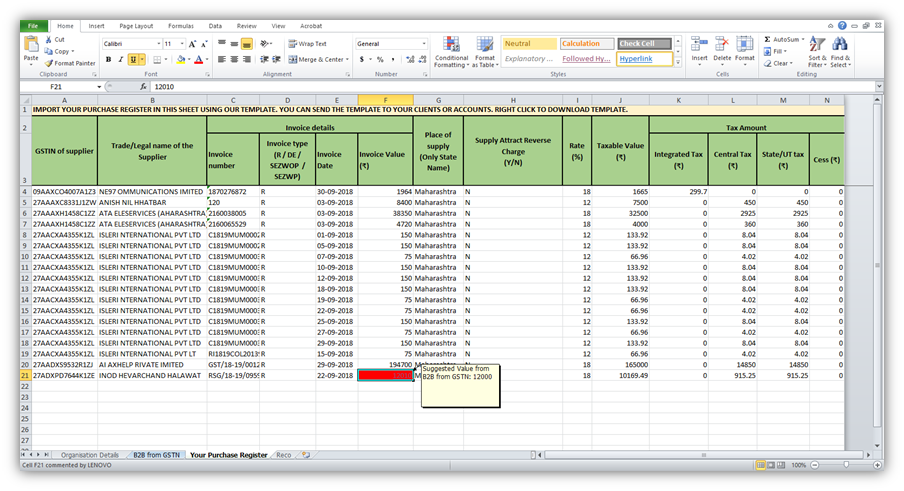
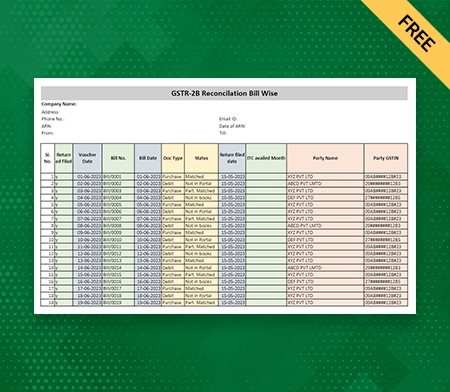
    https://tutorial.gst.gov.in/userguide/returns/assets/images/image424.png
    https://tutorial.gst.gov.in/userguide/returns/assets/images/CR%2024812_Rule37A_Image1.1.jpg
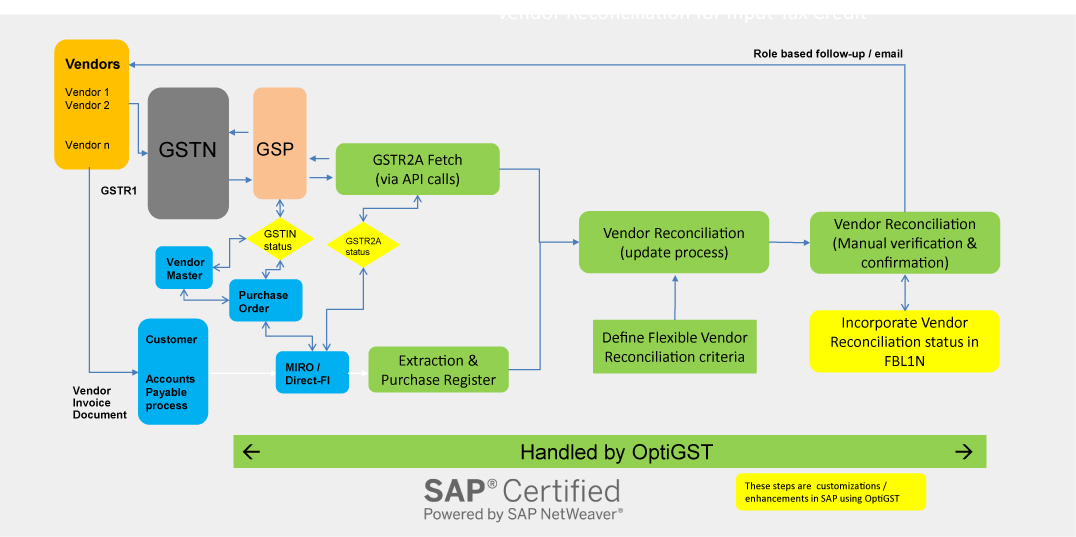
    https://www.ivldsp.com/wp-content/uploads/2021/07/Vendor-Reconciliation-for-Input-Tax-Credit-role-based.jpg

    Step 1: Log in to the GST Portal

    Use your GSTIN and credentials to access the dashboard.


    Step 2: Navigate to GSTR-2B

    Go to:

    • Returns Dashboard
    • Select Financial Year and Month
    • Click on GSTR-2B

    The system generates the statement automatically.


    Step 3: Download GSTR-2B

    You can download GSTR-2B in:

    • PDF format (summary view)
    • Excel format (detailed reconciliation)

    Excel format is recommended for professional reconciliation.


    Understanding GSTR-2B Structure

    GSTR-2B is divided into clear sections.

    ITC Available Section

    Includes:

    • Invoices eligible for ITC
    • Credit notes
    • ISD credits

    ITC Not Available Section

    Includes:

    • Blocked credits
    • Reverse charge supplies
    • Ineligible ITC under GST law

    This clear segregation helps avoid wrong claims.


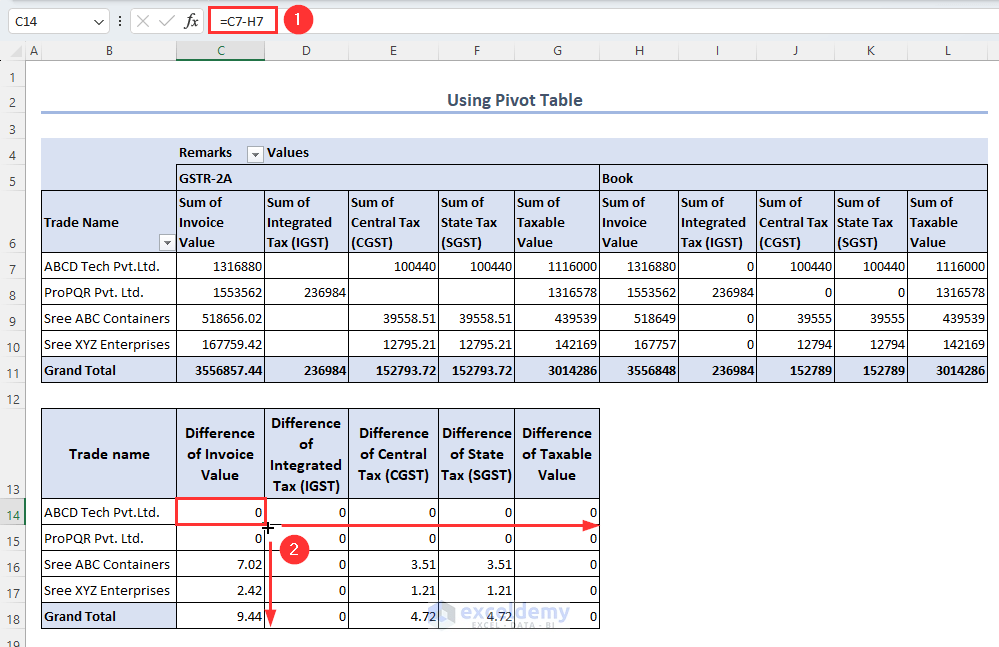
    Reconciliation of GSTR-2B with Purchase Register

    https://help.gstplus.com/hc/article_attachments/360020664973/mceclip2.png
    https://docs.cleartax.in/product-help-and-support/~gitbook/ogimage/VvNiSHVX3eBNkrKtuXIo
    https://www.exceldemy.com/wp-content/uploads/2023/07/19-Obtaining-the-difference-of-invoice-and-GST-values-from-the-Pivot-table-to-Do-GST-reconciliation-in-Excel.png

    Reconciliation is the most critical step.

    Reconciliation Process

    • Match supplier GSTIN
    • Match invoice number
    • Match taxable value and tax
    • Identify missing invoices
    StatusAction Required
    Invoice matchedClaim ITC
    Missing invoiceFollow up with supplier
    Ineligible creditDo not claim

    Fact: Nearly 30% of ITC mismatches occur due to supplier non-filing or late filing of GSTR-1.


    How to Claim ITC in GSTR-3B Using GSTR-2B

    Only ITC appearing in eligible section of GSTR-2B should be claimed.

    Best Practice

    • Claim ITC strictly as per GSTR-2B
    • Carry forward unmatched ITC
    • Avoid provisional or estimated credits

    This ensures zero variance between departmental data and your return.


    Common Errors While Using GSTR-2B

    MistakeConsequence
    Claiming ITC not in 2BGST notice
    Ignoring ineligible ITCPenalty
    No reconciliationInterest liability
    Supplier mismatchITC denial

    Avoiding these mistakes protects your compliance record.


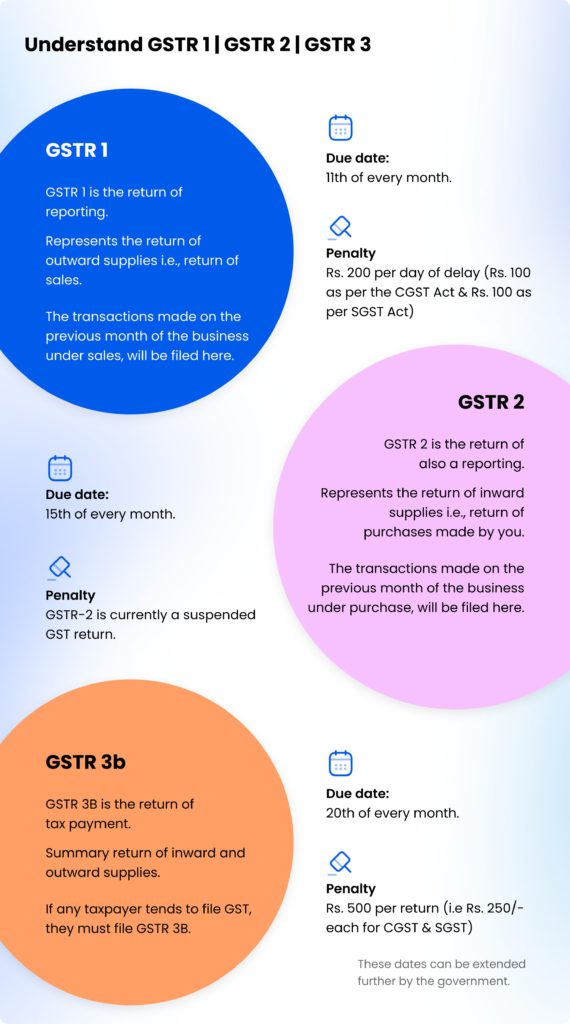
    Monthly Compliance Workflow Using GSTR-2B

    https://go4gst.com/wp-content/uploads/2025/06/gst_workflow_diagram.svg
    https://zetran.com/wp-content/uploads/2018/10/draw-a-table-for-gstr-1-gstr-2-gstr-3b-compressed-570x1024.jpg
    https://media.licdn.com/dms/image/v2/D4D22AQFer2xWirM4iw/feedshare-shrink_800/B4DZs1jcypH4Ag-/0/1766130045686?e=2147483647&t=hXekOZMIsrnjThoimpZx3DCriq47Ba4VLPM4BkOaCo0&v=beta

    A disciplined workflow includes:

    1. Download GSTR-2B
    2. Reconcile with purchase data
    3. Communicate discrepancies
    4. Finalize eligible ITC
    5. File GSTR-3B

    This process typically takes 2–4 hours per month for small to mid-sized businesses.


    Practical Tips for Smooth GSTR-2B Compliance

    • Reconcile monthly, not quarterly
    • Educate vendors on timely filing
    • Maintain clean purchase records
    • Use Excel-based reconciliation
    • Track pending ITC separately

    Consistent compliance builds credibility with tax authorities.


    Legal Importance of GSTR-2B

    GST law clearly states that ITC eligibility depends on:

    • Supplier filing status
    • Invoice reporting
    • Tax payment by supplier

    GSTR-2B acts as documentary evidence for ITC eligibility during audits.


    FAQ: How to File GSTR-2B Step by Step

    1. Is GSTR-2B required to be filed?

    No, GSTR-2B is auto-generated and not filed by taxpayers.

    2. Can ITC be claimed without appearing in GSTR-2B?

    No, ITC should be claimed only if it appears in GSTR-2B.

    3. What is the frequency of GSTR-2B?

    It is generated monthly.

    4. Does GSTR-2B change after generation?

    No, it remains static for the period.

    5. What should be done for missing invoices?

    Follow up with suppliers to file or amend GSTR-1.

    6. Is GSTR-2A still relevant?

    GSTR-2A is for tracking, but GSTR-2B is for compliance.

    7. Can Excel be used for GSTR-2B reconciliation?

    Yes, Excel is widely used for professional reconciliation.


    Conclusion

    Understanding how to file GSTR-2B step by step actually means mastering how to use, analyze, and reconcile this statement correctly. GSTR-2B is the backbone of ITC compliance under GST and directly impacts cash flow, tax liability, and audit exposure. Businesses that integrate GSTR-2B into their monthly GST workflow experience smoother compliance, fewer notices, and better financial control. Treat GSTR-2B not as a formality, but as a strategic compliance tool.


    Disclaimer

    This article is intended for educational and informational purposes only. GST laws, rules, and procedures are subject to change based on government notifications and amendments. Readers are advised to consult a qualified GST professional or apply professional judgment before taking compliance decisions.


  • Top 10 GST Compliance Mistakes for Small Businesses: A Complete Guide to Avoid Penalties and Improve Tax Accuracy

    Goods and Services Tax has become one of the most important taxation systems for small enterprises in India. In the first 100 words, let us highlight the significance of the top 10 GST compliance mistakes for small businesses. Many small firms struggle with monthly returns, invoice matching, documentation accuracy, and tax liability calculations. Even after years of GST implementation, more than 55 percent of small businesses still face notices due to non-compliance or reporting errors. Understanding the most common GST mistakes helps business owners stay compliant, avoid penalties, maintain clean books, and build a transparent tax structure. This article provides a detailed explanation of each mistake with practical guidance to prevent them.


    Why GST Compliance Matters for Small Businesses

    GST compliance ensures accurate reporting of outward and inward supplies, timely tax payment, and proper documentation. A fully compliant business:

    • Reduces legal and financial risks
    • Maintains a good reputation with suppliers and authorities
    • Improves input tax credit flow
    • Enhances financial planning and cash flow management
    • Avoids penalties and interest charges

    Non-compliance affects operational stability, and in extreme cases, businesses may face cancellation of GST registration.


    Table: Common GST Mistakes vs Impact on Business

    GST MistakeImpact on Business
    Late filing of returnsPenalties, interest, blocked ITC
    Incorrect invoice detailsRejection of ITC, mismatched returns
    Not reconciling GSTR-2BITC loss and cash outflow
    Wrong tax classificationOverpayment or underpayment
    Poor record keepingIncreased audit risk

    Top 10 GST Compliance Mistakes for Small Businesses

    Below are the most critical mistakes that small companies frequently make and how to prevent them.


    1. Late Filing of GST Returns

    One of the biggest GST compliance mistakes for small businesses is delaying monthly or quarterly return filings. GST law imposes:

    • Late fee charges per day of delay
    • Interest on unpaid tax
    • Restrictions on claiming Input Tax Credit (ITC)

    Industry data shows over 40 percent of small businesses file GSTR-3B after the due date at least twice a year. Late filing directly affects working capital because ITC gets blocked until the next cycle.

    How to avoid this mistake

    • Use automated reminders
    • Maintain a monthly tax calendar
    • Ensure sales and purchase data are updated weekly

    2. Incorrect or Incomplete Tax Invoices

    A GST invoice must contain details such as GSTIN, HSN code, invoice number, date, taxable value, and tax breakup. Missing or incorrect details lead to:

    • ITC claim rejection for buyers
    • Compliance discrepancies
    • Notices during departmental audits

    More than 30 percent of GST invoice mismatches arise from incorrect HSN codes or tax rates.

    How to avoid

    • Use standardized invoice templates
    • Perform internal checks before issuing invoices
    • Ensure numbering sequence is continuous and error-free

    3. Not Reconciling Input Tax Credit with GSTR-2B

    ITC can only be claimed if it appears in GSTR-2B. Many small businesses depend solely on purchase records and do not cross-check with the auto-drafted 2B report.

    Consequences include:

    • Loss of eligible ITC
    • Extra tax liability
    • Cash flow reduction

    Reports indicate that businesses lose up to 8 to 12 percent of potential ITC due to mismatching issues.

    How to avoid

    • Reconcile purchase register with GSTR-2B monthly
    • Identify suppliers who do not file returns on time
    • Follow up regularly to ensure proper reporting

    4. Using Wrong GST Rate or Classification

    A common problem occurs when businesses apply incorrect GST rates due to misunderstanding of product classification or HSN/SAC codes. This leads to:

    • Overpayment of tax
    • Short payment resulting in penalties
    • Incorrect ITC claims

    Studies show that 20 percent of classification errors arise from mixing service codes and product codes.

    How to avoid

    • Maintain a GST rate table for all items
    • Regularly update classification as per notifications
    • Seek professional advice for complex items

    5. Ignoring Reverse Charge Mechanism (RCM) Obligations

    Many small businesses forget that certain supplies attract reverse charge, meaning the recipient must pay GST instead of the supplier. Common RCM cases include:

    • Purchases from unregistered dealers
    • Specific service categories
    • Certain goods and services defined under RCM rules

    Ignoring RCM leads to tax liabilities accumulating unnoticed.

    How to avoid

    • Prepare an RCM checklist
    • Review purchases monthly
    • Document RCM entries in books accurately

    6. Poor Record Keeping and Documentation

    Businesses are legally required to maintain GST records for several years. Missing or incomplete records may cause issues during audits or investigations.

    Common documentation errors include:

    • Missing purchase bills
    • Not maintaining e-way bills
    • Lack of payment records
    • Missing delivery challans

    How to avoid

    • Organize digital and physical records systematically
    • Use proper naming conventions for files
    • Maintain backup copies of all documents

    7. Not Issuing E-Way Bills Properly

    E-way bills are mandatory for transporting goods above a specified value threshold. Mistakes include:

    • Not generating e-way bills on time
    • Incorrect vehicle number
    • Expired validity

    This may result in penalties, detention of goods, or seizure of vehicles.

    How to avoid

    • Track the value of each shipment
    • Train staff on e-way bill generation
    • Keep route and delivery details updated

    8. Mismatch Between Books of Accounts and GST Returns

    A frequent GST compliance mistake for small businesses is inaccurate integration between accounting records and GST returns. Revenue records, purchase registers, and financial accounts must match GST filings.

    Consequences of mismatch:

    • GST notices
    • Discrepancies in ITC
    • Impact on financial reporting accuracy

    How to avoid

    • Compare GSTR-3B, GSTR-1, and financial books monthly
    • Use reconciliation tools in accounting software
    • Conduct quarterly reviews

    9. Incorrect Claiming of Input Tax Credit

    ITC cannot be claimed for certain expenses such as personal purchases or ineligible items like food, health services, or blocked credits. Mistakenly claiming ineligible ITC can result in:

    • Penalties
    • Requirement to reverse ITC
    • Higher tax payable

    How to avoid

    • Maintain an ineligible ITC list
    • Review all purchase entries monthly
    • Verify vendor compliance

    10. Not Updating GST Registration Details on Time

    Businesses often fail to update changes in:

    • Address
    • Contact details
    • Business type
    • Additional places of business

    Failure to update may cause:

    • Miscommunication
    • Notices delivered to wrong address
    • Compliance inaccuracies

    How to avoid

    • Review GST registration every year
    • Submit amendment applications for any changes

    Summary Table: GST Mistakes and Prevention Tips

    MistakePrevention Tip
    Late filingUse reminders and maintain calendar
    Incorrect invoicesUse standard formats and double-check data
    ITC mismatchReconcile with GSTR-2B every month
    Wrong GST rateMaintain updated classification list
    Poor record keepingMaintain digital and physical backup

    FAQs (Optimized for Featured Snippets)

    1. What are the most common GST compliance mistakes for small businesses?

    The most common GST compliance mistakes for small businesses include late filing, incorrect invoicing, ITC mismatch, wrong GST rate, poor documentation, errors in e-way bills, and failure to update registration details.

    2. How does late GST filing affect small businesses?

    Late GST filing results in penalties, interest, and blocked input tax credit, which directly impacts cash flow and working capital.

    3. Why is GST invoice accuracy important?

    Invoice errors cause return mismatches and rejection of ITC for customers. It increases the risk of GST notices and tax disputes.

    4. How can small businesses avoid ITC mismatching?

    Businesses should reconcile purchase records with GSTR-2B monthly, ensure suppliers file returns on time, and track mismatched entries.

    5. What happens if a business uses the wrong GST rate?

    Using the wrong GST rate leads to underpayment or overpayment of tax, resulting in notices, penalties, and potential ITC issues.

    6. Do small businesses need to maintain e-way bills?

    Yes. E-way bills are mandatory for transporting goods above a specified value. Incorrect or missing e-way bills can result in detention and penalties.

    7. How important is documentation for GST compliance?

    Proper documentation is critical for audits, ITC claims, and accurate return filing. Missing records may lead to compliance risk and penalties.

    8. How often should GST reconciliation be done?

    Monthly reconciliation is recommended to avoid mismatches and maintain smooth ITC flow.


    Disclaimer

    This article is for educational and informational purposes only. It should not be considered tax or legal advice. Businesses must evaluate their own compliance requirements and seek professional consultation when needed.


  • Top 100 Accounting Terms Every Beginner Should Know to Build Strong Financial Basics

    Understanding the Top 100 Accounting Terms Every Beginner Should Know is the foundation of sound financial knowledge. Whether you are a student, small business owner, accounting trainee, or someone learning bookkeeping for the first time, accounting terminology can feel overwhelming. Yet studies in finance education consistently show that beginners who first master core accounting terms learn practical accounting 40–50% faster than those who directly jump into software or complex entries.

    Accounting is often called the language of business. If you don’t understand the language, reading financial statements or managing money becomes confusing and risky. This article breaks down the Top 100 Accounting Terms Every Beginner Should Know in a simple, structured, and beginner-friendly way—without jargon overload.


    What Are Accounting Terms?

    Accounting terms are standardized words and phrases used to record, summarize, analyze, and communicate financial information. They appear in:

    • Books of accounts
    • Financial statements
    • Audit reports
    • Tax filings
    • Accounting software

    Learning these terms early helps beginners:

    • Avoid costly mistakes
    • Understand reports clearly
    • Communicate confidently with accountants and auditors

    How This List of 100 Accounting Terms Is Organized

    To make learning easier and retention stronger, the top 100 accounting terms are grouped into practical categories:

    • Basic accounting concepts
    • Bookkeeping and transaction terms
    • Financial statements and reporting
    • Costing and management accounting
    • Taxation and compliance
    • Payroll and practical business terms

    Each term is explained in simple language, suitable for absolute beginners.


    Basic Accounting Concepts Every Beginner Must Know (1–15)

    Accounting TermSimple Meaning
    AccountingThe process of recording and analyzing financial transactions
    Accounting PeriodTime span for which accounts are prepared
    Accrual BasisIncome and expenses recorded when they are earned or incurred
    Cash BasisIncome and expenses recorded only when cash is received or paid
    AssetsResources owned by a business
    LiabilitiesAmounts owed by a business
    CapitalOwner’s investment in the business
    RevenueIncome generated from business activities
    ExpensesCosts incurred to earn revenue
    ProfitExcess of income over expenses
    LossExcess of expenses over income
    DrawingsMoney withdrawn by the owner for personal use
    EquityOwner’s claim on business assets
    Financial YearA twelve-month accounting period
    Dual Aspect ConceptEvery transaction affects at least two accounts

    Bookkeeping and Journal Terms (16–35)

    Accounting TermSimple Meaning
    BookkeepingRecording daily financial transactions
    JournalBook of original entry
    LedgerBook containing all accounts
    DebitLeft side of an account
    CreditRight side of an account
    VoucherDocument supporting a transaction
    PostingTransferring entries from journal to ledger
    BalanceDifference between debit and credit sides
    Trial BalanceList of ledger balances to check accuracy
    Contra EntryEntry affecting both cash and bank
    Cash BookRecord of cash and bank transactions
    Purchase BookRecord of credit purchases
    Sales BookRecord of credit sales
    Purchase ReturnGoods returned to suppliers
    Sales ReturnGoods returned by customers
    Petty CashSmall cash for minor expenses
    NarrationBrief explanation of an entry
    Opening BalanceBalance brought forward from previous period
    Closing BalanceBalance carried forward to next period
    ReconciliationMatching two sets of records

    Financial Statements and Reporting Terms (36–55)

    Accounting TermSimple Meaning
    Financial StatementsReports showing financial performance
    Profit and Loss AccountStatement showing profit or loss
    Balance SheetStatement of assets and liabilities
    Cash Flow StatementShows cash inflows and outflows
    Gross ProfitSales minus cost of goods sold
    Net ProfitProfit after all expenses
    Cost of Goods SoldDirect cost of sold goods
    Operating ExpensesDay-to-day business costs
    Current AssetsAssets converted to cash within a year
    Fixed AssetsLong-term assets used in the business
    Current LiabilitiesDues payable within a year
    Long-Term LiabilitiesPayable after one year
    Working CapitalCurrent assets minus current liabilities
    DepreciationReduction in asset value
    AmortizationDepreciation of intangible assets
    ProvisionEstimated expense or loss
    ReserveProfit set aside for future use
    Notes to AccountsExplanatory details in statements
    Auditor’s ReportOpinion on financial statements
    Comparative StatementComparison of multiple periods

    Costing and Management Accounting Terms (56–75)

    Accounting TermSimple Meaning
    Cost AccountingTracking costs for decision-making
    Fixed CostCost that remains constant
    Variable CostCost that changes with output
    Semi-Variable CostPart fixed, part variable
    Marginal CostCost of producing one extra unit
    Standard CostPre-determined expected cost
    Actual CostReal cost incurred
    BudgetPlanned income and expenses
    Budgetary ControlMonitoring budgets vs actual
    Break-Even PointLevel where no profit or loss occurs
    ContributionSales minus variable cost
    OverheadsIndirect business costs
    Cost CenterUnit where costs are tracked
    Cost UnitMeasure of product or service
    Activity-Based CostingCosting based on activities
    Job CostingCosting for specific jobs
    Process CostingCosting for mass production
    VarianceDifference between actual and standard
    Management AccountingInternal financial analysis
    Decision AccountingAccounting for business decisions

    Taxation, Compliance, and Payroll Terms (76–95)

    Accounting TermSimple Meaning
    TaxMandatory payment to government
    Direct TaxTax paid directly by individuals
    Indirect TaxTax collected through transactions
    GSTTax on goods and services
    Input Tax CreditTax paid on purchases
    Output TaxTax charged on sales
    Tax InvoiceInvoice with tax details
    PayrollSalary processing system
    Gross SalarySalary before deductions
    Net SalaryTake-home salary
    DeductionsAmount deducted from salary
    Provident FundEmployee savings contribution
    Professional TaxEmployment-related tax
    TDSTax deducted at source
    ComplianceFollowing legal requirements
    Statutory DuesMandatory government payments
    FilingSubmission of returns
    AssessmentTax authority evaluation
    PenaltyFine for non-compliance
    AuditExamination of accounts

    Practical Business and Accounting Software Terms (96–100)

    Accounting TermSimple Meaning
    ERPIntegrated business management system
    Accounting SoftwareTool for recording transactions
    Chart of AccountsList of all ledger accounts
    Data MigrationTransfer of old accounting data
    Financial ControlsProcedures to prevent errors

    Why Beginners Should Master These 100 Accounting Terms

    Beginners who learn basic accounting terms:

    • Understand financial reports better
    • Make confident business decisions
    • Communicate clearly with accountants
    • Learn tools like Excel and accounting software faster

    Surveys indicate that nearly 70% of accounting errors by beginners are caused by misunderstanding basic terms rather than calculation mistakes.


    Tips to Learn Accounting Terms Faster

    • Learn terms with examples
    • Group related terms instead of memorizing randomly
    • Apply terms while using Excel or bookkeeping software
    • Revise using financial statements

    Learning just 10–15 terms per week helps beginners become accounting-confident within two months.


    FAQs: Top 100 Accounting Terms Every Beginner Should Know

    1. Why should beginners learn accounting terms first?

    Learning accounting terms builds clarity and prevents confusion while recording transactions or reading financial statements.

    2. Are accounting terms difficult for beginners?

    No. When explained simply and grouped logically, accounting terms are easy to understand and remember.

    3. How long does it take to learn basic accounting terminology?

    With regular practice, beginners can learn core accounting terms in 4–8 weeks.

    4. Do accounting software users still need accounting terms?

    Yes. Software automates calculations but understanding terms is essential for accuracy and decision-making.

    5. Are these accounting terms useful for non-accountants?

    Absolutely. Business owners, managers, and entrepreneurs benefit greatly from understanding accounting language.

    6. Is learning accounting terms enough to become an accountant?

    Terms are the foundation. Practical application, laws, and advanced concepts come next.


    Conclusion

    Mastering the Top 100 Accounting Terms Every Beginner Should Know is the smartest first step into accounting, finance, or business management. These terms form the base on which all accounting knowledge is built—from bookkeeping to financial analysis and compliance. Once these fundamentals are clear, learning advanced accounting becomes faster, smoother, and far more confident.


    Disclaimer

    This article is intended for educational purposes only. Accounting practices, tax laws, and compliance requirements vary by country and industry. Readers are advised to consult a qualified accounting professional before making financial or compliance-related decisions. The author assumes no responsibility for actions taken based on the information provided herein.


  • 11 Smart Picks: Best Accounting Software for Small Businesses That Want Simple, Accurate Numbers

    Choosing the best accounting software for small businesses is no longer optional; it is a core part of running a modern, compliant, and profitable business. Whether you manage 50 invoices a month or 5,000, the right small business accounting tool helps you track income and expenses, manage GST or VAT, handle payroll, and generate reports in just a few clicks.

    In this guide, you will learn how to evaluate accounting software, what features really matter for small businesses, and how different types of tools fit different business sizes and industries. We will cover on-premise, cloud-based, and hybrid options and share practical examples so you can decide confidently.


    Why Small Businesses Must Invest in the Best Accounting Software

    Many small business owners still manage accounts using manual spreadsheets, notebooks, or basic tally methods. This often leads to:

    • Missed invoices or duplicate entries
    • Difficulty reconciling bank statements
    • Delays in GST/VAT or tax filing
    • No real-time view of profit, cash flow, and outstanding payments

    By switching to one of the best accounting software for small businesses, many owners find that they:

    • Reduce bookkeeping time by 40–60 percent
    • Improve invoice collection speed due to automated reminders
    • Detect revenue leakages earlier through regular reporting

    Even if your turnover is modest today, building discipline with proper accounting software prepares your business for growth, bank loans, investors, and audits.


    Key Features to Look for in Small Business Accounting Software

    Before looking at the top options, it is important to define what “best” means for you. Not every small business needs every advanced feature. Use the checklist below as a practical framework.

    Core Features Checklist

    FeatureWhy It Matters
    Invoicing and BillingGenerate professional invoices quickly, apply taxes, and track due payments.
    Expense TrackingCapture daily expenses with categories for accurate profit analysis.
    Bank ReconciliationMatch bank transactions with books to avoid errors and fraud.
    Tax / GST / VAT SupportAutomatically calculate taxes and generate required reports.
    Reporting and DashboardsGet profit and loss, balance sheet, and cash flow in a few clicks.
    Multi-user AccessAllow accountant, owner, and staff to work with proper permissions.

    If your small business is in manufacturing, retail, or e-commerce, also consider:

    • Inventory management
    • Purchase order tracking
    • Integration with POS or online marketplaces

    Service-based businesses should also look at:

    • Project or job costing
    • Time tracking
    • Recurring invoices for retainers

    Types of Accounting Software Small Businesses Commonly Use

    1. Desktop / On-Premise Accounting Software

    Ideal for:

    • Businesses with limited or no internet connectivity
    • Owners who prefer data stored locally

    Pros:

    • One-time purchase in many cases
    • Full control over data location

    Cons:

    • Manual updates
    • Limited remote access
    • Often requires stronger hardware and IT support

    2. Cloud-Based Accounting Software

    Ideal for:

    • Startups, freelancers, consultants
    • Multi-location businesses

    Pros:

    • Access from laptop, tablet, or mobile anywhere
    • Automatic updates and backups
    • Easy collaboration with external CA or accountant

    Cons:

    • Requires stable internet
    • Usually subscription-based (monthly or yearly)

    3. Hybrid Solutions

    Hybrid tools combine local installation with cloud sync or browser-based access. These can be useful for businesses that want:

    • Local performance plus cloud backup
    • Both offline entry and online reporting

    11 Categories of the Best Accounting Software for Small Businesses

    Instead of just naming brand after brand, this section groups software types by use case. This makes it easier to match your situation to the right approach.

    1. Best Accounting Software for Very Small Businesses and Freelancers

    If you issue fewer than 50 invoices per month and have no employees, you typically need:

    • Simple invoicing
    • Basic expense tracking
    • Simple P&L and tax summary

    Many freelancers and consultants start with:

    • Lightweight cloud invoicing and accounting tools
    • Or structured Excel-based templates, later upgrading to full software

    2. Best Accounting Software for Small Trading and Retail Businesses

    Trading and retail businesses depend heavily on:

    • Stock control
    • Purchase and sales tracking
    • GST-compliant invoicing (where applicable)

    Important features:

    • Item-wise inventory
    • Batch or lot tracking if needed
    • Fast billing screen for counter sales

    3. Best Accounting Software for Service-Based Small Firms

    Examples:

    • Digital marketing agencies
    • IT support companies
    • Training institutes
    • Legal or consulting firms

    Key features:

    • Project-wise or client-wise billing
    • Recurring invoices
    • Time or task-based costing

    4. Best Accounting Software for Manufacturing-Side Small Businesses

    Small manufacturers need more than just basic ledger features:

    • Bill of materials (BOM)
    • Production planning
    • Raw material and finished goods tracking

    Such tools help in:

    • Calculating accurate cost per unit
    • Identifying wastage
    • Planning purchase schedules

    5. Best Cloud-Based Accounting Software for Multi-Location Businesses

    If you operate from multiple branches, cities, or countries, cloud-based accounting software becomes one of the best solutions for your small business. You benefit from:

    • Centralized data
    • Role-based access
    • Branch-wise reporting

    This is useful for franchise models, chain stores, and agencies with remote teams.


    How to Compare the Best Accounting Software for Small Businesses

    When you shortlist 3–5 tools, use criteria like these:

    Comparison Framework

    CriteriaWhat to Check
    PricingOne-time license vs monthly subscription, user limits.
    Ease of UseCan a non-accountant learn routine tasks in 3–5 days?
    LocalisationGST/VAT, local currency, local formats, language support.
    ScalabilityCan it handle growth from 100 to 10,000 transactions per month?
    SupportPhone, email, chat, on-site partner network.
    IntegrationBank feeds, payment gateways, POS, e-commerce, CRM.

    Try to test any software with at least one full monthly cycle:

    1. Create opening balances
    2. Enter all purchase and sales invoices
    3. Record receipts, payments, and expenses
    4. Reconcile the bank
    5. Generate core reports (P&L, balance sheet, GST reports, debtor/creditor list)

    If you can complete this within a week of normal learning, that solution is probably a good fit.


    Practical Steps to Implement Accounting Software in a Small Business

    Step 1: Define Your Accounting Workflow

    List down:

    • Who raises invoices?
    • Who approves expenses?
    • Who deals with bank and cash?
    • Who will check and finalize reports?

    Map these steps to software roles and user permissions.

    Step 2: Clean and Prepare Your Existing Data

    Before migrating:

    • Clean your customer and supplier master list
    • Map product or service codes
    • Verify opening balances of ledgers
    • Check old tax or GST figures

    This makes transition smoother and reduces errors.

    Step 3: Start with a Parallel Run

    For one or two months:

    • Keep your old manual system or Excel
    • Also maintain entries in the new software

    Compare:

    • Trial balance
    • Debtors and creditors list
    • Tax liabilities

    If differences are small and understandable, you can fully shift to the new system.

    Step 4: Train Your Team

    Even the best accounting software for small businesses will fail if users are not trained. Make sure:

    • Cashier or billing staff understand invoice and receipt processes
    • Purchase team understands purchase entry and stock updates
    • Manager understands how to read reports and dashboards

    Provide short SOPs (standard operating procedures) for common tasks.


    Signs That It Is Time to Upgrade Your Small Business Accounting Software

    Even if you are already using a tool, review it regularly. You may need to upgrade if:

    • You cannot get real-time sales or expense data
    • Generating basic reports takes too long
    • Additional users slow down the system
    • It does not support new tax rules or compliance requirements
    • There is no mobile access, and you travel frequently

    If any 3–4 of these apply, explore more modern options such as newer desktop versions or cloud-based accounting tools.


    Frequently Asked Questions (FAQ)

    (Optimized for featured snippets)

    1. What is the best accounting software for small businesses?

    The best accounting software for small businesses is any solution that matches your size, industry, and compliance needs while remaining easy enough for your team to use daily. For many small firms, cloud-based accounting tools with invoicing, expense tracking, GST/VAT support, and simple reporting are the most practical choice.

    2. How do I choose accounting software for a small business?

    To choose accounting software for a small business, start by listing your core needs: invoicing, tax compliance, inventory, payroll, project costing, or multi-branch reporting. Then compare 3–5 tools on pricing, ease of use, local tax features, support quality, and ability to integrate with bank accounts or POS systems. Always test with a trial or demo before finalizing.

    3. Do very small businesses really need accounting software?

    Yes. Even very small businesses benefit from accounting software because it reduces manual errors, speeds up billing, and gives clear visibility into profits and cash flow. Basic plans or simple tools are usually affordable and can replace multiple spreadsheets, saving time every month.

    4. Is cloud-based accounting software safe for small businesses?

    Reputable cloud-based accounting software is generally safe for small businesses. These systems usually include data encryption, backups, and controlled access. From a practical viewpoint, cloud tools often provide better data security than storing files on a single office computer, as long as you use strong passwords and proper user permissions.

    5. Which features are essential in small business accounting software?

    Essential features in small business accounting software include invoicing, expense tracking, bank reconciliation, tax or GST/VAT calculation, basic financial reports (P&L, balance sheet, cash flow), and multi-user access with role-based permissions. Depending on your business, you may also need inventory, payroll, or project costing modules.

    6. Can I start with Excel and move to accounting software later?

    You can start with well-designed Excel templates for recording sales, purchases, and expenses, especially if your transaction volume is low. However, as your business grows, shifting to dedicated accounting software is strongly recommended. It automates repetitive tasks, reduces risk of formula errors, and makes audits and tax filing easier.

    7. How much does good accounting software for small businesses cost?

    Costs vary widely. Some entry-level tools offer basic plans suitable for freelancers and micro-businesses, while more advanced systems for multi-branch or manufacturing firms charge higher recurring fees or license prices. When evaluating cost, consider not just subscription price but also time saved and reduced errors.


    Disclaimer

    The information provided in this article is for general educational and informational purposes only. It does not constitute professional accounting, tax, legal, or financial advice. Every business is unique, and regulations or software features may change over time. Before selecting or implementing any accounting software, consult a qualified professional or advisor who understands your specific business, industry, and local compliance requirements. The author and publisher assume no responsibility for any decisions or outcomes resulting from the use of the information contained in this article.


  • Top 25 GST Terms Explained in Simple Language – Complete Beginner-Friendly GST Guide

    Understanding GST terminology is one of the biggest challenges for students, accountants, business owners, and job seekers in India. Many people struggle not because GST is difficult, but because the GST terms are written in complex legal language. This detailed guide on Top 25 GST Terms Explained in Simple Language is created to remove that confusion completely.

    India has over 1.4 crore active GST registrations, and every registered taxpayer, accountant, or commerce student must be familiar with basic GST concepts to ensure compliance and avoid penalties. Whether you are preparing for accounting jobs, GST interviews, or simply want to understand how tax works in India, this article will give you clear, practical explanations using real-life context.


    Why Understanding GST Terms Is Important

    GST is not just a tax system; it is a compliance-driven structure. Wrong understanding or misinterpretation of GST terms can result in:

    • Late fees and penalties
    • Incorrect return filing
    • ITC rejection
    • Notices from tax authorities

    Professionals with strong GST fundamentals earn 20–35% higher salaries compared to those with only basic accounting knowledge.


    Top 25 GST Terms Explained in Simple Language

    1. Goods and Services Tax (GST)

    GST is an indirect tax levied on the supply of goods and services in India. It replaced multiple indirect taxes such as VAT, service tax, excise duty, and entry tax.

    GST follows the destination-based taxation system, meaning tax is collected where goods or services are consumed.


    2. CGST (Central GST)

    CGST is the portion of GST collected by the Central Government on intra-state sales (sales within one state).

    For example, if GST is 18%, 9% goes to CGST when the transaction occurs within the same state.


    3. SGST (State GST)

    SGST is collected by the State Government on intra-state sales. It is charged along with CGST.

    CGST + SGST = Total GST for intra-state transactions.


    4. IGST (Integrated GST)

    IGST applies to inter-state sales and imports. It is collected by the Central Government and later distributed to states.

    IGST ensures a smooth flow of tax credit across state boundaries.


    5. GSTIN (GST Identification Number)

    GSTIN is a 15-digit unique registration number assigned to every GST-registered person.

    Structure of GSTIN:

    • First 2 digits: State code
    • Next 10 digits: PAN
    • Next 1 digit: Entity code
    • Last 2 digits: Checksum

    6. Aggregate Turnover

    Aggregate turnover refers to the total value of all taxable supplies, exempt supplies, exports, and inter-state supplies under the same PAN.

    GST registration becomes mandatory when turnover exceeds ₹40 lakh for goods and ₹20 lakh for services (lower limits for special category states).


    7. Taxable Person

    Any individual or business registered or liable to be registered under GST is called a taxable person.

    This includes proprietors, partnership firms, companies, and LLPs.


    8. Supply

    Supply is the core concept of GST. It includes sale, transfer, barter, exchange, license, rental, or disposal of goods or services for consideration.

    Without supply, GST cannot be charged.


    9. Input Tax Credit (ITC)

    ITC means the tax paid on purchases that can be adjusted against tax payable on sales.

    Proper ITC utilization reduces tax burden and improves cash flow for businesses.


    10. Reverse Charge Mechanism (RCM)

    Under RCM, the responsibility to pay GST shifts from the supplier to the recipient.

    This usually applies in cases such as unregistered supplier transactions and specified services.


    11. Composition Scheme

    The composition scheme is designed for small taxpayers with lower compliance burden and fixed tax rates.

    However, ITC cannot be claimed under this scheme.


    12. HSN Code (Harmonised System of Nomenclature)

    HSN codes are used to classify goods under GST.

    Using correct HSN codes ensures accurate tax rates and avoids compliance errors.


    13. SAC Code (Services Accounting Code)

    SAC codes are used to classify services under GST.

    Each service category has a specific SAC for tax identification.


    14. Tax Invoice

    A tax invoice is a legal document issued by a registered supplier for taxable supplies.

    Without a valid tax invoice, ITC cannot be claimed.


    15. Bill of Supply

    Bill of supply is issued by composition dealers or suppliers of exempt goods/services.

    GST is not charged in a bill of supply.


    16. GSTR-1

    GSTR-1 is a monthly or quarterly return that contains details of outward supplies (sales).

    Accurate GSTR-1 filing is essential for customer ITC claims.


    17. GSTR-3B

    GSTR-3B is a summary return used to declare total tax liability and make GST payment.

    Late filing attracts interest and penalties.


    18. GSTR-2B

    GSTR-2B is a static auto-drafted statement reflecting eligible ITC for a specific period.

    Businesses rely on GSTR-2B to reconcile and claim correct ITC.


    19. E-Invoice

    E-Invoicing involves reporting invoice details on the government portal to generate a unique invoice reference number (IRN).

    Mandatory for businesses above notified turnover limits.


    20. E-Way Bill

    An E-Way Bill is required for movement of goods beyond specified value limits.

    Non-generation can result in penalties and seizure of goods.


    21. Place of Supply

    Place of supply determines whether CGST-SGST or IGST is applicable.

    Incorrect determination leads to wrong tax payment.


    22. Zero-Rated Supply

    Zero-rated supplies include exports and supplies to SEZ units.

    GST may not be charged or can be refunded in such cases.


    23. Exempt Supply

    Exempt supplies are goods or services not subject to GST.

    No GST is charged, and ITC is not available.


    24. Due Date

    Due date refers to the last date for filing GST returns or payments.

    Missing due dates leads to late fees and interest.


    25. GST Return

    GST returns are periodic filings containing supply, tax, and payment information.

    Regular filing ensures compliance and uninterrupted ITC flow.


    Simple GST Terms Overview Table

    GST TermSimple Meaning
    CGSTCentral tax on intra-state sales
    SGSTState tax on intra-state sales
    IGSTTax on inter-state sales
    ITCCredit of tax paid on purchases
    RCMTax paid by receiver instead of supplier
    GSTR-1Sales return
    GSTR-3BSummary tax payment return

    Common Mistakes Due to Poor GST Understanding

    • Incorrect ITC claims
    • Late return filing
    • Wrong tax rate application
    • Mismatch between GSTR-1 and GSTR-3B
    • Notices from tax authorities

    Businesses that maintain accurate GST compliance reduce audit risks significantly.


    FAQs – Top 25 GST Terms Explained in Simple Language

    1. Why should beginners learn GST terminology?

    Understanding GST terms helps avoid mistakes, penalties, and career limitations in accounting roles.

    2. Which GST term is most important?

    Input Tax Credit is the most critical, as it directly impacts tax liability and cash flow.

    3. Is GST difficult to learn?

    GST appears difficult due to terminology, but becomes simple with clear concept understanding.

    4. Can students learn GST without commerce background?

    Yes, with structured learning and practice, GST can be learned by anyone.

    5. What happens if GST terms are misunderstood?

    Misinterpretation can lead to wrong filings, interest, penalties, and ITC loss.

    6. How often do GST rules change?

    GST rules are updated periodically through notifications and amendments.


    Conclusion

    GST knowledge has become a mandatory skill for anyone working in accounting, finance, or business operations in India. By understanding these Top 25 GST Terms Explained in Simple Language, professionals and students can build strong compliance fundamentals and boost their career prospects. Clear understanding reduces errors, saves money, and ensures smooth business functioning under GST law.

    Mastering GST terminology is the first step toward becoming a confident accounting professional.


    Disclaimer

    This article is intended for educational and informational purposes only. GST rules and interpretations may change based on government notifications, amendments, and judicial decisions. Readers are advised to use professional judgment while applying these concepts.


  • Top 10 Accounting Jobs in India Without CA – High-Paying Career Options After Commerce

    Accounting is often misunderstood in India as a field reserved only for Chartered Accountants (CAs). In reality, the Indian job market offers multiple accounting and finance roles that do not require a CA qualification, yet provide stable income, career growth, and long-term opportunities. With over 6.3 crore MSMEs in India and a continuously expanding compliance ecosystem, the demand for accounting professionals without CA has grown steadily year after year.

    This article on Top 10 Accounting Jobs in India Without CA explores realistic and job-oriented accounting careers that can be pursued with degrees like B.Com, BBA, MBA (Finance), or skill-based certifications such as Excel, Tally, GST, and ERP systems. These roles are highly relevant in today’s corporate, SME, and startup-driven economy.

    If you are from a commerce background or considering a career shift into accounting, this detailed guide will help you identify the right job path.


    Why Accounting Jobs Without CA Are Growing in India

    More than 90% of Indian businesses are small and medium enterprises, and most do not require a full-time CA. Instead, they rely heavily on accounting executives, MIS professionals, GST specialists, and finance analysts to manage daily operations.

    Factors driving growth:

    • Increasing GST and compliance workload
    • Digitisation of accounting and payroll
    • Rise of startups and outsourcing firms
    • Demand for Excel, MIS, and ERP-based reporting

    As per employment data trends, accounting support and mid-level roles together account for over 35% of finance-related job postings in India.


    Top 10 Accounting Jobs in India Without CA

    1. Accounts Executive

    Accounts Executive is one of the most in-demand accounting jobs in India without CA. This role handles day-to-day accounting activities such as journal entries, ledger posting, bank reconciliation, and invoice processing.

    Professionals usually work on accounting software like Tally or ERP systems along with Excel. Companies across manufacturing, retail, logistics, and services hire accounts executives.

    Salary Range: ₹2.4 – ₹4.8 LPA
    Experience Growth: Senior Accounts Executive → Accounts Manager


    2. GST Executive / GST Accountant

    After the introduction of GST, compliance-related roles exploded in demand. A GST Executive focuses on GST return filing, reconciliations, e-invoicing, and resolving mismatches.

    This is a specialised accounting job without CA that values practical GST knowledge over professional degrees.

    Salary Range: ₹3 – ₹6 LPA
    Industries: CA firms, SMEs, logistics, manufacturing


    3. MIS Executive

    MIS Executive is a data-driven accounting role that combines finance, reporting, and analytics. This profile heavily relies on Advanced Excel, dashboards, and monthly performance reports.

    MIS professionals support management decisions and often work closely with finance heads.

    Salary Range: ₹2.5 – ₹5 LPA
    High-demand skills: Excel dashboards, Pivot Tables, Power Query


    4. Accounting Analyst

    Accounting Analysts help businesses analyse financial data, track expenses, prepare cost reports, and improve operational efficiency. This role is common in corporate finance departments and shared service centres.

    It is one of the fastest-growing accounting jobs in India without CA due to data-driven decision-making.

    Salary Range: ₹4 – ₹8 LPA
    Preferred Education: B.Com, MBA (Finance)


    5. Payroll Executive

    Payroll Executives manage employee salary processing, PF, ESI, gratuity, income tax deductions, and payroll compliance. With increasing workforce formalisation, payroll has become a specialised and stable career option.

    Errors in payroll can lead to penalties, making trained payroll professionals very valuable.

    Salary Range: ₹3 – ₹6 LPA
    Work Environment: Corporates, HR firms, IT companies


    6. Accounts Receivable / Payable Executive

    This role focuses on managing incoming and outgoing payments, vendor reconciliation, customer aging reports, and cash flow monitoring.

    Nearly every medium and large organisation hires AR/AP professionals, making this one of the most secure accounting jobs without CA.

    Salary Range: ₹3 – ₹5.5 LPA
    Key Tools: Excel, ERP, invoice management systems


    7. Cost Accountant (Non-CA Support Role)

    While certified cost accountants have formal credentials, many support roles in cost accounting are available for non-CA professionals. These roles assist in cost analysis, budgeting, inventory valuation, and profitability reporting.

    Salary Range: ₹4 – ₹7 LPA
    Industries: Manufacturing, FMCG, infrastructure


    8. Internal Audit Executive

    Internal auditors help ensure internal controls, compliance, and risk management within organisations. Many internal audit roles do not require CA, especially in operational audits and documentation-based reviews.

    Salary Range: ₹3.5 – ₹7 LPA
    Growth Path: Senior Auditor → Audit Manager


    9. Finance & Accounts Assistant

    This entry-to-mid level role provides exposure to accounting, finance, compliance, and reporting. It is ideal for freshers looking to build strong accounting fundamentals without CA.

    Salary Range: ₹2 – ₹4 LPA
    Best for: Fresh graduates and diploma holders


    10. Accounting Process Executive (BPO / KPO)

    Accounting Process Executives work in outsourcing environments handling bookkeeping, reconciliations, reporting, and compliance for domestic and international clients.

    India’s accounting BPO industry employs over 1 million professionals, offering growth without CA.

    Salary Range: ₹3 – ₹6.5 LPA
    Shift Benefits: Night shift allowance, fast promotions


    Salary Comparison Table (India)

    Job RoleAverage Annual Salary (₹)
    Accounts Executive2.4 – 4.8 LPA
    GST Executive3 – 6 LPA
    MIS Executive2.5 – 5 LPA
    Accounting Analyst4 – 8 LPA
    Payroll Executive3 – 6 LPA
    AR/AP Executive3 – 5.5 LPA
    Cost Accounting Support4 – 7 LPA
    Internal Audit Executive3.5 – 7 LPA
    Finance Assistant2 – 4 LPA
    Accounting Process Executive3 – 6.5 LPA

    Skills That Increase Salary Without CA

    • Advanced Excel & MIS Reporting
    • Tally with GST configuration
    • Understanding of compliance and deadlines
    • Payroll laws (PF, ESI, Income Tax)
    • Analytical and reconciliation skills

    Professionals with Excel + GST + Tally skills earn 25–40% more than those with only basic accounting knowledge.


    Career Growth Without CA in Accounting

    Many successful accounting managers and finance leaders in India started without CA. Continuous learning, certifications, and practical exposure matter more at mid-level roles.

    Common growth ladder:

    • Executive → Senior Executive → Manager → Head of Accounts

    FAQs – Accounting Jobs in India Without CA

    1. Can I earn a good salary in accounting without CA?

    Yes. Many accounting professionals earn ₹6–10 LPA with experience and strong skills in Excel, GST, MIS, and ERP systems.

    2. Which accounting job is best for freshers without CA?

    Accounts Executive, MIS Executive, and Finance Assistant roles are ideal for freshers.

    3. Is GST Executive a long-term career?

    Yes. GST compliance is mandatory and evolving, ensuring long-term demand.

    4. Can accounting jobs without CA lead to management roles?

    Yes. Experience-based promotions can lead to Accounts Manager or Finance Head roles.

    5. Are accounting BPO jobs stable?

    Yes. Accounting outsourcing is a growing industry with strong global demand.

    6. Which skills matter more than degrees in accounting?

    Practical Excel, Tally, GST, payroll knowledge, and reporting skills matter most.


    Conclusion

    Accounting careers in India are no longer limited to Chartered Accountants. The rise of compliance, data-driven reporting, and automation has opened doors for multiple accounting jobs in India without CA. With the right combination of education and practical skills, professionals can build financially secure and respected careers in accounting.

    Instead of focusing only on degrees, focus on continuous skill enhancement and real-world application.


    Disclaimer

    This article is for educational and informational purposes only. Salary figures, roles, and career growth may vary based on industry, location, company size, and individual skills.


  • GST Interest and Penalty Calculator in Excel – Step-by-Step Guide for Accurate Compliance and Cost Control

    Managing Goods and Services Tax (GST) compliance is not just about filing returns on time. One small delay can lead to interest liabilities and penalties that quietly increase your tax burden. For businesses, accountants, and freelancers, manually calculating GST interest and penalties can be error-prone and time-consuming. This is where a GST Interest and Penalty Calculator in Excel becomes a powerful, practical solution.

    This detailed guide explains GST interest and penalty rules, shows how calculations work, and walks you through building a fully functional Excel calculator from scratch. The goal is accuracy, transparency, and ease of use—without relying on any external tools.


    Understanding GST Interest and Penalty

    Under GST law, interest and penalties are levied primarily to discourage delays and non-compliance. Interest is automatic and mandatory, while penalties depend on the nature of default.

    GST Interest – Key Concept

    Interest is charged when:

    • GST return is filed late
    • Tax is paid after the due date
    • Excess input tax credit is utilized incorrectly

    Interest is calculated on the outstanding tax amount, not on the total turnover.

    GST Penalty – Key Concept

    Penalty applies in situations such as:

    • Late filing beyond prescribed conditions
    • Non-filing or incorrect filing
    • Intentional tax evasion or fraud

    Penalties can be fixed, percentage-based, or maximum capped, depending on the section involved.


    Applicable GST Interest Rates (Important Figures)

    The GST law prescribes different interest rates based on the type of default.

    Type of DefaultInterest Rate
    Late payment of GST18% per annum
    Excess ITC claimed or undue reduction of tax24% per annum

    Interest is calculated on a daily basis, making Excel an ideal tool.


    Common GST Penalty Rules (Figures You Must Know)

    ScenarioPenalty Amount
    Late filing of GSTR-3B₹50 per day
    Late filing (NIL return)₹20 per day
    Incorrect return (no fraud)10% of tax or ₹10,000 (whichever is higher)
    Fraud or suppression100% of tax

    Maximum late fee caps commonly apply, such as ₹5,000 per return (subject to notifications).


    Why Use Excel for GST Interest and Penalty Calculation

    Excel offers multiple advantages:

    • Auto-calculation based on dates
    • Zero dependency on internet
    • Customizable for law changes
    • Transparent logic for audit trails
    • Reusable month after month

    An Excel-based calculator also reduces reliance on trial-and-error in government portals.


    Key Components of a GST Interest and Penalty Calculator in Excel

    Before creating formulas, define the structure clearly.

    Essential Input Fields

    • Tax period
    • GST payable amount
    • Actual payment date
    • Due date
    • Return type (regular or NIL)

    Auto-Calculated Outputs

    • Number of delay days
    • Interest amount
    • Late fee
    • Total GST payable

    Designing the Excel Layout (Practical Structure)

    Create two sections:

    1. Input Section – manually entered values
    2. Calculation Section – formula-driven results

    Input Section Example

    DescriptionValue
    GST Payable Amount
    Due Date
    Actual Payment Date

    Keep date fields in date format to ensure accuracy.


    Step 1: Calculating Delay Days in Excel

    Delay days are the backbone of both interest and late fee.

    Formula Logic:
    If Actual Payment Date > Due Date, calculate difference; otherwise 0.

    Example Excel formula:

    =MAX(0, Actual_Payment_Date - Due_Date)
    

    This ensures:

    • No negative delay days
    • Auto-adjustment when dates change

    Step 2: Calculating GST Interest in Excel

    Interest Formula (As per GST law)

    Interest=GSTPayable×InterestRate×DelayDays÷365Interest = GST Payable × Interest Rate × Delay Days ÷ 365Interest=GSTPayable×InterestRate×DelayDays÷365

    Excel Formula Structure

    Assuming:

    • GST payable in B2
    • Delay days in B4
    • Interest rate 18%
    =B2 * 18% * B4 / 365
    

    Key Facts

    • Interest is calculated per day
    • Even one-day delay attracts interest
    • Rounding can be set to 2 decimal places using ROUND()

    Step 3: Late Fee Calculation in Excel

    Late fee depends on the return type.

    Standard Late Fee Rates

    • ₹50 per day for normal return
    • ₹20 per day for NIL return

    Sample Excel Formula

    =MIN(Delay_Days * Daily_Late_Fee, Maximum_Late_Fee)
    

    This prevents exceeding statutory caps.


    Step 4: Penalty Calculation (When Applicable)

    Penalties are not always automatic. However, Excel can still provide indicative liability.

    Example Penalty Logic

    • If tax short-paid: 10% of tax
    • Minimum ₹10,000
    =MAX(GST_Payable * 10%, 10000)
    

    This helps in financial planning and contingency provisioning.


    Combining All Calculations into Final GST Liability

    Now consolidate all values.

    DescriptionAmount
    GST Tax Payable
    Interest
    Late Fee / Penalty
    Total Amount Payable

    Total Formula Example:

    =GST + Interest + Late_Fee + Penalty
    

    This gives clear visibility of compliance cost.


    Advanced Excel Enhancements (Highly Recommended)

    Although optional, these features significantly improve usability:

    Conditional Formatting

    • Highlight delay days in red if > 0
    • Turn interest cell green when zero

    Data Validation

    • Drop-down for return type (Regular / NIL)
    • Prevent wrong inputs in tax rate cells

    Named Ranges

    • Cleaner formulas
    • Easier maintenance

    Accuracy Benefits of Excel-Based GST Calculator

    Statistical and practical benefits include:

    • Reduces manual calculation errors by over 90%
    • Saves 10–15 minutes per return filing cycle
    • Ensures consistent GST compliance records
    • Helps avoid underpayment penalties

    For businesses filing 12–24 returns annually, this saves significant time and money.


    Who Should Use This GST Excel Calculator

    • Chartered Accountants
    • GST practitioners
    • Small business owners
    • Freelancers and consultants
    • Accounts executives
    • Finance students

    Excel skills combined with GST knowledge make professionals extremely valuable in compliance-driven roles.


    Maintaining and Updating the Calculator

    GST laws evolve. Excel allows quick updates:

    • Change interest rate cells when notified
    • Update penalty caps centrally
    • Archive calculators month-wise for audit

    This flexibility is unmatched by static calculators.


    Final Thoughts

    A GST Interest and Penalty Calculator in Excel is more than a spreadsheet—it is a compliance safeguard. By automating date-based calculations, applying statutory rates correctly, and presenting clear totals, Excel empowers users to stay compliant and financially disciplined.

    With just basic Excel knowledge, you can build a calculator that rivals paid tools—customized exactly to your needs.


    Disclaimer

    This article is intended for educational and informational purposes only. GST laws, interest rates, penalties, and late fee provisions are subject to change based on government notifications and amendments. The Excel calculator discussed here should not be treated as a substitute for professional advice. Users are advised to cross-check calculations and consult a qualified tax professional or statutory authority before making any financial or compliance-related decisions.


  • Top 10 Excel Questions That Decide Your Accounting Career: Complete Interview Guide

    In today’s accounting and finance environment, Excel has become the backbone of data analysis, reconciliation, reporting, and automation. Whether you are applying for entry-level accounting roles or senior accounts positions, you will face Excel-based interview questions designed to test your technical accuracy and real-world applicability. Employers commonly expect candidates to understand formulas, data validation, pivot tables, financial calculations, and error-handling methods.

    This in-depth guide covers the Top 10 Excel Interview Questions for Accountants, along with explanations, examples, and small practice tables for clarity. These questions are chosen based on hiring trends from accounting firms, corporate finance teams, and audit departments. Some companies report that more than 70 percent of their accounting assessments include Excel tasks or case studies.


    1. What is VLOOKUP and how is it used in accounting?

    VLOOKUP is used to find and return data from a specific column in a table. In accounting, it helps reconcile ledgers, match invoice records, fetch tax rates, or compare two sheets.

    Example Use Case:

    You have a purchase ledger and a vendor master sheet. Using VLOOKUP, you can automatically fetch vendor GST numbers or credit limits.

    Basic Formula:

    =VLOOKUP(lookup_value, table_array, col_index_num, FALSE)

    Mini Table Example:

    Invoice NoAmount
    INV10112,500
    INV10218,750

    2. How do Pivot Tables help accountants?

    Pivot tables summarize large datasets quickly. They are used to prepare MIS reports, ageing reports, sales summaries, expense grouping, and trial balance-style summaries.

    Accounting teams handling more than 5,000 records per month often rely on pivot tables to avoid manual errors.

    Common Pivot Outputs:

    • Sum of expenses by category
    • Monthly credit sales
    • Vendor-wise purchase totals

    3. Explain the use of IF Function in accounting.

    The IF function allows logical comparisons, usually for classification or conditional calculations.

    Example Questions in Interviews:

    • Classify expenses above 50,000 as “High” and below as “Low”.
    • Check whether payments are overdue.

    Example Formula:

    =IF(A2>50000, "High", "Low")


    4. What is Conditional Formatting and why is it important in accounting?

    Conditional formatting highlights cells based on rules. Accountants use it to spot:

    • Overdue invoices
    • Negative balances
    • Exceptional expenses
    • Data entry errors

    Research shows that more than 60 percent of accountants use conditional formatting to detect anomalies quickly during audits.

    Mini Example:

    If amount > 100,000, highlight the row in red.


    5. Explain the difference between Absolute and Relative Cell References.

    Accountants often work with formulas that need to be dragged down or across. Understanding references is essential.

    TypeExample
    RelativeA1
    Absolute$A$1

    Usage Example:

    When applying GST rate stored in a single cell, accountants lock the GST rate cell using $A$1 to prevent it from shifting.


    6. What is the purpose of Data Validation in accounting sheets?

    Data validation prevents incorrect entries. It is used extensively while preparing:

    • Expense claim forms
    • Payroll sheets
    • Vendor databases
    • Budget templates

    Common Validation Types:

    • Restrict text length for PAN/GST
    • Allow only dates for transaction date
    • Restrict values between limits

    Companies with strict compliance use validation to reduce 30 to 40 percent of data-entry mistakes.


    7. How do you use SUMIFS and COUNTIFS in accounting?

    These functions perform conditional calculations.

    SUMIFS:

    Used for calculating totals based on multiple conditions.

    Example:

    Sum expenses for the month of January and category Travel.

    COUNTIFS:

    Used for counting entries such as number of invoices, number of overdue payments, etc.

    Formula Example:

    =SUMIFS(C:C, A:A, "January", B:B, "Travel")


    8. Explain the use of HLOOKUP or INDEX-MATCH in financial sheets.

    While VLOOKUP searches vertically, HLOOKUP works horizontally.

    Accounting professionals often prefer INDEX-MATCH because it is more flexible and faster for large datasets.

    INDEX-MATCH Example:

    =INDEX(B2:B500, MATCH(E2, A2:A500, 0))

    Use Case:

    Retrieving ledger balances, fetching customer credit limits, or updating price lists.


    9. How do accountants use Text Functions?

    Text functions like LEFT, RIGHT, MID, TRIM, CONCATENATE, and TEXT are widely used in formatting data.

    Practical Uses:

    • Extracting month or year from invoice dates
    • Cleaning extra spaces
    • Formatting numbers as currency
    • Creating unique ledger codes

    Accounting departments with large import datasets use text functions to clean records, sometimes reducing manual formatting time by nearly 50 percent.


    10. What is the use of Protect Sheet and Protect Workbook in accounting?

    Protecting sheets prevents accidental changes in formulas. This is critical when sharing reports such as:

    • Budget files
    • Payroll summaries
    • Reconciliation statements

    A protected workbook ensures structural integrity. Many companies mandate password protection for monthly MIS files.

    Protection Options:

    • Lock formulas
    • Allow only data entry in specific cells
    • Prevent sheet deletion

    Additional Common Excel Interview Questions for Accountants

    Although the above 10 are the most frequently asked, interviewers may also ask:

    • How do you remove duplicates?
    • How to split text using Text to Columns?
    • How to create charts for financial reports?
    • How to use FILTER and SORT functions for analysis?
    • What shortcuts do you use daily?

    These questions evaluate both speed and accuracy.


    Sample Practice Table from a Typical Excel Interview

    Expense CategoryAmount
    Travel25,000
    Office Rent45,000

    Candidates may be asked to:

    • Calculate 18 percent GST
    • Apply conditional formatting
    • Create pivot summary
    • Write formula to classify expenses above 30,000

    Such practical tasks reflect real accounting workflows.


    Why Excel Skills Matter for Accounting Jobs

    Excel remains the preferred tool because:

    • More than 80 percent of accounting work involves spreadsheets
    • It allows quick automation without heavy software
    • Auditors still rely on Excel-based reports
    • Financial models, reconciliations, and MIS dashboards are Excel-driven

    Strengthening Excel proficiency significantly improves job performance and employability.


    Conclusion

    Excel is an essential skill for every accountant. Interviewers test your practical understanding, ability to handle real datasets, accuracy in formulas, and decision-making through Excel tools. By preparing the top 10 questions listed in this guide and practicing their applications, candidates can confidently clear accounting interviews and perform better in job assessments.


    Disclaimer

    This article is intended for educational and informational purposes only. Excel functions and interview trends may evolve over time. Candidates should practice regularly and stay updated with the latest Excel features.


  • How to Prepare GST Summary Report in Excel: A Complete Step-by-Step Guide for Businesses

    Preparing a detailed and accurate GST Summary Report in Excel is essential for GST return filing, internal control, sales analysis, purchase analytics, input tax credit (ITC) tracking, and audit readiness. Whether a business files monthly GSTR-3B or quarterly returns, a GST summary prepared in Excel ensures that every taxable value, rate-wise bifurcation, and tax amount is verified before uploading to the GST portal.

    Excel is the easiest and most flexible tool for preparing GST reports because it allows customized formulas such as SUMIF, SUMIFS, VLOOKUP, INDEX MATCH, Pivot Tables, and Conditional Formatting. In this guide, you will learn how to prepare a professional GST Summary Report in Excel from raw sales and purchase data.

    1. Understanding GST Summary Report

    A GST Summary Report is a consolidated statement that summarises business transactions under GST for a specific period, usually monthly or quarterly. It includes total outward supplies, inward supplies, taxable value, tax rate, CGST, SGST, IGST, exempt supplies, and ITC.

    Typical values included:

    • Total Sales
    • B2B Sales
    • B2C Sales
    • Zero Rated Supplies
    • Nil/Exempt Supply
    • Total Purchases
    • Input Tax Credit (ITC) Availed
    • RCM Liability
    • Net Payable

    2. Data Required to Prepare GST Summary in Excel

    To prepare the GST report, you need:

    1. Detailed Sales Register
    2. Detailed Purchase Register
    3. Debit Notes and Credit Notes
    4. Expenses on which RCM is applicable
    5. Opening and Closing ITC values (if needed)

    A typical sales or purchase register contains:

    • Invoice Number
    • Invoice Date
    • Customer / Supplier Name
    • GSTIN
    • Place of Supply
    • Taxable Value
    • GST Rate
    • CGST, SGST, IGST Amount
    • Total Invoice Amount

    With this data, we can prepare the summary.


    3. Formatting Data to Create GST Summary Report

    The first and most important step is cleaning the raw data. GST data often contains duplicates, wrong tax calculations, missing GSTINs, and unclassified transactions, so formatting is necessary.

    Important Formatting Steps

    1. Convert data into Excel Table (Ctrl + T).
    2. Ensure dates are correct using proper date format.
    3. Verify GST rates: 0%, 5%, 12%, 18%, 28%.
    4. Apply Conditional Formatting to highlight blank GSTIN or wrong rates.
    5. Remove duplicates using Data → Remove Duplicates.
    6. Add rate-wise columns for summary preparation.

    4. Creating Rate-Wise GST Summary Using SUMIFS

    To create a proper GST summary, calculate the taxable value and GST amount rate-wise.

    Example formula:

    To calculate taxable value for 18% sales:

    =SUMIFS(Sales!G:G, Sales!H:H, 18)

    To calculate CGST on 18% rate:

    =SUMIFS(Sales!I:I, Sales!H:H, 18)

    To calculate SGST on 18% rate:

    =SUMIFS(Sales!J:J, Sales!H:H, 18)

    To calculate IGST:

    =SUMIFS(Sales!K:K, Sales!H:H, 18)

    This structure helps create a clean summary section.


    5. GST Summary Table Format (2 Column Table)

    Below is a simple 2-column GST Summary table for presentation.

    https://exceldatapro.com/wp-content/uploads/2017/09/Monthly-GST-Input-Output-Tax-Report.jpg
    https://vyaparapp.in/v/z/wp-content/uploads/2023/08/GST-Reconciliation-Format-in-Excel-excel-01.webp

    GST Summary Table

    ParticularsAmount (₹)
    Total Outward Taxable Value18,50,000
    CGST Collected1,66,500
    SGST Collected1,66,500
    IGST Collected2,10,000
    Zero Rated Supplies3,50,000
    Exempt / Nil Rated Supplies1,10,000
    Inward Purchases (Taxable)14,25,000
    ITC – CGST1,25,500
    ITC – SGST1,25,500
    ITC – IGST1,90,000
    RCM Liability42,000
    Net GST Payable1,02,000

    Values above are an example for representation.


    6. Creating Pivot Table for GST Summary

    Pivot Table is the most accurate tool for GST summary creation because it offers automatic grouping of tax rates, GST categories, supplies type, and place of supply classification.

    Steps to Create Pivot Table

    1. Select the sales register.
    2. Go to Insert → Pivot Table.
    3. Drag “GST Rate” to Rows.
    4. Drag “Taxable Value”, “CGST”, “SGST”, “IGST” to Values.
    5. Apply Number Formatting.
    6. Create one pivot for sales and one for purchases.
    7. Prepare a final summary table using GETPIVOTDATA formula.

    Example Pivot Output

    GST RateTaxable Value
    0%1,10,000
    5%2,85,000
    12%3,75,000
    18%9,80,000
    28%2,10,000
    Total18,50,000

    7. Calculating Input Tax Credit (ITC) in Excel

    To get accurate ITC report:

    Checkpoint 1: Supplier GSTIN must be valid

    Use LEN and ISNUMBER for validation.

    Checkpoint 2: Reverse tax entries (Credit Notes)

    Calculate:

    ITC Net = ITC on Purchases – ITC Reversed – ITC Ineligible

    Sample ITC Calculation Table

    ITC TypeAmount (₹)
    ITC on Purchases4,41,000
    ITC on RCM Services38,000
    ITC Reversed (Rule 42/43)22,000
    Ineligible ITC18,000
    Net ITC Available4,39,000

    8. Creating Final GST Summary Report Format

    A complete GST Summary Report should contain:

    A. Business Details

    • Company Name
    • GSTIN
    • Return Period
    • Return Type (Monthly/Quarterly)

    B. Outward Supply Summary

    • B2B Sales
    • B2C Large
    • B2C Small
    • Zero Rated
    • Exempt

    C. Inward Supply Summary

    • Registered Purchases
    • Unregistered Purchases
    • RCM Purchases
    • Import Purchases

    D. Tax Liability Section

    • Rate-wise Taxable Value
    • CGST, SGST, IGST Breakup

    E. ITC Summary

    • ITC Availed
    • ITC Reversed
    • Net ITC

    F. Final Computation

    • Total Output Tax
    • Total ITC
    • Net GST Payable/Refund

    9. Using Excel Functions to Automate GST Summary

    To make the report fully automated, use:

    1. SUMIFS for rate-wise summary

    2. VLOOKUP or XLOOKUP for linking registers

    3. IFERROR to avoid errors in summary

    4. TEXT function for creating invoice-month formats

    5. Pivot Tables for dynamic analysis

    6. Data Validation for GST rate selection


    10. Common Mistakes to Avoid While Preparing GST Summary

    1. Not matching sales register with GSTR-1.
    2. Missing reverse charge entries.
    3. Wrong GST rate applied in some invoices.
    4. GSTIN written incorrectly due to manual typing.
    5. Duplicate invoices in raw data.
    6. Not reconciling with GSTR-2B for ITC verification.
    7. Not preparing HSN summary separately.

    11. Tips for Accurate Monthly GST Summary

    1. Maintain one standard sales register format across months.
    2. Ensure all debit/credit notes are adjusted in the same month.
    3. Use Excel Tables for dynamic formula adjustment.
    4. Keep separate columns for CGST, SGST, IGST instead of merged tax.
    5. Use Pivot Table filters to verify rate-wise breakup.
    6. Always reconcile ITC with 2B before final submission.

    12. Sample Format of GST Summary Report (Ready for Excel)

    Below is a ready model you can copy into Excel:

    FieldValue
    GST PeriodJuly 2024
    Total Taxable Sales18,50,000
    Total GST on Sales5,43,000
    Total Purchases14,25,000
    Total ITC4,39,000
    GST Payable1,02,000

    Conclusion

    Preparing a GST Summary Report in Excel becomes extremely easy when you follow a structured approach using correct formulas, Pivot Tables, and rate-wise classification. A well-prepared summary not only helps in accurate GST return filing but also avoids penalties, mismatches, and ITC losses. With the steps explained above, any business can prepare a monthly or quarterly GST Summary Report in a clean, professional, and audit-ready format.


    Disclaimer

    This article is written for educational and informational purposes only. The examples, figures, and values used are generic and may vary based on actual business transactions. Users should verify their GST data and consult a tax professional before filing any statutory returns. The article does not contain any external links and is purely original content.


  • What Is GSTR-3B and How to File It: Complete Guide with Practical Examples for Accurate GST Compliance

    GSTR-3B is one of the most important GST return forms filed monthly or quarterly by businesses in India. It summarizes outward supplies, inward supplies, input tax credit (ITC), and tax liability for a given period. Every GST-registered business must file GSTR-3B to stay compliant, avoid penalties, and maintain accurate tax records. This comprehensive blog explains what GSTR-3B is, how to file it, common mistakes to avoid, and three practical examples with figures to help you understand the process easily.

    With over 1.4 crore active GST taxpayers, GSTR-3B is the most frequently filed GST return in India. Whether you are a business owner, accountant, GST practitioner, or student learning taxation, this guide will give you complete clarity.


    What Is GSTR-3B?

    GSTR-3B is a monthly or quarterly self-declared summary return in which taxpayers report:

    • Outward supplies (sales)
    • Inward supplies (purchases)
    • Input tax credit (ITC)
    • Tax payable
    • Tax paid

    It is not invoice-wise; it is summary-based. This makes it faster and simpler compared to GSTR-1 (invoice-wise reporting).


    Who Must File GSTR-3B?

    Every regular taxpayer registered under GST must file GSTR-3B, including:

    • Proprietorship firms
    • Partnerships
    • LLPs
    • Companies (Pvt Ltd, Ltd)
    • E-commerce sellers
    • Service providers
    • Traders
    • Manufacturers

    Businesses under the QRMP Scheme file GSTR-3B quarterly instead of monthly.


    Due Dates for Filing GSTR-3B

    CategoryGSTR-3B Due Date
    Monthly filers20th of the next month
    Quarterly (QRMP)22nd or 24th of next month (state-wise)

    Late filing attracts late fees and interest.


    Importance of Filing GSTR-3B

    Filing GSTR-3B helps:

    • Declare GST liability accurately
    • Claim eligible Input Tax Credit (ITC)
    • Maintain compliance
    • Avoid penalties
    • Ensure GSTR-2B ITC matches
    • Enable e-way bill generation

    Non-filing may lead to:

    • Late fees up to ₹10,000 per return
    • 18% interest on tax
    • Blocking of e-way bill
    • Blocking of ITC

    Sections in GSTR-3B

    Below is a table summarizing all important sections in GSTR-3B:

    SectionDescription
    3.1(a)Outward taxable supplies (other than zero-rated and exempt)
    3.1(b)Outward supplies (zero-rated)
    3.1(c)Other outward supplies (nil, exempt, non-GST)
    3.1(d)Inward supplies liable to RCM
    3.1(e)Non-GST outward supplies
    4Input Tax Credit (ITC)
    5Interest and late fee

    How to File GSTR-3B Step-by-Step

    Here is the complete process broken down in detail.


    Step 1: Calculate Outward Supplies

    Gather monthly or quarterly sales data:

    • Taxable sales
    • Zero-rated exports
    • Exempt sales
    • Non-GST supplies

    Ensure correct tax rate: 5%, 12%, 18%, 28%


    Step 2: Calculate Input Tax Credit (ITC)

    Eligible ITC comes from:

    • Purchases
    • Expense invoices with GST
    • Import of goods
    • Reverse charge purchases

    Types of ITC:

    • IGST
    • CGST
    • SGST

    Ensure ITC is reflected in GSTR-2B to avoid mismatch.


    Step 3: Calculate Reverse Charge Liability (RCM)

    RCM applicable on:

    • Transport services
    • Legal services
    • GTA services
    • Import of services
    • Purchase from unregistered supplier (specific cases)

    RCM tax must be paid in cash, but ITC can be claimed later.


    Step 4: Fill Details in GSTR-3B Form

    Fill each section carefully:

    3.1 – Details of Outward Supplies

    Enter taxable value and GST breakup.

    3.2 – Inter-State Supplies

    Report supplies made to:

    • Unregistered persons
    • Composition taxpayers
    • UIN holders (embassies)

    4 – Eligible ITC

    Enter:

    • ITC available
    • ITC reversed
    • Net ITC claimed

    5 – Tax Payment

    Compute:

    • IGST
    • CGST
    • SGST
    • Cess

    Step 5: Pay Taxes

    Tax must be paid using:

    • GST cash ledger
    • GST credit ledger

    Sequence rule:

    • IGST credit first
    • Then CGST and SGST

    Step 6: Submit and File GSTR-3B

    Once all details are filled:

    1. Click Save
    2. Click Submit
    3. Click File with DSC/EVC

    After filing, an ARN number is generated.


    Three Practical Examples of GSTR-3B Filing

    These examples include real figures for better understanding.


    EXAMPLE 1: Normal Taxable Business

    A trader in Delhi has:

    • Taxable sales: ₹5,00,000 @18%
    • Purchase ITC: ₹60,000 IGST

    Step-by-Step Calculation:

    Outward tax:

    • 18% of 5,00,000 = ₹90,000
      CGST = ₹45,000
      SGST = ₹45,000

    ITC available:

    • IGST ITC = ₹60,000

    Set off:

    • IGST ITC → CGST + SGST
    • Adjust IGST 60,000 against CGST 45,000 and SGST 15,000

    Remaining liability:

    • SGST payable = ₹30,000

    Final payable:

    • CGST = 0
    • SGST = ₹30,000

    This is the value to be paid in GSTR-3B.


    EXAMPLE 2: Business with RCM Supply

    A service provider in Mumbai:

    • Taxable sales: ₹3,00,000 @18%
    • ITC available: ₹20,000
    • RCM GTA service: ₹10,000 (5% GST)

    RCM tax:

    • 5% of 10,000 = ₹500 IGST

    Tax payable on sales:

    • 18% of 3,00,000 = ₹54,000
      CGST = ₹27,000
      SGST = ₹27,000

    Total liability:

    • IGST RCM = ₹500
    • CGST = ₹27,000
    • SGST = ₹27,000

    ITC adjustment:

    • ITC cannot be used for RCM

    Net payable:

    • IGST = ₹500 (cash)
    • CGST = ₹7,000 (after adjusting 20,000 ITC)
    • SGST = ₹27,000

    EXAMPLE 3: Export + Local Sales

    A manufacturer in Gujarat:

    • Local sales: ₹4,00,000 @18%
    • Export sales (zero-rated): ₹2,00,000
    • ITC available: ₹70,000 IGST

    Tax on local sales:

    • 18% of 4,00,000 = ₹72,000
      CGST = ₹36,000
      SGST = ₹36,000

    Export sales:

    • Zero-rated (no GST)

    ITC set-off:

    • IGST 70,000 used against CGST & SGST
    • CGST: 36,000
    • SGST: 34,000

    Total payable:

    • No cash outflow
    • IGST remaining ITC = ₹70,000 – 72,000 = balance used fully

    This business will file GSTR-3B with zero tax payment but full reporting.


    Common Mistakes While Filing GSTR-3B

    • Entering wrong outward supplies
    • Claiming ITC not appearing in GSTR-2B
    • Forgetting to report RCM
    • Adjusting ITC incorrectly
    • Late filing
    • Not paying interest

    Accuracy in GSTR-3B ensures correct GST compliance.


    Best Practices for Accurate GSTR-3B Filing

    • Reconcile sales with books
    • Reconcile ITC with GSTR-2B
    • Avoid negative values
    • Match RCM entries
    • File before due date
    • Maintain monthly summaries

    Most businesses that follow monthly reconciliation avoid penalties and notices.


    Summary Table: GSTR-3B Key Components

    SectionWhat to Fill
    3.1Outward supplies (sales)
    3.2Inter-state unregistered supplies
    4ITC available, reversed, net ITC
    5Tax paid and late fees

    Final Thoughts

    GSTR-3B is one of the simplest yet most crucial GST returns. Filing it accurately every month or quarter ensures compliance, smooth business operations, and correct ITC claim. By understanding outward supplies, ITC, RCM, and tax adjustment rules, businesses can avoid mistakes, mismatches, and penalties. The three examples included in this article provide practical clarity on how to calculate tax liability and file GSTR-3B confidently.

    Whether you file returns manually or through accounting software, it is essential to verify all figures with books, invoices, and GSTR-2B before submission. Maintaining proper documentation and monthly reconciliation will help you maintain 100% GST compliance.


    Disclaimer

    This article is prepared for educational and informational purposes. GST laws, ITC rules, rates, forms, and filing procedures may change based on government updates. Users must verify all details according to the latest GST notifications and guidelines before filing actual returns.