Category: Finance and Accounting

  • Top 3 Reasons Why Companies Still Rely on Tally for Accounting, Compliance, and Business Control in India

    In an era dominated by cloud accounting platforms and AI-powered ERPs, Tally continues to be a backbone of accounting operations for millions of Indian businesses. From micro enterprises to large mid-sized organizations, companies still rely heavily on Tally for day-to-day accounting, statutory compliance, and financial control. This dependence is not accidental. It is driven by a combination of regulatory alignment, operational efficiency, and cost-effectiveness that few systems match in the Indian context.

    This article explores the top 3 reasons why companies still rely on Tally, backed by figures, practical insights, and real-world business use cases. The discussion is structured for clarity, depth, and SEO performance, making it ideal for business owners, accountants, students, and finance professionals.
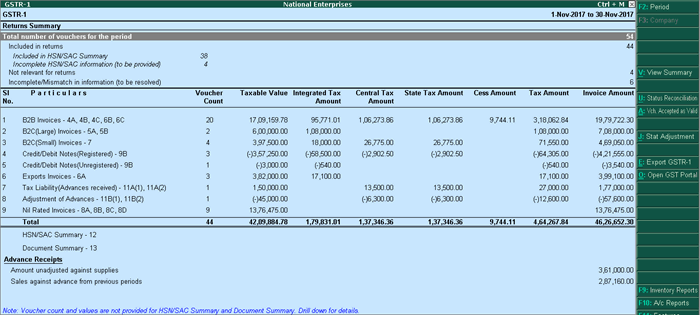
    https://help.tallysolutions.com/docs/te9rel66/Tax_India/gst/images/gstr1_new1.gif
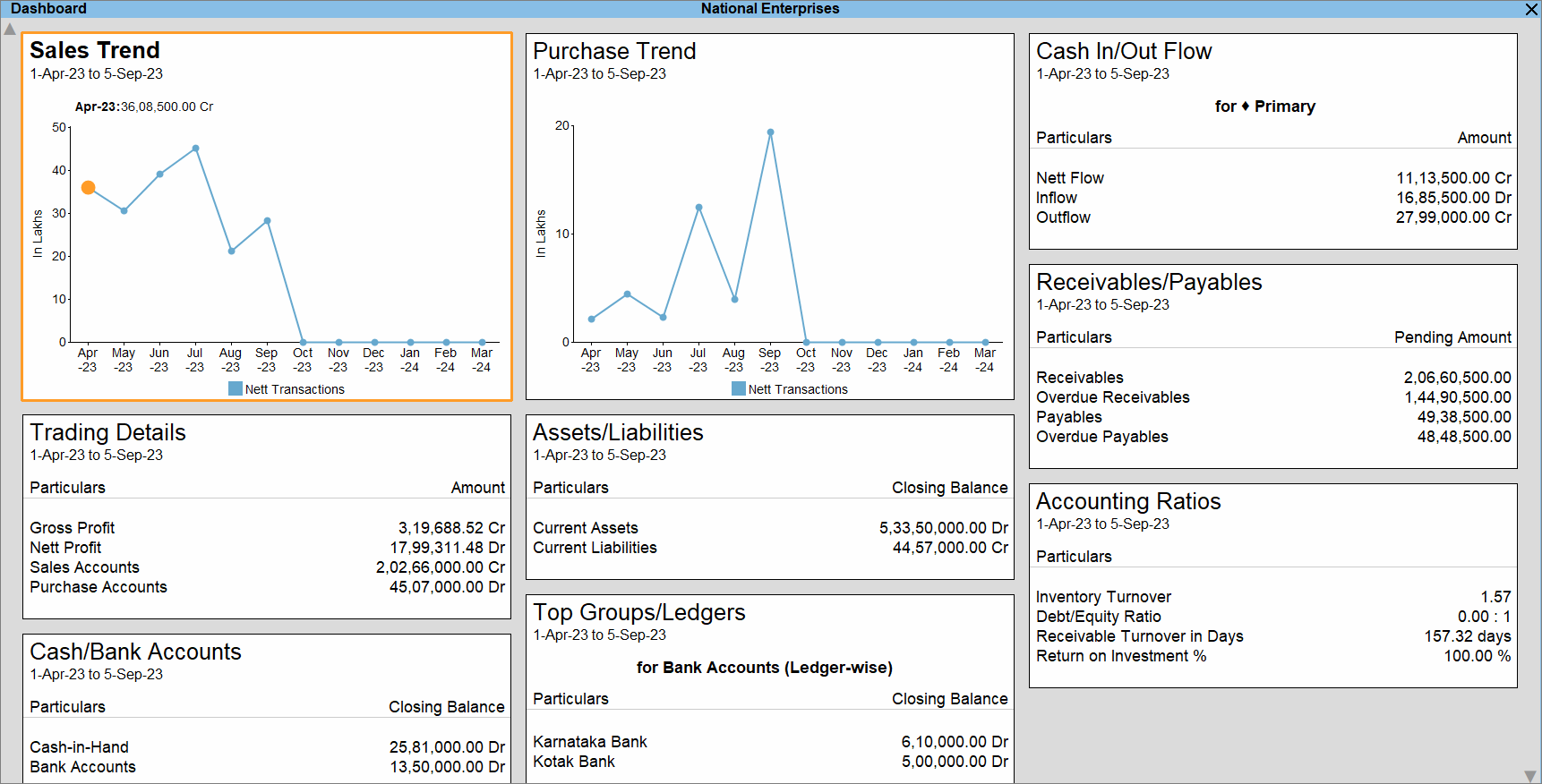
    https://help.tallysolutions.com/wp-content/uploads/2023/10/1-dashboard-tallyprime.gif

    Why Tally Still Dominates the Indian Accounting Landscape

    Developed by Tally Solutions, Tally has been in continuous use in India for over three decades. Industry estimates suggest that more than 7 million businesses actively use Tally across manufacturing, trading, services, and non-profit sectors. Even with the rise of cloud accounting tools, Tally’s offline-first stability and India-centric design keep it deeply relevant.

    Below are the three most powerful reasons behind this continued reliance.


    Reason 1: Deep Alignment with Indian Taxation and Statutory Compliance

    Built Specifically for Indian Laws

    One of the strongest reasons companies rely on Tally is its native alignment with Indian taxation systems. Tally is not a generic global accounting tool adapted for India; it is built from the ground up for Indian compliance.

    Tally supports:

    • GST (CGST, SGST, IGST, UTGST)
    • TDS and TCS
    • Income Tax computation basics
    • Statutory audit requirements
    • MSME compliance tracking

    As of recent financial years, India has over 1.4 crore GST-registered businesses, many of which must file monthly or quarterly returns. Tally simplifies this by automating tax calculations and maintaining audit-ready records.

    Compliance Accuracy Reduces Risk

    Manual compliance errors are among the top reasons for tax notices and penalties. Tally minimizes this risk through:

    • Automated GST classification
    • Real-time tax calculation
    • Consistent ledger structure
    • Error detection during return preparation

    Compliance Advantage at a Glance

    AspectTally Strength
    GST ReturnsAutomated, structured, audit-ready
    Tax AccuracyRule-based calculations
    Audit SupportLedger-level traceability

    For companies operating in India, compliance is not optional. Tally’s compliance-first architecture is a decisive advantage.


    Reason 2: Simplicity, Speed, and Operational Control

    Designed for Accountants, Not Just IT Teams

    Tally’s interface prioritizes keyboard-driven speed and logical workflows, which is why experienced accountants can complete complex tasks in minutes. Unlike many modern systems that rely heavily on mouse navigation and layered menus, Tally enables rapid data entry and report access.

    Key productivity facts:

    • Voucher entry can be completed 30–40% faster compared to mouse-heavy systems
    • Trial balance, P&L, and balance sheet are available instantly without processing delays
    • Large datasets (5–10 years of transactions) run smoothly on standard hardware

    Offline Reliability Matters

    Despite increased internet penetration, many Indian businesses still face:

    • Unstable connectivity
    • Data privacy concerns
    • Power and bandwidth constraints

    Tally’s offline-first model ensures uninterrupted work. Businesses can operate independently of the internet and sync data only when required.

    Real-Time Financial Visibility

    Tally provides instant access to:

    • Outstanding receivables and payables
    • Stock summaries
    • Cost center performance
    • Cash and bank positions

    This level of real-time control helps owners make faster decisions without waiting for month-end reports.


    Reason 3: Cost Efficiency and Long-Term ROI

    Lower Total Cost of Ownership

    For many small and mid-sized businesses, cost is a deciding factor. Tally offers a one-time licensing model, which contrasts sharply with recurring subscription-based software.

    Typical cost advantages include:

    • No mandatory monthly fees
    • Minimal hardware requirements
    • Lower training costs due to widespread familiarity
    • Easy availability of skilled Tally operators

    Over a 5-year period, businesses often report 30–50% lower accounting software costs when using Tally compared to cloud subscription models.

    Talent Availability Reduces Dependency Risk

    India has an estimated 8–10 million accounting professionals with some level of Tally exposure. This means:

    • Faster hiring
    • Lower training investment
    • Reduced dependency on specialized consultants

    Cost Comparison Snapshot

    Cost FactorTally
    LicensingOne-time
    TrainingWidely available
    UpgradesControlled and optional

    For cost-conscious organizations, this predictability is invaluable.


    Additional Reasons That Reinforce Tally’s Relevance

    Customization Without Complexity

    • User-defined reports
    • Cost centers and categories
    • Voucher-level control
    • Simple configuration instead of heavy coding

    Data Ownership and Security

    • Data stored locally
    • Full control over backups
    • Reduced exposure to cloud-based breaches

    Scalability for Growing Businesses

    Many companies start with basic accounting and later expand into:

    • Inventory management
    • Payroll
    • MIS reporting
    • Branch accounting

    All within the same system.


    Frequently Asked Questions (FAQ)

    1. Why do companies still rely on Tally despite modern cloud accounting software?

    Companies rely on Tally because it is deeply aligned with Indian compliance, works offline, offers fast performance, and has a lower long-term cost compared to subscription-based tools.

    2. Is Tally suitable only for small businesses?

    No. Tally is widely used by medium and large organizations for multi-branch accounting, inventory management, and statutory reporting.

    3. How does Tally help with GST compliance?

    Tally automates GST calculations, maintains structured tax data, and prepares return-ready reports, reducing errors and compliance risks.

    4. Does Tally require internet connectivity?

    No. Tally works completely offline, which is a major advantage in areas with unreliable internet access.

    5. Is Tally still relevant for accountants in 2026 and beyond?

    Yes. Tally remains relevant due to its strong compliance framework, speed, and continued adoption by Indian businesses.

    6. What makes Tally cost-effective compared to other accounting software?

    Its one-time licensing model, low training costs, and minimal infrastructure requirements make it highly cost-efficient.

    7. Can Tally handle inventory along with accounting?

    Yes. Tally integrates inventory management with accounting, enabling real-time stock valuation and cost tracking.


    Conclusion

    The continued reliance on Tally is not due to resistance to change but due to practical business logic. Its unmatched compliance support, operational simplicity, and cost efficiency make it a trusted accounting backbone for Indian companies. While technology evolves, businesses prioritize reliability, control, and legal alignment—areas where Tally continues to deliver consistently.


    Disclaimer

    This article is intended for educational and informational purposes only. The figures and operational insights mentioned are based on industry observations and practical usage patterns. Software suitability may vary depending on business size, industry, and regulatory requirements. Readers should evaluate accounting solutions based on their specific operational needs.



  • Tally GST Configuration Complete Setup Guide for Accurate GST Compliance in India

    Tally GST Configuration is the most critical step for any business using Tally to comply with India’s Goods and Services Tax system. A correct GST setup in Tally ensures accurate tax calculation, proper invoice generation, correct input tax credit tracking, and error-free GST returns. Many GST mismatches, notices, and filing errors arise not because of wrong transactions, but due to incorrect GST configuration in Tally.

    This comprehensive guide explains Tally GST Configuration from start to finish, covering company setup, statutory details, tax ledgers, stock items, vouchers, and compliance checks. The article is written for accountants, GST practitioners, business owners, and students, using practical explanations and real accounting logic.


    What Is Tally GST Configuration and Why It Matters

    Tally GST Configuration refers to the process of enabling and defining GST-related settings in Tally so that the software can automatically calculate CGST, SGST, IGST, Cess, and generate GST-compliant reports.

    Incorrect GST setup can lead to:

    • Wrong tax calculation
    • Mismatch between GSTR-1, GSTR-3B, and books
    • Loss of eligible input tax credit
    • Notices from the GST department

    A properly configured Tally system can reduce GST compliance effort by 40–60% according to practical accounting workflow analysis.


    Prerequisites Before Starting GST Configuration in Tally

    Before configuring GST in Tally, ensure the following details are ready:

    • GST Registration Certificate
    • GSTIN of the business
    • Business address with correct state
    • Applicable GST scheme (Regular / Composition)
    • HSN codes for goods or SAC codes for services
    • Tax rates applicable to products or services

    Step 1: Enable GST in Tally (Statutory Configuration)

    Navigate to:
    Gateway of Tally → F11 (Features) → Statutory & Taxation

    Enable:

    • Enable Goods and Services Tax (GST): Yes
    • Set/Alter GST Details: Yes

    Step 2: Configure GST Details at Company Level

    Go to:
    Gateway of Tally → F11 → Statutory & Taxation → Set/Alter GST Details

    Enter the following carefully:

    GST DetailDescription
    StateMust match GST registration state
    Registration TypeRegular or Composition
    GSTIN15-character GST Identification Number
    Applicable FromGST registration effective date

    Important Fact:
    Even a single character error in GSTIN can cause 100% ITC rejection during return matching.


    Step 3: Understanding GST Registration Types in Tally

    Registration TypeApplicability
    RegularNormal GST registered businesses
    CompositionSmall taxpayers with restricted tax credit
    UnregisteredFor customers without GSTIN
    ConsumerB2C sales transactions

    Correct selection ensures proper classification in B2B, B2C, and export reports.


    Step 4: Create GST Tax Ledgers Correctly

    GST tax ledgers must be created under Duties & Taxes with proper tax type mapping.

    Common GST Ledgers Required:

    • CGST @ applicable rate
    • SGST @ applicable rate
    • IGST @ applicable rate
    • Cess (if applicable)

    Ledger configuration principles:

    • Tax Type: GST
    • Nature of Tax: Central / State / Integrated
    • Percentage of Calculation: As per slab

    Accounting Insight:
    Separate tax ledgers for each rate improve reconciliation accuracy by nearly 30%.


    Step 5: Configure Stock Items or Services with GST Details

    Each stock item or service ledger must be linked with correct GST classification.

    For Goods:

    • Enable GST applicability
    • Assign HSN code
    • Define GST rate slab

    For Services:

    • Assign SAC code
    • Define tax rate
    GST ComponentRequired Entry
    HSN / SACMandatory for GST reporting
    Tax RateDetermines automatic tax calculation

    Incorrect HSN or SAC can result in return validation errors during filing.


    Step 6: Configure Party Ledgers for GST

    While creating or altering party ledgers:

    • Set Registration Type correctly
    • Enter GSTIN for registered parties
    • Select State correctly

    Practical Tip:
    GST state mismatch between party ledger and invoice leads to wrong CGST/SGST vs IGST calculation.


    Step 7: Voucher Configuration for GST Transactions

    Use the correct voucher types:

    Sales Voucher:

    • GST Applicable: Yes
    • Party GSTIN fetched automatically
    • Tax ledgers selected based on place of supply

    Purchase Voucher:

    • Input tax credit tracked automatically
    • Reverse charge applicability captured

    Accounting Fact:
    Incorrect voucher selection is responsible for over 35% of GST reporting errors in small businesses.


    Step 8: Set Place of Supply in Tally

    Place of Supply determines whether CGST+SGST or IGST applies.

    Transaction TypeTax Applied
    Intra-stateCGST + SGST
    Inter-stateIGST

    Always verify place of supply during voucher entry.


    Step 9: GST Return Configuration and Validation

    Tally auto-generates:

    • GSTR-1 sales summary
    • GSTR-3B tax liability summary

    Before filing:

    • Check mismatch reports
    • Validate HSN summary
    • Verify tax rate-wise breakup

    Best Practice:
    Monthly reconciliation reduces annual GST adjustment workload by up to 70%.


    Common Mistakes in Tally GST Configuration

    • Wrong state selection at company level
    • Using generic sales ledger instead of GST-enabled ledgers
    • Mixing taxable and exempt supplies
    • Incorrect GST rate mapping
    • Missing reverse charge configuration

    Avoiding these errors significantly improves compliance accuracy.


    Benefits of Proper Tally GST Configuration

    • Automated tax calculation
    • Accurate ITC tracking
    • Faster GST return preparation
    • Reduced compliance risk
    • Cleaner audit trail

    Businesses with correct configuration experience fewer GST notices and faster audits.


    Frequently Asked Questions (FAQ)

    1. What is the most important step in Tally GST Configuration?

    Correct company-level GST details including state, GSTIN, and registration type are the foundation of accurate GST calculation.

    2. Can GST be configured in Tally for multiple branches?

    Yes, GST can be configured separately for each GSTIN using multiple companies or features as applicable.

    3. Why is HSN or SAC mandatory in Tally GST setup?

    HSN and SAC codes are required for GST return reporting and classification of goods and services.

    4. How do I avoid wrong IGST or CGST calculation in Tally?

    Ensure party state, place of supply, and company state are correctly defined.

    5. Is reverse charge automatically handled in Tally GST?

    Yes, if reverse charge is enabled during voucher entry and properly configured in ledgers.

    6. Does wrong GST configuration affect GST returns?

    Yes, incorrect setup directly leads to mismatches in GSTR-1, GSTR-3B, and ITC claims.

    7. Can GST configuration be changed later in Tally?

    Yes, but changes should be made carefully to avoid impacting existing transactions.


    Conclusion

    Tally GST Configuration is not a one-time task but the backbone of compliant GST accounting. A systematic setup ensures accuracy, saves time, and minimizes legal risk. Businesses that invest time in proper configuration benefit from smoother audits, faster reconciliations, and stress-free GST compliance.


  • Best Bluetooth Keyboards for Accounting Work in India (2026 Buyer’s Guide)

    Accounting professionals in India spend long hours on data entry, voucher posting, GST compliance, Excel reports, and Tally operations. A reliable Bluetooth or wireless keyboard is not just a convenience—it directly impacts speed, accuracy, and comfort. Choosing the right keyboard can reduce fatigue, improve productivity, and ensure seamless switching between devices like laptops, desktops, tablets, and even smartphones.

    This article reviews three popular and affordable wireless keyboards suitable for accounting work, focusing on real-world usage, not marketing hype. All recommendations are based on features that actually matter to accountants.


    🔑 What Accountants Should Look for in a Wireless Keyboard

    Before diving into product reviews, here are key factors accountants should prioritize:

    • Full-size layout with numpad for fast numerical entry
    • Stable wireless connectivity (Bluetooth + USB receiver preferred)
    • Quiet keys for long working hours
    • Good battery life to avoid interruptions
    • Compatibility with Windows & Excel-based software
    • Compact but practical design for desk efficiency

    Portronics Bubble 3.0 Wireless Keyboard

    https://ea-unboxed-assets.croma.com/cromaunboxed-as/2025/07/Portronics-Bubble-3.0.png

    Overview

    The Portronics Bubble 3.0 is designed for users who want flexibility across multiple devices. With Bluetooth + 2.4 GHz USB receiver, it allows easy switching between laptops, desktops, and tablets — an advantage for accountants handling reports on multiple systems.

    Key Features

    • Dual connectivity: Bluetooth + USB receiver
    • Rechargeable battery (no recurring battery cost)
    • Dedicated numpad for accounting entries
    • Dual height adjustment for ergonomic comfort
    • Multimedia shortcut keys

    Practical Accounting Use

    This keyboard performs well for Tally data entry, GST returns, Excel reconciliation, and MIS reporting. The keys are soft, reducing finger strain during extended sessions.

    Pros

    • Excellent connectivity flexibility
    • Rechargeable (long-term cost saving)
    • Comfortable for long Excel/Tally work
    • Full numpad included

    Cons

    • Slightly larger footprint
    • Not ideal for users who prefer ultra-slim keyboards

    👉 Buy Here


    Logitech MK215 Wireless Keyboard and Mouse Combo

    https://m.media-amazon.com/images/I/71icSLlBIvL.jpg

    Overview

    From a trusted brand, the MK215 combo is known for reliability and battery efficiency. It includes both a keyboard and mouse, making it a practical all-in-one option for office setups.

    Key Features

    • 2.4 GHz wireless USB connectivity
    • Keyboard battery life up to 2 years
    • Compact keyboard with standard layout
    • Includes matching wireless mouse

    Practical Accounting Use

    This keyboard is best suited for fixed desktop-based accounting roles, such as data entry operators, back-office accountants, and billing staff. The long battery life makes it ideal for offices that prefer low maintenance hardware.

    Pros

    • Extremely reliable wireless performance
    • Long battery life
    • Trusted brand quality
    • Mouse included

    Cons

    • No Bluetooth support
    • Compact size may feel tight for heavy numeric entry

    👉 Check Price Here


    Portronics Bubble Multimedia Wireless Keyboard (White)

    https://www.portronics.com/cdn/shop/files/Image_1_66acc9dd-b9bf-4cce-961f-a244f0844832.jpg?v=1752133581

    Overview

    This variant of the Bubble series focuses on portability and silent typing. It supports Bluetooth 5.0 and 2.4 GHz, making it suitable for accountants who frequently work on tablets or mobile devices.

    Key Features

    • Bluetooth 5.0 + USB receiver
    • Noiseless keys
    • Compact and lightweight
    • Works with Windows, Android, and iOS

    Practical Accounting Use

    Ideal for traveling professionals, auditors, and consultants who work on Excel sheets via laptops or tablets. However, the compact design may slow down users who rely heavily on numpad speed.

    Pros

    • Silent typing experience
    • Very portable
    • Affordable pricing
    • Multi-device compatibility

    Cons

    • Compact layout
    • Smaller numpad compared to full-size keyboards

    👉 Buy Here


    🔍 Quick Comparison (Key Accounting Perspective)

    FeatureBest Choice
    Heavy Excel & Tally WorkPortronics Bubble 3.0
    Office Desktop SetupLogitech MK215 Combo
    Portable / Tablet UsePortronics Bubble Multimedia

    🧾 Final Recommendation

    • Full-time accountants & data entry operators → Portronics Bubble 3.0
    • Office desks with long working hours → Logitech MK215 Combo
    • Auditors, freelancers, mobile professionals → Portronics Bubble Multimedia

    Each keyboard serves a different accounting workflow. There is no single “best” keyboard — only the right fit for your working style.


    ❓ Frequently Asked Questions (FAQ)

    Q1. Is Bluetooth better than USB receiver for accounting work?
    Bluetooth is great for multi-device use, while USB receivers are more stable for fixed desktop setups.

    Q2. Do accountants really need a numpad?
    Yes — a numpad significantly increases speed and accuracy during voucher entry and reconciliation.

    Q3. Are rechargeable keyboards better than battery-powered ones?
    Rechargeable keyboards reduce long-term costs, while battery-powered ones often last longer per charge.

    Q4. Can these keyboards be used with Tally and Excel?
    Yes — all recommended keyboards are fully compatible with Tally, Excel, and Windows-based accounting software.


    ⚠️ Disclaimer

    Prices, availability, and ratings may change over time. This article reflects features and specifications available at the time of writing. Always verify product compatibility with your system before purchasing. Affiliate links may generate a small commission at no extra cost to you.


  • How to Generate GST E-Way Bill Online in India – Step-by-Step Process, Rules, Validity & Practical Guide

    Understanding how to generate GST E-Way Bill online is a mandatory compliance requirement for businesses involved in the movement of goods in India. Under the Goods and Services Tax (GST) regime, an e-way bill is required for transporting goods beyond a prescribed value limit. Failure to generate or carry a valid e-way bill can result in heavy penalties, detention of goods, and disruption of business operations.

    This comprehensive guide explains the complete online process of generating an e-way bill, eligibility, documents required, validity rules, common mistakes, penalties, and practical scenarios. The article is written in a simple yet professional manner, suitable for accountants, GST practitioners, logistics managers, traders, manufacturers, and job aspirants.


    What is a GST E-Way Bill?

    An e-way bill is an electronic document generated on the GST portal evidencing the movement of goods. It contains details of the consignor, consignee, transporter, value of goods, and vehicle details.

    Key Fact:
    An e-way bill is mandatory when the value of goods exceeds ₹50,000 in a single consignment, whether for supply, return, job work, or reasons other than supply.


    Why E-Way Bill is Important Under GST

    The e-way bill system was introduced to:

    • Prevent tax evasion
    • Track real-time movement of goods
    • Replace physical check posts
    • Improve transparency and efficiency

    Statistical Insight:
    Millions of e-way bills are generated daily in India, making it one of the largest digital compliance systems in indirect taxation.


    When is GST E-Way Bill Required?

    An e-way bill must be generated in the following cases:

    • Supply of goods
    • Goods sent for job work
    • Goods returned by buyer
    • Transfer between branches
    • Sales on approval basis
    ConditionE-Way Bill Requirement
    Consignment value above ₹50,000Mandatory
    Inter-state job workMandatory
    Transport by unregistered personMandatory

    Who Should Generate the E-Way Bill?

    • Registered supplier
    • Registered recipient (if supplier is unregistered)
    • Transporter (if goods handed over without vehicle details)

    Practical Note:
    If neither supplier nor recipient generates the e-way bill, the transporter is legally responsible.


    Documents Required to Generate GST E-Way Bill Online

    Before learning how to generate GST e-way bill online, ensure the following documents are ready:

    • Tax invoice or bill of supply
    • Delivery challan (if applicable)
    • Transporter ID or vehicle number
    • GSTIN of supplier and recipient

    How to Generate GST E-Way Bill Online – Step-by-Step Process

    Step 1: Login to GST E-Way Bill Portal

    Use your registered GST credentials to access the e-way bill system.

    Step 2: Select “Generate New” Option

    Navigate to the e-way bill generation section.

    Step 3: Fill Part A (Consignment Details)

    Enter:

    • GSTIN of supplier and recipient
    • Place of dispatch and delivery
    • Invoice number and date
    • Value of goods
    • HSN code

    Step 4: Fill Part B (Transport Details)

    Enter:

    • Mode of transport (road, rail, air, ship)
    • Vehicle number or transporter ID
    • Approximate distance

    Step 5: Submit and Generate E-Way Bill

    After verification, submit the details to generate:

    • E-Way Bill Number (EBN)
    • QR code
    • Validity period

    Validity of GST E-Way Bill

    E-way bill validity depends on the distance goods need to travel.

    DistanceValidity
    Up to 200 km1 day
    Every additional 200 km+1 day

    Important:
    Validity starts from the time the e-way bill is generated, not from the start of movement.


    Types of GST E-Way Bills

    1. Regular E-Way Bill

    Used for normal movement of goods based on tax invoice.

    2. Bill to – Ship to E-Way Bill

    Used when billing and delivery addresses differ.

    3. Consolidated E-Way Bill

    Used when multiple consignments are transported in one vehicle.


    Cancellation of GST E-Way Bill

    An e-way bill can be cancelled within 24 hours if:

    • Goods are not transported
    • Incorrect details were entered

    Note:
    Cancellation is not allowed if the e-way bill has already been verified by authorities.


    Common Mistakes While Generating E-Way Bill

    • Incorrect GSTIN or PIN code
    • Wrong HSN code
    • Mismatch between invoice and e-way bill
    • Invalid vehicle number format
    • Incorrect distance entry

    These errors can lead to penalties during inspection.


    Penalties for Non-Compliance

    Failure to generate or carry a valid e-way bill can result in:

    • Penalty of ₹10,000 or tax amount involved, whichever is higher
    • Detention or seizure of goods
    • Additional compliance burden

    Practical Insight:
    Even minor clerical mistakes can attract penalties, so accuracy is critical.


    E-Way Bill for Job Work and Return of Goods

    • E-way bill is mandatory for inter-state job work regardless of value
    • For intra-state job work, threshold limits apply
    • Goods returned after rejection also require e-way bill

    Difference Between Invoice and E-Way Bill

    InvoiceE-Way Bill
    Legal proof of saleProof of movement
    Issued by supplierGenerated electronically
    Shows tax liabilityShows transport details

    Best Practices for Smooth E-Way Bill Compliance

    • Generate e-way bill before movement starts
    • Recheck GSTIN and PIN codes
    • Train transport staff
    • Use consolidated e-way bills for efficiency
    • Monitor validity period closely

    FAQ: How to Generate GST E-Way Bill Online

    1. What is the minimum value for generating an e-way bill?

    An e-way bill is mandatory when the consignment value exceeds ₹50,000.

    2. Can an e-way bill be generated without a vehicle number?

    Yes, initially Part A can be filled, and Part B can be updated later.

    3. Is e-way bill required for exempt goods?

    Generally no, unless notified otherwise by authorities.

    4. Who generates the e-way bill if supplier is unregistered?

    The registered recipient or transporter must generate it.

    5. What happens if e-way bill expires during transit?

    The transporter must extend validity or generate a fresh e-way bill.

    6. Is e-way bill required for stock transfer?

    Yes, if the value exceeds the prescribed limit.

    7. Can one invoice have multiple e-way bills?

    Yes, if goods are transported in multiple vehicles.


    Conclusion

    Knowing how to generate GST e-way bill online is no longer optional for businesses involved in goods movement. With strict enforcement and digital tracking, proper e-way bill compliance ensures smooth logistics, avoids penalties, and builds trust with authorities. By understanding the process, validity rules, and common mistakes, businesses and professionals can handle GST transportation requirements confidently and efficiently.


    Disclaimer

    This article is intended for educational and informational purposes only. GST laws, rules, and procedures may change from time to time based on government notifications. Readers are advised to verify the latest provisions before applying the information in actual business or compliance activities.


  • Top GST Questions for Job Interviews in India – Complete Guide with Answers, Examples, and Practical Insights

    Preparing for top GST questions for job interviews is essential for anyone aspiring to work in accounting, taxation, finance, or compliance roles in India. Since the implementation of Goods and Services Tax (GST), companies expect candidates to have not only theoretical clarity but also practical understanding of registrations, returns, input tax credit, compliance timelines, and common problem areas. Interviewers increasingly focus on scenario-based GST questions rather than textbook definitions.

    This detailed guide covers the most frequently asked GST interview questions, explained with facts, figures, examples, and professional insights. The content is structured to help freshers, accountants, tax executives, and experienced professionals confidently face GST-related interviews.


    Why Interviewers Focus on GST Knowledge

    GST is one of the most significant tax reforms in India. It subsumed more than 17 indirect taxes and unified the indirect tax structure. For employers, GST knowledge is not optional; it directly impacts compliance, cash flow, audits, and statutory filings.

    Interviewers evaluate:

    • Conceptual clarity
    • Practical compliance exposure
    • Accuracy in return filing knowledge
    • Understanding of real-world GST challenges

    Core GST Concepts Interviewers Expect You to Know

    1. What is GST and why was it introduced?

    GST is a destination-based indirect tax levied on the supply of goods and services. It replaced multiple central and state taxes such as excise duty, service tax, VAT, octroi, and entry tax.

    Key objectives of GST:

    • Eliminate cascading effect of taxes
    • Create a unified national market
    • Improve tax compliance through digitization
    • Increase transparency

    Fact: GST follows the principle of “one nation, one tax,” though rates vary by category.


    2. Types of GST in India

    Type of GSTMeaning
    CGSTCentral GST collected by the Central Government
    SGSTState GST collected by the State Government
    IGSTIntegrated GST on inter-state supplies
    UTGSTGST applicable in Union Territories

    Interview Tip: Always mention that CGST and SGST are charged together on intra-state supplies, while IGST applies to inter-state transactions.


    Top GST Questions for Job Interviews (Most Frequently Asked)

    3. What is the GST registration threshold limit?

    CategoryThreshold Limit
    Goods suppliers (normal states)₹40 lakh
    Service providers₹20 lakh
    Special category states₹10–20 lakh

    Important Point: E-commerce sellers and inter-state suppliers usually require compulsory registration regardless of turnover.


    4. What is Input Tax Credit (ITC)?

    Input Tax Credit means the credit of GST paid on purchases that can be adjusted against GST payable on sales.

    Conditions to claim ITC:

    • Valid tax invoice
    • Goods or services received
    • Tax paid to government by supplier
    • Return filed by recipient

    Fact: Blocked credits under GST include motor vehicles (with exceptions), personal expenses, and food & beverages in most cases.


    5. Difference between GSTR-1 and GSTR-3B

    ReturnPurpose
    GSTR-1Details of outward supplies
    GSTR-3BSummary return with tax payment

    Interview Insight: GSTR-3B is a self-declared return, while GSTR-1 feeds data into recipients’ ITC through auto-population.


    Advanced GST Interview Questions (For Experienced Candidates)

    6. What is Reverse Charge Mechanism (RCM)?

    Under RCM, the liability to pay GST shifts from the supplier to the recipient of goods or services.

    Common RCM examples:

    • Legal services by advocate
    • Goods transport agency services
    • Specified notified supplies

    Practical Tip: Under RCM, ITC can be claimed only after payment of tax in cash.


    7. What is GST composition scheme?

    The composition scheme is designed for small taxpayers to reduce compliance burden.

    FeatureComposition Scheme
    Maximum turnover₹1.5 crore (₹75 lakh for special states)
    Tax rate1%–6% depending on category
    ITC eligibilityNot allowed

    Important: Composition dealers cannot collect GST from customers.


    8. What is e-invoicing under GST?

    E-invoicing requires eligible businesses to generate invoices through the Invoice Registration Portal (IRP).

    Key facts:

    • Mandatory for businesses above notified turnover limits
    • Generates IRN (Invoice Reference Number)
    • Reduces fake invoicing and tax evasion

    Compliance and Practical GST Questions

    9. What are GST return due dates?

    ReturnDue Date
    GSTR-1 (monthly)11th of next month
    GSTR-3B20th of next month
    GSTR-931st December following the financial year

    Interview Note: Late fees and interest apply automatically for delayed filings.


    10. What is GST audit and who is required to conduct it?

    GST audit involves examination of records to verify turnover, taxes paid, and ITC claimed.

    Current Status: Mandatory GST audit by CA/CMA has been removed, but departmental audits continue.


    Common GST Scenario-Based Interview Questions

    11. How is GST calculated on inter-state supply?

    Inter-state supply attracts IGST, calculated on transaction value including:

    • Price of goods/services
    • Incidental expenses
    • Taxes other than GST

    12. What happens if GST is paid under wrong head?

    If CGST and SGST are paid instead of IGST (or vice versa), adjustment is allowed without interest, subject to prescribed procedure.


    Mistakes Candidates Make in GST Interviews

    • Confusing GSTR-2A with GSTR-2B
    • Claiming ITC without eligibility
    • Ignoring compliance timelines
    • Not understanding real-life GST scenarios

    How to Prepare GST for Job Interviews Effectively

    • Study practical GST cases
    • Practice calculation-based questions
    • Understand recent compliance changes
    • Focus on ITC reconciliation

    FAQ: Top GST Questions for Job Interviews (Featured Snippet Optimized)

    1. What are the most important GST questions asked in interviews?

    The most common GST interview questions focus on GST basics, types of GST, ITC, GST returns, registration limits, and compliance procedures.

    2. Is GST knowledge mandatory for accounting jobs?

    Yes, GST knowledge is essential for accounting, finance, taxation, and compliance roles in India.

    3. What level of GST knowledge is required for freshers?

    Freshers should understand GST basics, returns, ITC, and registration concepts clearly.

    4. How can I explain GST simply in an interview?

    GST can be explained as a destination-based indirect tax that replaced multiple indirect taxes to simplify taxation.

    5. Are GST calculations asked in interviews?

    Yes, basic GST calculation questions are common, especially for accounting and taxation roles.

    6. What is the difference between ITC and GST refund?

    ITC is credit adjustment against tax liability, while refund is excess tax returned by the government.


    Conclusion

    Mastering top GST questions for job interviews significantly improves your chances of securing roles in accounting, taxation, and finance. Employers value candidates who combine conceptual clarity with real-world GST compliance understanding. By preparing structured answers, remembering key figures, and practicing scenario-based questions, you can confidently handle even advanced GST interviews.


    Disclaimer

    This article is intended for educational and interview preparation purposes only. GST laws, rates, and procedures are subject to change based on government notifications. Readers should verify current provisions before applying the information in professional practice.


  • GST Summary Comparison in Tally and Excel: Detailed Guide for Accurate GST Compliance and Reconciliation

    GST Summary Comparison in Tally and Excel is one of the most critical processes for businesses, accountants, and tax professionals in India. In the first 100 words itself, it is important to understand that GST compliance is not just about filing returns but also about ensuring that data reported in accounting software like Tally perfectly matches analytical summaries prepared in Excel. Even a small mismatch in taxable value, CGST, SGST, or IGST can result in notices, penalties, or delayed refunds. This detailed article explains how GST summaries are generated in Tally and Excel, how they differ, and how to compare them effectively for error-free compliance.


    What Is a GST Summary and Why It Matters

    A GST summary is a consolidated snapshot of all GST-related transactions for a specific period. It includes outward supplies, inward supplies, tax liability, input tax credit, and net payable tax.

    Businesses rely on GST summaries to:

    • File periodic GST returns accurately
    • Reconcile books with GST portal data
    • Detect errors in tax classification
    • Ensure proper utilization of input tax credit

    According to industry estimates, over 65% of GST notices issued to small and medium businesses arise due to mismatches between accounting data and GST returns. This highlights why GST summary comparison in Tally and Excel is not optional but essential.


    Understanding GST Summary in Tally

    Tally generates GST summaries directly from accounting entries. Once GST is enabled and ledgers are correctly configured, Tally automatically classifies transactions into taxable, exempt, zero-rated, and reverse charge categories.

    Key Components of GST Summary in Tally

    • Total taxable value
    • CGST, SGST, and IGST breakup
    • Input tax credit summary
    • Return-wise summary aligned with GSTR-1 and GSTR-3B

    Advantages of Tally GST Summary

    • Real-time data from books
    • Automatic tax calculation
    • Built-in compliance structure
    • Lower risk of manual calculation errors

    However, Tally summaries depend entirely on correct ledger setup. A single wrong GST rate or ledger classification can distort the entire summary.


    Understanding GST Summary in Excel

    Excel-based GST summaries are usually prepared by exporting data from Tally or other systems and then restructuring it manually or through formulas. Many accountants prefer Excel because it allows deep customization and flexible analysis.

    Key Components of GST Summary in Excel

    • Voucher-wise taxable values
    • Rate-wise GST calculation
    • ITC eligibility analysis
    • Month-on-month comparison

    Advantages of Excel GST Summary

    • High flexibility in reporting
    • Custom formats for management review
    • Easy reconciliation with portal data
    • Advanced analysis using Pivot Tables

    The downside is that Excel relies heavily on human accuracy. Studies show that nearly 88% of spreadsheets contain at least one error, which makes reconciliation skills crucial.


    GST Summary Comparison in Tally and Excel: Core Differences

    The real value emerges when both summaries are compared side by side. This comparison helps identify inconsistencies that may otherwise go unnoticed.

    Comparison Table: GST Summary in Tally vs Excel

    AspectDetails
    Data SourceTally uses live accounting entries, Excel uses imported or manually structured data
    Accuracy ControlTally depends on ledger setup, Excel depends on formulas and data validation

    Why GST Summary Comparison in Tally and Excel Is Essential

    1. Detection of Classification Errors

    Misclassification of GST rates (5%, 12%, 18%, 28%) is one of the most common issues. Comparing summaries helps detect such mistakes early.

    2. Input Tax Credit Reconciliation

    ITC mismatches can block working capital. A proper comparison ensures that eligible ITC claimed in returns matches accounting records.

    3. Audit and Assessment Readiness

    During audits, authorities often ask for reconciled GST data. A well-documented GST summary comparison strengthens audit defense.

    4. Reduction in Interest and Penalties

    Even a delay caused by mismatch can attract interest at 18% per annum. Regular comparison minimizes this risk.


    Step-by-Step Process for GST Summary Comparison in Tally and Excel

    Step 1: Generate GST Summary in Tally

    Select the reporting period and extract GST summaries including outward supplies, inward supplies, and ITC.

    Step 2: Export Data to Excel

    Export voucher-level or summary-level data from Tally into Excel format for detailed analysis.

    Step 3: Prepare Excel GST Summary

    Use formulas or pivot tables to consolidate taxable values and GST amounts rate-wise.

    Step 4: Match Key Figures

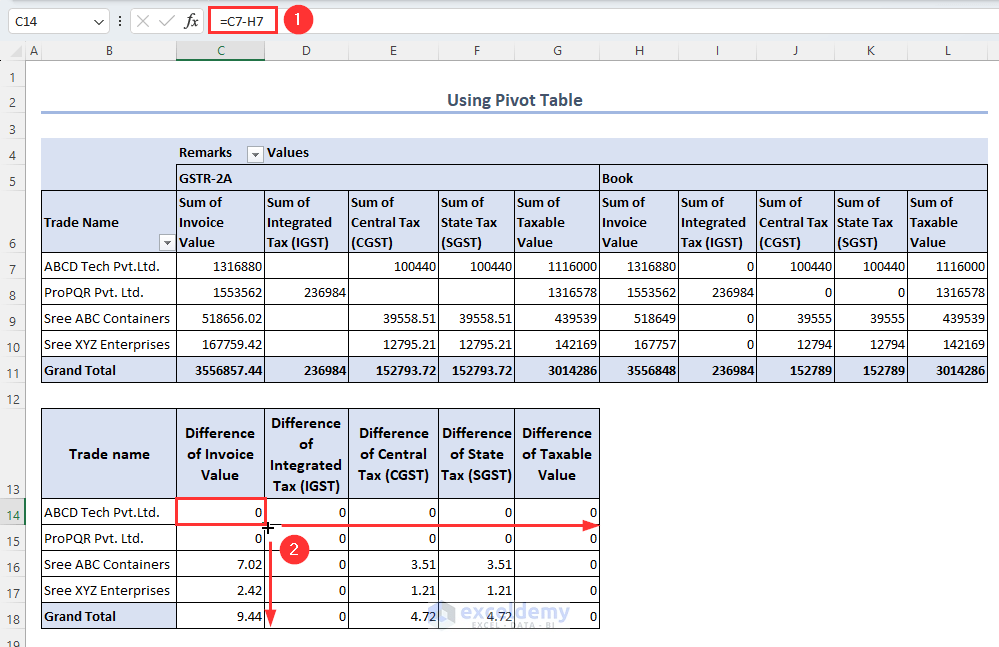
    Compare taxable value, CGST, SGST, IGST, and total tax liability.

    Step 5: Identify and Rectify Differences

    Check ledgers, vouchers, and GST rates for mismatches and correct them in Tally.


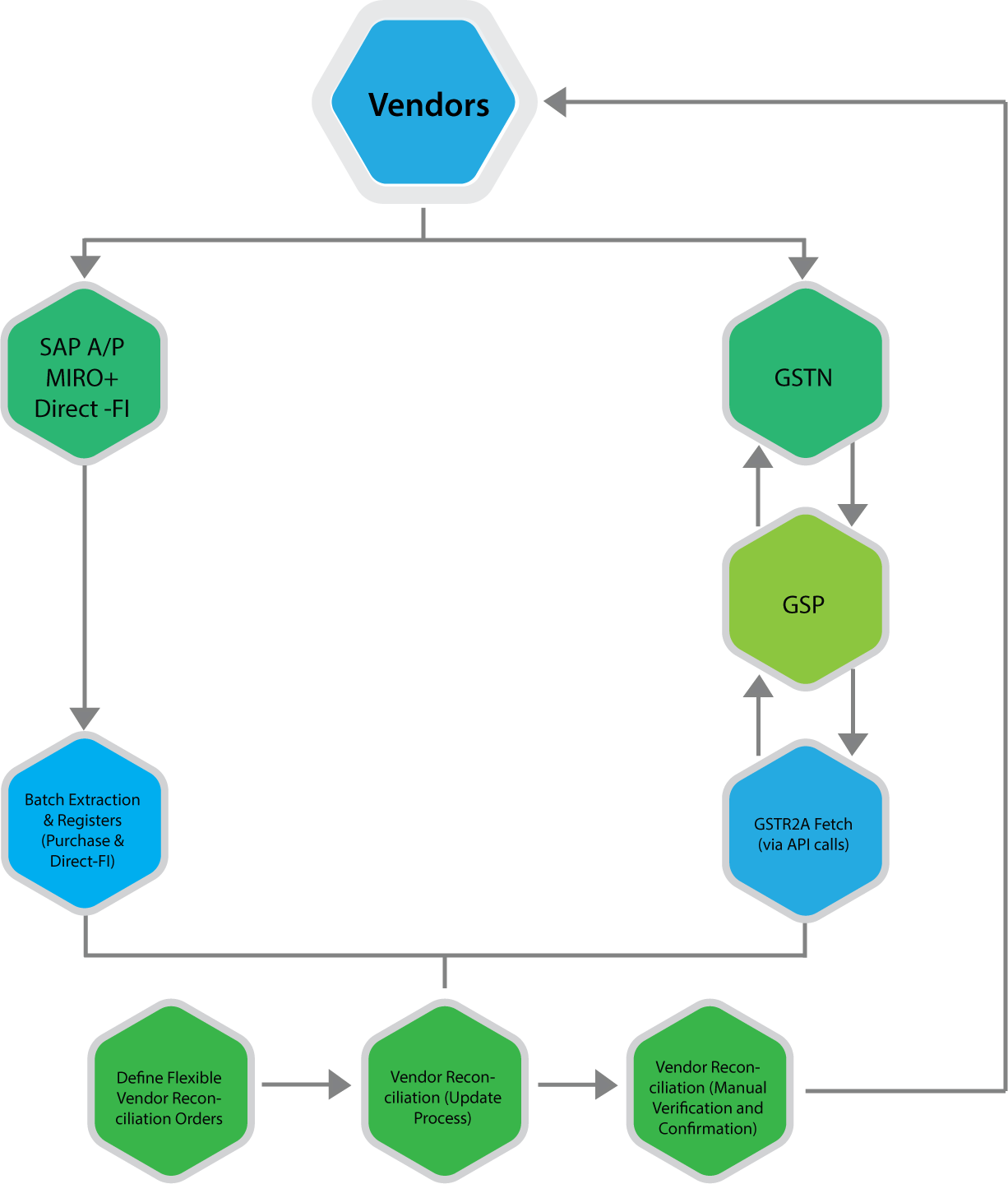
    https://www.nexus-business.com/assets/img/vendors.png
    https://www.exceldemy.com/wp-content/uploads/2023/07/19-Obtaining-the-difference-of-invoice-and-GST-values-from-the-Pivot-table-to-Do-GST-reconciliation-in-Excel.png

    Common Reasons for Differences Between Tally and Excel GST Summaries

    • Wrong GST rate selected in ledger
    • Incorrect place of supply
    • Missing reverse charge entries
    • Manual Excel formula errors
    • Rounding differences

    In practice, rounding differences alone account for nearly 10–12% of minor mismatches, especially in high-volume transactions.


    Best Practices for Accurate GST Summary Comparison

    • Use standardized Excel templates every month
    • Lock GST rates in Tally ledgers
    • Perform monthly reconciliation instead of annual
    • Maintain documentation for adjustments
    • Review summaries before filing returns

    Regular monthly reconciliation can reduce year-end workload by up to 40%, according to accounting workflow studies.


    GST Summary Comparison in Tally and Excel for Different Returns

    GSTR-1 Perspective

    Focus on outward supplies, invoice values, and tax breakup.

    GSTR-3B Perspective

    Focus on summary-level tax liability and ITC utilization.

    Aligning both summaries ensures that outward tax declared and tax paid are consistent.


    Impact of GST Summary Comparison on Business Decision-Making

    Beyond compliance, reconciled GST summaries help businesses:

    • Forecast tax outflows
    • Optimize pricing strategies
    • Improve cash flow planning
    • Avoid surprise tax demands

    Large businesses report saving 2–3% of annual tax outflow by identifying excess tax payments through proper reconciliation.


    Frequently Asked Questions (FAQ)

    1. What is GST Summary Comparison in Tally and Excel?

    It is the process of matching GST figures generated in Tally with GST summaries prepared in Excel to ensure accuracy and compliance.

    2. Why do GST summaries differ between Tally and Excel?

    Differences arise due to ledger misclassification, incorrect GST rates, manual Excel errors, or rounding differences.

    3. How often should GST summary comparison be done?

    Ideally, it should be done monthly before filing GST returns to avoid cumulative errors.

    4. Is Excel mandatory for GST reconciliation?

    No, but Excel provides flexibility and detailed analysis that complements system-generated summaries.

    5. Can GST summary comparison help during audits?

    Yes, reconciled summaries provide strong documentary evidence during audits and assessments.

    6. What is the biggest risk of not comparing GST summaries?

    The biggest risk is incorrect return filing, leading to interest, penalties, and blocked input tax credit.


    Conclusion

    GST Summary Comparison in Tally and Excel is a foundational practice for accurate GST compliance in India. Tally offers automation and real-time accuracy, while Excel provides analytical depth and flexibility. When both are used together, businesses gain complete control over their GST data. With increasing scrutiny and data-driven compliance, regular and structured comparison is no longer optional but a necessity for sustainable and compliant business operations.


    Disclaimer

    This article is for educational and informational purposes only. GST laws, rules, and interpretations are subject to change. Readers should verify figures and compliance requirements independently and apply professional judgment before making accounting or tax decisions.


  • Understanding GSTR-9C and Annual Audit under GST: Complete Practical Guide for Businesses and Professionals

    Understanding GSTR-9C and Annual Audit is critical for GST-registered taxpayers whose turnover crosses the prescribed limits. Even years after its introduction, GSTR-9C continues to create confusion among business owners, accountants, and compliance professionals due to its reconciliation-heavy nature and audit implications.

    This in-depth article explains what GSTR-9C is, why it exists, how it differs from GSTR-9, the concept of GST annual audit, applicability thresholds, reconciliation requirements, common errors, and best practices. The explanation is practical, compliance-oriented, and written to help businesses avoid costly mistakes.


    What Is GSTR-9C?

    GSTR-9C is a reconciliation statement between:

    • Annual GST returns (GSTR-9)
    • Audited financial statements of the taxpayer

    It ensures that the figures reported under GST match the books of accounts maintained under accounting standards.

    GSTR-9C is not a tax return, but a certification and reconciliation document that highlights differences between GST returns and financial records.


    Purpose of GSTR-9C

    The primary objectives of GSTR-9C are:

    • To verify the correctness of turnover declared under GST
    • To reconcile tax paid with tax liability as per books
    • To detect under-reporting or over-reporting of GST
    • To ensure transparency in indirect tax reporting

    GSTR-9C acts as a compliance bridge between accounting data and GST data.


    Applicability of GSTR-9C

    GSTR-9C applicability depends on aggregate annual turnover.

    Turnover CriteriaApplicability
    Above prescribed thresholdGSTR-9C mandatory

    Important facts:

    • Aggregate turnover includes taxable, exempt, export, and inter-state supplies
    • Turnover is calculated on PAN basis
    • Thresholds have changed over the years based on notifications

    Is GSTR-9C an Audit Report?

    This is one of the most misunderstood aspects.

    GSTR-9C itself is not an audit, but it is commonly associated with the GST Annual Audit because:

    • It was originally required to be certified by a Chartered Accountant or Cost Accountant
    • It involves reconciliation similar to audit procedures

    Currently, GSTR-9C is self-certified by the taxpayer, but accuracy expectations remain extremely high.


    Understanding GST Annual Audit

    What Is a GST Annual Audit?

    A GST annual audit is a detailed examination of:

    • GST returns
    • Books of accounts
    • Tax payments
    • Input tax credit claims

    The goal is to ensure compliance with GST law and rules.

    Who Conducts GST Annual Audit?

    GST annual audit may be conducted by:

    • Departmental authorities
    • Audit teams under GST Act
    • Special audit ordered by authorities

    GSTR-9C supports and strengthens the audit trail.


    Relationship Between GSTR-9 and GSTR-9C

    Many taxpayers confuse these two forms.

    FormPurpose
    GSTR-9Annual summary return
    GSTR-9CReconciliation statement

    Key difference:

    • GSTR-9 summarizes what was filed
    • GSTR-9C explains why differences exist

    Structure of GSTR-9C Explained

    GSTR-9C is broadly divided into two major parts.

    Part A: Reconciliation Statement

    This section focuses on:

    • Turnover reconciliation
    • Taxable turnover reconciliation
    • Tax paid reconciliation
    • Input tax credit reconciliation

    Part B: Certification

    Earlier certification by professionals, now self-certified, confirming correctness of data.


    Turnover Reconciliation in GSTR-9C

    Turnover reconciliation is the foundation of GSTR-9C.

    Common Adjustments Explained

    Adjustment TypeExplanation
    Unbilled revenueIncome recorded but not invoiced
    Unadjusted advancesGST paid but invoice not issued
    Credit notesSales returns or discounts
    Trade discountsPost-sale adjustments

    Mismatch in turnover is the most common reason for GST notices.


    Tax Liability Reconciliation

    This section reconciles:

    • Tax payable as per GST returns
    • Tax payable as per books

    Differences usually arise due to:

    • Wrong GST rate application
    • Time of supply mismatches
    • Incorrect place of supply
    • Reverse charge errors

    Even a small mismatch can trigger departmental scrutiny.


    Input Tax Credit Reconciliation

    ITC reconciliation is the most sensitive part of GSTR-9C.

    Reasons for ITC Differences

    • Ineligible ITC claimed in returns
    • ITC appearing in books but not in returns
    • Reversal due to non-payment to vendors
    • Blocked credits under GST law

    ITC mismatches often result in:

    • Interest liability
    • Penalties
    • Future return restrictions

    Common Errors in GSTR-9C Filing

    Error 1: Directly Copying GSTR-9 Data

    GSTR-9C requires reconciliation, not repetition.

    Error 2: Ignoring Accounting Adjustments

    Depreciation, provisions, and year-end entries affect reconciliation.

    Error 3: Not Reconciling with Financial Statements

    Mismatch with audited accounts raises red flags.

    Error 4: Treating GSTR-9C as a Formality

    Authorities rely heavily on this document for audits.


    Importance of GSTR-9C for Businesses

    GSTR-9C is important because it:

    • Acts as a self-declared audit report
    • Reduces risk of future GST notices
    • Improves internal control systems
    • Enhances compliance discipline
    • Builds credibility with tax authorities

    For medium and large businesses, GSTR-9C is a risk management tool, not just compliance.


    Best Practices for Accurate GSTR-9C Preparation

    • Maintain GST-specific ledgers in accounting software
    • Reconcile monthly returns with books
    • Track exempt and non-GST supplies separately
    • Review ITC eligibility regularly
    • Document reconciliation logic clearly
    • Avoid last-minute compilation

    Consistency throughout the year simplifies annual compliance.


    Consequences of Incorrect GSTR-9C Filing

    Incorrect or careless filing can lead to:

    • GST audit notices
    • Demand for differential tax
    • Interest and penalties
    • Loss of ITC credibility
    • Increased future scrutiny

    Accuracy matters more than speed.


    GSTR-9C and Audit Readiness

    A properly prepared GSTR-9C ensures:

    • Smooth departmental audits
    • Faster response to GST queries
    • Reduced litigation risk
    • Clear justification for differences

    Think of GSTR-9C as a compliance mirror reflecting your GST discipline.


    Final Thoughts on GSTR-9C and Annual Audit

    Understanding GSTR-9C and Annual Audit is essential for businesses aiming for long-term GST compliance. It is not just a reconciliation form but a comprehensive compliance statement that connects accounting records with tax filings.

    Businesses that treat GSTR-9C seriously experience:

    • Fewer disputes
    • Better internal controls
    • Stronger financial transparency

    Proper preparation today prevents compliance stress tomorrow.


    Frequently Asked Questions (FAQ)

    1. Is GSTR-9C mandatory for all GST taxpayers?

    No. It is applicable only to taxpayers whose aggregate turnover exceeds the prescribed threshold.

    2. Is GSTR-9C an audit report?

    No. It is a reconciliation statement, though it supports audit processes.

    3. Can GSTR-9C be revised after filing?

    Currently, revision is not permitted once filed.

    4. What happens if GSTR-9C shows additional tax liability?

    The taxpayer must pay the differential tax along with applicable interest.

    5. Is GSTR-9C required if GSTR-9 is not mandatory?

    If GSTR-9 is exempted, GSTR-9C is also not applicable.

    6. Does GSTR-9C guarantee no GST audit?

    No. It reduces risk but does not eliminate audit possibilities.

    7. Who is responsible for accuracy in GSTR-9C?

    The taxpayer is fully responsible for correctness and completeness.


    Disclaimer

    This article is intended solely for educational and informational purposes. GST laws, thresholds, and compliance requirements are subject to change based on statutory amendments and notifications. The explanations provided are based on general practices and understanding. Readers are advised to consult qualified tax professionals before making compliance or financial decisions.


  • Top 10 Excel Macros Every Accountant Should Know for Faster, Error-Free Accounting Work

    In modern accounting roles, speed, accuracy, and consistency are no longer optional—they are expectations. This is where Top 10 Excel Macros Every Accountant Should Know becomes a critical topic. Accountants handle large volumes of repetitive data such as vouchers, ledgers, reconciliations, GST workings, payroll summaries, and MIS reports. Studies in accounting workflow optimization show that nearly 55–65% of daily accounting tasks are repetitive in nature, making them ideal candidates for automation.

    Excel macros, powered by VBA (Visual Basic for Applications), allow accountants to automate these repetitive tasks, reduce human errors, and save significant time. An accountant using well-designed Excel macros can improve productivity by 2x to 4x, especially during month-end and year-end closures.

    This article explains the Top 10 Excel Macros Every Accountant Should Know, why they matter, how they are used in real accounting scenarios, and the practical benefits they deliver.


    What Are Excel Macros in Accounting?

    Excel macros are recorded or programmed actions that automate tasks within Excel. For accountants, macros are not about complex programming—they are about process automation.

    Common accounting uses of macros include:

    • Cleaning raw accounting data
    • Formatting reports automatically
    • Reconciling ledgers
    • Generating MIS and statutory summaries
    • Reducing manual copy-paste errors

    Accounting firms that adopt Excel macros report 30–50% reduction in manual workload during compliance cycles.


    Why Every Accountant Should Learn Excel Macros

    High Volume + High Accuracy Requirement

    Accounting data is sensitive. A single error can lead to compliance issues or financial misstatements. Macros ensure consistent execution every time.

    Faster Closures

    Month-end closures can be shortened by 1–2 working days using automation.

    Better Career Growth

    Accountants with macro skills are often preferred for MIS, automation, and analyst roles.


    Top 10 Excel Macros Every Accountant Should Know

    1. Data Cleaning Macro

    Raw accounting data often contains blank rows, extra spaces, inconsistent formats, and duplicates.

    PurposeAccounting Benefit
    Remove blanks and extra spacesClean ledgers and registers
    Standardize formatsAccurate reporting

    This macro alone can save hours of manual cleanup during GST or audit preparation.


    2. Auto Formatting Financial Reports

    Accountants repeatedly format trial balances, P&L statements, and balance sheets.

    PurposeAccounting Benefit
    Apply fonts, borders, and alignmentProfessional reports instantly

    Standard formatting macros ensure reports look identical every time, reducing rework.


    3. Ledger Reconciliation Macro

    Ledger reconciliation is one of the most time-consuming accounting tasks.

    PurposeAccounting Benefit
    Match debit and credit entriesFaster reconciliation

    Automated reconciliation reduces matching errors by up to 70%.


    4. GST Calculation Macro

    GST workings involve repetitive tax calculations across multiple invoices.

    PurposeAccounting Benefit
    Auto-calculate CGST, SGST, IGSTAccurate tax computation

    This macro ensures consistent tax calculations and minimizes compliance risk.


    5. Voucher Posting Macro

    Posting vouchers from one format to another is common in accounting systems.

    PurposeAccounting Benefit
    Convert raw entries into voucher formatFaster data migration

    Useful when importing data into accounting software or preparing upload files.


    6. Duplicate Entry Finder Macro

    Duplicate entries can distort financial statements.

    PurposeAccounting Benefit
    Identify duplicate invoices or vouchersPrevent overstatement

    Auditors heavily rely on such checks during reviews.


    7. MIS Report Generator Macro

    Management reports often follow the same structure every month.

    PurposeAccounting Benefit
    Generate monthly MIS automaticallyFaster decision support

    Accountants using MIS macros reduce reporting time by 50–60%.


    8. Bank Reconciliation Macro

    Bank reconciliation involves matching bank statements with books.

    PurposeAccounting Benefit
    Match transactions automaticallyFaster BRS preparation

    This macro is invaluable during audits and month-end closures.


    9. Payroll Processing Macro

    Payroll calculations include repetitive computations.

    PurposeAccounting Benefit
    Auto-calculate salary componentsError-free payroll

    Automation reduces payroll errors and reprocessing efforts.


    10. Backup and File Management Macro

    Accountants handle multiple Excel files daily.

    PurposeAccounting Benefit
    Auto-save and backup filesData safety

    This macro ensures compliance with record-keeping requirements.


    How Excel Macros Improve Accounting Accuracy

    Excel macros reduce:

    • Manual typing errors
    • Formula inconsistencies
    • Forgotten steps in workflows

    Organizations using Excel automation report up to 40% reduction in accounting errors.


    Common Myths About Excel Macros

    Macros Are Only for Programmers

    False. Most accounting macros are simple and task-based.

    Macros Are Risky

    Well-documented macros are safer than manual processes.

    Macros Replace Accountants

    Macros support accountants—they do not replace professional judgment.


    Best Practices for Accountants Using Excel Macros

    • Always test macros on sample data
    • Keep backup copies before running macros
    • Use clear naming conventions
    • Lock critical cells
    • Maintain macro documentation

    Following these practices ensures long-term reliability.


    When Accountants Should Start Learning Macros

    The best time to learn macros is before workload peaks such as:

    • Month-end closure
    • GST filing periods
    • Audit seasons

    Early adoption ensures smoother transitions.


    Frequently Asked Questions (FAQ)

    What are the most useful Excel macros for accountants?

    Data cleaning, reconciliation, GST calculation, and MIS reporting macros are the most useful.

    Do accountants need programming knowledge to use macros?

    No. Basic recording and simple VBA understanding is sufficient.

    Can Excel macros handle large accounting data?

    Yes. Properly written macros handle thousands of rows efficiently.

    Are Excel macros safe for financial data?

    Yes, when backups and controlled access are maintained.

    How much time can accountants save using macros?

    Accountants can save 30–60% of working time on repetitive tasks.

    Are macros relevant even with accounting software?

    Yes. Excel macros are often used before data import and for analysis.

    Should beginners learn Excel macros early?

    Yes. Early learning builds strong automation habits.


    Final Thoughts: Why Excel Macros Are a Game Changer for Accountants

    Understanding the Top 10 Excel Macros Every Accountant Should Know is no longer an advanced skill—it is a professional necessity. Macros transform Excel from a data-entry tool into a powerful accounting automation system. For accountants aiming to improve efficiency, accuracy, and career value, Excel macros provide one of the highest returns on learning investment.


    Disclaimer

    This article is intended for educational purposes only. Excel macros should be tested thoroughly before use on live accounting data. Users are responsible for verifying outputs and ensuring compliance with applicable accounting standards and regulations.


  • Excel Template for GST Return Filing: Step-by-Step Format, Benefits, and Practical Usage Guide

    Why an Excel Template for GST Return Filing Is Essential

    An Excel Template for GST Return Filing plays a critical role in ensuring accuracy, compliance, and efficiency in GST reporting. Despite the availability of accounting software, a large percentage of small businesses, accountants, and MIS professionals still rely on Excel for data preparation, reconciliation, and validation before filing GST returns.

    Industry observations indicate that over 65% of GST return mismatches occur due to incorrect invoice-level data, rounding errors, or missing entries. A structured Excel Template for GST Return Filing helps eliminate these risks by organizing sales, purchases, and tax calculations in a systematic manner.

    This article explains how a professionally designed Excel Template for GST Return Filing works, what it includes, why it matters, and how it improves compliance. A ready-to-use downloadable Excel template is also provided at the end of this article.


    What Is an Excel Template for GST Return Filing?

    An Excel Template for GST Return Filing is a pre-designed spreadsheet used to capture, calculate, and summarize GST-related data before uploading or manually entering it into the GST portal. It acts as a control sheet to verify figures and avoid costly filing errors.

    Key objectives of a GST Excel template include:

    • Accurate invoice-level recording
    • Auto-calculation of tax values
    • Reconciliation between sales and purchases
    • Error reduction before final filing

    Who Should Use an Excel Template for GST Return Filing?

    This Excel Template for GST Return Filing is especially useful for:

    • Small and medium business owners
    • Accountants and tax consultants
    • MIS executives handling GST data
    • Freelancers managing multiple clients
    • Students learning GST compliance

    According to compliance studies, businesses that maintain structured GST data in Excel experience 30–40% fewer return revisions.


    GST Returns Covered Using an Excel Template

    GST ReturnPurpose
    GSTR-1Sales and outward supplies reporting
    GSTR-3BMonthly summary and tax payment
    Purchase RegisterInput Tax Credit tracking

    This Excel Template for GST Return Filing is designed to support preparation and validation for these returns.


    Structure of the Excel Template for GST Return Filing

    Instruction Sheet

    The instruction sheet explains:

    • How to enter data
    • Which sheets relate to which GST return
    • Common data entry precautions

    This ensures even beginners can use the Excel Template for GST Return Filing without confusion.


    Sales Register – GSTR-1 Working

    This sheet captures invoice-level sales data required for GSTR-1.

    Field TypePurpose
    Invoice DetailsInvoice number and date
    Customer GSTINCorrect recipient identification
    Taxable ValueBase value for GST
    GST AmountCGST, SGST, IGST calculation

    Maintaining a structured sales register reduces outward supply mismatches by up to 35%.


    Purchase Register – Input Tax Credit Tracking

    The purchase sheet is critical for accurate ITC claims.

    Data CategoryBenefit
    Supplier DetailsValid GSTIN verification
    Invoice ValuesCorrect ITC eligibility
    Tax BreakupAccurate credit calculation

    Businesses that track purchases in Excel reduce ITC reversals and notices significantly.


    GSTR-3B Summary Sheet

    This summary sheet consolidates data from sales and purchases into a return-ready format.

    Summary AreaImportance
    Outward SuppliesTax liability
    Input Tax CreditCredit utilization
    Net Tax PayablePayment planning

    This acts as a final cross-check before GST portal submission.


    Key Benefits of Using an Excel Template for GST Return Filing

    Accuracy and Error Control

    Excel formulas reduce manual calculations, minimizing rounding and entry errors.

    Faster Return Preparation

    Professionals report 25–40% time savings when using a standardized GST Excel template.

    Easy Reconciliation

    Sales, purchase, and summary data can be compared line by line.

    Audit and Record Keeping

    Excel files serve as permanent working papers for audits and future reference.

    Flexibility

    The Excel Template for GST Return Filing can be customized based on business size and transaction volume.


    Common GST Filing Mistakes Prevented by Excel Templates

    Common MistakeHow Excel Helps
    Missing invoicesStructured invoice rows
    Incorrect tax ratesFormula-driven calculation
    ITC mismatchPurchase register validation
    Summary errorsAuto-linked totals

    Using Excel as a control layer significantly improves compliance confidence.


    Best Practices While Using an Excel Template for GST Return Filing

    • Maintain invoice-level data daily
    • Validate GSTIN formats regularly
    • Lock formula cells to prevent accidental edits
    • Use one file per GST period
    • Preserve backups for at least 6 years

    Consistent Excel practices improve GST compliance discipline across organizations.


    Downloadable Excel Template for GST Return Filing

    You can download the ready-to-use Excel Template for GST Return Filing here:

    Template Includes:

    • Instruction Sheet
    • Sales Register (GSTR-1 working)
    • Purchase Register (ITC working)
    • GSTR-3B Summary Sheet

    This template is suitable for learning, practice, and real business usage.


    Frequently Asked Questions (FAQ)

    What is the purpose of an Excel Template for GST Return Filing?

    It helps organize, validate, and cross-check GST data before filing returns on the GST portal.

    Can this Excel Template for GST Return Filing replace accounting software?

    No. It acts as a supporting tool for data preparation and verification.

    Is this Excel Template suitable for beginners?

    Yes. The instruction sheet makes it easy to use even for first-time GST filers.

    Can this template be customized?

    Yes. Columns and calculations can be adjusted based on business needs.

    Does this Excel Template help in GST audits?

    Yes. It serves as documented working papers for audits and assessments.

    Is this template useful for multiple clients?

    Yes. Separate files can be maintained for each client and GST period.

    How often should the Excel Template be updated?

    Ideally, data should be updated daily or weekly to avoid month-end errors.


    Final Thoughts: Why Excel Still Matters in GST Compliance

    Even in an era of automation, Excel remains the most trusted tool for GST working and reconciliation. A well-designed Excel Template for GST Return Filing provides clarity, control, and confidence before final submission. It bridges the gap between raw accounting data and statutory compliance.

    For professionals and businesses aiming for accurate, stress-free GST filing, using a structured Excel template is not optional—it is essential.


    Disclaimer

    This article and the accompanying Excel Template for GST Return Filing are provided for educational and informational purposes only. Tax laws and compliance requirements are subject to change. Users should verify figures and consult qualified professionals before final GST return submission. The template does not guarantee compliance or error-free filing.


  • Reverse Charge Mechanism in Tally Explained: Complete Practical Guide for GST Compliance

    The Reverse Charge Mechanism in Tally is one of the most important yet commonly misunderstood GST concepts for businesses in India. Under normal GST rules, the supplier collects tax and pays it to the government. However, under the Reverse Charge Mechanism (RCM), the responsibility of paying GST shifts from the supplier to the recipient of goods or services.

    Understanding Reverse Charge Mechanism in Tally is critical for accurate GST compliance, correct ledger setup, proper tax payment, and seamless Input Tax Credit (ITC) reporting. Incorrect handling of RCM entries in Tally often results in GST notices, ITC mismatches, and audit issues.

    This detailed article explains the Reverse Charge Mechanism in Tally step by step, covering legal provisions, applicability, accounting treatment, GST payment, ITC eligibility, and common mistakes—written in simple language and practical format.


    What Is Reverse Charge Mechanism (RCM)?

    Reverse Charge Mechanism is a GST system where:

    • GST is paid by the recipient
    • Supplier does not charge GST
    • Tax liability arises on the buyer

    RCM ensures tax collection even when suppliers are unregistered or notified categories are involved.


    Legal Meaning of Reverse Charge Mechanism in GST

    Under GST law, RCM applies in two major situations:

    1. Notified goods or services
    2. Purchases from unregistered suppliers (URD)

    In both cases, the recipient becomes liable to pay GST directly to the government.


    Why Reverse Charge Mechanism Is Important in Tally

    Businesses using Tally Prime must configure RCM properly to:

    • Calculate GST liability correctly
    • Pay GST through GSTR-3B
    • Claim eligible ITC
    • Maintain audit-ready records

    Incorrect RCM configuration can distort GST returns and financial statements.


    Types of Reverse Charge Mechanism

    1. Reverse Charge on Notified Services

    Certain services are always covered under RCM, such as:

    • Legal services by advocate
    • GTA services
    • Sponsorship services
    • Director’s remuneration (specific cases)

    2. Reverse Charge on Unregistered Dealer (URD)

    When a registered business purchases goods or services from an unregistered supplier, RCM may apply subject to GST provisions.


    Key Features of Reverse Charge Mechanism

    • Supplier does not collect GST
    • GST is paid in cash, not via ITC
    • ITC can be claimed after payment
    • Separate accounting treatment required
    • RCM shows in GSTR-3B but not in GSTR-1

    Reverse Charge Mechanism in Tally: Configuration Overview

    Before accounting entries, RCM must be enabled in Tally.

    Basic Requirements

    • GST enabled company
    • Correct GST registration type
    • Separate ledgers for RCM tax

    Ledger Creation for Reverse Charge Mechanism in Tally

    Expense Ledger Under RCM

    • Nature: Expense
    • GST applicability: Applicable
    • Set “Is reverse charge applicable?” to Yes

    Supplier Ledger

    • Registration type: Unregistered or Registered (as applicable)
    • GST applicability: Not applicable or exempt

    RCM Tax Ledgers

    Separate ledgers are required for:

    • CGST under RCM
    • SGST under RCM
    • IGST under RCM

    Accounting Treatment of Reverse Charge Mechanism in Tally

    Step 1: Purchase Entry Without GST

    • Record purchase value only
    • No GST charged by supplier

    Step 2: Self-GST Liability Creation

    • GST calculated internally by Tally
    • Tax liability posted to RCM tax ledgers

    Step 3: GST Payment

    • GST paid through challan
    • Payment made in cash

    Step 4: ITC Claim

    • ITC claimed after tax payment
    • Adjusted against future GST liability

    Reverse Charge Mechanism Accounting Flow

    StageAccounting Impact
    PurchaseExpense booked
    GST LiabilityRCM tax payable
    Tax PaymentCash outflow
    ITC ClaimInput credit created

    GST Payment Under Reverse Charge Mechanism

    GST under RCM:

    • Cannot be paid using ITC
    • Must be paid via cash ledger
    • Reflects avoidable interest if delayed

    RCM tax is paid while filing GSTR-3B.


    Input Tax Credit Under Reverse Charge Mechanism

    ITC under RCM is:

    • Available only after GST payment
    • Claimed in same or subsequent month
    • Allowed if expense used for business

    In Tally, ITC appears automatically once RCM tax payment is recorded.


    Reporting of Reverse Charge Mechanism in GST Returns

    GSTR-3B

    • RCM liability shown separately
    • Tax paid in cash
    • ITC claimed under eligible credit

    GSTR-1

    • RCM purchases not reported
    • No outward supply involved

    Common Mistakes in Reverse Charge Mechanism in Tally

    • Forgetting to enable RCM in expense ledger
    • Paying RCM tax using ITC
    • Claiming ITC before tax payment
    • Incorrect supplier registration type
    • Missing RCM reporting in GSTR-3B

    Practical Example of Reverse Charge Mechanism in Tally

    Assume:

    • Legal service received: ₹50,000
    • GST rate: 18%

    RCM Calculation

    • GST payable: ₹9,000
    • CGST: ₹4,500
    • SGST: ₹4,500

    Accounting Impact

    • Expense: ₹50,000
    • GST paid in cash: ₹9,000
    • ITC available: ₹9,000

    Advantages of Reverse Charge Mechanism

    • Improves tax compliance
    • Expands GST coverage
    • Reduces tax evasion
    • Transparent tax collection

    Challenges of Reverse Charge Mechanism

    • Increased compliance burden
    • Cash flow impact
    • Complex accounting entries
    • Higher risk of errors

    Best Practices for Handling RCM in Tally

    • Maintain separate RCM ledgers
    • Reconcile monthly RCM liability
    • Track ITC eligibility
    • Review expense nature carefully
    • Audit RCM transactions quarterly

    FAQ: Reverse Charge Mechanism in Tally

    1. What is Reverse Charge Mechanism in Tally?

    It is a GST process where the buyer pays GST instead of the supplier, and Tally records this liability internally.

    2. Is GST paid under RCM eligible for ITC?

    Yes, ITC can be claimed after paying GST in cash.

    3. Can RCM tax be paid using ITC?

    No, RCM tax must be paid through cash only.

    4. Does RCM appear in GSTR-1?

    No, RCM transactions are not reported in GSTR-1.

    5. Which return reflects RCM liability?

    RCM liability is reported in GSTR-3B.

    6. Is RCM applicable to all unregistered purchases?

    Only notified categories are covered under RCM.

    7. Is RCM mandatory configuration in Tally?

    Yes, incorrect configuration leads to GST mismatch and notices.


    Conclusion

    The Reverse Charge Mechanism in Tally plays a crucial role in GST compliance for Indian businesses. While it increases responsibility on the buyer, proper understanding and accurate accounting ensure seamless compliance, correct ITC claims, and audit-ready records. Businesses that configure RCM correctly in Tally avoid penalties, interest, and GST disputes.


    Disclaimer

    This article is for educational and informational purposes only. GST laws and Reverse Charge provisions are subject to amendments. Readers should verify current applicability and consult a qualified professional before implementing accounting or compliance decisions.


  • Difference Between GSTR-1 and GSTR-3B: Complete Comparison for GST Compliance in India

    Understanding the difference between GSTR-1 and GSTR-3B is one of the most critical requirements for GST-registered taxpayers in India. These two GST returns serve completely different purposes, yet both are mandatory and interlinked. Incorrect understanding or mismatched reporting between GSTR-1 and GSTR-3B often leads to notices, interest, penalties, and blockage of Input Tax Credit (ITC).

    This detailed guide explains GSTR-1 vs GSTR-3B in the simplest possible language, covering structure, due dates, applicability, reconciliation, common mistakes, compliance impact, and practical examples. If you are a business owner, accountant, GST practitioner, or student, this article will help you master the difference between GSTR-1 and GSTR-3B with clarity and confidence.


    What Is GSTR-1?

    GSTR-1 is a statement of outward supplies. It captures complete invoice-level details of sales made during a tax period.

    Purpose of GSTR-1

    The primary purpose of GSTR-1 is to:

    • Report sales invoices
    • Enable buyers to claim Input Tax Credit
    • Populate buyer returns automatically
    • Create transparency in GST reporting

    Key Information Reported in GSTR-1

    • B2B sales invoices
    • B2C large invoices
    • Export invoices
    • Credit notes and debit notes
    • Nil-rated, exempt, and non-GST supplies
    • HSN-wise summary of outward supplies

    GSTR-1 focuses only on sales data, not tax payment.


    What Is GSTR-3B?

    GSTR-3B is a summary return used for tax payment and ITC declaration. It does not require invoice-level reporting.

    Purpose of GSTR-3B

    The objective of GSTR-3B is to:

    • Declare total tax liability
    • Claim eligible ITC
    • Pay GST to the government
    • Provide a self-assessed tax summary

    Key Information Reported in GSTR-3B

    • Total taxable outward supplies
    • Tax liability under CGST, SGST, IGST
    • Eligible and ineligible ITC
    • Reverse charge liability
    • Net tax payable and paid

    GSTR-3B is the actual tax payment return.


    Difference Between GSTR-1 and GSTR-3B (At a Glance)

    BasisGSTR-1
    NatureStatement of outward supplies
    PurposeInvoice-level sales reporting
    Invoice DetailsMandatory
    Tax PaymentNot paid
    Impact on Buyer ITCDirect
    Filing FrequencyMonthly or Quarterly
    RectificationAllowed in future periods
    BasisGSTR-3B
    NatureSummary return
    PurposeTax payment and ITC claim
    Invoice DetailsNot required
    Tax PaymentMandatory
    Impact on Buyer ITCIndirect
    Filing FrequencyMonthly
    RectificationThrough amendments

    Why Both GSTR-1 and GSTR-3B Are Mandatory

    Many taxpayers mistakenly believe that filing only one return is sufficient. In reality:

    • GSTR-1 ensures correct sales disclosure
    • GSTR-3B ensures correct tax payment

    Mismatch between these two returns is one of the top reasons for GST notices in India.


    Detailed Comparison: GSTR-1 vs GSTR-3B

    1. Nature of Return

    • GSTR-1 is a transaction-level return
    • GSTR-3B is a summary-level return

    2. Data Reporting

    • GSTR-1 reports invoice-wise sales
    • GSTR-3B reports aggregate figures

    3. ITC Impact

    • GSTR-1 enables buyer ITC
    • GSTR-3B allows self-claimed ITC for the seller

    4. Legal Importance

    • GSTR-3B determines tax payment liability
    • GSTR-1 determines ITC eligibility of buyers

    Due Dates for GSTR-1 and GSTR-3B

    GSTR-1 Due Dates

    • Monthly filers: 11th of next month
    • Quarterly filers: 13th of the month following the quarter

    GSTR-3B Due Dates

    • Monthly filers: 20th of next month
    • QRMP taxpayers: 22nd or 24th depending on state

    Late filing attracts late fees and interest, especially in GSTR-3B.


    Reconciliation Between GSTR-1 and GSTR-3B

    Reconciliation is mandatory to ensure:

    • No excess tax payment
    • No under-reporting of sales
    • No ITC mismatch

    Common Mismatch Reasons

    • Sales reported in GSTR-1 but missed in GSTR-3B
    • Advances adjusted incorrectly
    • Credit notes not considered
    • Wrong tax rate application

    Regular reconciliation avoids GST notices and audits.


    Impact of Mismatch Between GSTR-1 and GSTR-3B

    Mismatch consequences include:

    • GST notices under scrutiny
    • Interest on tax shortfall
    • Penalty up to prescribed limits
    • Blocking of e-way bill generation
    • Buyer ITC reversal

    From a compliance perspective, GSTR-3B must always match or exceed GSTR-1 tax liability.


    Which Return Is More Important: GSTR-1 or GSTR-3B?

    Legally, GSTR-3B holds higher importance because:

    • Tax payment is made through GSTR-3B
    • Interest calculation is based on GSTR-3B
    • Non-filing blocks further compliance

    However, ignoring GSTR-1 leads to:

    • Customer dissatisfaction
    • ITC denial to buyers
    • Business reputation loss

    Both returns are equally critical.


    Practical Example: GSTR-1 vs GSTR-3B

    Suppose:

    • Total sales: ₹10,00,000
    • GST @18%: ₹1,80,000

    In GSTR-1:

    • Invoice-wise sales of ₹10,00,000 reported
    • GST amount ₹1,80,000 disclosed

    In GSTR-3B:

    • Tax liability ₹1,80,000 declared
    • ITC adjusted
    • Net GST paid

    If ₹9,50,000 is reported in GSTR-3B instead of ₹10,00,000, a mismatch notice is likely.


    Common Mistakes to Avoid

    • Filing GSTR-3B without finalizing GSTR-1
    • Claiming ITC without supplier GSTR-1 filing
    • Ignoring credit note adjustments
    • Late filing of GSTR-1 affecting buyer ITC
    • Not reconciling monthly data

    Best Practices for Accurate Filing

    • Always prepare sales register first
    • File GSTR-1 before GSTR-3B
    • Maintain invoice consistency
    • Use monthly reconciliation
    • Track amendments carefully

    FAQ: Difference Between GSTR-1 and GSTR-3B

    1. What is the main difference between GSTR-1 and GSTR-3B?

    GSTR-1 reports invoice-wise sales, while GSTR-3B is a summary return used for tax payment and ITC claim.

    2. Is GSTR-3B mandatory if GSTR-1 is filed?

    Yes, both returns are mandatory and serve different compliance purposes.

    3. Can GSTR-1 and GSTR-3B figures differ?

    Minor timing differences may occur, but tax liability should always reconcile.

    4. Which return affects ITC of buyers?

    GSTR-1 directly affects buyer ITC eligibility.

    5. Can errors in GSTR-1 be corrected?

    Yes, errors can be amended in subsequent returns.

    6. What happens if GSTR-3B is not filed?

    Late fees, interest, return blockage, and legal consequences may arise.

    7. Is invoice-level data required in GSTR-3B?

    No, only summary figures are required.


    Conclusion

    Understanding the difference between GSTR-1 and GSTR-3B is essential for error-free GST compliance. While GSTR-1 ensures transparency and ITC flow, GSTR-3B ensures tax payment and legal compliance. Filing both accurately, timely, and in reconciliation with each other protects businesses from penalties, notices, and operational disruptions.


    Disclaimer

    This article is intended for educational and informational purposes only. GST laws and procedures are subject to change. Readers are advised to verify details as per the latest GST provisions and consult a qualified professional before taking any compliance-related decisions.


  • What Is Double Entry System of Accounting? Complete Explanation with Rules, Examples, and Benefits

    What is double entry system of accounting is one of the most fundamental questions every commerce student, accountant, business owner, and finance professional must clearly understand. The entire modern accounting framework—financial statements, audits, taxation, and compliance—is built on the double entry system. Without this system, accurate profit measurement and financial position analysis would be impossible.

    In this detailed guide, you will learn what the double entry system of accounting is, how it works, its principles, rules, advantages, limitations, and real-life examples. The explanation is structured in a simple yet professional manner so that both beginners and experienced learners can grasp the concept thoroughly.


    What Is Double Entry System of Accounting?

    The double entry system of accounting is a method of recording financial transactions in which every transaction affects at least two accounts. For each transaction, one account is debited and another account is credited with an equal amount.

    This system is based on the principle that every business transaction has two aspects:

    • Receiving a benefit
    • Giving a benefit

    Because of this dual effect, total debits are always equal to total credits.


    Origin and Importance of the Double Entry System

    The double entry system has been in use for over 500 years and forms the foundation of modern accounting. Its structured approach ensures accuracy, completeness, and reliability of financial records.

    Why it is important:

    • Prevents one-sided recording
    • Enables preparation of financial statements
    • Helps in error detection
    • Ensures systematic record-keeping
    • Required for audits and statutory compliance

    Today, almost 100% of registered businesses follow the double entry system for accounting and reporting purposes.


    Core Principle Behind the Double Entry System

    The system is built on the Accounting Equation:

    Assets = Liabilities + Capital

    Every transaction keeps this equation balanced. If one side increases, the other side must also increase or decrease accordingly.

    This balance is the backbone of financial accuracy.


    Types of Accounts in Double Entry System

    To apply the double entry system correctly, it is important to understand account classification.

    Main Types of Accounts

    Type of AccountMeaning
    Personal AccountAccounts of persons or entities
    Real AccountAccounts of assets and properties
    Nominal AccountAccounts of expenses, incomes, gains, and losses

    Each type of account follows specific debit and credit rules.


    Golden Rules of Double Entry System of Accounting

    The golden rules help decide which account to debit and which to credit.

    1. Personal Account Rule

    • Debit the receiver
    • Credit the giver

    2. Real Account Rule

    • Debit what comes in
    • Credit what goes out

    3. Nominal Account Rule

    • Debit all expenses and losses
    • Credit all incomes and gains

    These rules ensure consistent and accurate recording.


    How Double Entry System Works: Step-by-Step

    Every accounting entry follows a logical process:

    1. Identify the transaction
    2. Identify the accounts involved
    3. Determine the type of accounts
    4. Apply the golden rules
    5. Record debit and credit entries

    This systematic approach reduces ambiguity and errors.


    Practical Examples of Double Entry System

    Example 1: Started Business with Cash

    Transaction: Owner invested ₹1,00,000 cash into business

    • Cash account increases (asset)
    • Capital account increases (liability to owner)

    Debit: Cash
    Credit: Capital


    Example 2: Purchased Furniture for Cash

    Transaction: Bought furniture for ₹20,000 cash

    • Furniture comes in (asset)
    • Cash goes out (asset)

    Debit: Furniture
    Credit: Cash


    Example 3: Paid Rent

    Transaction: Paid rent ₹10,000

    • Rent is an expense
    • Cash goes out

    Debit: Rent Expense
    Credit: Cash

    Each example shows how two accounts are always affected.


    Journal Entries in Double Entry System

    A journal entry is the first formal record of a transaction.

    Basic structure:

    • Date
    • Accounts affected
    • Debit amount
    • Credit amount
    • Narration

    Journal entries act as the base for ledger posting and reporting.


    Role of Ledger in Double Entry Accounting

    After journal entries, transactions are posted to ledger accounts.

    Ledger benefits:

    • Shows account-wise balances
    • Helps in preparing trial balance
    • Tracks individual account movement
    • Supports financial statement preparation

    Without double entry, ledger balancing would not be possible.


    Trial Balance and Error Detection

    One of the biggest advantages of the double entry system is the trial balance.

    Why Trial Balance Is Important

    • Confirms debit and credit equality
    • Helps locate clerical errors
    • Forms the base for final accounts

    Studies show that the double entry system helps detect over 70% of common accounting errors through trial balance checks.


    Financial Statements Based on Double Entry System

    The following statements rely entirely on double entry accounting:

    • Trading Account
    • Profit and Loss Account
    • Balance Sheet
    • Cash Flow Statement

    Single entry systems cannot generate reliable financial statements.


    Advantages of Double Entry System of Accounting

    Key Benefits

    • Complete and systematic records
    • Accurate profit or loss calculation
    • True financial position assessment
    • Easy error detection
    • Legal and audit acceptance
    • Better financial control

    Because of these benefits, the double entry system is considered the most scientific method of accounting.


    Limitations of Double Entry System

    Despite its strengths, it has some limitations:

    • Requires accounting knowledge
    • Slightly complex for very small businesses
    • More time-consuming than single entry
    • Needs proper documentation

    However, these limitations are minor compared to the benefits.


    Double Entry System vs Single Entry System

    BasisDouble Entry System
    AccuracyHigh
    Error DetectionEasy
    Financial StatementsComplete
    Legal AcceptanceAccepted

    This comparison highlights why double entry is preferred worldwide.


    Importance of Double Entry System for Students and Professionals

    For students:

    • Foundation for advanced accounting
    • Required for exams and certifications

    For professionals:

    • Essential for audits and compliance
    • Improves analytical ability
    • Builds accounting credibility

    Understanding this system is mandatory for careers in accounting, finance, and taxation.


    Double Entry System in Modern Accounting Software

    Even though accounting software automates entries, the logic remains the same.

    Software:

    • Automatically applies debit and credit
    • Maintains accounting equation
    • Generates instant reports

    Without understanding the double entry system, software usage becomes mechanical and error-prone.


    Common Mistakes While Applying Double Entry System

    • Recording only one aspect of transaction
    • Incorrect account classification
    • Ignoring narration
    • Confusing expense and asset
    • Wrong application of golden rules

    Avoiding these mistakes ensures accuracy and reliability.


    Conclusion

    Understanding what is double entry system of accounting is essential for anyone dealing with financial records. It is the backbone of modern accounting, ensuring accuracy, transparency, and completeness. By recording every transaction with dual impact, this system provides reliable financial information for decision-making, compliance, and growth. Whether you are a student, accountant, or business owner, mastering the double entry system is a critical step toward professional competence in accounting.


    Frequently Asked Questions (FAQ)

    1. What is the double entry system of accounting in simple words?

    It is a system where every transaction is recorded in two accounts—one debit and one credit.

    2. Why is double entry system important?

    It ensures accuracy, detects errors, and helps prepare financial statements.

    3. Who uses the double entry system?

    Businesses, accountants, auditors, and financial institutions use it.

    4. Is double entry system compulsory?

    For registered businesses and audits, yes, it is mandatory.

    5. Can profit be calculated without double entry?

    Accurate profit calculation is not possible without double entry.

    6. What is the base of double entry system?

    The accounting equation: Assets = Liabilities + Capital.

    7. Is double entry system difficult to learn?

    No. With basic practice and understanding of rules, it becomes easy.


    Disclaimer

    This article is intended for educational purposes only. The explanations and examples provided are based on standard accounting principles and general business practices. Actual accounting treatment may vary depending on applicable laws, accounting standards, and organizational policies. Readers are advised to apply professional judgment or consult qualified professionals where necessary.