Blog

  • 100 Voucher Entry Examples for Logistics Companies in Tally Prime – With Excel Download

    Maintaining accurate voucher entries is crucial for any logistics company. From fuel expenses to freight income, vehicle maintenance to driver salaries – logistics firms deal with hundreds of recurring transactions every month.

    This list of 100 voucher entry examples is designed to help accountants, MIS executives, tally operators, and business owners ensure proper classification, compliance, and consistency in accounting.

    By studying these examples, you will:

    • Understand different types of vouchers (Payment, Receipt, Journal, Contra, Purchase, Sales)
    • Learn real-world entries for logistics operations
    • Improve internal control and reduce audit risks
    • Make your Tally Prime or ERP software reporting more accurate

    📘 Categories Covered:

    ✅ Vehicle-related Expenses
    ✅ Transport Income & Charges
    ✅ Salaries & Staff Payments
    ✅ Fuel, Toll & Maintenance
    ✅ Office Overheads
    ✅ Bank, Loan & EMI-related
    ✅ Statutory Payments (GST, TDS, etc.)
    ✅ Advance & Settlements
    ✅ Accounting Adjustments


    📋 100 Voucher Entry Examples for a Logistics Company:

    🚛 Vehicle-Related Expenses

    1. Vehicle Insurance Premium Paid

    Dr Insurance Charges A/c
    Cr Bank A/c

    1. RC Renewal Fees Paid

    Dr Legal Expenses A/c
    Cr Bank A/c

    1. Fitness Certificate Charges Paid

    Dr RTO Expenses A/c
    Cr Cash A/c

    1. Pollution Certificate Charges

    Dr Vehicle Maintenance A/c
    Cr Cash A/c

    1. Vehicle EMI Paid

    Dr Vehicle Loan A/c
    Cr Bank A/c

    1. Vehicle GPS Subscription

    Dr IT Expenses A/c
    Cr Bank A/c

    1. Purchase of Spare Tyres

    Dr Vehicle Parts A/c
    Cr Creditors A/c

    1. Servicing Charges Paid

    Dr Vehicle Maintenance A/c
    Dr Input CGST
    Dr Input SGST
    Cr Bank A/c

    1. Monthly Parking Charges

    Dr Parking Expense A/c
    Cr Cash A/c

    1. Truck Washing Expense

    Dr Vehicle Cleaning Charges A/c
    Cr Cash A/c


    Fuel, Toll, and Daily Operations

    1. Diesel Purchase from Petrol Pump

    Dr Fuel Expense A/c
    Cr Cash A/c

    1. Fastag Recharge

    Dr Toll Charges A/c
    Cr Bank A/c

    1. Driver Advance Given

    Dr Advance to Driver A/c
    Cr Cash A/c

    1. Settlement of Driver Advance (with bills)

    Dr Freight Charges A/c
    Cr Advance to Driver A/c

    1. Daily Allowance to Driver

    Dr DA to Staff A/c
    Cr Cash A/c

    1. Repair & Breakdown Expense Paid by Driver

    Dr Repair & Maintenance A/c
    Cr Advance to Driver A/c

    1. Penalty or Fine Paid at RTO

    Dr Penalty Charges A/c
    Cr Cash A/c

    1. Food Expense for Staff on Trip

    Dr Staff Welfare A/c
    Cr Cash A/c

    1. Tyre Puncture Expense

    Dr Vehicle Maintenance A/c
    Cr Cash A/c

    1. Air Refill Charges

    Dr Vehicle Maintenance A/c
    Cr Cash A/c


    🧾 Freight Income / Transport Revenue

    1. Freight Received in Cash

    Dr Cash A/c
    Cr Freight Income A/c

    1. Freight Received via Bank

    Dr Bank A/c
    Cr Freight Income A/c

    1. Freight Bill Raised to Client

    Dr Debtor A/c
    Cr Freight Income A/c

    1. Freight Charges Received with GST

    Dr Debtor A/c
    Cr Freight Income A/c
    Cr Output CGST
    Cr Output SGST

    1. Demurrage Charges Received

    Dr Bank A/c
    Cr Other Income A/c

    1. Loading Charges Collected

    Dr Customer A/c
    Cr Loading Income A/c

    1. Unloading Charges Collected

    Dr Customer A/c
    Cr Unloading Income A/c

    1. Driver Incentive Deducted from Freight

    Dr Driver Incentive A/c
    Cr Freight Income A/c

    1. Advance Received from Customer

    Dr Bank A/c
    Cr Advance from Customer A/c

    1. TDS Deducted by Customer

    Dr TDS Receivable A/c
    Dr Bank A/c
    Cr Freight Income A/c


    🧑‍💼 Salaries & Staff Payments

    1. Monthly Salary Paid to Staff

    Dr Salary Expense A/c
    Cr Bank A/c

    1. Bonus Paid to Driver

    Dr Staff Bonus A/c
    Cr Cash A/c

    1. ESI Contribution Paid

    Dr ESI Payable A/c
    Cr Bank A/c

    1. PF Contribution Paid

    Dr PF Payable A/c
    Cr Bank A/c

    1. TDS on Salary Paid

    Dr TDS Payable A/c
    Cr Bank A/c

    1. Conveyance Reimbursement

    Dr Conveyance Expense A/c
    Cr Cash A/c

    1. Leave Encashment Paid

    Dr Staff Welfare A/c
    Cr Bank A/c

    1. Incentive to Office Staff

    Dr Staff Incentive A/c
    Cr Bank A/c

    1. Salary Advance to Employee

    Dr Advance to Employee A/c
    Cr Bank A/c

    1. Settlement of Salary Advance

    Dr Salary Expense A/c
    Cr Advance to Employee A/c


    🏢 Office Expenses / Overheads

    1. Office Rent Paid

    Dr Rent Expense A/c
    Cr Bank A/c

    1. Telephone & Internet Bill Paid

    Dr Communication Expense A/c
    Cr Bank A/c

    1. Stationery Purchased

    Dr Office Supplies A/c
    Cr Cash A/c

    1. Electricity Bill

    Dr Power & Fuel A/c
    Cr Bank A/c

    1. Water Charges

    Dr Office Maintenance A/c
    Cr Bank A/c

    1. Courier Charges Paid

    Dr Courier Expense A/c
    Cr Bank A/c

    1. IT Software Subscription

    Dr Software Expense A/c
    Cr Bank A/c

    1. Accounting Software Renewal

    Dr Accounting Expense A/c
    Cr Bank A/c

    1. Office Chair Purchase

    Dr Office Equipment A/c
    Cr Bank A/c

    1. Tea & Snacks for Office

    Dr Staff Welfare A/c
    Cr Cash A/c


    🏦 Bank, Loan & Financial Entries

    1. Bank Loan Received

    Dr Bank A/c
    Cr Bank Loan A/c

    1. Interest on Loan Paid

    Dr Interest Expense A/c
    Cr Bank A/c

    1. Bank Charges Deducted

    Dr Bank Charges A/c
    Cr Bank A/c

    1. Cheque Deposited in Bank

    Dr Bank A/c
    Cr Debtor A/c

    1. Bank to Petty Cash Transfer

    Dr Cash A/c
    Cr Bank A/c

    1. Cash to Bank Transfer

    Dr Bank A/c
    Cr Cash A/c

    1. Loan EMI Paid

    Dr Loan A/c
    Dr Interest A/c
    Cr Bank A/c

    1. Bank Reconciliation Adjustment

    Dr Bank Charges A/c
    Cr Bank A/c

    1. FD Created

    Dr Fixed Deposit A/c
    Cr Bank A/c

    1. Interest Received on FD

    Dr Bank A/c
    Cr Interest Income A/c


    📑 GST, TDS, and Other Statutory Payments

    1. GST Payment Made

    Dr GST Payable A/c
    Cr Bank A/c

    1. GST Refund Received

    Dr Bank A/c
    Cr GST Receivable A/c

    1. TDS Paid to Govt

    Dr TDS Payable A/c
    Cr Bank A/c

    1. Professional Fees Paid with TDS

    Dr Professional Fees A/c
    Cr TDS Payable A/c
    Cr Bank A/c

    1. Freight Income GST Adjustment

    Dr Output GST A/c
    Cr Freight Income A/c

    1. GST Input from Purchase

    Dr Purchase A/c
    Dr Input GST A/c
    Cr Creditor A/c

    1. E-Way Bill Charges Paid

    Dr Legal Expense A/c
    Cr Cash A/c

    1. Penalty Paid to GST Department

    Dr Penalty Expense A/c
    Cr Bank A/c

    1. TCS Collected on Transport

    Dr Debtor A/c
    Cr TCS Payable A/c

    1. TCS Paid to Government

    Dr TCS Payable A/c
    Cr Bank A/c


    🔁 Adjustments, Journals, and Year-End

    1. Depreciation on Vehicle

    Dr Depreciation A/c
    Cr Vehicle A/c

    1. Outstanding Salary

    Dr Salary Expense A/c
    Cr Outstanding Salary A/c

    1. Prepaid Insurance

    Dr Prepaid Expense A/c
    Cr Insurance Expense A/c

    1. Provision for Bonus

    Dr Bonus Expense A/c
    Cr Provision for Bonus A/c

    1. Closing Stock Entry

    Dr Closing Stock A/c
    Cr Trading A/c

    1. Opening Stock Entry

    Dr Trading A/c
    Cr Opening Stock A/c

    1. Bad Debts Written Off

    Dr Bad Debts A/c
    Cr Debtor A/c

    1. Provision for Doubtful Debts

    Dr P&L A/c
    Cr Provision for Bad Debts A/c

    1. Correction Entry for Excess Posted Freight

    Dr Freight Income A/c
    Cr Customer A/c

    1. Interest on Capital

    Dr Interest on Capital A/c
    Cr Capital A/c


    💸 Miscellaneous Expenses

    1. Office Cleaning Charges

    Dr Office Maintenance A/c
    Cr Cash A/c

    1. Employee Uniform Purchase

    Dr Staff Welfare A/c
    Cr Cash A/c

    1. Fire Extinguisher Servicing

    Dr Safety Expense A/c
    Cr Cash A/c

    1. First Aid Kit Purchase

    Dr Safety Equipment A/c
    Cr Cash A/c

    1. Local Travel Expense

    Dr Conveyance A/c
    Cr Cash A/c

    1. Subscription to Trade Magazine

    Dr Misc Expense A/c
    Cr Bank A/c

    1. Mobile Recharge for Staff

    Dr Communication A/c
    Cr Cash A/c

    1. Business Promotion Expense

    Dr Marketing Expense A/c
    Cr Bank A/c

    1. Festive Bonus Paid

    Dr Staff Bonus A/c
    Cr Bank A/c

    1. Donation Made

    Dr Donation A/c
    Cr Bank A/c


    📦 Purchase, Sale & Inventory Related

    1. Truck Tyres Purchased

    Dr Vehicle Spares A/c
    Cr Bank A/c

    1. Stationery Purchased from Local Vendor

    Dr Stationery A/c
    Cr Cash A/c

    1. Laptop Purchased

    Dr Computer A/c
    Cr Bank A/c

    1. Office Furniture Bought

    Dr Furniture A/c
    Cr Creditors A/c

    1. Purchase Return Entry

    Dr Creditor A/c
    Cr Purchase Return A/c

    1. Sale of Scrap Material

    Dr Cash A/c
    Cr Scrap Sales A/c

    1. Sold Old Printer

    Dr Bank A/c
    Cr Asset Disposal A/c

    1. Discount Given to Client

    Dr Discount Allowed A/c
    Cr Debtor A/c

    1. Commission Paid to Agent

    Dr Commission Expense A/c
    Cr Bank A/c

    1. Commission Received

    Dr Bank A/c
    Cr Commission Income A/c


    Voucher entries are the backbone of proper accounting in logistics companies. With the above 100 detailed entries, you’ll ensure:

    • Smooth audits
    • Better control on operations
    • Timely compliance with GST, TDS, and employee regulations
    • A clear track of profit, expenses, and receivables

    As an MIS trainer, I always emphasize creating a voucher library like this for your team. Train your staff with these real examples and build confidence in your Tally or accounting system.


    🧾 How Voucher Entry Works in Tally Prime (in short)

    📌 Step-by-step:

    1. Gateway of Tally → Accounting Vouchers
    2. Select the voucher type: Payment, Receipt, Journal, Purchase, Sales, Contra, etc.
    3. Use shortcut keys like:
      • F5 = Payment
      • F6 = Receipt
      • F7 = Journal
      • F8 = Sales
      • F9 = Purchase
    4. Enter:
      • Date
      • Ledger names (Debited & Credited)
      • Amount
      • Narration (for clarity)

    🧮 Impact on Reports:

    • Balance Sheet: Shows assets like vehicles, liabilities like loans.
    • P&L Account: Reflects income (freight, demurrage) and expenses (fuel, salary).
    • Cash Flow: Shows real-time liquidity.
    • Cost Center Reports: Trip-wise, route-wise or vehicle-wise profits.
    • GST Reports: Based on taxable purchases/sales.

    Here is your Excel file with 100 voucher entry examples for a logistics company:


  • Top 5 Budget Laptops for Productivity & Training Under ₹50,000 – My Expert Picks

    🔝 Top 5 Laptops Under ₹50,000 for Professionals, Students & MIS Trainers – August 2025

    Looking for the best laptops under ₹50,000 that offer solid performance, fast multitasking, and are ideal for professionals, students, or MIS trainers like myself? Here’s a detailed review of 5 great options you can consider right now – handpicked based on performance, pricing, features, and practical use in real-world business scenarios like Excel reporting, data analysis, Tally, SQL tools, presentations, and web-based dashboards.


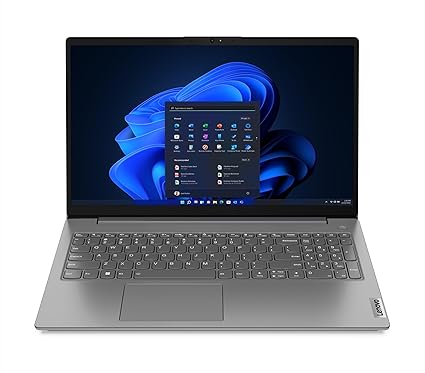
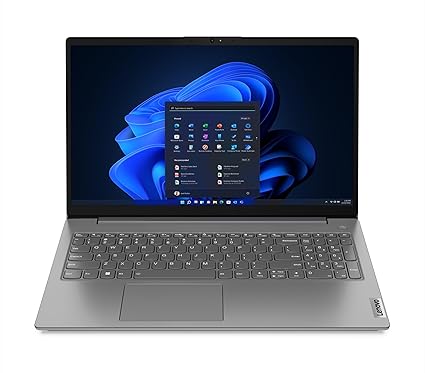
    1️⃣ Lenovo V15 – AMD Ryzen 7 7730U (16GB/512GB SSD)

    💰 Price: ₹44,490
    🔗 Check on Amazon

    Specs at a glance:

    • Processor: Ryzen 7 7730U, 8 cores, up to 4.5 GHz
    • RAM: 16 GB DDR4
    • Storage: 512 GB SSD
    • Display: 15.6” FHD, Anti-glare
    • Weight: 1.65 kg
    • Battery: Up to 8.7 hours

    Why buy?
    Powerful Ryzen 7 processor and 16GB RAM at this price point is a rare find. Ideal for multitasking, Excel macros, running Power BI dashboards, and even lightweight video editing.


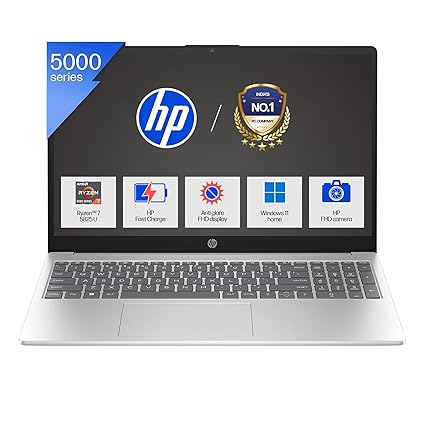
    2️⃣ HP 15 – Ryzen 7 5825U (16GB/512GB SSD, Backlit Keyboard)

    💰 Price: ₹46,990
    🔗 Check on Amazon

    Specs at a glance:

    • Processor: Ryzen 7 5825U, up to 4.5 GHz
    • RAM: 16 GB
    • Storage: 512 GB SSD
    • Display: 15.6” FHD Micro-edge
    • Special: Backlit keyboard, Full HD webcam
    • Weight: 1.59 kg

    Why buy?
    The backlit keyboard is perfect for late-night Excel modeling or scripting. Good for both work and meetings (thanks to its FHD camera). Best suited for office pros who attend virtual sessions.


    3️⃣ Dell Vostro 15 3530 – Intel Core i5 13th Gen (8GB/512GB SSD)

    💰 Price: ₹46,490
    🔗 Check on Amazon

    Specs at a glance:

    • Processor: Intel Core i5-1334U, 13th Gen
    • RAM: 8 GB (expandable)
    • Storage: 512 GB SSD
    • Display: 15.6” FHD, 120Hz Refresh Rate
    • Weight: 1.66 kg

    Why buy?
    Great for techies who want a smooth 120Hz display. Slightly less RAM than others, but 13th Gen i5 delivers excellent performance for web-based apps, code compiling, and Excel-heavy work.


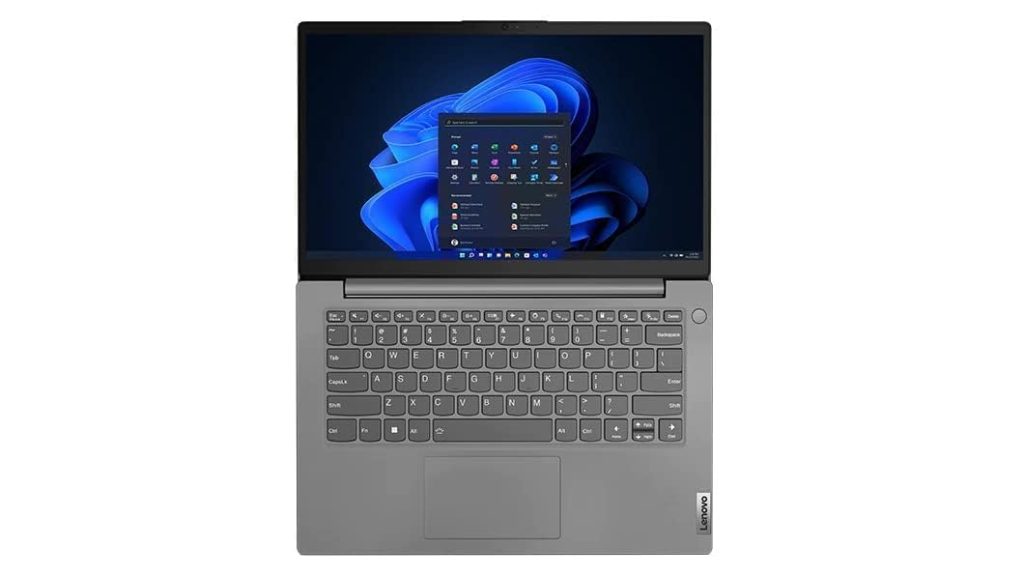
    4️⃣ Lenovo V14 G3 – Intel Core i7 12th Gen (16GB/512GB SSD)

    💰 Price: ₹49,900
    🔗 Check on Amazon

    Specs at a glance:

    • Processor: Intel Core i7-1255U (10 cores)
    • RAM: 16 GB
    • Storage: 512 GB SSD
    • Display: 14” FHD
    • Weight: 1.7 kg
    • Ports: USB-C, HDMI, LAN
    Version 1.0.0

    Why buy?
    Intel Core i7 under 50k is impressive. Compact 14” display makes it ultra-portable for traveling trainers, consultants, or working professionals who move a lot.


    5️⃣ Acer Aspire 3 – Intel Core i5 13th Gen (16GB/512GB SSD, IPS Display)

    💰 Price: ₹42,990
    🔗 Check on Amazon

    Specs at a glance:

    • Processor: Intel Core i5-1334U
    • RAM: 16 GB DDR4
    • Storage: 512 GB SSD
    • Display: 14” IPS Full HD
    • Weight: 1.45 kg
    • Battery: 2-cell, 45.6

    Why buy?
    Best for portability lovers. Its IPS panel is perfect for long hours on Excel or Google Sheets. Decent brightness and performance make it a great everyday performer.


    🏆 My Personal Favorite – Lenovo V15 Ryzen 7 (16GB/512GB SSD)

    As an MIS trainer, my work involves heavy Excel modeling, dashboard creation, teaching advanced formulas, and running lightweight databases and Power BI. The Lenovo V15 with Ryzen 7 and 16GB RAM gives the best price-to-performance ratio among all options listed.

    ✅ Here’s why:

    • 8-core Ryzen 7 handles multiple heavy Excel files with ease.
    • 16GB RAM ensures seamless multitasking – Excel, Tally, Chrome tabs, PowerPoint – all at once.
    • Big 15.6″ screen improves visibility during training or content creation.
    • Price under ₹45,000 is a great deal for a trainer or a working professional.

  • What is an Excel Dashboard? Importance, Career Scope & How to Learn It in 25 Days

    📊 What is a Dashboard in Excel?

    An Excel Dashboard is a visual and interactive summary of key data used to monitor performance, track KPIs, and make informed decisions. It combines charts, tables, metrics, and slicers on a single screen to present complex data in a clear and actionable format.

    Think of it as the control panel of your data – where decision-makers can quickly get answers without digging into raw spreadsheets.


    ✅ Key Elements of a Good Excel Dashboard:

    • Clean and well-prepared data sources
    • Use of PivotTables and formulas (SUMIFS, INDEX-MATCH, etc.)
    • Interactive elements like Slicers, Drop-downs, and Form Controls
    • Charts (Bar, Line, Combo, etc.) for visual storytelling
    • Focused on key metrics (KPI-focused)

    💡 Why Excel Dashboards Are Important

    1. Fast Decision-Making: Present trends and insights in seconds
    2. Time-Saving: Automates reports that would take hours to compile
    3. Customizable & Interactive: Tailored to specific teams—sales, HR, finance, etc.
    4. Widely Used Tool: Excel is available in almost every organization worldwide
    5. No Need for Expensive Tools: Dashboards in Excel offer business intelligence without needing Power BI or Tableau (for small to medium needs)

    👩‍💼 Career Impact of Mastering Excel Dashboards

    📈 Huge Demand Across Industries:
    Excel dashboards are used in marketing, sales, finance, HR, operations, and more.

    💼 Boost Your Resume & Job Role:
    Proficiency in dashboards is a top skill recruiters look for in analysts, managers, and administrators.

    💵 Higher Earning Potential:
    Professionals with Excel dashboard and data analysis skills command higher salaries and are often first in line for promotions.

    🌐 Freelancing & Consulting Opportunities:
    Many small businesses need dashboard creators but can’t afford BI tools. Your skill can become a paid gig or side hustle.


    Excel Dashboard Mastery: 25-Day Learning Plan

    📅 WEEK 1: Excel Foundations & Data Basics

    Goal: Strengthen core Excel skills and data understanding

    DayTopic
    Day 1✅ Introduction to Dashboards 📌 What makes a good dashboard, types (KPI, analytical, strategic)
    Day 2✅ Excel Interface & Shortcuts 📌 Ribbons, ranges, tables, navigation
    Day 3✅ Data Cleaning Basics 📌 Remove blanks, duplicates, trim, text-to-columns
    Day 4✅ Data Types & Formatting 📌 Numbers, dates, text formatting, custom formats
    Day 5✅ Excel Tables & Structured References 📌 Convert data into tables, advantages
    Day 6✅ Named Ranges & Cell Referencing 📌 Absolute vs relative references
    Day 7🔁 Practice Day 📌 Data cleanup & prep challenges

    📅 WEEK 2: Data Analysis & Functions

    Goal: Master formulas essential for dashboards

    DayTopic
    Day 8✅ Lookup Functions 📌 VLOOKUP, HLOOKUP, INDEX-MATCH
    Day 9✅ Logical Functions 📌 IF, IFS, AND, OR
    Day 10✅ Text Functions 📌 LEFT, RIGHT, MID, TEXTJOIN, TEXT
    Day 11✅ Date & Time Functions 📌 TODAY, MONTH, NETWORKDAYS
    Day 12✅ COUNTIFS, SUMIFS, AVERAGEIFS 📌 Conditional calculations
    Day 13✅ Sorting, Filtering & Advanced Filters
    Day 14🔁 Practice Day 📌 Create a mini report using all formulas learned

    📅 WEEK 3: Pivot Tables, Charts & Data Modeling

    Goal: Learn core visual & analysis tools

    DayTopic
    Day 15✅ Pivot Tables Basics 📌 Summarize & group data
    Day 16✅ Pivot Charts & Slicers 📌 Visual summary + interactivity
    Day 17✅ Chart Types in Excel 📌 Column, Line, Bar, Pie, Combo
    Day 18✅ Advanced Charts 📌 Gauge, Bullet, Thermometer, Gantt
    Day 19✅ Data Model & Power Pivot (Basics)
    Day 20🔁 Chart Building Practice Day 📌 Build 5 different charts

    📅 WEEK 4: Interactivity, Design & Final Dashboards

    Goal: Learn how to create complete, professional dashboards

    DayTopic
    Day 21✅ Data Validation & Drop-downs
    Day 22✅ Form Controls (Sliders, Checkboxes) & Conditional Formatting
    Day 23✅ Dashboard Design Principles 📌 Layout, color, user experience
    Day 24✅ Create a Full Interactive Dashboard 📌 With slicers, charts, KPIs
    Day 25✅ Capstone Project + Review 📌 Create your own business dashboard from scratch

    🔧 Tools & Skills You’ll Use:

    • Excel Tables & PivotTables
    • Dynamic Named Ranges
    • Formulas: IF, VLOOKUP, INDEX/MATCH, SUMIFS
    • Charts: Column, Line, Combo, Gauge
    • Form Controls: Buttons, Sliders
    • Conditional Formatting
    • Slicers, Timelines
    • Power Query (basic if time permits)

    📘 Suggested Practice Projects:

    • ✅ Sales Dashboard (weekly trends, region-wise sales)
    • ✅ HR Dashboard (employee attrition, hiring, headcount)
    • ✅ Financial Dashboard (profit/loss, KPIs, forecasts)
    • ✅ Inventory Dashboard (stock, reorder levels, category-wise)

    ✅ Tips to Stay on Track:

    • Practice daily, not just watching videos
    • Use real or sample business datasets
    • Keep dashboards simple, functional, and visually clean
    • Review your own dashboards critically (What’s missing? Is it user-friendly?)

    🎓 Want to Learn Faster and Smarter?


    If you’re serious about mastering Excel—not just for dashboards, but from the ground up—you’ll love this course:

    🚀 Microsoft Excel 365 – From Beginner to Advanced | Unleash Your Excel Potential

    ✅ Master Excel 365 – From Novice to Pro
    📚 11.5 hours of real-world training, hands-on walkthroughs, downloadable files, and lifetime access

    Whether you’re brushing up your skills or starting from scratch, this course will guide you through data entry to automation—helping you become job-ready, data-savvy, and confident in Excel.


  • CBSE Class 10 Compartment Result 2025 Declared – Check Now!

    The Central Board of Secondary Education (CBSE) has officially released the Class 10 Compartment Result 2025. Students who appeared for the supplementary exams can now check their results online through CBSE’s official websites.

    This is a crucial moment for many students aiming to improve their scores and move ahead with their academic or career plans without delay.


    Exam Timeline

    The CBSE Class 10 Compartment (Supplementary) Exams were held between July 15 and July 22, 2025 across various exam centers in India and abroad. These exams provided a second chance for students who did not pass one or more subjects in the main board examinations.


    When Was the Result Declared?

    The CBSE 10th Compartment Result 2025 was released on August 5, 2025. Students can now view and download their marksheets from the official result portals.


    How to Check CBSE 10th Compartment Result 2025

    You can check your result by following these simple steps:

    Step-by-Step Guide:

    1. Visit one of the official CBSE result portals:
    2. On the homepage, click on the link that says:
      • “Secondary School Certificate Examination (Class X) Supplementary Results 2025”
    3. Enter the required credentials:
      • Roll Number
      • School Number
      • Date of Birth
      • Admit Card ID
    4. Fill in the CAPTCHA or security PIN if prompted.
    5. Click on the Submit button.
    6. Your marksheet will appear on the screen. Download or print it for future use.

    Alternative Ways to Access Your Result

    If the official websites are slow or unresponsive, you can try the following options:

    1. DigiLocker App

    • Log in at https://www.digilocker.gov.in or use the mobile app.
    • Go to the “Issued Documents” section and select “CBSE”.
    • Enter your roll number and access your digital marksheet and certificate.

    2. UMANG App

    • Download the UMANG mobile app.
    • Search for “CBSE Results” and follow the instructions to view your result.

    3. SMS or IVRS

    • In some cases, CBSE also allows results via SMS or Interactive Voice Response System. Keep your roll number ready if this option is available in your region.

    What to Do After Checking the Result

    1. Passed? Congratulations! You can now proceed with higher studies or apply for admission into various academic or professional courses.
    2. Still not passed? You may consider:
      • Applying for rechecking or verification (dates typically open a few days after result declaration).
      • Exploring NIOS (National Institute of Open Schooling) as an alternative.
      • Consulting with your school for academic guidance.

    Revaluation and Rechecking

    If you believe there has been an error in the evaluation, you can apply for re-evaluation or verification of marks. The re-evaluation window is expected to open between August 8 and August 19, 2025. This process can be done online via the CBSE portal.


    Important Links

    Here are the direct links to check your result:


    Final Words

    The compartment exam is a valuable second chance, and clearing it allows you to move ahead without losing an academic year. Make sure to download your provisional marksheet, as the original will be issued by your school later.


    ⚠️ Important Notice:

    All students are strongly advised to verify their results only through official CBSE websites and platforms like DigiLocker or UMANG. Avoid third-party websites or unofficial news sources, as they may provide outdated or inaccurate information. Always cross-check your results from the CBSE official portals listed above.


  • TCS Employee Footpath Incident: A Reminder to Upgrade, Not Eliminate

    The image of a TCS employee sleeping on the footpath outside the company’s Pune office has gone viral—not because it’s sensational, but because it’s symbolic. It represents a disturbing disconnect between corporate decisions and individual livelihoods.

    This wasn’t just about delayed salary. It was about being locked out—of systems, of communication, and perhaps even of hope. And while the specifics of the incident may vary, one thing is clear: mass layoffs and impersonal processes are failing the human side of technology.

    But what if there were another way?


    🚀 What If We Reskilled Instead of Released?

    In a rapidly changing tech world driven by AI, automation, and digital disruption, companies are understandably under pressure to stay competitive. But cutting jobs to reduce costs isn’t the only path.

    Instead of laying off, companies can re-invest in their existing employees. They already understand the culture, the expectations, the systems. Why not upgrade their skill sets to match evolving business needs?

    Imagine the TCS employee on the footpath—if, instead of being deactivated, he had been enrolled in an internal program to learn AI tools, automation frameworks, or low-code development, would he still be sleeping outside the very building he once contributed to?


    📉 Layoffs Are a Short-Term Fix with Long-Term Damage

    While layoffs may offer a short-term reduction in payroll cost, they come with hidden losses:

    • Morale dips among remaining employees
    • Loss of knowledge and continuity
    • Brand damage in the public eye
    • Re-hiring costs when new talent is eventually needed

    The human toll is even greater. It can take months or even years for laid-off workers to retrain, recover emotionally, and re-enter the workforce. In contrast, internal upskilling takes weeks or months, and the employee never leaves the system.


    📚 Upskilling: The Smarter Strategy

    Here’s what companies can do instead:

    1. 🔄 Internal Talent Mobility

    Create programs that allow employees to shift between roles after training, rather than facing termination.

    2. 🧠 AI and Automation Training

    Instead of replacing employees with AI, train them to work alongside AI—in tools like Power BI, Python, ChatGPT, Tableau, or cloud platforms like AWS and Azure.

    3. 📈 Continuous Learning Culture

    Build a structure where learning is not just encouraged but embedded into job roles.

    4. 🛡️ Skill Assurance Before Termination

    Before any role is declared redundant, offer a pathway to redeployment through reskilling—especially in large firms with vast internal project diversity.


    🏢 Real Leadership Prioritizes People

    The TCS employee footpath incident isn’t just a corporate HR issue—it’s a missed opportunity. An opportunity to treat employees not as replaceable resources, but as assets worth upgrading.

    In today’s world, skills are currency. And the best investment a company can make is not in severance—but in education.


    💬 Final Thought: Replace Pink Slips with Progress

    In a world changing faster than ever, human capital must evolve, not evaporate. Layoffs may be an easy answer on a spreadsheet, but in the long run, upskilling creates more value, loyalty, and sustainability.

    As AI grows, so must we.
    Let the footpath never again be the desk of a talented professional.


  • TCS Employee Footpath Protest Highlights Urgent Need for Corporate Empathy and Policy Reform

    In a deeply unsettling turn of events, a software professional was seen living on a footpath outside his company’s office, drawing national attention. The image of a TCS employee sleeping on the footpath with a hand-written note explaining his plight has become symbolic of a growing concern in India’s IT sector: the lack of support systems when employees are caught in procedural or transition-based conflicts.

    🚧 When Corporate Process Fails the Individual

    This wasn’t just about delayed salary or inactive ID access. It was about what happens when communication gaps, administrative delays, or unclear HR protocols leave an employee stranded—both literally and emotionally. Without income, housing, or access to internal systems, the employee reportedly decided to remain on the footpath in front of the very company he worked for, silently protesting what he believed was an unjust response to his situation.

    Such an act isn’t just a cry for help—it’s a mirror held up to an entire industry’s operational blind spots.

    💼 Corporate Structure vs Human Sensitivity

    In large IT firms, structured HR processes and compliance rules often guide responses to employee issues. But when these policies are applied without empathy or flexibility, the consequences can be devastating. Whether the situation stemmed from a miscommunication or a breach of contract, no employee should be left homeless outside the gates of their workplace. It highlights a gap not just in policy, but in compassion.

    This incident begs a simple question: Should administrative silence ever leave an employee sleeping on concrete for days?

    📉 Layoffs, AI, and the Shrinking Middle

    This situation also comes at a time when the Indian IT industry is seeing a rise in layoffs, salary freezes, and restructuring, often attributed to automation, project slowdowns, and evolving client demands. Employees, especially those in mid-level or non-core roles, find themselves increasingly vulnerable to being deactivated or replaced, often without clear transitional support.

    Unfortunately, in many such cases, companies either lack predefined exit frameworks or fail to communicate with clarity and timeliness, resulting in confusion and resentment.

    🧾 Companies Must Plan Before They Cut

    What we’re seeing today isn’t just about one employee on one footpath—it’s about a systemic lack of foresight in how companies handle benching, exits, and role transitions.

    Every enterprise, especially giants like TCS, must ensure that:

    • Clear communication is maintained with all employees—even inactive ones.
    • Transition assistance programs are in place before roles are cut.
    • Payroll status is not abruptly affected without proper due process.
    • Housing or emergency support options exist in extreme situations.

    Simply put, if a layoff or deactivation is inevitable, it must be done humanely and responsibly.

    📚 A Wake-Up Call: Reskill Before the World Moves On

    Behind this incident also lies a subtle truth: the industry is changing faster than ever before. Automation and artificial intelligence are beginning to replace repetitive and low-value tasks across domains. Those who are not actively upgrading their skills may find themselves without warning on the wrong side of that shift.

    This is why now, more than ever, professionals must embrace AI literacy, digital transformation, and continuous learning. Whether you’re a developer, analyst, support engineer, or project manager, staying updated isn’t optional—it’s survival.

    🌱 Final Thought

    The TCS employee footpath episode is not just a one-off event. It’s a signal flare for both employers and employees to pause, reflect, and prepare.

    • Companies must create humane, transparent offboarding and transition policies.
    • Employees must proactively upskill and embrace emerging technologies, especially AI and automation.

    After all, in an age where machines are learning faster than people, the best safety net is education—and empathy.


  • Best MacBook Under ₹95,000 in 2025 for Office Work & Video Editing

    If you’re on the hunt for the best MacBook under ₹95,000 that can effortlessly handle office tasks, multitasking, and even video editing, the 2025 Apple MacBook Air (13-inch, M4, 16GB, 256GB) is an unbeatable deal—especially during Amazon’s Freedom Sale.


    💡 Why This MacBook Air (M4) Stands Out

    🔥 Powered by Apple’s Latest M4 Chip

    At the heart of this MacBook Air is the blazing-fast Apple M4 chip with a 10-core CPU and 8-core GPU, offering superior performance and energy efficiency. It breezes through everyday productivity tasks and doesn’t flinch even when you throw light to moderate video editing or design work its way.

    🧠 Built for Apple Intelligence

    With Apple Intelligence built-in, you can streamline tasks, write faster, and get creative work done quicker—making it an ideal productivity companion for professionals and creators alike.


    💻 Perfect for Office & Creative Work

    • Office Tasks: Whether you’re using Microsoft 365, Google Workspace, or managing multiple tabs in Safari—this machine is a multitasking champion.
    • Video Editing: Apps like iMovie, Final Cut Pro, and Adobe Premiere run smoothly thanks to unified memory and the powerful GPU. The 16GB Unified RAM ensures minimal lag even during heavier workflows.
    • Multimedia: A gorgeous 13.6″ Liquid Retina display with support for 1 billion colors makes content pop. Combine that with Spatial Audio and a 12MP camera—and you’ve got a media creation and consumption powerhouse.

    🪄 Magic of Ecosystem + Portability

    • Seamless integration with iPhone via iPhone Mirroring, AirDrop, and Universal Clipboard.
    • Incredibly thin and light—take it anywhere with up to 18 hours of battery life on a single charge.

    🔌 Modern Connectivity

    • 2× Thunderbolt 4 ports
    • MagSafe Charging
    • Wi-Fi 6E
    • Bluetooth 5.3
    • Headphone Jack

    🎨 Available Colors

    • Starlight (highlighted)
    • Midnight
    • Silver
    • Sky Blue

    💰 Price & Offer Summary

    • Current Price: ₹91,990 (8% OFF from MRP ₹99,900)
    • Monthly EMI: ₹4,438 (SBI Credit Card – 24 Months)
    • Cashback Offers: Upto ₹4,599 (ICICI Amazon Pay Credit Card)
    • Extra Discount: Upto ₹5,000 with SBI Cards
    • No Cost EMI | Free Delivery | 10-day Replacement

    🏁 Conclusion: Why You Should Buy It

    The 2025 MacBook Air M4 (13-inch, 16GB, 256GB) is the best MacBook under ₹95,000 for those who need fast performance, long battery life, and portability for serious office work and creative tasks like video editing, design, or content creation.

    Whether you’re a working professional, student, freelancer, or small business owner, this model delivers maximum value for money in the current market.

    👉 Click here to grab this deal on Amazon before it’s gone


  • File ITR-1 for AY 2025-26 Yourself: Step-by-Step Guide with Salary Examples (Old vs New Regime)

    📄 What is ITR-1 (Sahaj)?

    ITR-1 is for resident individuals (not HUF) having:

    • Income from Salary/Pension
    • One House Property
    • Other Sources (like interest)
    • Total income up to ₹50 lakh

    ❌ Not applicable if:

    • You’re a director in a company
    • Own foreign assets
    • Have capital gains or business income

    🧾 Documents Required

    1. Form 16 – from your employer
    2. Form 26AS – tax credit summary
    3. AIS (Annual Information Statement) – full record of your income
    4. Bank statement – for interest income
    5. Investment proofs – 80C, 80D, etc.
    6. Aadhaar, PAN, and bank account details

    📌 What is Form 26AS?

    • It shows TDS (Tax Deducted at Source) details – by employer, banks, etc.
    • Verify your tax has been correctly deducted and deposited.

    🔽 Where to download:

    1. Go to https://incometax.gov.in
    2. Login → Go to e-FileIncome Tax ReturnsView Form 26AS

    📌 What is AIS (Annual Information Statement)?

    • AIS shows a consolidated view of all your income – salary, interest, dividends, shares, etc.
    • Cross-check your declared income.

    🔽 Where to find:

    1. Login to https://incometax.gov.in
    2. Click AIS on the top menu
    3. Download the PDF/JSON for verification

    🧮 How to File ITR-1: Step-by-Step

    1. Login to the Income Tax Portal
    2. Go to e-File → Income Tax Return
    3. Select:
      • Assessment Year: 2025-26
      • ITR Form: ITR-1
      • Filing Type: Original
      • Submission: Online
    4. Auto-filled data will appear from:
      • Form 26AS
      • AIS
      • PAN-Aadhaar linked info
    5. Verify each section:
      • Personal Info
      • Salary Income
      • Deductions (80C, 80D, etc.)
      • Tax Details (TDS from Form 26AS)
    6. Preview and Validate
    7. Submit and e-verify (via Aadhaar OTP or Netbanking)

    💰 Example-wise Tax Comparison (Old vs New Regime)

    Assumptions:

    • Only salary income
    • No business or capital gains
    • Standard deduction: ₹50,000 (Old Regime only)
    • Section 80C: ₹1,50,000
    • Section 80D (health insurance): ₹25,000
    Gross SalaryOld Regime (after deductions)Tax (Old Regime)Tax (New Regime)
    ₹5,00,000₹2,75,000₹0 (Rebate u/s 87A)₹0 (Rebate u/s 87A)
    ₹7,00,000₹5,25,000₹10,400₹0 (Rebate u/s 87A)
    ₹10,00,000₹7,75,000₹70,200₹54,600
    ₹12,50,000₹10,25,000₹1,30,800₹93,600
    ₹16,00,000₹13,75,000₹2,38,200₹1,62,000
    ₹20,00,000₹17,75,000₹3,57,000₹2,34,000
    ₹25,00,000₹22,75,000₹5,35,800₹3,72,000

    🧮 Tax calculated after standard deduction & 80C/80D for Old Regime.


    🆚 Old vs New Tax Regime Slabs (FY 2024-25)

    ✅ New Regime (Default):

    Income SlabTax Rate
    0 – ₹3,00,0000%
    ₹3,00,001 – ₹6,00,0005%
    ₹6,00,001 – ₹9,00,00010%
    ₹9,00,001 – ₹12,00,00015%
    ₹12,00,001 – ₹15,00,00020%
    Above ₹15,00,00030%

    No deductions (80C, 80D, etc.) but standard deduction ₹50,000 is now allowed in new regime from FY 2023-24 onwards.

    ✅ Old Regime:

    Income SlabTax Rate
    0 – ₹2,50,0000%
    ₹2,50,001 – ₹5,00,0005%
    ₹5,00,001 – ₹10,00,00020%
    Above ₹10,00,00030%

    You can claim all deductions (80C, 80D, HRA, LTA, home loan interest, etc.)


    📌 Which regime is better?

    • Up to ₹7 lakh: New Regime (100% tax rebate)
    • ₹7–10 lakh: New regime may be better if you don’t have many deductions
    • ₹10–20 lakh: If you claim full 80C + 80D + HRA + home loan, Old Regime may save more
    • ₹20 lakh+ with fewer deductions: New Regime usually wins

    ✅ Use the Income Tax Calculator on the portal to compare.


    🎯 Final Checklist Before Submitting ITR

    ✔ Cross-check income from Form 16 with AIS & 26AS
    ✔ Declare all interest income
    ✔ Choose tax regime carefully
    ✔ E-verify after filing
    ✔ Keep ITR-V or acknowledgment safely


  • What is Form 26AS? Download, Understand & File ITR Easily with Real Example (2025 Guide)

    Form 26AS is a crucial document for filing your Income Tax Return (ITR) in India. Here’s a complete and easy-to-understand explanation for you:


    🔍 What is Form 26AS?

    Form 26AS is an annual tax credit statement issued by the Income Tax Department. It contains details of:

    • TDS (Tax Deducted at Source) deducted by employers, banks, or others
    • TCS (Tax Collected at Source)
    • Advance tax or self-assessment tax paid by you
    • Refunds received
    • High-value transactions (like mutual fund purchases, property transactions, etc.)

    ✅ It acts as a consolidated tax statement linked to your PAN and is very important while filing your ITR.


    🛠️ Where to Download Form 26AS

    You can download Form 26AS from:

    ✅ Method 1: Through Income Tax Portal

    1. Go to https://www.incometax.gov.in
    2. Login using your PAN/Aadhaar and password
    3. Click on “e-file” > “Income Tax Returns” > “View Form 26AS”
    4. Click on “Confirm” to be redirected to the TRACES portal
    5. Choose Assessment Year (e.g., 2024–25 for income earned in FY 2023–24)
    6. Choose HTML / Text / PDF format and click “View/Download”

    💡 Make sure pop-ups are enabled in your browser.


    🧾 How to Use Form 26AS While Filing ITR (Step-by-Step)

    📘 Example Scenario:

    • You’re a salaried person.
    • Your company deducted ₹50,000 TDS during the year.
    • You also earned ₹10,000 interest from a bank (with ₹1,000 TDS deducted).
    • You want to file ITR-1 for FY 2023–24 (AY 2024–25).

    🪜 Steps:

    ✅ Step 1: Download Form 26AS

    Follow the download process above and open Form 26AS. You’ll see:

    SectionDetails
    Part ATDS by Employer – ₹50,000
    Part A1TDS on Bank Interest – ₹1,000
    Part CSelf/Advance Tax (if any)
    Part DRefunds (if any)
    Part ESFT Transactions (if applicable)

    ✅ Step 2: Match Income and TDS

    Check that:

    • Salary mentioned in Form 26AS matches your Form 16
    • TDS deducted is properly reflected (₹50,000 + ₹1,000 = ₹51,000)
    • Bank interest income is added in your return

    ✅ Step 3: File ITR

    1. Go to the Income Tax e-filing portal
    2. Select “File Income Tax Return”
    3. Choose:
      • AY 2024–25
      • Online
      • ITR Form: ITR-1 (for most salaried individuals)
    4. Fill in personal details
    5. Under Income Sources:
      • Add Salary (as per Form 16)
      • Add Other Income → Interest from Bank
    6. Under Tax Details, the portal will automatically fetch TDS from Form 26AS
    7. If all is correct, proceed to Tax Summary — it will show refund/payable
    8. Submit and verify using Aadhaar OTP / net banking / other methods

    📌 Tips:

    • If TDS is missing from Form 26AS, contact the deductor (employer/bank) to file a revised TDS return
    • Always cross-check Form 16/Form 16A with 26AS before filing
    • You may also compare with the new AIS (Annual Information Statement) for better accuracy

    🧠 Summary:

    AspectDetails
    WhatForm 26AS is your tax passbook showing TDS, tax payments, and transactions
    Download Fromincometax.gov.in via TRACES
    UseHelps pre-fill TDS and verify income while filing ITR
    Useful ForSalaried, freelancers, businesspeople, investors

    ✅ Real-Life Scenario: Filing ITR Using Form 26AS

    👩‍💼 Profile: Ms. Priya Sharma

    • Works at: Infosys
    • Salary (FY 2023–24): ₹12,00,000
    • TDS by employer: ₹1,20,000
    • Bank FD interest: ₹20,000
    • TDS on FD interest: ₹2,000
    • PAN: Linked to her income and investments

    🔽 Step-by-Step Process

    📌 Step 1: Priya logs in to the Income Tax Portal

    1. Goes to https://www.incometax.gov.in
    2. Logs in using her PAN and password
    3. Clicks: e-file > Income Tax Returns > View Form 26AS

    📌 Step 2: Download Form 26AS

    Form 26AS shows:

    SectionDetails
    Part A – Employer (Infosys):
    Gross salary: ₹12,00,000, TDS deducted: ₹1,20,000
    Part A1 – Bank FD (HDFC Bank):
    FD interest: ₹20,000, TDS: ₹2,000

    📌 Step 3: File ITR Using Pre-Filled Data

    Priya selects:

    • ITR Form: ITR-1
    • AY: 2024–25

    The portal auto-fills the TDS details from Form 26AS:

    SourceIncomeTDS
    Infosys₹12,00,000₹1,20,000
    HDFC Bank₹20,000₹2,000

    She verifies:

    • Salary matches Form 16
    • Bank interest is declared under “Income from Other Sources”

    📌 Step 4: Tax Calculation

    • Total Income: ₹12,20,000
    • Tax liability as per slab: ₹1,30,000
    • TDS available: ₹1,22,000

    ⚠️ Remaining Tax to Pay: ₹8,000

    She pays self-assessment tax and verifies it via Challan 280.


    📌 Step 5: Submit & e-Verify

    • Files the return
    • e-Verify using Aadhaar OTP

    ITR Successfully Filed


    🎯 Key Learnings from This Scenario:

    PointInsight
    1Always match Form 26AS with Form 16 and bank TDS
    2If TDS is missing, fix it before filing ITR
    3Use Form 26AS to avoid underreporting or notices
    4Even if income is tax-free, declare it (e.g., exempt interest)

  • Tally Prime for Logistics Companies – Step-by-Step Guide with Entries, Job Work, and Profit Reports

    Using Tally Prime for a logistics company can streamline accounting, billing, GST compliance, and financial reporting. Logistics companies deal with freight charges, vehicle expenses, driver payments, and customer billing. Tally Prime can efficiently manage all of these.


    🚛 Tally Prime for a Logistics Company: Full Guide


    1. Set Up Your Company in Tally Prime

    • Gateway of Tally → Create Company
      • Company Name: XYZ Logistics Pvt Ltd
      • Financial Year: 1-Apr-2025
      • Base Currency: ₹ Indian Rupee

    Enable essential features:

    • F11 (Features) → Accounting Features:
      • Enable GST: Yes
      • Maintain bill-wise details: Yes
      • Use cost centers: Yes
      • Maintain payroll: Yes (if managing driver salary directly)

    2. Ledger Creation

    Create ledgers under the appropriate groups:

    A. Customer / Client

    • Name: ABC Enterprises
    • Under: Sundry Debtors
    • GSTIN: Add GST details
    • Maintain Bill-wise: Yes

    B. Freight Income

    • Name: Freight Charges
    • Under: Sales Account
    • GST Applicable: Yes (Linked to Sales Taxable)

    C. Vehicle Maintenance

    • Name: Truck Repair
    • Under: Indirect Expenses

    D. Fuel Expenses

    • Name: Diesel Expenses
    • Under: Indirect Expenses

    E. Driver Salary

    • Name: Driver Salary
    • Under: Indirect Expenses (or use Payroll module)

    F. Cash / Bank

    • Name: HDFC Bank
    • Under: Bank Accounts

    G. Toll / RTO Charges

    • Name: Toll Charges
    • Under: Direct Expenses

    3. Cost Centres (for trip-wise profit)

    Use this if you want to track income & expenses trip-wise or vehicle-wise.

    • Gateway of Tally → Accounts Info → Cost Centres → Create
      • Name: Trip #1001 – Delhi to Mumbai
      • OR use: Vehicle No. MH12AB1234

    In F11, enable “Maintain cost centers” and link to all income/expense ledgers.


    4. GST Configuration

    • Gateway of Tally → Statutory & Taxation → GST → Enable → Set details (State, GSTIN, etc.)
    • Assign HSN codes and tax rates in:
      • Freight Charges → GST applicable: Yes → HSN: 9965 → 18%

    🧾 Common Entries for a Logistics Company


    🔹 1. Freight Invoice to Customer (with GST)

    Scenario: XYZ Logistics delivers goods for ABC Enterprises from Delhi to Mumbai. Freight Charges: ₹50,000 + GST @ 18%

    Voucher Type: Sales
    Gateway of Tally → Accounting Vouchers → F8 (Sales)

    FieldValue
    Party A/c NameABC Enterprises
    Sales LedgerFreight Charges
    Amount₹50,000
    GSTIGST @18% (₹9,000)
    Narration“Freight charges for Delhi-Mumbai trip”
    Cost CentreTrip #1001 – Delhi to Mumbai

    ➡️ Auto GST will be calculated if properly set.


    🔹 2. Fuel Purchase

    Scenario: Diesel purchased from Bharat Petroleum for ₹10,000.

    Voucher Type: Payment
    Gateway of Tally → Accounting Vouchers → F5 (Payment)

    FieldValue
    AccountDiesel Expenses
    PartyBharat Petroleum
    Amount₹10,000
    ModeHDFC Bank
    Cost CentreTrip #1001
    NarrationDiesel for Trip 1001

    🔹 3. Toll Charges

    Scenario: Paid ₹2,500 toll on route.

    Voucher Type: Payment

    FieldValue
    AccountToll Charges
    Amount₹2,500
    ModeCash
    Cost CentreTrip #1001

    🔹 4. Driver Salary

    Scenario: ₹15,000 paid to driver Ram.

    Voucher Type: Payment

    FieldValue
    AccountDriver Salary
    Name of DriverRam Kumar
    Amount₹15,000
    ModeCash
    Cost CentreTrip #1001

    🔹 5. Vehicle Maintenance

    Scenario: Repair expenses ₹8,000 for MH12AB1234.

    Voucher Type: Payment

    FieldValue
    AccountTruck Repair
    Amount₹8,000
    ModeHDFC Bank
    Cost CentreMH12AB1234

    📊 6. View Reports

    🧮 A. Profit per Trip / Vehicle

    • Gateway of Tally → Display More Reports → Cost Centre Breakup

    You can see:

    • Income (Freight)
    • Expenses (Fuel, Toll, Salary, Maintenance)
    • Net Profit/Loss per trip or per truck

    📈 B. GST Reports

    • Display → Statutory Reports → GST → GSTR-1 / GSTR-3B

    🧾 C. Outstanding Receivables

    • Display → Statements of Accounts → Outstanding → Receivables

    ✅ Conclusion

    Tally Prime can handle the entire financial tracking of a logistics company — from trip-level profitability to GST compliance.


    📦 Summary of Ledgers You May Need

    CategoryExample Ledgers
    IncomeFreight Charges
    ExpensesDiesel, Toll, Repairs, Salary
    PartiesClients, Fuel Vendors
    BanksHDFC, ICICI
    StatutoryGST (IGST, CGST, SGST)
    Cost CentersTrips, Vehicle Numbers

    Great! In a logistics company, Job Work or Job Creation in Tally Prime can be used when you outsource or track activities like:

    • Consignment handling
    • Loading/unloading jobs
    • Warehousing
    • Driver/truck assignments per consignment
    • Contract-based logistics services

    Tally Prime has Job Work In and Job Work Out modules, but for logistics, we’ll typically use Job Work Out to manage assignments like transport jobs, handling, and third-party logistics tasks.


    🚧 Job Work Out in Logistics – Step-by-Step in Tally Prime

    1. Enable Job Work Features

    Go to:

    • F11 (Features) → Inventory Features
      • Enable Job Order Processing: ✅ Yes
      • Enable Cost Tracking: ✅ Yes

    2. Create Necessary Masters


    A. Create a Godown (Location)

    Gateway of Tally → Inventory Info → Godowns → Create
    
    Name: On Route – Delhi to Mumbai  
    Under: Primary
    

    B. Create Stock Item (Optional)

    If you also track goods being transported.

    Stock Item: Refrigerator Units  
    Unit: Nos  
    Under: Finished Goods
    

    C. Create Job Worker Ledger

    If you outsource part of logistics work (e.g. warehouse handling or trailer vendor):

    Name: Ramesh Transport Services  
    Under: Sundry Creditors  
    Maintain Balances: Yes  
    GST Details: (if applicable)
    

    3. Create Job Work Out Order

    Used when assigning a logistics task to a third-party (job worker).

    Gateway of Tally → Order Vouchers → Alt+F5 (Job Work Out Order)
    
    Party: Ramesh Transport Services  
    Job Order No: JOB1001  
    Order Date: 01-Aug-2025  
    Godown: On Route – Delhi to Mumbai  
    Item: Refrigerator Units  
    Quantity: 50 Nos  
    Due Date: 02-Aug-2025  
    Narration: Assigning Delhi-Mumbai trip handling of 50 units
    

    ➡️ This is useful if the company is coordinating freight for clients but outsourcing part of the movement.


    4. Delivery Note (Optional)

    When goods are handed over to job worker.

    Gateway of Tally → Inventory Vouchers → F8 (Delivery Note)
    
    Party: Ramesh Transport Services  
    Against Job Order: JOB1001  
    Item: Refrigerator Units  
    Godown: On Route – Delhi to Mumbai  
    Qty: 50 Nos
    

    5. Job Work Out Completion Entry

    Once job is done (delivery completed, task over):

    Gateway of Tally → Inventory Vouchers → F7 (Stock Journal)
    
    Type: Job Work Out  
    Job Order: JOB1001  
    From: On Route – Delhi to Mumbai  
    To: Completed Jobs  
    Qty: 50 Nos  
    Narration: Job completed by Ramesh Transport
    

    6. Payment Entry to Job Worker

    Gateway of Tally → Accounting Vouchers → F5 (Payment)
    
    Party: Ramesh Transport Services  
    Amount: ₹12,000  
    Ledger: Transport Charges (Indirect Expenses)
    Cost Centre: Trip #1001
    Narration: Payment for outsourced transport job
    

    📊 Reports for Job Work

    • Display → Inventory Reports → Job Work Out Reports
      • Job Orders Outstanding
      • Job Work Analysis
      • Movement Summary

    These help track what work is pending, what was completed, and how much was paid.


    📦 Logistics Job Work Example Summary

    TaskTally Action
    Assign job to contractorJob Work Out Order
    Track item handoverDelivery Note
    Track task completionJob Work Completion (Stock Journal)
    Payment to job workerPayment Voucher
    Monitor job statusJob Work Reports

    🔧 Example Scenario:

    Logistics Company assigns Delhi to Mumbai freight to Ramesh Transport for 50 refrigerator units on 1-Aug.

    • Job Order created in Tally: JOB1001
    • Goods handed over via Delivery Note
    • Completion marked via Stock Journal
    • ₹12,000 paid after delivery

    Based on the logistics company entries (freight billing, fuel, toll, driver salary, job work orders, etc.), here are the Tally Prime reports you can generate step-by-step along with sample report content (as it would appear in Tally):


    📊 1. Cost Centre Breakup Report (Trip-wise Profitability)

    Path:
    Gateway of Tally → Display More Reports → Cost Centres → Cost Centre Breakup

    Select: Trip #1001 – Delhi to Mumbai

    🧾 Sample Report

    ParticularsAmount (₹)
    Income
    Freight Charges50,000.00
    Expenses
    Diesel Expenses10,000.00
    Toll Charges2,500.00
    Driver Salary15,000.00
    Truck Repair8,000.00
    Outsourced Job Payment12,000.00
    Net Profit2,500.00

    ➡️ Use case: This report is key to understanding profitability per trip or per vehicle.


    📦 2. Job Work Out Summary Report

    Path:
    Gateway of Tally → Display More Reports → Job Work Out Reports → Job Work Out Summary

    This shows all job orders given to third-party contractors.

    🧾 Sample Report

    Job Order NoParty NameItem DescriptionQtyStatus
    JOB1001Ramesh Transport ServicesRefrigerator Units50Completed ✅

    📌 3. Outstanding Receivables Report

    Path:
    Gateway of Tally → Display → Statements of Accounts → Outstandings → Receivables

    🧾 Sample Report

    Party NameBill NoDateAmount (₹)Due Days
    ABC EnterprisesINV00101-Aug-2559,000.0031

    ➡️ Use this to follow up on payments.


    📑 4. Day Book (All Entries View)

    Path:
    Gateway of Tally → Display → Day Book

    Filter by Voucher Type or Date Range.

    🧾 Sample Report

    DateVoucher TypeParticularsDebit (₹)Credit (₹)
    01-Aug-25SalesABC Enterprises – Freight59,000.00
    01-Aug-25PaymentDiesel Expenses10,000.00
    01-Aug-25PaymentToll Charges2,500.00
    01-Aug-25PaymentDriver Salary – Ram Kumar15,000.00
    01-Aug-25PaymentTruck Repair8,000.00
    02-Aug-25PaymentRamesh Transport – Job Work12,000.00

    📈 5. Profit & Loss Account

    Path:
    Gateway of Tally → Display → Profit & Loss Account

    If cost centres are enabled, press F7 to filter by Trip/Vehicle.

    🧾 Sample Report (For All Trips)

    ParticularsAmount (₹)
    Freight Charges1,50,000.00
    Less: Diesel30,000.00
    Less: Toll Charges7,500.00
    Less: Driver Salary45,000.00
    Less: Repairs24,000.00
    Less: Job Work36,000.00
    Net Profit7,500.00

    📊 6. GSTR-1 Report

    Path:
    Display More Reports → Statutory Reports → GST Reports → GSTR-1

    🧾 Sample View

    Invoice NoParty NameGST TypeTaxable AmtGST Amt
    INV001ABC EnterprisesIGST₹50,000₹9,000

    🗂️ 7. Ledger Reports

    A. Freight Charges Ledger

    Path:
    Display → Account Books → Ledger → Freight Charges

    DateParticularsAmount (₹)
    01-Aug-25Sales – ABC Enterprises50,000.00

    📎 Bonus: Trip Register Format (Custom Report Idea)

    You can use a Cost Centre Summary Report to manually compile this format:

    Trip IDFrom – ToDateFreightExpensesProfit
    Trip #1001Delhi – Mumbai01-Aug-2550,00047,5002,500

    ✅ Summary of Key Reports

    Report NameUse Case
    Cost Centre BreakupTrip/Vehicle-wise profit analysis
    Job Work Out SummaryMonitor outsourced logistics jobs
    Outstanding ReceivablesTrack client payments
    Day BookView all entries
    Profit & Loss AccountOverall profitability
    GST Reports (GSTR-1/3B)Monthly GST filing
    Ledger ReportsIncome/Expense account-wise details

  • Best MBA Colleges Without CAT Exam in India – Top Picks with Exams & Fees

    No CAT? No Problem! Best 10 MBA Colleges in India You Can Still Get Into

    Looking to pursue an MBA in India but don’t want to appear for CAT? You’re not alone — many top-tier MBA colleges in India offer admissions through alternative entrance exams like XAT, NMAT, SNAP, GMAT, GRE, or even direct admission routes. Whether you’re a working professional, career switcher, or fresh graduate looking for flexibility, there are credible and reputed B-Schools that do not require CAT for admission.

    In this detailed guide, we cover the Top 10 MBA Institutes in India that accept students without CAT scores — including their admission criteria, accepted exams, course fees, reputation, and placement track records.

    From the globally reputed XLRI Jamshedpur and SP Jain Global, to popular private institutes like NMIMS Mumbai, Symbiosis (SIBM Pune), and Great Lakes, you’ll find plenty of excellent options to build your management career. These institutes are trusted by recruiters from Deloitte, Amazon, HDFC, EY, Infosys, KPMG, and more — offering you the exposure and return on investment you’re looking for.

    ✅ Whether you want to study full-time, pursue a one-year PGPM, or prefer an international MBA experience, this list will help you explore the best MBA colleges in India without CAT — along with helpful insights on their fee structure, campus location, cutoffs, and history.

    💼 Don’t let the CAT limit your aspirations — start your management journey through other recognized paths and build a successful future.

    Top 10 MBA institutes in India where you can get admission without a CAT score

    1. XLRI – Xavier School of Management, Jamshedpur

    One of India’s oldest and most prestigious business schools, XLRI offers flagship programs like PGDM in Business Management and Human Resource Management. Admission is through the XAT (Xavier Aptitude Test) or GMAT. The average XAT cutoff is quite high, often above the 99 percentile. Fees for the two-year MBA program are around ₹23–25 lakhs. XLRI has a strong placement record with average packages crossing ₹30 LPA.


    2. NMIMS – Narsee Monjee Institute of Management Studies, Mumbai

    A top-ranked private university, NMIMS accepts NMAT scores instead of CAT. The NMAT allows multiple attempts, and a competitive score of 230+ is usually needed for the Mumbai campus. The full-time MBA costs approximately ₹23 lakhs, with total expenses (including living) nearing ₹30 lakhs. NMIMS offers excellent placements, with top recruiters from BFSI, consulting, and tech sectors.


    3. SIBM – Symbiosis Institute of Business Management, Pune

    SIBM Pune is a flagship institute under Symbiosis International University. It admits students through the SNAP exam. A high SNAP percentile (typically 98 or more) is required for admission. Fees for the two-year MBA are about ₹20–22 lakhs. The institute has strong industry connections and consistently good placement outcomes with reputed companies like Amazon, KPMG, and Wipro.


    4. SP Jain School of Global Management

    This is a globally reputed B-school with campuses in Mumbai, Dubai, Singapore, and Sydney. SP Jain accepts GMAT, GRE, or its own SPJAT exam. The MBA program has international exposure and high-end corporate collaborations. The fee is on the higher side, ranging between ₹35–40 lakhs. Graduates often receive global placements with attractive salary packages.


    5. Great Lakes Institute of Management, Chennai

    Great Lakes offers a one-year PGPM and a two-year PGDM program. It accepts scores from GMAT, XAT, CMAT, and NMAT. The average fee is around ₹16–18 lakhs. The school is known for its focus on analytics, AI, and digital transformation. Great Lakes has a solid placement track record with mid-to-senior level corporate roles.


    6. IMT Ghaziabad (Institute of Management Technology)

    IMT is a well-established private B-school that accepts GMAT, XAT, and also considers direct admissions for certain seats. Fees are approximately ₹18–20 lakhs. It is known for its marketing and finance programs and has decent placements with companies in FMCG, BFSI, and consulting domains.


    7. IMI New Delhi / IMI Kolkata

    International Management Institute offers MBA programs with admissions through GMAT, XAT, or their own selection process. The fee structure ranges from ₹20–22 lakhs. IMI Delhi, in particular, has an excellent reputation for academic rigor and decent ROI. Both campuses have a growing placement ecosystem.


    8. IBS Hyderabad (ICFAI Business School)

    IBS Hyderabad is part of the ICFAI Foundation and is known for its large batch size and modern curriculum. It conducts its own entrance exam called IBSAT. Alternatively, it accepts GMAT, NMAT, or CAT. The fee is around ₹14–16 lakhs. Placements are decent, with a wide recruiter base including Deloitte, TCS, and HDFC.


    9. TAPMI – T.A. Pai Management Institute, Manipal

    TAPMI is a reputed institution in South India offering PGDM programs. It accepts GMAT, XAT, and NMAT scores. The cutoff is generally in the 90+ percentile range. Fees are in the range of ₹17–19 lakhs. TAPMI has a good placement record and is well-regarded in domains like finance, HR, and operations.


    10. Amrita School of Business (Amrita Vishwa Vidyapeetham)

    With campuses in Coimbatore, Kochi, and Bengaluru, Amrita School of Business offers MBA programs with admission through their own test, MAT, or direct routes. The fee is comparatively affordable, around ₹10–12 lakhs. Placement records are improving each year, and the school has international collaborations for academic exchange.


    🎯 How to Target Top MBA Institutes in India Without CAT (Complete Guide)

    📌 Step 1: Choose Your Target Colleges & Know Their Entrance Exam

    Each institute accepts different entrance tests. Here’s a breakdown of the common ones:

    ExamInstitutes That Accept
    XATXLRI, IMT, Great Lakes, TAPMI
    NMATNMIMS, KJ Somaiya, XIMB, TAPMI
    SNAPSIBM Pune, SCMHRD, SIIB, other Symbiosis colleges
    GMAT / GREISB, SP Jain Global, Great Lakes, IMI
    IBSATIBS Hyderabad and other IBS campuses
    Own Entrance TestsSPJAT (SP Jain), IBSAT, Amity, ISBF

    📖 Tip: Target 2–3 exams based on the institutes you want to apply for.


    📝 Step 2: Understand the Eligibility Criteria

    • Educational Qualification: Minimum 50% in graduation (some require 60%)
    • Final Year Students: Most colleges allow provisional admission
    • Work Experience: Some programs (like ISB, Great Lakes PGPM) prefer or require 2+ years

    📅 Step 3: Track Important Dates & Deadlines (2025–2026 Admissions)

    ExamRegistration OpensExam MonthResult
    XAT 2025August 2024Jan 2025Late Jan 2025
    NMAT 2024Aug 2024Oct–Dec 2024Rolling basis
    SNAP 2024Aug–Sep 2024Dec 2024Jan 2025
    GMAT/GREYear-roundFlexibleInstant (GMAT)
    IBSAT 2024July 2024Dec 2024Jan 2025

    🎯 Pro tip: Create a calendar and set alerts for each exam and institute application date.


    📚 Step 4: Preparation Strategy for Entrance Exams

    For XAT / SNAP / NMAT:

    • Quantitative Ability: Practice basic arithmetic, algebra, geometry, and DI
    • Logical Reasoning: Puzzles, seating arrangements, data sufficiency
    • Verbal Ability: RCs, grammar, vocab, critical reasoning
    • Decision Making (XAT only): Practice case-based ethical scenarios
    • Mock Tests: Start at least 3–4 months before the exam

    For GMAT / GRE:

    • GMAT: Focus on Data Sufficiency, Sentence Correction, and Integrated Reasoning
    • GRE: More emphasis on vocabulary and reading comprehension

    🧠 Recommended books:

    • Arun Sharma (Quant and LR)
    • Manhattan / Official Guides for GMAT/GRE
    • Word Power Made Easy (for vocab)

    🧾 Step 5: Application Process

    Once exams are cleared, follow these steps:

    1. Register on institute websites (individually) — even if you’ve already taken the entrance test
    2. Fill in academic, personal, and work experience details
    3. Upload documents (photo, ID proof, certificates, SOPs, etc.)
    4. Pay application fees
    5. Appear for WAT-GD-PI rounds (Writing Ability Test, Group Discussion, and Personal Interview)

    💡 Tips to Strengthen Your Profile

    • Work Experience: Highlight leadership or impact-based roles
    • Certifications: Add industry-relevant courses (Excel, finance, analytics, digital marketing, etc.)
    • Extracurriculars: Show well-rounded personality
    • SOP & Essays: Be clear about career goals, “Why MBA?”, and “Why this institute?”

    📍 City Preference & Institute Factors

    Choose your institute based on:

    • City: Mumbai (NMIMS, SP Jain), Pune (SIBM), Delhi (IMI), Hyderabad (ISB, IBS), Chennai (Great Lakes)
    • Specialization: If you’re interested in Marketing → NMIMS, HR → XLRI, Analytics → Great Lakes

    💬 Final Advice

    If you want a top-tier MBA without CAT:

    • Plan early, as non-CAT exams usually begin from September to December
    • Be open to multiple exams
    • Focus equally on exam scores and personality rounds (PI/GD)
    • Build a strong, differentiated application that reflects your goals, strengths, and potential