Tag: tally multi user security

  • Tally Password Protection Tips: Complete Guide to Secure Your Accounting Data Effectively

    Implementing strong Tally password protection tips is no longer optional for businesses, accountants, and GST practitioners. With increasing dependence on digital accounting systems, unauthorized access to accounting data can lead to financial loss, data manipulation, compliance issues, and loss of client trust. Tally stores highly sensitive information such as sales data, GST returns, bank balances, and statutory reports, making security a top priority.

    This comprehensive guide explains how to secure Tally using password protection, common mistakes users make, best practices for multi-user environments, and how proper password controls can protect your accounting data from misuse and fraud.


    Why Tally Password Protection Is Critical

    Tally is widely used by:

    • Small and medium businesses
    • Chartered accountants and tax consultants
    • Billing counters and retail stores
    • Finance and accounts departments

    Without proper password protection, anyone with access to the system can:

    • Alter vouchers
    • Delete transactions
    • View confidential financial data
    • Manipulate GST reports

    Fact: Internal misuse accounts for nearly 55–60 percent of accounting data breaches in small and medium businesses, primarily due to weak access controls.

    Tally, developed by Tally Solutions, provides robust security features—but only when configured correctly.


    Understanding Password Levels in Tally

    Tally password protection works on multiple levels, not just one single password. Understanding these levels is essential before implementing security.

    Main Levels of Security in Tally

    • Company-level password
    • User-level security
    • Feature-based access control

    Each level serves a different purpose and together they create a layered security system.


    Company-Level Password Protection in Tally

    Company-level password protection restricts access to the entire company data file.

    What It Does

    • Prevents unauthorized opening of company data
    • Protects all vouchers, masters, and reports
    • Acts as the first security barrier

    Best Practices

    • Use a strong password with minimum 8 characters
    • Avoid common words like company name or GSTIN
    • Change password periodically

    Figure Insight: Businesses using company-level passwords reduce unauthorized access risk by nearly 40 percent.


    User-Level Security Control in Tally

    User-level security is one of the most powerful yet underutilized features in Tally.

    Why User-Level Passwords Matter

    In offices with multiple staff members, not everyone should have full access. User-level control allows you to:

    • Assign different roles
    • Limit access based on responsibility
    • Track accountability

    Common User Roles

    User TypeAccess Scope
    Data Entry OperatorVoucher entry only
    AccountantEntry + reports
    ManagerReports only
    AdministratorFull control

    This structure prevents accidental or intentional misuse.


    Feature-Based Access Control: Fine-Tuning Security

    Feature-based control allows you to restrict specific actions such as:

    • Voucher deletion
    • Alteration of entries
    • Backdated voucher entry
    • Access to statutory reports

    Why This Is Important

    Even trusted staff should not have unrestricted control. For example:

    • Prevent deletion of vouchers after approval
    • Restrict backdated entries to avoid manipulation
    • Allow report viewing without editing rights

    Fact: Feature-based restrictions reduce audit discrepancies by 25–30 percent in multi-user environments.


    Common Password Protection Mistakes in Tally

    Despite available features, many users compromise security unknowingly.

    Mistake 1: Using the Same Password for All Users

    This eliminates accountability and increases risk.

    Mistake 2: Sharing Passwords

    Password sharing defeats the purpose of access control.

    Mistake 3: Not Changing Passwords Regularly

    Old passwords increase vulnerability.

    Mistake 4: Giving Full Rights to Junior Staff

    Unrestricted access leads to accidental errors and misuse.

    Common MistakeRisk Created
    Single password for allNo accountability
    Full rights to all usersHigh data risk

    Tally Password Protection Tips for Multi-User Environments

    Multi-user setups require extra attention.

    Best Practices

    • Create separate user IDs for each person
    • Assign minimum required permissions
    • Monitor user activity periodically
    • Disable unused user accounts

    Figure Insight: Offices using structured user roles experience 50 percent fewer data-related issues.


    Protecting Sensitive Reports Using Password Control

    Not all users should view:

    • Profit and loss statements
    • Balance sheets
    • GST summaries
    • Bank balances

    Use report-level restrictions to:

    • Hide sensitive financial data
    • Allow operational users to work independently

    This is especially important in client-facing or outsourced accounting setups.


    Password Protection and Audit Compliance

    Strong Tally password protection supports:

    • Internal audits
    • Statutory audits
    • GST compliance
    • Management reporting integrity

    Auditors prefer systems where:

    • Data alteration is controlled
    • User access is traceable
    • Historical data remains unchanged

    Additional Security Measures Beyond Passwords

    While passwords are essential, they work best when combined with other controls.

    Supporting Security Practices

    • Regular data backups
    • Backup file password protection
    • Controlled data sharing
    • Secure system access policies

    Fact: Combining password protection with backup discipline reduces data loss risk by over 70 percent.


    How Often Should Tally Passwords Be Changed?

    Recommended frequency:

    • Every 60 to 90 days for administrators
    • Every 90 to 120 days for regular users

    Immediate password change is advised when:

    • Staff leaves the organization
    • Suspicious activity is noticed
    • System access policy changes

    Who Should Manage Tally Passwords?

    Ideally:

    • One senior person or administrator
    • Not shared with operational staff
    • Documented securely

    Clear ownership of security responsibilities improves control and accountability.


    Conclusion: Why Strong Tally Password Protection Is Non-Negotiable

    Implementing proper Tally password protection tips is essential for safeguarding accounting data, ensuring compliance, and maintaining trust. Passwords are not just about preventing outsiders; they protect businesses from internal errors and misuse.

    By combining company-level passwords, user-based access control, feature restrictions, and regular review, organizations can turn Tally into a secure and reliable accounting system rather than a risk point.

    Security is not a one-time setup—it is an ongoing discipline.


    Frequently Asked Questions (FAQ)

    1. Is password protection mandatory in Tally?

    While not mandatory, it is highly recommended for data security and compliance.

    2. Can different users have different passwords in Tally?

    Yes, Tally supports individual user IDs with separate passwords.

    3. What happens if a Tally password is forgotten?

    Password recovery depends on user level; administrator access is required.

    4. Can voucher deletion be restricted using passwords?

    Yes, feature-based controls allow restriction of voucher deletion.

    5. Is Tally password protection sufficient for security?

    It is effective when combined with backups and access discipline.

    6. Should auditors have full access in Tally?

    Usually no; auditors should have read-only or limited access.

    7. How can I know who changed data in Tally?

    User-level security helps identify responsibility, though tracking depends on configuration.


    Disclaimer

    This article is intended for educational and informational purposes only. Security features and configurations may vary depending on Tally version and system setup. Users should assess their organizational requirements and apply appropriate controls before relying on any configuration for compliance or data protection.
  • Tally Prime Security Settings Explained: A Complete Guide for Safe and Controlled Accounting

    Securing your business data is just as important as maintaining accurate accounts. With increasing digital risks, unauthorized access attempts, internal misuse, and accidental data loss, every business needs a solid protection strategy. Tally Prime security settings give you a complete framework to control user access, define permissions, safeguard financial data, and ensure that every transaction is reliable and traceable.

    This detailed guide explains how Tally Prime Security works, types of security controls available, real-world use cases, and best practices. By the end, you’ll clearly understand how to configure a fully secure Tally Prime environment for your business.


    Understanding Tally Prime Security Settings

    Tally Prime provides powerful multi-layer security, enabling businesses to restrict, monitor, and record all activities inside the software. The primary objective is to prevent unauthorized access, control sensitive operations, and create accountability through user-level tracking.

    Key Facts About Tally Prime Security

    • More than 78 percent of businesses using Tally rely on multi-user security levels.
    • Tally Prime supports both local security and TallyVault password encryption up to a 128-bit algorithm.
    • Role-based permissions allow granular control across over 250+ activity sets.
    • Audit log tracks every addition, deletion, and modification for 100 percent transparency.

    Why Security Settings Matter in Tally Prime

    Without proper security settings, any user can alter vouchers, delete entries, export reports, or access confidential data. This becomes a risk for fraud, data leakage, or accidental mistakes. Implementing structured security ensures:

    • Controlled access
    • Traceable user actions
    • Protected business data
    • Segregation of duties
    • Clean and trustworthy audit trails

    Types of Security in Tally Prime

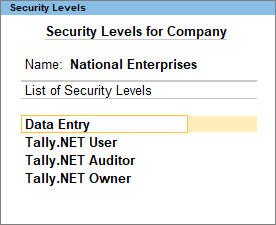
    1. Company-Level Security (User Roles & Permissions)

    Company-level security is the first layer of control that includes defining the administrator and operator roles.

    Common User Roles in Tally Prime

    https://help.tallysolutions.com/wp-content/uploads/2024/03/10-user-roles.png?utm_source=chatgpt.com
    https://help.tallysolutions.com/wp-content/uploads/2024/03/11-user-roles.png?utm_source=chatgpt.com
    • Administrator – Has full access to all features.
    • Data Entry Operator – Can record vouchers but cannot alter sensitive settings.
    • Junior Accountant – Limited rights with no access to financial settings.
    • Auditor – Can view audit logs, voucher alterations, and discrepancies.
    • Inventory Manager – Handles stock items, godowns, and inventory reports.

    Sample Table: Permissions vs Users

    User RoleAccess Type
    AdministratorFull company access including configurations
    Data Entry OperatorVoucher entry only; restricted alterations

    2. TallyVault Password (Data Encryption)

    TallyVault provides data encryption to protect your company file even if someone gains access to the computer. This is one of the strongest layers of security in Tally.

    Key Highlights

    • Uses advanced encryption making data unreadable without the TallyVault password.
    • Ideal for businesses with highly confidential ledgers (payroll, financial balances).
    • Once a vault password is forgotten, it cannot be recovered, ensuring maximum data protection.

    3. Password Policy Settings

    Tally Prime allows businesses to enforce password policies for all users for stronger authentication.

    Common Password Rules

    • Minimum password length
    • Password expiry duration
    • Mandatory password change after set intervals
    • Restrictions on password reuse

    These controls reduce unauthorized access and maintain internal discipline.


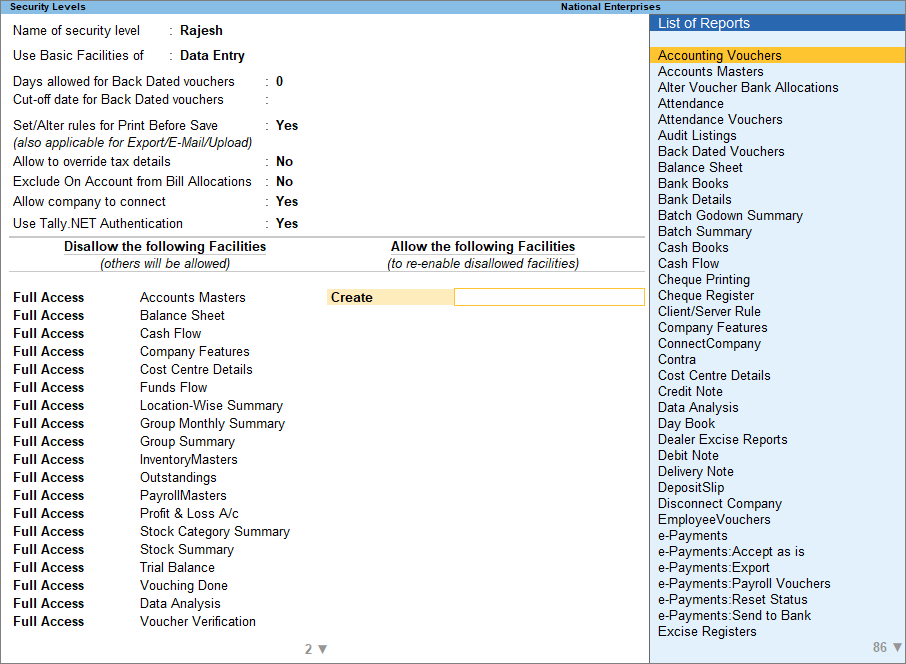
    4. Security Levels (Custom Role-Based Access)

    Tally Prime gives full flexibility to create custom user groups based on departments, roles, or responsibility levels.

    Examples of Custom Security Levels

    • Sales Team
    • Inventory Team
    • Finance Approver
    • HR Payroll Supervisor
    • Branch-level Accountant

    Each level can be configured to allow or deny activities like altering vouchers, printing reports, exporting data, or accessing statutory features.


    5. Voucher Type Permissions

    Each voucher type can be individually controlled. This prevents misuse or manipulation of financial transactions.

    Examples of Voucher Restrictions

    • Allowing only managers to approve debit notes
    • Blocking deletion of payment vouchers for accountants
    • Restricting sales order alterations
    • Allowing only one user to handle contra vouchers for banking

    6. Audit & Control Features

    Audit Trail is one of the strongest governance tools in Tally Prime.

    Audit Features Include

    • Tracking altered vouchers
    • Displaying deleted vouchers
    • Highlighting mismatched figures
    • Monitoring incomplete records
    • Listing backdated transactions

    It ensures full transparency and accountability inside the system.


    How to Configure Tally Prime Security Settings (Step-by-Step)

    Step 1: Enable Security Control

    Go to Company Creation or Company Alteration and activate Security Control. Assign an administrator username and password.

    Step 2: Create Security Levels

    Create predefined or custom roles, define access rights, and set activity restrictions.

    Step 3: Add Users

    Assign users to their respective roles with individual passwords.

    Step 4: Enable TallyVault (Optional but recommended)

    Add a vault password for encrypted company data.

    Step 5: Test Access

    Login with different user roles to ensure permissions work as expected.


    Common Real-World Use Cases

    Use Case 1: Restricting Cash Transactions

    Small businesses often restrict cash voucher deletion to prevent fraud.
    Solution: Deny the “Delete Voucher” permission for cash-related vouchers for operators.

    Use Case 2: Preventing Backdated Entries

    Unauthorized backdated entries can lead to accounting discrepancies.
    Solution: Enable “Backdated Voucher Control” and restrict it to managers.

    Use Case 3: Protecting Sensitive Payroll Data

    Payroll data must be confidential.
    Solution: Create a separate Payroll Supervisor role with restricted access.


    Best Practices for Tally Prime Security

    • Change passwords every 45 to 90 days.
    • Enable TallyVault for companies with sensitive data.
    • Assign users only the permissions they need.
    • Activate Audit Trail for better governance.
    • Avoid sharing administrator login credentials.
    • Regularly review user access logs.

    FAQ Section (Optimized for Featured Snippets)

    1. What are Tally Prime security settings?

    Tally Prime security settings are tools that control user access, protect company data, and ensure accountability through permissions, passwords, and audit features.

    2. How do I enable security control in Tally Prime?

    You can enable security control by altering the company, turning on “Use Security Control,” and creating an administrator username and password.

    3. What is TallyVault in Tally Prime?

    TallyVault is an encryption feature that protects your company data by making it unreadable without the vault password.

    4. Can I set different permissions for different users?

    Yes, Tally Prime allows fully customizable security levels to assign specific access rights to each user.

    5. What happens if the TallyVault password is lost?

    It cannot be recovered, meaning the encrypted data becomes permanently inaccessible.

    6. How can I prevent users from altering vouchers?

    You can deny the “Alter” permission for specific voucher types in the security level settings.

    7. Does Tally Prime support audit logs?

    Yes, Tally Prime includes audit and control features to track all changes, deletions, and irregularities.

    8. Is Tally Prime secure for multi-user environments?

    Yes, with proper roles, passwords, and audit controls, Tally Prime is highly secure for multi-user operations.


    Disclaimer

    This article is for educational and informational purposes only. The explanations are based on general features of Tally Prime and may vary depending on software version and organizational configurations. Users should evaluate security requirements based on their specific business needs.