Tag: Stock Management

  • Mastering Inventory Management in Tally ERP 9

    Managing inventory information in Tally ERP 9 involves creating and organizing stock groups, stock categories, stock items, units of measurement, godowns, batch numbers, and recording stock transactions. Here are detailed steps along with five practical examples:

    Steps for Managing Inventory Information:

    Step 1: Creating Stock Groups
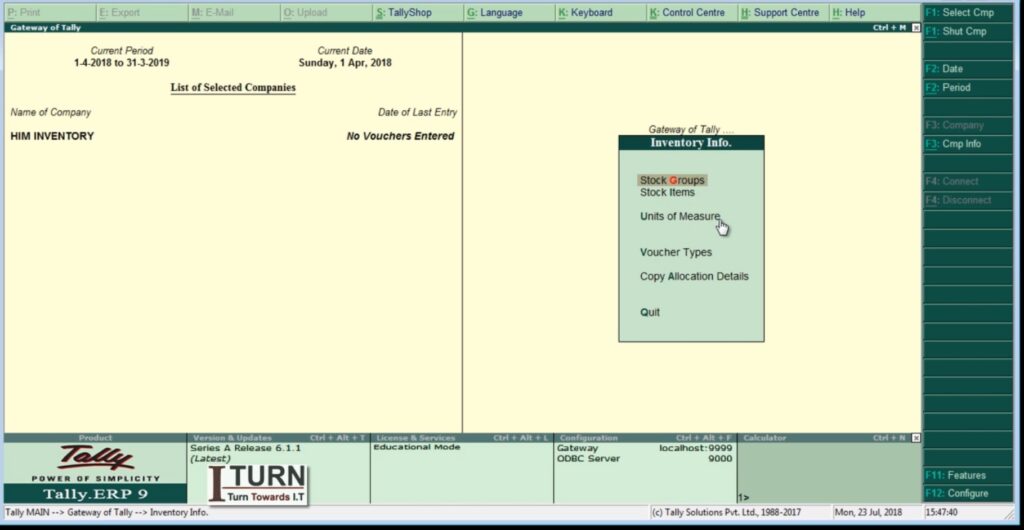
    1. Go to Gateway of Tally > Inventory Info > Stock Groups.
    2. Select “Create” (Alt + C) to create a new stock group.
    3. Enter the Name of the stock group (e.g., Electronics) and Subgroup if needed.
    4. Save the details (Ctrl + A).
    Step 2: Creating Stock Categories
    1. Go to Gateway of Tally > Inventory Info > Stock Categories.
    2. Select “Create” (Alt + C) to create a new stock category.
    3. Enter the Name of the stock category (e.g., Mobile Phones) and select the parent stock group (Electronics).
    4. Save the details (Ctrl + A).
    Step 3: Creating Stock Items
    1. Go to Gateway of Tally > Inventory Info > Stock Items.
    2. Select “Create” (Alt + C) to create a new stock item.
    3. Enter the Name of the stock item (e.g., iPhone 12 Pro) and select the parent stock category (Mobile Phones).
    4. Specify details like Units of Measurement, Standard Rate, etc.
    5. Save the details (Ctrl + A).
    Step 4: Creating Units of Measurement (UOM)
    1. Go to Gateway of Tally > Inventory Info > Units of Measurement.
    2. Select “Create” (Alt + C) to create a new unit of measurement (e.g., Dozen).
    3. Enter the Symbol and Full Form for the unit (Dozen).
    4. Save the details (Ctrl + A).
    Step 5: Creating Godowns
    1. Go to Gateway of Tally > Inventory Info > Godowns.
    2. Select “Create” (Alt + C) to create a new godown (e.g., Main Warehouse).
    3. Enter the Name and Address of the godown.
    4. Save the details (Ctrl + A).
    Step 6: Enabling Batch Numbers
    1. Go to Gateway of Tally > F11: Features > F2: Inventory Features.
    2. Enable the option “Maintain Batch-wise Details.”
    3. Save the settings (Ctrl + A).

    Practical Examples:

    Example 1: Stock Transfer Between Godowns
    1. Go to Gateway of Tally > Inventory Vouchers > F7: Stock Journal.
    2. Select the source and destination godowns.
    3. Enter the stock item details and quantity.
    4. Save the voucher (Ctrl + A).
    Example 2: Stock Receipt (Purchase) with Batch Number
    1. Go to Gateway of Tally > Inventory Vouchers > F9: Purchase.
    2. Select the supplier, stock item, and enter quantity and rate.
    3. Enable batch details, enter batch numbers, and save the voucher (Ctrl + A).
    Example 3: Stock Issuance (Sales) with Batch Number
    1. Go to Gateway of Tally > Inventory Vouchers > F8: Sales.
    2. Select the customer, stock item, and enter quantity and rate.
    3. Enable batch details, select the appropriate batch, and save the voucher (Ctrl + A).
    Example 4: Stock Adjustment for Damaged Goods
    1. Go to Gateway of Tally > Inventory Vouchers > F7: Stock Journal.
    2. Select the stock item and adjust quantity for damaged goods.
    3. Save the voucher (Ctrl + A).
    Example 5: Stock Opening Balances Entry
    1. Go to Gateway of Tally > Inventory Info > Opening Balances.
    2. Select the stock item, enter opening quantity, and rate.
    3. Specify godown details if applicable and save (Ctrl + A).

    These steps and examples provide a comprehensive guide for managing inventory information in Tally ERP 9, covering stock groups, stock categories, stock items, units of measurement, godowns, batch numbers, and various stock transactions.

  • Inventory Management in Tally ERP 9

    Inventory information in Tally ERP 9 encompasses a range of data related to the management of goods, products, and materials within a business. It allows businesses to track stock levels, monitor inventory movements, and manage purchase and sales orders efficiently. Here’s a detailed explanation of inventory information in Tally ERP 9:

    Components of Inventory Information:

    1. Stock Groups:
    • Stock groups are categories used to classify similar types of products or items.
    • For example, you might have stock groups like “Electronics,” “Clothing,” “Stationery,” etc.
    2. Stock Categories:
    • Stock categories are further subdivisions within stock groups.
    • They help in organizing inventory hierarchically.
    • For example, within the “Electronics” stock group, you might have categories like “Mobile Phones,” “Laptops,” “Televisions,” etc.
    3. Stock Items:
    • Stock items are individual products or items that the business buys, sells, or manufactures.
    • Each stock item has a unique name, code, and other attributes.
    • For example, within the “Mobile Phones” category, specific stock items might include “iPhone 12 Pro,” “Samsung Galaxy S21,” etc.
    4. Units of Measurement:
    • Units of measurement define how quantities of stock items are measured and represented.
    • Tally ERP 9 supports various units of measurement such as pieces, kilograms, meters, liters, etc.
    • For example, a stock item like “Pencil” might have units of measurement like “Dozen” or “Each.”
    5. Godowns:
    • Godowns are physical locations where inventory is stored or managed.
    • They can represent warehouses, storage facilities, or any other designated storage areas.
    • For example, you might have godowns named “Main Warehouse,” “Retail Store,” “Backroom,” etc.
    6. Batch Numbers:
    • Batch numbers are used to track and manage groups of identical items that were produced or received together.
    • They are particularly useful for products with expiration dates or manufacturing dates.
    • For example, pharmaceuticals, food items, and cosmetics often use batch numbers for tracking purposes.
    7. Stock Vouchers:
    • Stock vouchers are used to record inventory-related transactions such as stock transfers, stock receipts, stock issuances, and stock adjustments.
    • These vouchers ensure accurate recording of inventory movements within the business.

    Features of Inventory Information in Tally ERP 9:

    • Stock Valuation: Tally ERP 9 supports various methods of stock valuation including FIFO (First In First Out), LIFO (Last In First Out), Weighted Average, and Standard Cost.
    • Stock Aging Analysis: Businesses can analyze the age of their inventory to identify slow-moving or obsolete stock items.
    • Inventory Reports: Tally ERP 9 provides a range of inventory reports such as stock summary, stock item-wise reports, godown-wise reports, and batch-wise reports for effective inventory management.
    • Inventory Control: Businesses can set reorder levels, minimum stock levels, and maximum stock levels to ensure optimal inventory levels and prevent stockouts or overstock situations.

    Overall, inventory information in Tally ERP 9 plays a critical role in managing and controlling the flow of goods and materials within a business, ultimately contributing to efficient operations and improved financial performance.