Tag: gst return filing india

  • How to File GSTR-2B Step by Step: Complete Guide to ITC Reconciliation and GST Compliance for Businesses

    How to file GSTR-2B step by step is one of the most searched GST compliance topics for accountants, business owners, and GST practitioners. In the first 100 words itself, it is important to clarify that GSTR-2B is not a return to be filed, but a system-generated Input Tax Credit (ITC) statement that plays a decisive role in filing GSTR-3B accurately. Since August 2020, GSTR-2B has become the primary reference document for ITC eligibility, helping taxpayers avoid excess claims and GST notices.

    As per GST department observations, more than 65% of GST mismatches arise due to incorrect ITC claims. Proper understanding and use of GSTR-2B significantly reduces this risk.


    What Is GSTR-2B?

    GSTR-2B is a static auto-drafted ITC statement generated monthly for regular GST taxpayers. It consolidates purchase-related data uploaded by suppliers in:

    • GSTR-1
    • GSTR-5 (non-resident)
    • GSTR-6 (ISD)

    Unlike GSTR-2A, GSTR-2B does not change once generated for a tax period.

    Key Characteristics of GSTR-2B

    • Generated monthly
    • Static in nature
    • Based on supplier filings
    • Used for ITC eligibility
    • Linked directly to GSTR-3B

    Why GSTR-2B Is Important for GST Compliance

    GSTR-2B determines how much ITC you are legally allowed to claim.

    Benefits of Using GSTR-2B

    • Reduces excess ITC claims
    • Prevents GST notices and penalties
    • Improves accuracy in GSTR-3B
    • Simplifies reconciliation
    • Ensures legal compliance

    Fact: Businesses that reconcile ITC with GSTR-2B every month face up to 70% fewer GST notices compared to those who don’t.


    Difference Between GSTR-2A and GSTR-2B

    Understanding this difference is crucial.

    ParameterGSTR-2A / GSTR-2B
    NatureDynamic / Static
    UpdatesReal-time / Monthly
    PurposeTracking / Filing ITC
    UsageInformational / Compliance

    GSTR-2B is the only valid base for ITC claim in GSTR-3B.


    Who Needs to Use GSTR-2B?

    GSTR-2B applies to:

    • Regular GST taxpayers
    • Businesses claiming ITC
    • Accountants and GST practitioners
    • Companies filing monthly GSTR-3B

    It does not apply to composition dealers or non-GST registered persons.


    How to File GSTR-2B Step by Step (Practical Explanation)

    https://tutorial.gst.gov.in/userguide/returns/assets/images/image424.png
    https://tutorial.gst.gov.in/userguide/returns/assets/images/CR%2024812_Rule37A_Image1.1.jpg
    https://www.ivldsp.com/wp-content/uploads/2021/07/Vendor-Reconciliation-for-Input-Tax-Credit-role-based.jpg

    Step 1: Log in to the GST Portal

    Use your GSTIN and credentials to access the dashboard.


    Step 2: Navigate to GSTR-2B

    Go to:

    • Returns Dashboard
    • Select Financial Year and Month
    • Click on GSTR-2B

    The system generates the statement automatically.


    Step 3: Download GSTR-2B

    You can download GSTR-2B in:

    • PDF format (summary view)
    • Excel format (detailed reconciliation)

    Excel format is recommended for professional reconciliation.


    Understanding GSTR-2B Structure

    GSTR-2B is divided into clear sections.

    ITC Available Section

    Includes:

    • Invoices eligible for ITC
    • Credit notes
    • ISD credits

    ITC Not Available Section

    Includes:

    • Blocked credits
    • Reverse charge supplies
    • Ineligible ITC under GST law

    This clear segregation helps avoid wrong claims.


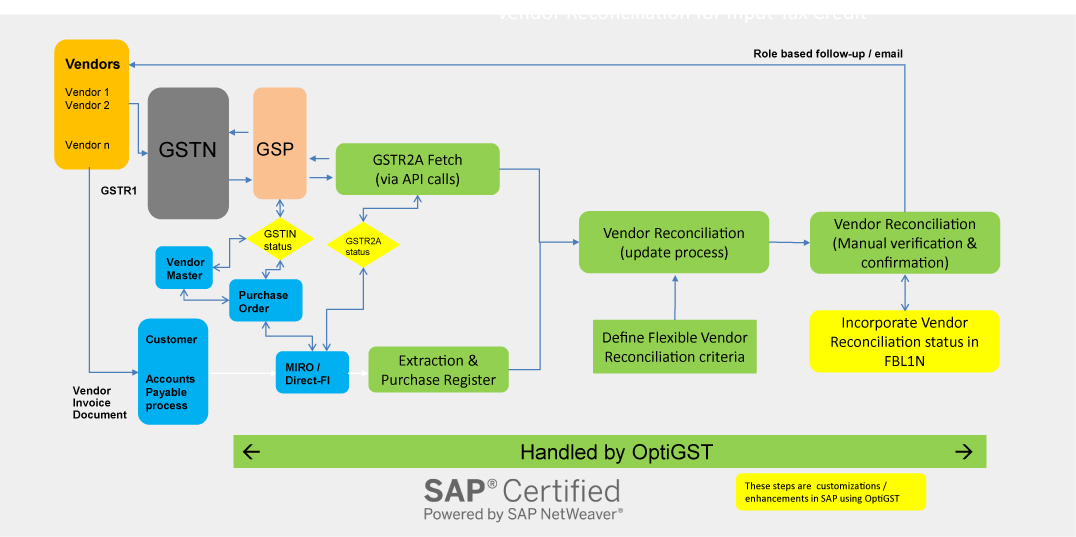
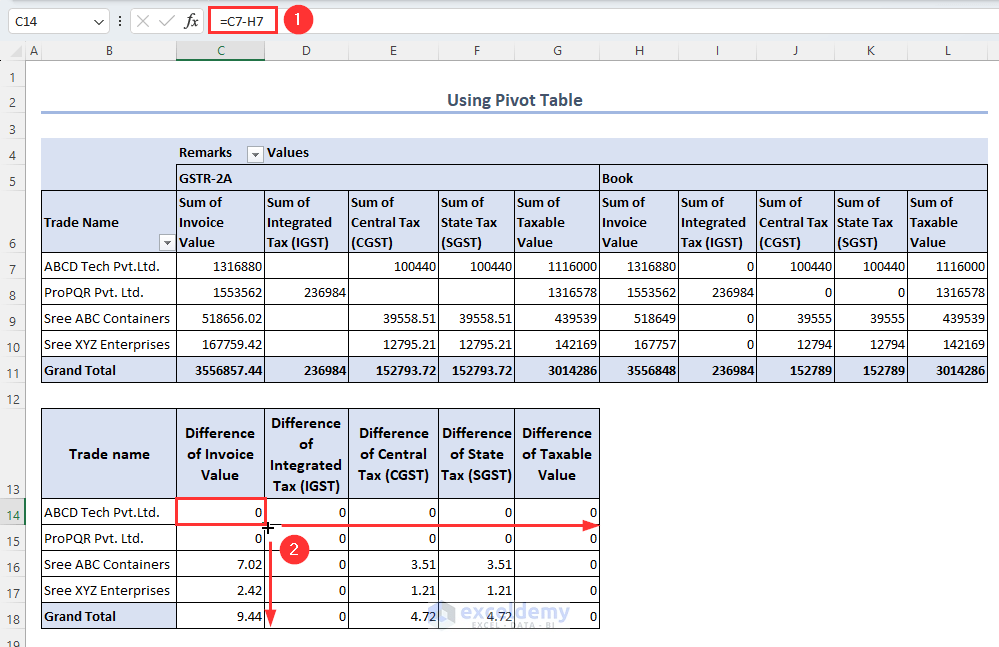
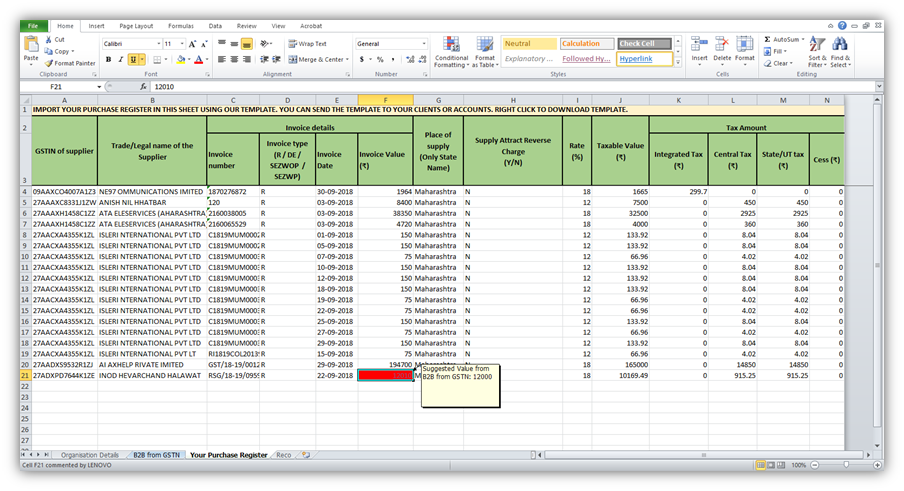
    Reconciliation of GSTR-2B with Purchase Register
    https://help.gstplus.com/hc/article_attachments/360020664973/mceclip2.png
    https://docs.cleartax.in/product-help-and-support/~gitbook/ogimage/VvNiSHVX3eBNkrKtuXIo
    https://www.exceldemy.com/wp-content/uploads/2023/07/19-Obtaining-the-difference-of-invoice-and-GST-values-from-the-Pivot-table-to-Do-GST-reconciliation-in-Excel.png

    Reconciliation is the most critical step.

    Reconciliation Process

    • Match supplier GSTIN
    • Match invoice number
    • Match taxable value and tax
    • Identify missing invoices
    StatusAction Required
    Invoice matchedClaim ITC
    Missing invoiceFollow up with supplier
    Ineligible creditDo not claim

    Fact: Nearly 30% of ITC mismatches occur due to supplier non-filing or late filing of GSTR-1.


    How to Claim ITC in GSTR-3B Using GSTR-2B

    Only ITC appearing in eligible section of GSTR-2B should be claimed.

    Best Practice

    • Claim ITC strictly as per GSTR-2B
    • Carry forward unmatched ITC
    • Avoid provisional or estimated credits

    This ensures zero variance between departmental data and your return.


    Common Errors While Using GSTR-2B

    MistakeConsequence
    Claiming ITC not in 2BGST notice
    Ignoring ineligible ITCPenalty
    No reconciliationInterest liability
    Supplier mismatchITC denial

    Avoiding these mistakes protects your compliance record.


    Monthly Compliance Workflow Using GSTR-2B

    https://go4gst.com/wp-content/uploads/2025/06/gst_workflow_diagram.svg
    https://zetran.com/wp-content/uploads/2018/10/draw-a-table-for-gstr-1-gstr-2-gstr-3b-compressed-570x1024.jpg
    https://media.licdn.com/dms/image/v2/D4D22AQFer2xWirM4iw/feedshare-shrink_800/B4DZs1jcypH4Ag-/0/1766130045686?e=2147483647&t=hXekOZMIsrnjThoimpZx3DCriq47Ba4VLPM4BkOaCo0&v=beta

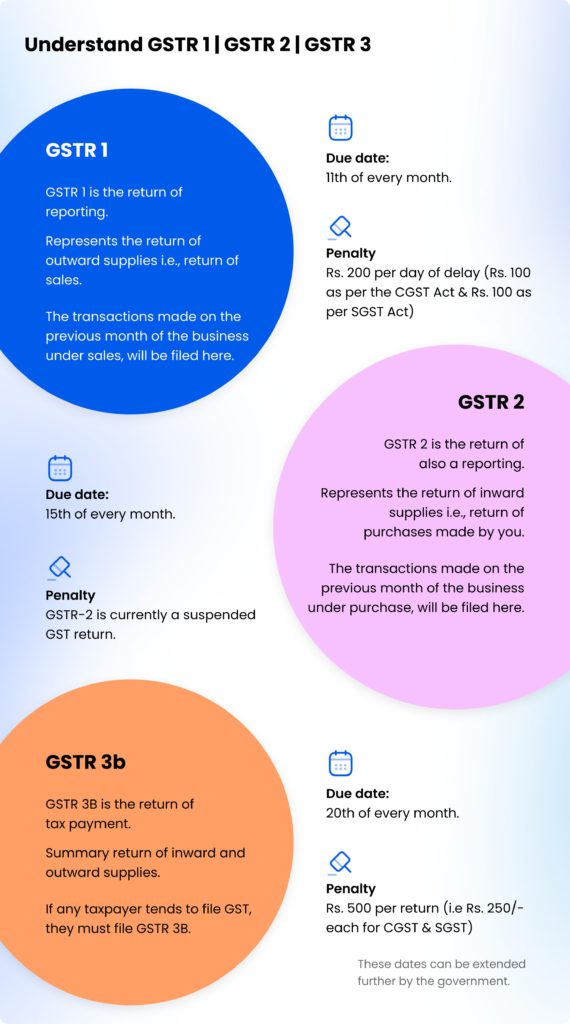
    A disciplined workflow includes:

    1. Download GSTR-2B
    2. Reconcile with purchase data
    3. Communicate discrepancies
    4. Finalize eligible ITC
    5. File GSTR-3B

    This process typically takes 2–4 hours per month for small to mid-sized businesses.


    Practical Tips for Smooth GSTR-2B Compliance

    • Reconcile monthly, not quarterly
    • Educate vendors on timely filing
    • Maintain clean purchase records
    • Use Excel-based reconciliation
    • Track pending ITC separately

    Consistent compliance builds credibility with tax authorities.


    Legal Importance of GSTR-2B

    GST law clearly states that ITC eligibility depends on:

    • Supplier filing status
    • Invoice reporting
    • Tax payment by supplier

    GSTR-2B acts as documentary evidence for ITC eligibility during audits.


    FAQ: How to File GSTR-2B Step by Step

    1. Is GSTR-2B required to be filed?

    No, GSTR-2B is auto-generated and not filed by taxpayers.

    2. Can ITC be claimed without appearing in GSTR-2B?

    No, ITC should be claimed only if it appears in GSTR-2B.

    3. What is the frequency of GSTR-2B?

    It is generated monthly.

    4. Does GSTR-2B change after generation?

    No, it remains static for the period.

    5. What should be done for missing invoices?

    Follow up with suppliers to file or amend GSTR-1.

    6. Is GSTR-2A still relevant?

    GSTR-2A is for tracking, but GSTR-2B is for compliance.

    7. Can Excel be used for GSTR-2B reconciliation?

    Yes, Excel is widely used for professional reconciliation.


    Conclusion

    Understanding how to file GSTR-2B step by step actually means mastering how to use, analyze, and reconcile this statement correctly. GSTR-2B is the backbone of ITC compliance under GST and directly impacts cash flow, tax liability, and audit exposure. Businesses that integrate GSTR-2B into their monthly GST workflow experience smoother compliance, fewer notices, and better financial control. Treat GSTR-2B not as a formality, but as a strategic compliance tool.


    Disclaimer

    This article is intended for educational and informational purposes only. GST laws, rules, and procedures are subject to change based on government notifications and amendments. Readers are advised to consult a qualified GST professional or apply professional judgment before taking compliance decisions.


  • How to File NIL GST Return in 5 Minutes – A Step-by-Step Guide for Small Business Owners

    Filing GST returns is mandatory for all registered taxpayers under the Goods and Services Tax (GST) regime in India, even if there are no transactions during a specific tax period. Many small business owners, freelancers, and inactive GST holders often need to file a NIL GST Return to stay compliant and avoid penalties. This article explains in detail how to file a NIL GST Return in just 5 minutes using the GST portal — quickly, correctly, and without any hassle.


    What is a NIL GST Return?

    A NIL GST Return is filed when a registered taxpayer has no outward supplies (sales), no inward supplies (purchases), and no tax liability during a particular tax period. In simple terms, if your business has not made any sale or purchase in a month or quarter, you are still required to file a NIL return to declare that no activity took place.

    For example:
    If your GSTIN is active but your business was inactive in the month of September 2025, you must still file a NIL GSTR-3B and NIL GSTR-1 for that month to stay compliant.


    Why Filing NIL GST Return is Important

    Even though there are no transactions, filing NIL returns is mandatory under GST law. Missing or delaying NIL returns can lead to penalties and suspension of your GSTIN.

    ReasonImportance
    ComplianceMandatory even for inactive business periods.
    Avoid PenaltiesLate filing can attract fines of ₹50 per day.
    Maintain Active GSTINHelps prevent suspension or cancellation.
    Build Good RecordKeeps your business in good standing with the GST Department.
    Required for Future FilingsNext month’s return cannot be filed without previous submission.

    Types of NIL Returns under GST

    Depending on your registration type and filing frequency, you may have to file one or more NIL returns.

    Return TypePurposeFrequencyEligible for NIL Return
    GSTR-3BSummary return showing outward and inward suppliesMonthly/QuarterlyYes
    GSTR-1Details of outward supplies (sales)Monthly/QuarterlyYes
    CMP-08For taxpayers under composition schemeQuarterlyYes
    GSTR-4Annual return for composition taxpayersAnnuallyYes

    Eligibility to File NIL GST Return

    You can file a NIL return if all the following conditions are met during the tax period:

    • No outward supply (no sales invoice raised).
    • No inward supply (no purchase or expense under GST).
    • No tax liability under reverse charge.
    • No ITC (Input Tax Credit) to claim or utilize.
    • No late fee or interest pending from previous returns.

    If any of these conditions are not true, you must file a regular return instead of a NIL return.


    How to File NIL GST Return in 5 Minutes (Step-by-Step Process)

    Step 1: Visit the GST Portal

    Go to the official GST website and log in using your credentials — GSTIN, username, and password.

    Step 2: Select the Return Filing Option

    After logging in, navigate to:
    Services → Returns → Returns Dashboard

    Step 3: Choose the Tax Period

    Select the appropriate Financial Year and Month/Quarter for which you want to file the return.

    Step 4: Choose the Return Type

    Click on Prepare Online under the return type (for example, GSTR-3B).

    Step 5: Select “Yes” for NIL Return

    The system will ask whether you want to file a NIL return. Choose “Yes” if you have no transactions to report.

    Step 6: Preview and Submit

    Check the prefilled details (it should show zeros in all fields). Click Submit and then File with DSC or EVC (based on your registration type).

    Step 7: Confirmation

    Once submitted, the portal will display a success message and a reference number (ARN) for your filed NIL return. You can download the acknowledgment for records.


    Time-Saving Option: File NIL Return via SMS

    If you meet the eligibility criteria, you can even file your NIL GSTR-3B and NIL GSTR-1 through a simple SMS without logging into the portal.
    It is an efficient method for small taxpayers who have no activity during the period.

    Return TypeFiling MethodTime Required
    NIL GSTR-3BThrough SMS or Portal3–5 minutes
    NIL GSTR-1Through SMS or Portal3–5 minutes
    CMP-08 NILPortal only5–7 minutes

    This is why NIL GST filing is often called the “5-minute return filing process.”


    Common Mistakes to Avoid While Filing NIL GST Return

    MistakeImpact
    Forgetting to file NIL returnLate fee and penalty charges apply.
    Filing NIL when transactions existNon-compliance and future scrutiny.
    Missing filing periodReturn sequence breaks, blocking next filing.
    Not downloading ARNLack of filing proof in case of audit.
    Ignoring EVC/DSC authenticationReturn submission remains incomplete.

    Late Fees for Non-Filing of NIL GST Return

    If you fail to file NIL returns within the due date, the following late fees apply under Section 47 of the CGST Act:

    Type of TaxLate Fee (per day)Maximum Late Fee
    Central GST (CGST)₹25₹500
    State GST (SGST)₹25₹500
    Total Late Fee₹50 per day₹1000 per return

    Filing NIL returns on time ensures that these penalties never apply to your business.


    Benefits of Filing NIL GST Return Regularly

    BenefitExplanation
    Keeps GSTIN ActiveAvoids suspension due to non-compliance.
    Smooth Future FilingsEnsures next month’s return is accepted.
    Builds TrustMaintains a clean tax record.
    Prevents NoticesAvoids unnecessary legal communication.
    Easy for Loan or TenderBanks and agencies prefer consistent GST compliance.

    Tips for Quick NIL GST Filing

    • Always mark your tax period accurately before submission.
    • Use the SMS method for faster filing if eligible.
    • Keep a checklist for each filing type (GSTR-1, GSTR-3B, CMP-08).
    • File returns before the 20th of every month (for GSTR-3B).
    • Save all ARN acknowledgments for audit and compliance proof.

    Example: Filing NIL Return for the Month of September 2025

    ParticularsDetails
    Taxpayer NameABC Traders
    GSTIN09ABCDE1234F1Z2
    PeriodSeptember 2025
    SalesNil
    PurchasesNil
    ITC ClaimedNil
    Tax LiabilityNil
    Filing Date19 October 2025
    StatusSuccessfully Filed (NIL GSTR-3B)

    This example illustrates how a taxpayer with no activity can stay fully compliant by filing a NIL return before the due date.


    Conclusion

    Filing a NIL GST Return is a simple yet essential compliance task that ensures your GST registration remains active and penalty-free. Whether you are an inactive business, a freelancer, or temporarily not trading, you can file NIL returns online in just 5 minutes using the GST portal or SMS method. Staying consistent with NIL filings builds your credibility, saves money on penalties, and keeps your GST compliance track clean for future growth.


    Disclaimer:
    The information provided in this article is for educational purposes only. GST laws and portal functionalities may change over time. Always verify the latest process and filing due dates from official government sources before filing your return.