Tag: GST reconciliation in Tally

  • Top 5 Mistakes While Filing GST in Tally and How to Avoid Them (Complete Guide for Accurate GST Returns)

    Filing GST returns correctly is one of the most critical responsibilities for businesses and accountants in India. However, many users still make common errors while using Tally, which can lead to penalties, notices, and financial losses. Understanding the top 5 mistakes while filing GST in Tally can help you avoid costly errors and ensure smooth compliance.

    With over 1.3 crore GST-registered businesses in India, even small mistakes in filing can lead to significant issues. Studies suggest that nearly 30–40% of GST filing errors occur due to incorrect accounting entries or improper configuration in Tally.

    In this detailed guide, we will explore the top 5 mistakes while filing GST in Tally, their impact, and practical solutions to avoid them.


    Why Accuracy in GST Filing Matters

    Before diving into mistakes, it’s important to understand why GST accuracy is crucial.

    Key Reasons:

    • Avoid penalties and late fees
    • Maintain compliance with tax laws
    • Ensure accurate input tax credit (ITC)
    • Prevent audit issues
    • Build trust with clients and authorities

    Overview of Top 5 Mistakes While Filing GST in Tally

    MistakeImpact
    Incorrect GST ConfigurationWrong tax calculation
    Wrong Ledger SelectionMisclassification of transactions
    Ignoring ReconciliationMismatch with GST portal
    Incorrect Invoice EntriesFiling errors and notices
    Missing GST Returns DeadlinesPenalties and interest

    Mistake 1: Incorrect GST Configuration in Tally

    One of the most common issues is improper GST setup.

    Common Errors:

    • GST not enabled in company features
    • Wrong GSTIN entered
    • Incorrect tax rates applied
    • Wrong state selection

    Impact:

    • Incorrect tax calculation
    • Wrong GST returns
    • Loss of input tax credit

    How to Avoid:

    • Always verify GST settings in F11 features
    • Check GSTIN carefully
    • Assign correct tax rates to ledgers

    Pro Tip:

    Spend at least 10–15 minutes verifying GST setup before starting entries. This can prevent hours of correction later.


    Mistake 2: Wrong Ledger Selection

    Choosing the wrong ledger is a frequent mistake, especially for beginners.

    Common Errors:

    • Using sales ledger instead of purchase ledger
    • Selecting wrong GST classification
    • Mixing taxable and non-taxable ledgers

    Impact:

    • Incorrect GST reporting
    • Financial misstatements
    • Errors in returns like GSTR-1 and GSTR-3B

    Correct Ledger Usage Example

    TransactionCorrect Ledger
    Sales with GSTSales Account (GST Applicable)
    Purchase with GSTPurchase Account (GST Applicable)
    ExpensesExpense Ledger

    How to Avoid:

    • Create separate ledgers for GST and non-GST transactions
    • Use proper ledger groups
    • Double-check ledger selection before saving entries

    Mistake 3: Ignoring GST Reconciliation

    Many users skip reconciliation between Tally and the GST portal.

    What is Reconciliation?

    Matching your Tally data with GST portal data (GSTR-2A, GSTR-2B).

    Impact:

    • ITC mismatch
    • Notice from GST department
    • Financial discrepancies

    How to Avoid:

    • Reconcile data monthly
    • Compare purchase data with GSTR-2B
    • Correct mismatches immediately

    Fact:

    Businesses that perform regular reconciliation reduce errors by up to 60%.


    Mistake 4: Incorrect Invoice Entries

    Invoices are the backbone of GST filing, and errors here can be costly.

    Common Errors:

    • Missing GST details in invoice
    • Incorrect HSN/SAC codes
    • Wrong tax rates
    • Duplicate invoices

    Impact:

    • Rejection of returns
    • Penalties
    • Loss of ITC

    Checklist for Correct Invoice Entry

    CheckpointRequirement
    GSTINMust be accurate
    HSN/SAC CodeMandatory for most businesses
    Tax RateAs per GST rules
    Invoice NumberUnique and sequential

    How to Avoid:

    • Use predefined templates in Tally
    • Verify invoice details before saving
    • Maintain proper documentation

    Mistake 5: Missing GST Return Deadlines

    Late filing is a very common issue among businesses.

    Key Deadlines:

    • GSTR-1: Monthly/Quarterly
    • GSTR-3B: Monthly

    Impact:

    • Late fees (₹50–₹200 per day)
    • Interest on tax liability
    • Loss of compliance rating

    How to Avoid:

    • Set reminders for due dates
    • Maintain a GST calendar
    • File returns in advance

    Additional Mistakes to Watch Out For

    • Not updating Tally software
    • Ignoring GST updates and rules
    • Not backing up data
    • Using outdated tax rates
    • Poor documentation

    Best Practices for Accurate GST Filing in Tally

    1. Maintain Clean Data

    Accurate entries lead to accurate returns.

    2. Update Tally Regularly

    New updates include GST changes.

    3. Perform Monthly Reviews

    Check reports before filing returns.

    4. Use GST Reports in Tally

    Analyze GSTR-1 and GSTR-3B before submission.

    5. Train Staff Properly

    Well-trained users reduce errors significantly.


    Real-Life Example

    A small business filed GST returns with incorrect ledger mapping:

    • ITC claimed: ₹50,000
    • Actual eligible ITC: ₹35,000

    Result:

    • Notice issued
    • Penalty applied
    • Additional tax paid

    Lesson:
    Even small mistakes can lead to big financial losses.


    SEO Insight: GST Compliance in India

    • Over 70% of GST errors occur due to manual mistakes
    • Businesses using proper accounting software reduce errors by 50%+
    • Regular reconciliation improves compliance accuracy significantly

    FAQ Section (Optimized for Featured Snippets)

    1. What are the top mistakes while filing GST in Tally?

    The top mistakes include incorrect GST configuration, wrong ledger selection, ignoring reconciliation, incorrect invoice entries, and missing deadlines.

    2. How can I avoid GST errors in Tally?

    Verify GST settings, use correct ledgers, reconcile data regularly, and double-check invoices before filing.

    3. What happens if GST is filed incorrectly?

    Incorrect filing can lead to penalties, notices, and loss of input tax credit.

    4. How often should GST reconciliation be done?

    It should be done monthly to ensure accuracy and avoid mismatches.

    5. Can Tally automatically calculate GST?

    Yes, if configured correctly, Tally can calculate GST automatically.

    6. What is the penalty for late GST filing?

    Late fees range from ₹50 to ₹200 per day depending on the return type.

    7. Why is ledger selection important in GST filing?

    Incorrect ledger selection can lead to wrong tax reporting and financial errors.


    Conclusion

    Understanding the top 5 mistakes while filing GST in Tally is essential for maintaining compliance and avoiding penalties. Most errors occur due to lack of attention, improper configuration, or insufficient knowledge.

    By following best practices, verifying entries, and regularly reconciling data, you can ensure accurate GST filing and smooth business operations. Remember, accuracy in GST is not just about compliance—it’s about financial discipline and business credibility.


    Disclaimer

    This article is for educational purposes only. GST rules and Tally features may change over time. Users are advised to consult professionals or refer to official guidelines before filing GST returns.
  • GST Summary Comparison in Tally and Excel: Detailed Guide for Accurate GST Compliance and Reconciliation

    GST Summary Comparison in Tally and Excel is one of the most critical processes for businesses, accountants, and tax professionals in India. In the first 100 words itself, it is important to understand that GST compliance is not just about filing returns but also about ensuring that data reported in accounting software like Tally perfectly matches analytical summaries prepared in Excel. Even a small mismatch in taxable value, CGST, SGST, or IGST can result in notices, penalties, or delayed refunds. This detailed article explains how GST summaries are generated in Tally and Excel, how they differ, and how to compare them effectively for error-free compliance.


    What Is a GST Summary and Why It Matters

    A GST summary is a consolidated snapshot of all GST-related transactions for a specific period. It includes outward supplies, inward supplies, tax liability, input tax credit, and net payable tax.

    Businesses rely on GST summaries to:

    • File periodic GST returns accurately
    • Reconcile books with GST portal data
    • Detect errors in tax classification
    • Ensure proper utilization of input tax credit

    According to industry estimates, over 65% of GST notices issued to small and medium businesses arise due to mismatches between accounting data and GST returns. This highlights why GST summary comparison in Tally and Excel is not optional but essential.


    Understanding GST Summary in Tally

    Tally generates GST summaries directly from accounting entries. Once GST is enabled and ledgers are correctly configured, Tally automatically classifies transactions into taxable, exempt, zero-rated, and reverse charge categories.

    Key Components of GST Summary in Tally

    • Total taxable value
    • CGST, SGST, and IGST breakup
    • Input tax credit summary
    • Return-wise summary aligned with GSTR-1 and GSTR-3B

    Advantages of Tally GST Summary

    • Real-time data from books
    • Automatic tax calculation
    • Built-in compliance structure
    • Lower risk of manual calculation errors

    However, Tally summaries depend entirely on correct ledger setup. A single wrong GST rate or ledger classification can distort the entire summary.


    Understanding GST Summary in Excel

    Excel-based GST summaries are usually prepared by exporting data from Tally or other systems and then restructuring it manually or through formulas. Many accountants prefer Excel because it allows deep customization and flexible analysis.

    Key Components of GST Summary in Excel

    • Voucher-wise taxable values
    • Rate-wise GST calculation
    • ITC eligibility analysis
    • Month-on-month comparison

    Advantages of Excel GST Summary

    • High flexibility in reporting
    • Custom formats for management review
    • Easy reconciliation with portal data
    • Advanced analysis using Pivot Tables

    The downside is that Excel relies heavily on human accuracy. Studies show that nearly 88% of spreadsheets contain at least one error, which makes reconciliation skills crucial.


    GST Summary Comparison in Tally and Excel: Core Differences

    The real value emerges when both summaries are compared side by side. This comparison helps identify inconsistencies that may otherwise go unnoticed.

    Comparison Table: GST Summary in Tally vs Excel

    AspectDetails
    Data SourceTally uses live accounting entries, Excel uses imported or manually structured data
    Accuracy ControlTally depends on ledger setup, Excel depends on formulas and data validation

    Why GST Summary Comparison in Tally and Excel Is Essential

    1. Detection of Classification Errors

    Misclassification of GST rates (5%, 12%, 18%, 28%) is one of the most common issues. Comparing summaries helps detect such mistakes early.

    2. Input Tax Credit Reconciliation

    ITC mismatches can block working capital. A proper comparison ensures that eligible ITC claimed in returns matches accounting records.

    3. Audit and Assessment Readiness

    During audits, authorities often ask for reconciled GST data. A well-documented GST summary comparison strengthens audit defense.

    4. Reduction in Interest and Penalties

    Even a delay caused by mismatch can attract interest at 18% per annum. Regular comparison minimizes this risk.


    Step-by-Step Process for GST Summary Comparison in Tally and Excel

    Step 1: Generate GST Summary in Tally

    Select the reporting period and extract GST summaries including outward supplies, inward supplies, and ITC.

    Step 2: Export Data to Excel

    Export voucher-level or summary-level data from Tally into Excel format for detailed analysis.

    Step 3: Prepare Excel GST Summary

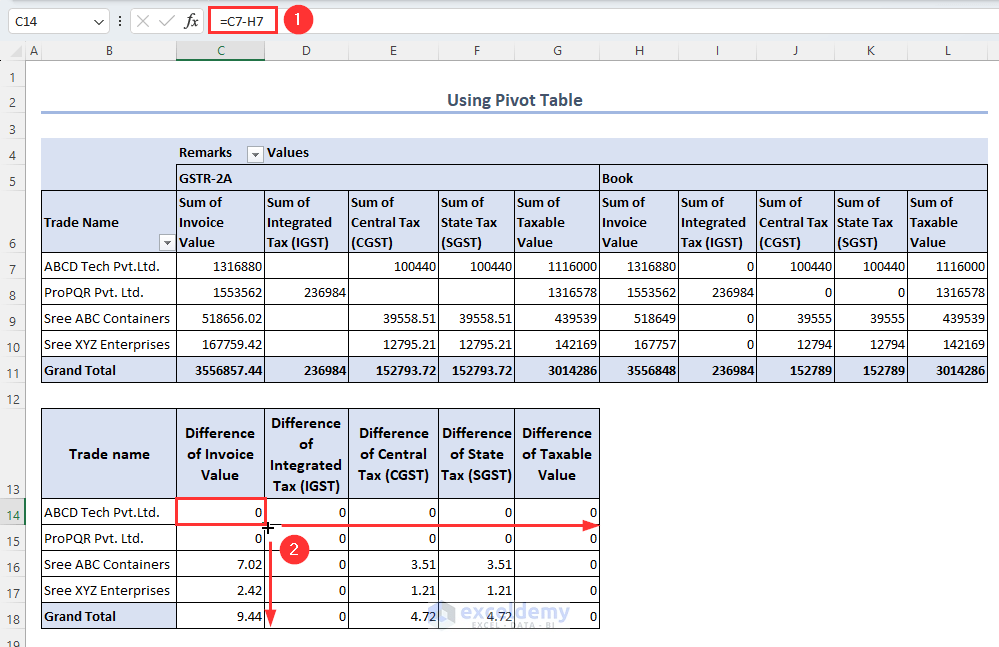
    Use formulas or pivot tables to consolidate taxable values and GST amounts rate-wise.

    Step 4: Match Key Figures

    Compare taxable value, CGST, SGST, IGST, and total tax liability.

    Step 5: Identify and Rectify Differences

    Check ledgers, vouchers, and GST rates for mismatches and correct them in Tally.


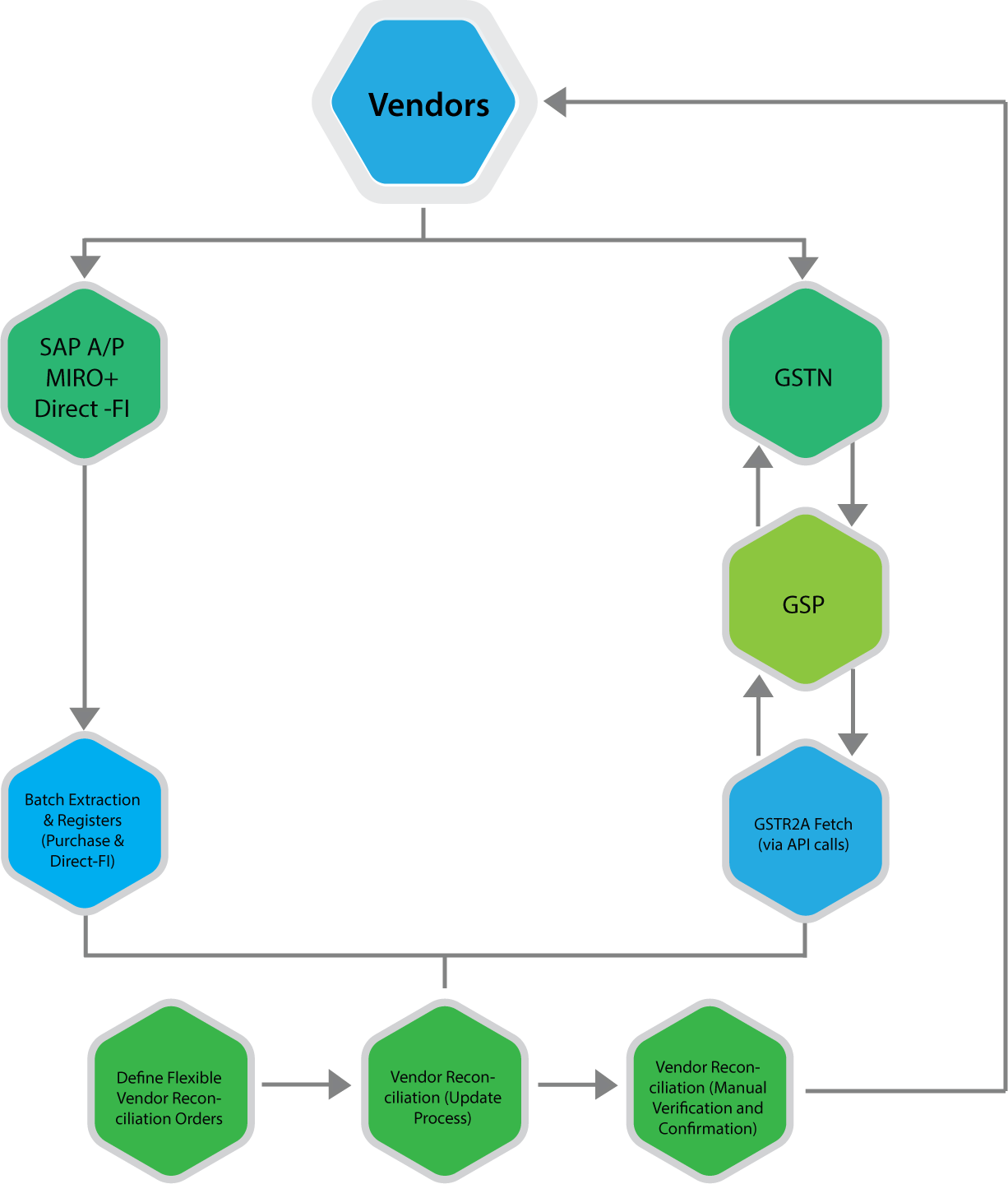
    https://www.nexus-business.com/assets/img/vendors.png
    https://www.exceldemy.com/wp-content/uploads/2023/07/19-Obtaining-the-difference-of-invoice-and-GST-values-from-the-Pivot-table-to-Do-GST-reconciliation-in-Excel.png

    Common Reasons for Differences Between Tally and Excel GST Summaries

    • Wrong GST rate selected in ledger
    • Incorrect place of supply
    • Missing reverse charge entries
    • Manual Excel formula errors
    • Rounding differences

    In practice, rounding differences alone account for nearly 10–12% of minor mismatches, especially in high-volume transactions.


    Best Practices for Accurate GST Summary Comparison

    • Use standardized Excel templates every month
    • Lock GST rates in Tally ledgers
    • Perform monthly reconciliation instead of annual
    • Maintain documentation for adjustments
    • Review summaries before filing returns

    Regular monthly reconciliation can reduce year-end workload by up to 40%, according to accounting workflow studies.


    GST Summary Comparison in Tally and Excel for Different Returns

    GSTR-1 Perspective

    Focus on outward supplies, invoice values, and tax breakup.

    GSTR-3B Perspective

    Focus on summary-level tax liability and ITC utilization.

    Aligning both summaries ensures that outward tax declared and tax paid are consistent.


    Impact of GST Summary Comparison on Business Decision-Making

    Beyond compliance, reconciled GST summaries help businesses:

    • Forecast tax outflows
    • Optimize pricing strategies
    • Improve cash flow planning
    • Avoid surprise tax demands

    Large businesses report saving 2–3% of annual tax outflow by identifying excess tax payments through proper reconciliation.


    Frequently Asked Questions (FAQ)

    1. What is GST Summary Comparison in Tally and Excel?

    It is the process of matching GST figures generated in Tally with GST summaries prepared in Excel to ensure accuracy and compliance.

    2. Why do GST summaries differ between Tally and Excel?

    Differences arise due to ledger misclassification, incorrect GST rates, manual Excel errors, or rounding differences.

    3. How often should GST summary comparison be done?

    Ideally, it should be done monthly before filing GST returns to avoid cumulative errors.

    4. Is Excel mandatory for GST reconciliation?

    No, but Excel provides flexibility and detailed analysis that complements system-generated summaries.

    5. Can GST summary comparison help during audits?

    Yes, reconciled summaries provide strong documentary evidence during audits and assessments.

    6. What is the biggest risk of not comparing GST summaries?

    The biggest risk is incorrect return filing, leading to interest, penalties, and blocked input tax credit.


    Conclusion

    GST Summary Comparison in Tally and Excel is a foundational practice for accurate GST compliance in India. Tally offers automation and real-time accuracy, while Excel provides analytical depth and flexibility. When both are used together, businesses gain complete control over their GST data. With increasing scrutiny and data-driven compliance, regular and structured comparison is no longer optional but a necessity for sustainable and compliant business operations.


    Disclaimer

    This article is for educational and informational purposes only. GST laws, rules, and interpretations are subject to change. Readers should verify figures and compliance requirements independently and apply professional judgment before making accounting or tax decisions.