Tag: GST accounting errors

  • Top 10 GST Errors That Trigger Notices in India – Complete Guide to Avoid Penalties and Ensure Compliance

    GST compliance is critical for every registered taxpayer in India. However, even small mistakes can result in serious consequences. In fact, Top 10 GST Errors That Trigger Notices is one of the most searched concerns among businesses, accountants, and GST practitioners.

    If errors are detected by the GST system, taxpayers may receive notices such as DRC-01, DRC-01B, or scrutiny notices. These notices can lead to penalties, interest, audits, and even suspension of GSTIN in severe cases.

    In this detailed guide, you will learn the top 10 GST errors that trigger notices, along with examples, impacts, and practical solutions to avoid them.


    Why GST Notices Are Issued

    GST is a data-driven system where returns are auto-matched:

    • GSTR-1 (Sales)
    • GSTR-3B (Tax Summary)
    • GSTR-2B (ITC Statement)

    Any inconsistency between these returns is flagged automatically. Even a small mismatch can trigger a notice.


    Top 10 GST Errors That Trigger Notices

    1. GSTR-1 and GSTR-3B Mismatch

    This is the most common reason for GST notices.

    If:

    • Sales in GSTR-1 > Sales in GSTR-3B
    • Tax liability is under-reported

    Authorities may issue notice for tax shortfall.

    Example:
    Sales in GSTR-1 = ₹15,00,000
    Sales in GSTR-3B = ₹12,00,000
    Difference = ₹3,00,000 → Tax liability not paid


    2. Excess ITC Claim Compared to GSTR-2B

    Claiming more Input Tax Credit than available in GSTR-2B is a major red flag.

    Example:

    ParticularsAmount
    ITC claimed in GSTR-3B₹2,50,000
    ITC available in GSTR-2B₹2,00,000

    Excess ITC = ₹50,000 → Notice likely


    3. Non-Filing or Late Filing of Returns

    Delay in filing:

    • GSTR-1
    • GSTR-3B

    can trigger system-generated notices.

    Consistent delay may lead to:

    • Late fees
    • Interest
    • Blocking of return filing

    4. Mismatch in E-Way Bill and GST Returns

    If:

    • E-way bill shows higher turnover
    • But GSTR-1 shows lower sales

    This discrepancy can trigger scrutiny.


    5. Wrong GST Rate Application

    Applying incorrect GST rates leads to:

    • Underpayment or overpayment of tax

    Example:

    • Product taxed at 18%
    • Applied rate = 12%

    Tax shortfall leads to notice.


    6. Incorrect Classification of Supply (HSN/SAC Errors)

    Wrong classification of goods/services:

    • Incorrect HSN code
    • Incorrect tax category

    can result in wrong tax calculation.


    7. Claiming ITC on Ineligible Expenses

    ITC is not allowed on certain expenses such as:

    • Personal use
    • Certain motor vehicles
    • Club memberships

    Claiming such ITC triggers notices.


    8. Not Reporting Reverse Charge Liability

    Failure to report Reverse Charge Mechanism (RCM):

    • Leads to underpayment of tax

    Even if ITC is available later, non-reporting triggers notice.


    9. Ignoring Credit Notes and Debit Notes

    If:

    • Credit notes are issued
    • But not adjusted in returns

    Mismatch occurs in taxable value and tax liability.


    10. Differences in Turnover Reported in GST vs Income Tax

    Authorities compare:

    • GST returns
    • Income Tax returns

    If turnover differs significantly, it raises suspicion.


    Summary of Top GST Errors

    Error TypeRisk Level
    GSTR-1 vs GSTR-3B mismatchVery High
    Excess ITC claimVery High
    Late filingHigh
    E-way bill mismatchHigh
    Wrong GST rateMedium
    HSN/SAC errorsMedium
    Ineligible ITCHigh
    RCM not reportedHigh
    Credit note mismatchMedium
    GST vs Income Tax mismatchVery High

    Impact of GST Errors That Trigger Notices

    1. Financial Penalties

    Penalties can range from ₹10,000 to higher amounts depending on the case.

    2. Interest on Tax Liability

    Interest is charged on unpaid or short-paid tax.

    3. GST Audit and Scrutiny

    Repeated errors may lead to detailed audits.

    4. Blocking of ITC

    Wrong ITC claims may be blocked or reversed.

    5. GSTIN Suspension

    Serious non-compliance may lead to cancellation.


    How to Avoid GST Errors and Notices

    1. Monthly Reconciliation

    • Match GSTR-1, GSTR-3B, and GSTR-2B
    • Identify mismatches early

    2. Use Automation Tools

    • Excel-based reconciliation
    • GST software

    This reduces manual errors significantly.


    3. Verify ITC Before Claim

    • Claim ITC only as per GSTR-2B
    • Avoid excess claims

    4. Maintain Proper Documentation

    • Invoices
    • Credit notes
    • Debit notes

    5. Cross-check Tax Rates

    Ensure correct GST rates and classification.


    6. Train Your Team

    Regular training helps avoid compliance mistakes.


    Advanced Insight: How GST System Detects Errors

    GST portal uses:

    • Data analytics
    • AI-based matching
    • Real-time validation

    This means:

    • Even small mismatches are detected instantly
    • Manual errors cannot be ignored

    Frequently Asked Questions (FAQs)

    1. What are the top GST errors that trigger notices?

    The most common errors include GSTR-1 vs GSTR-3B mismatch, excess ITC claim, and non-filing of returns.


    2. Can small GST errors also trigger notices?

    Yes, even minor mismatches can be flagged by the GST system.


    3. What is the penalty for GST errors?

    Penalties vary but may start from ₹10,000 and increase based on the severity.


    4. How to avoid GST notices?

    Regular reconciliation, accurate reporting, and proper documentation help avoid notices.


    5. Does ITC mismatch always lead to notice?

    Not always, but significant differences are likely to trigger scrutiny.


    6. Can GST notice be ignored?

    No, ignoring notices can lead to penalties and legal action.


    7. How quickly should GST notices be responded to?

    As soon as possible, within the given deadline.


    Conclusion

    Understanding the Top 10 GST Errors That Trigger Notices is essential for every business. Most notices arise due to simple mistakes like mismatches, incorrect ITC claims, or delayed filings.

    By implementing proper reconciliation processes, using automation tools, and ensuring accurate data entry, businesses can avoid penalties and maintain smooth GST compliance.


    Disclaimer

    This article is for educational purposes only. GST laws and compliance requirements may change, and interpretations may vary depending on specific situations. It is advisable to consult a qualified professional before making any GST-related decisions.
  • GST Summary Comparison in Tally and Excel: Detailed Guide for Accurate GST Compliance and Reconciliation

    GST Summary Comparison in Tally and Excel is one of the most critical processes for businesses, accountants, and tax professionals in India. In the first 100 words itself, it is important to understand that GST compliance is not just about filing returns but also about ensuring that data reported in accounting software like Tally perfectly matches analytical summaries prepared in Excel. Even a small mismatch in taxable value, CGST, SGST, or IGST can result in notices, penalties, or delayed refunds. This detailed article explains how GST summaries are generated in Tally and Excel, how they differ, and how to compare them effectively for error-free compliance.


    What Is a GST Summary and Why It Matters

    A GST summary is a consolidated snapshot of all GST-related transactions for a specific period. It includes outward supplies, inward supplies, tax liability, input tax credit, and net payable tax.

    Businesses rely on GST summaries to:

    • File periodic GST returns accurately
    • Reconcile books with GST portal data
    • Detect errors in tax classification
    • Ensure proper utilization of input tax credit

    According to industry estimates, over 65% of GST notices issued to small and medium businesses arise due to mismatches between accounting data and GST returns. This highlights why GST summary comparison in Tally and Excel is not optional but essential.


    Understanding GST Summary in Tally

    Tally generates GST summaries directly from accounting entries. Once GST is enabled and ledgers are correctly configured, Tally automatically classifies transactions into taxable, exempt, zero-rated, and reverse charge categories.

    Key Components of GST Summary in Tally

    • Total taxable value
    • CGST, SGST, and IGST breakup
    • Input tax credit summary
    • Return-wise summary aligned with GSTR-1 and GSTR-3B

    Advantages of Tally GST Summary

    • Real-time data from books
    • Automatic tax calculation
    • Built-in compliance structure
    • Lower risk of manual calculation errors

    However, Tally summaries depend entirely on correct ledger setup. A single wrong GST rate or ledger classification can distort the entire summary.


    Understanding GST Summary in Excel

    Excel-based GST summaries are usually prepared by exporting data from Tally or other systems and then restructuring it manually or through formulas. Many accountants prefer Excel because it allows deep customization and flexible analysis.

    Key Components of GST Summary in Excel

    • Voucher-wise taxable values
    • Rate-wise GST calculation
    • ITC eligibility analysis
    • Month-on-month comparison

    Advantages of Excel GST Summary

    • High flexibility in reporting
    • Custom formats for management review
    • Easy reconciliation with portal data
    • Advanced analysis using Pivot Tables

    The downside is that Excel relies heavily on human accuracy. Studies show that nearly 88% of spreadsheets contain at least one error, which makes reconciliation skills crucial.


    GST Summary Comparison in Tally and Excel: Core Differences

    The real value emerges when both summaries are compared side by side. This comparison helps identify inconsistencies that may otherwise go unnoticed.

    Comparison Table: GST Summary in Tally vs Excel

    AspectDetails
    Data SourceTally uses live accounting entries, Excel uses imported or manually structured data
    Accuracy ControlTally depends on ledger setup, Excel depends on formulas and data validation

    Why GST Summary Comparison in Tally and Excel Is Essential

    1. Detection of Classification Errors

    Misclassification of GST rates (5%, 12%, 18%, 28%) is one of the most common issues. Comparing summaries helps detect such mistakes early.

    2. Input Tax Credit Reconciliation

    ITC mismatches can block working capital. A proper comparison ensures that eligible ITC claimed in returns matches accounting records.

    3. Audit and Assessment Readiness

    During audits, authorities often ask for reconciled GST data. A well-documented GST summary comparison strengthens audit defense.

    4. Reduction in Interest and Penalties

    Even a delay caused by mismatch can attract interest at 18% per annum. Regular comparison minimizes this risk.


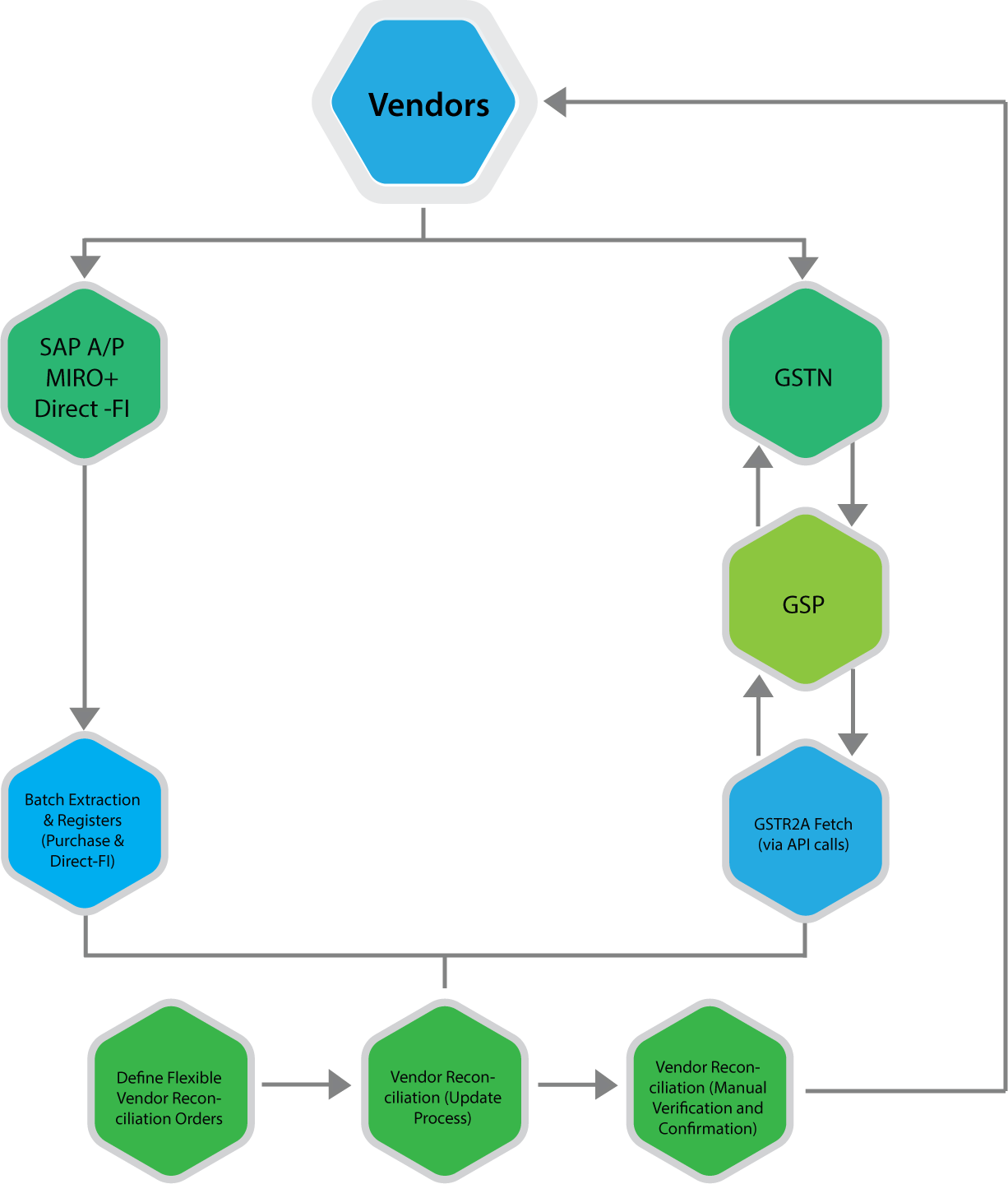
    Step-by-Step Process for GST Summary Comparison in Tally and Excel

    Step 1: Generate GST Summary in Tally

    Select the reporting period and extract GST summaries including outward supplies, inward supplies, and ITC.

    Step 2: Export Data to Excel

    Export voucher-level or summary-level data from Tally into Excel format for detailed analysis.

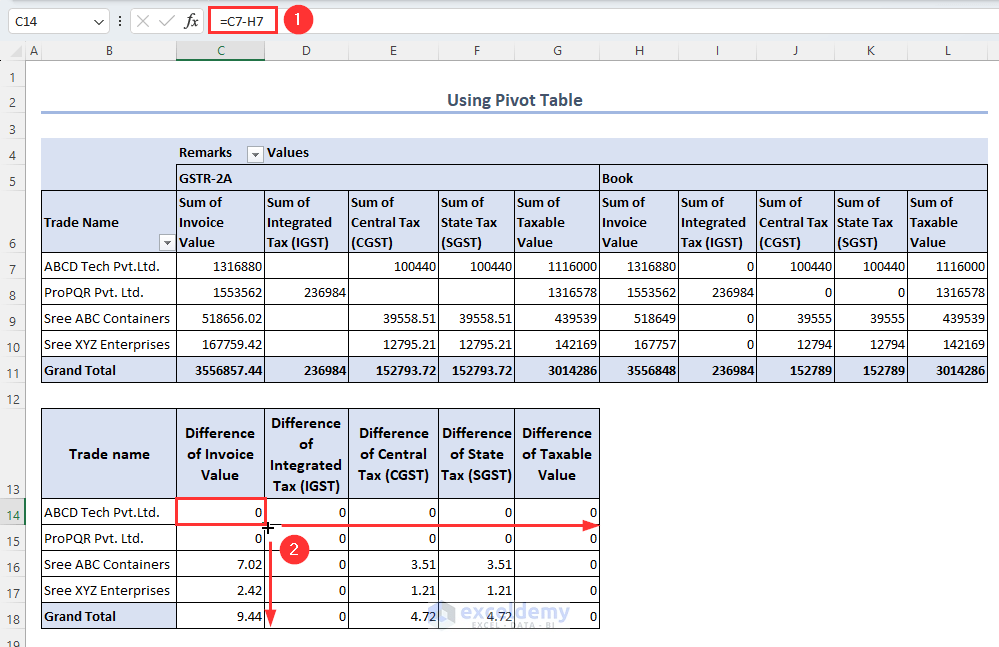
    Step 3: Prepare Excel GST Summary

    Use formulas or pivot tables to consolidate taxable values and GST amounts rate-wise.

    Step 4: Match Key Figures

    Compare taxable value, CGST, SGST, IGST, and total tax liability.

    Step 5: Identify and Rectify Differences

    Check ledgers, vouchers, and GST rates for mismatches and correct them in Tally.


    https://www.nexus-business.com/assets/img/vendors.png
    https://www.exceldemy.com/wp-content/uploads/2023/07/19-Obtaining-the-difference-of-invoice-and-GST-values-from-the-Pivot-table-to-Do-GST-reconciliation-in-Excel.png

    Common Reasons for Differences Between Tally and Excel GST Summaries

    • Wrong GST rate selected in ledger
    • Incorrect place of supply
    • Missing reverse charge entries
    • Manual Excel formula errors
    • Rounding differences

    In practice, rounding differences alone account for nearly 10–12% of minor mismatches, especially in high-volume transactions.


    Best Practices for Accurate GST Summary Comparison

    • Use standardized Excel templates every month
    • Lock GST rates in Tally ledgers
    • Perform monthly reconciliation instead of annual
    • Maintain documentation for adjustments
    • Review summaries before filing returns

    Regular monthly reconciliation can reduce year-end workload by up to 40%, according to accounting workflow studies.


    GST Summary Comparison in Tally and Excel for Different Returns

    GSTR-1 Perspective

    Focus on outward supplies, invoice values, and tax breakup.

    GSTR-3B Perspective

    Focus on summary-level tax liability and ITC utilization.

    Aligning both summaries ensures that outward tax declared and tax paid are consistent.


    Impact of GST Summary Comparison on Business Decision-Making

    Beyond compliance, reconciled GST summaries help businesses:

    • Forecast tax outflows
    • Optimize pricing strategies
    • Improve cash flow planning
    • Avoid surprise tax demands

    Large businesses report saving 2–3% of annual tax outflow by identifying excess tax payments through proper reconciliation.


    Frequently Asked Questions (FAQ)

    1. What is GST Summary Comparison in Tally and Excel?

    It is the process of matching GST figures generated in Tally with GST summaries prepared in Excel to ensure accuracy and compliance.

    2. Why do GST summaries differ between Tally and Excel?

    Differences arise due to ledger misclassification, incorrect GST rates, manual Excel errors, or rounding differences.

    3. How often should GST summary comparison be done?

    Ideally, it should be done monthly before filing GST returns to avoid cumulative errors.

    4. Is Excel mandatory for GST reconciliation?

    No, but Excel provides flexibility and detailed analysis that complements system-generated summaries.

    5. Can GST summary comparison help during audits?

    Yes, reconciled summaries provide strong documentary evidence during audits and assessments.

    6. What is the biggest risk of not comparing GST summaries?

    The biggest risk is incorrect return filing, leading to interest, penalties, and blocked input tax credit.


    Conclusion

    GST Summary Comparison in Tally and Excel is a foundational practice for accurate GST compliance in India. Tally offers automation and real-time accuracy, while Excel provides analytical depth and flexibility. When both are used together, businesses gain complete control over their GST data. With increasing scrutiny and data-driven compliance, regular and structured comparison is no longer optional but a necessity for sustainable and compliant business operations.


    Disclaimer

    This article is for educational and informational purposes only. GST laws, rules, and interpretations are subject to change. Readers should verify figures and compliance requirements independently and apply professional judgment before making accounting or tax decisions.